
SpringCloud入门(十): Config 统一配置中心
SpringCloud Config 简介
在分布式系统中,由于服务组件过多,为了方便争对不通的环境下的服务配置文件统一管理,实时更新,所以出现了分布式配置中心组件。市面上开源的配置中心有很多,360的QConf、淘宝的diamond、百度的disconf都是解决这类问题。国外也有很多开源的配置中心Apache的Apache Commons Configuration等。SpringCloud中选用的是SpringCloud Config。
SpringCloud Config分为Config Server和Config Client两部分,为分布式系统外部化配置提供了支持。 由于Config Server和Config Client都实现了对Spring Environment和PropertySource抽象的映射,因此SpringCloud Config非常适合Spring应用程序,当然也可与其他语言应用程序配合使用。
Config Server是一个可横向扩展、集中式的配置服务器,它用于集中管理应用程序各个环境下的配置(开发,测试,生产,灰度),默认使用Git存储配置内容(也可使用Subversion、本地文件系统或Vault存储配置),因此可以方便的实现对配置的版本控制与内容审计。 Config Client 是Config Server的客户端,用于操作存储在Config Server中的配置属性。
SpringCloud Config带来的便利
1、集中管理配置,通过Config来对集群中所有组件服务的配置信息进行集中管理;
2、争对不同的环境进行不同的配置(开发,联调,测试,灰度,生产);
3、运行期间可动态调整,根据服务器的负载情况动态的设置连接池信息或者熔断阈值;
4、配置修改后,不需要关闭服务可自动更新配置;
SpringCloud Config入门
1、申请一个自己的git仓库,将测试项目得yml或properties文件上传至Git目录;
2、构建Config Service
<!-- 、引入Jar包 -->

<dependency>

    <groupId>org.springframework.cloud</groupId>

    <artifactId>spring-cloud-config-server</artifactId>

</dependency>

<!-- 、配置属性信息 -->

server:

  port:

spring:

  application:

    name: ms-cfg-service

  cloud:

    config:

      server:

        git:

          uri: https://gitee.com/******/springcloudconfig.git

          username: ******

          password: ******

<!-- 3、加注解@EnableConfigServer -->
@SpringBootApplication
@EnableConfigServer
public class ConfigServiceApplication {

    public static void main(String[] args) {
        SpringApplication.run(ConfigServiceApplication.class, args);
    }
}
备注:配置文件有三种访问方式,分别是:
1)通过application-{profiles}.yml来访问,eg:http://localhost:8080/application-dev.yml
2)通过/application/{profiles}/{lable}来访问, eg:http://localhost:8080/application/dev/master
3)通过/{lable}/application-{profiles}.yml来访问,eg:http://localhost:8080/master/application-dev.yml
3、构建Config Client
<!-- 1. 引入Jar包 -->

<dependency>

    <groupId>org.springframework.cloud</groupId>

    <artifactId>spring-cloud-starter-config</artifactId>

</dependency>

<!-- 2. 创建配置文件bootstrap.yml -->

spring:

  application:

    name: application

  cloud:

    config:

      uri: http://localhost:8080/

      profile: dev

      label: master
备注: spring.application.name 对应访问规则中的{application}
spring.cloud.config.profile 对应访问规则中的{profiles}
spring.cloud.config.label 对应访问规则中的{lable}
SpringCloud config的常规用法
我们定义一个openTest开关,来控制业务逻辑代码走新的逻辑分支还是走老的业务逻辑分支
方法一:
<!-- 1、在属性文件中定义一个变量 -->

ycdhz.openTest=dev

<!-- 2、在代码中通过@Value注解引用 -->

@Value("${ycdhz.openTest}")

private String openTest;

public void findInfo(){

    if(openTest.equal("dev")){

        System.out.print("开发环境")

    } else if (openTest.equal("test")){

        System.out.print("测试环境")

    } else {

        System.out.print("生产环境")

    }

}

<!-- 3、修改属性文件,重启生效-->
方法二:
<!-- 1、再Client端工程,引入jar包 -->

<dependency>

    <groupId>org.springframework.boot</groupId>

    <artifactId>spring-boot-starter-actuator</artifactId>

</dependency>

<!-- 2、再Client端工程,开启refresh的监控端点 -->

management:

  endpoints:

    web:

      exposure:

        include: "*"   开启所有的端点

<!-- 3、在读取配置文件中的类上加入@RefreshScope -->

@RestController

@RequestMapping("/order")

@RefreshScope

public class OrderController {

    @Value("${openTest}")

    private String openTest;

}

<!-- 4、在git上修改openTest的配置文件 -->

通过Post请求,执行http://localhost:8001/actuator/refresh刷新接口
备注:不在需要重启,只需要通过Post执行刷新方法即可。但是当需要在集群中大面积修改的情况下依旧很繁琐,需要对每一个服务进行刷新。
方法三:
配置Config Client
<!-- 1、在client端工程,引入jar包 -->

<dependency>

    <groupId>org.springframework.cloud</groupId>

    <artifactId>spring-cloud-starter-bus-amqp</artifactId>

</dependency>

<dependency>

    <groupId>org.springframework.boot</groupId>

    <artifactId>spring-boot-starter-actuator</artifactId>

</dependency>

<!-- 2、在client端工程,配置属性 -->

spring:

  application:

    name: application

  cloud:

    config:

      uri: http://localhost:9000/

      label: master

  rabbitmq:

    host: ****IP地址****

    port: ****端口号****

    virtual-host: ****host名****

    username: root

    password: root

    connection-timeout: 10000

    template:

      mandatory: true

management:

  endpoints:

    web:

      exposure:

        include: "*"

  server:

    port: 8080
配置 config Service
<!-- 1、在Service端工程,引入jar包 -->

<dependency>

    <groupId>org.springframework.cloud</groupId>

    <artifactId>spring-cloud-starter-bus-amqp</artifactId>

</dependency>

<dependency>

    <groupId>org.springframework.boot</groupId>

    <artifactId>spring-boot-starter-actuator</artifactId>

</dependency>

<!-- 2、在Service端工程,配置属性 -->

server:

  port: 9000

spring:

  application:

    name: ms-cfg-service

  cloud:

    config:

      server:

        git:

          uri: https://gitee.com/******/springcloudconfig.git

          username: ******

          password: ******

  rabbitmq:

    host: ****IP地址****

    port: ****端口号****

    virtual-host: ****host名****

    username: root

    password: root

    connection-timeout: 10000

    template:

      mandatory: true

<!-- 3、在Git上更新配置信息,访问bus-refresh刷新服务配置 -->

访问监控端点http://localhost:9000/actuator/bus-refresh刷新所有服务的配置信息
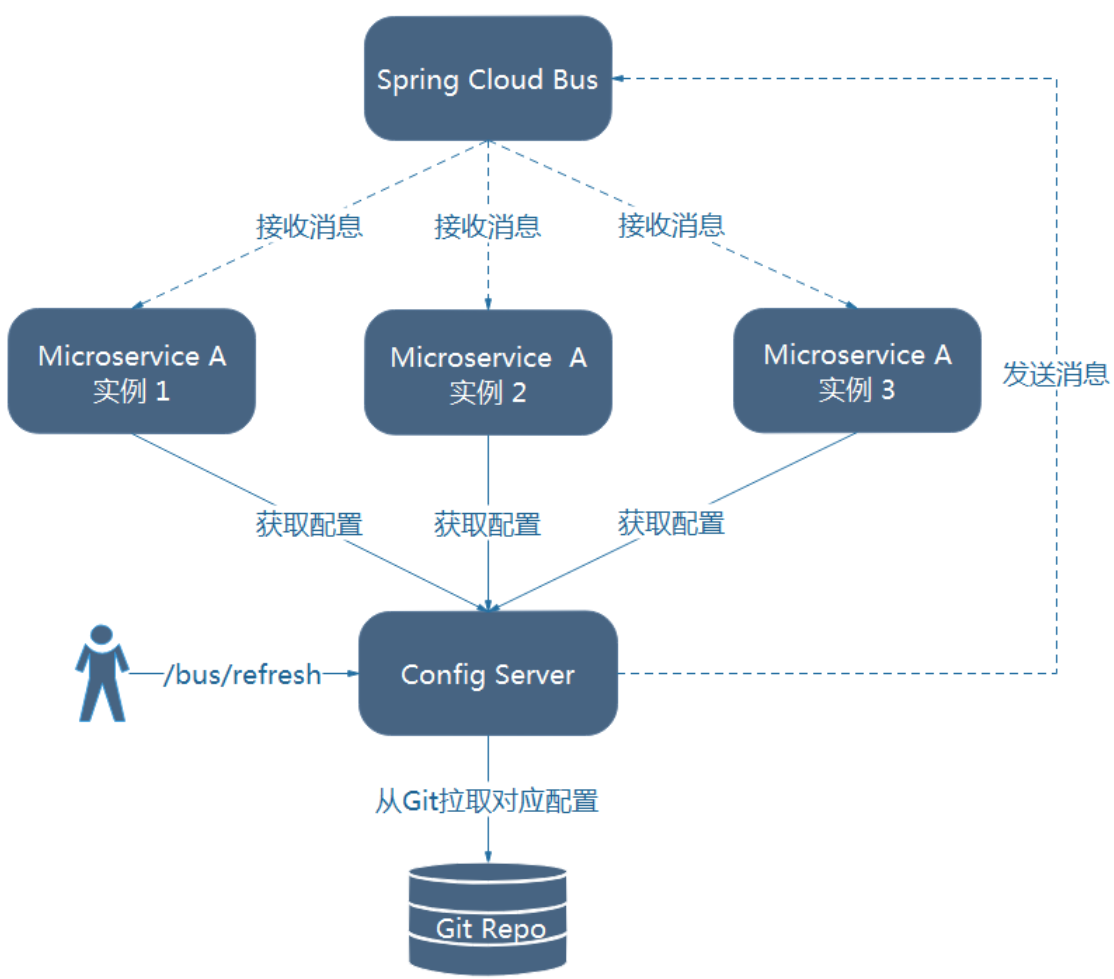
备注:使用消息总线bus来实现,不再需要去争对一个个服务组件做刷新。原理如图:
SpringCloud入门(十): Config 统一配置中心的更多相关文章
- SpringCloud学习之Config分布式配置中心(八)
统一配置中心概述 如果微服务架构中没有使用统一配置中心时,所存在的问题: 配置文件分散在各个项目里,不方便维护 配置内容安全与权限,实际开发中,开发人员是不知道线上环境的配置的 更新配置后,项目需要重 ...
- springcloud-spring cloud config统一配置中心
统一配置中心 为什么需要统一配置中心? 统一配置中心顾名思义,就是将配置统一管理,配置统一管理的好处是在日后大规模集群部署服务应用时相同的服务配置一致,日后再修改配置只需要统一修改全部同步,不需要一个 ...
- Spring Cloud第十篇 | 分布式配置中心Config
本文是Spring Cloud专栏的第十篇文章,了解前九篇文章内容有助于更好的理解本文: Spring Cloud第一篇 | Spring Cloud前言及其常用组件介绍概览 Spring Clo ...
- SpringCloud初体验:二、Config 统一配置管理中心
Spring Cloud Config : 配置管理工具包,让你可以把配置放到远程服务器,集中化管理集群配置,目前支持本地存储.Git以及Subversion. 配置中心也区分为服务端和客户端,本次体 ...
- 跟我学SpringCloud | 第六篇:Spring Cloud Config Github配置中心
SpringCloud系列教程 | 第六篇:Spring Cloud Config Github配置中心 Springboot: 2.1.6.RELEASE SpringCloud: Greenwic ...
- Spring Cloud之——Config(配置中心)
Spring Cloud Config(配置中心) 大家好,有一段时间没有写技术博客了.由于工作上的事情,这方面很难分配时间.近几年随着服务化的兴起,一批服务化的框架应运而生,像dubbo,thrif ...
- 基于ZK构建统一配置中心的方案和实践
背景: 近期使用Zk实现了一个简单的配置管理的小东西,在此开源出来,有兴趣的希望提出您的宝贵意见.如果恰巧您也使用或者接触过类似的东西, 也希望您可以分享下您觉得现在这个项目可以优化和改进的地方. 项 ...
- .NET Core微服务之基于Apollo实现统一配置中心
Tip: 此篇已加入.NET Core微服务基础系列文章索引 一.关于统一配置中心与Apollo 在微服务架构环境中,项目中配置文件比较繁杂,而且不同环境的不同配置修改相对频繁,每次发布都需要对应修改 ...
- Spring Cloud实战之初级入门(五)— 配置中心服务化与配置实时刷新
目录 1.环境介绍 2.配置中心服务化 2.1 改造mirco-service-spring-config 2.2 改造mirco-service-provider.mirco-service-con ...
随机推荐
- LoadRunner录制HTTPS协议脚本
学习LoadRunner录制HTTPS协议脚本,其实是一个意外的收获.当我拿到要测试的URL时,我像以前的步骤一样录制脚本,但是录制结束后,发现并没有生成脚本,开始以为是LoadRunner的原因,我 ...
- Django路由层与视图层、pycharm虚拟环境
一. Django路由层 路由层即对应项目文件下的urls.py文件.实际上每个APP中也可以有自己的urls.py路由层.templates文件夹及static文件夹.Django支持这么做,也为实 ...
- hdu3038加权(扩展)并查集
题目链接:http://icpc.njust.edu.cn/Problem/Hdu/3038/ 参考博客: https://blog.csdn.net/weixin_44580710/article/ ...
- CF1327C Game with Chips 题解
原题链接 简要题意: 每个点有起始目标和终点(二维).要求每次将所有点向一个方向移动一次(四方向,若出界则不变),使得每个点均 经过 其终点. 本题只要抓住本质,瞬间得解. 你会发现,如果要求每个点最 ...
- c++实现单纯形法现行规划问题的求解
在本程序中默认该现行规划问题有最优解 针对此问题: #include<iostream> using namespace std; int check(float *sigema, int ...
- Selenium系列(十五) - Web UI 自动化基础实战(2)
如果你还想从头学起Selenium,可以看看这个系列的文章哦! https://www.cnblogs.com/poloyy/category/1680176.html 其次,如果你不懂前端基础知识, ...
- Word文档转html并提取标题
最近做了一个功能,需要将word文档转化成html的格式,并提取出标题生成导航.考虑到功能的复杂程度,将需要降低为对“标题1”这种格式进行提取. docx为后缀的文档(word2007)支持XML的文 ...
- 瀑布流vue-waterfall的高度设置
最近用vue做项目,用到了瀑布流vue-waterfall,其中遇到高度的设置问题,大概介绍下,希望可以帮到一些人 1.安装 npm install --save vue-waterfall 2.引入 ...
- [vijos1304]回文数<模拟>
题目链接:https://vijos.org/p/1304 好久没写博客了,最近一直打不出题,感觉自己是废了,今天做了一道模拟水题,但还是半天没过,后来才发现是忘记考虐10以上的进制是带有字母的,然后 ...
- Git之旅
ithub安装,我选择的是windows下的版本. git配置用户信息 安装完成后,还需要最后一步设置,在命令行输入: $git config --global user.name "You ...