
.Net Core服务监控报警指标上报Prometheus+Grafana
前言
简单集成Prometheus+Grafana,指标的上报收集可视化。
Prometheus
Prometheus是一个监控平台,监控从HTTP端口收集受监控目标的指标。在微服务的架构里Prometheus多维度的数据收集是非常强大的 我们首先下载安装Prometheus和node_exporter,node_exporter用于监控CPU、内存、磁盘、I/O等信息
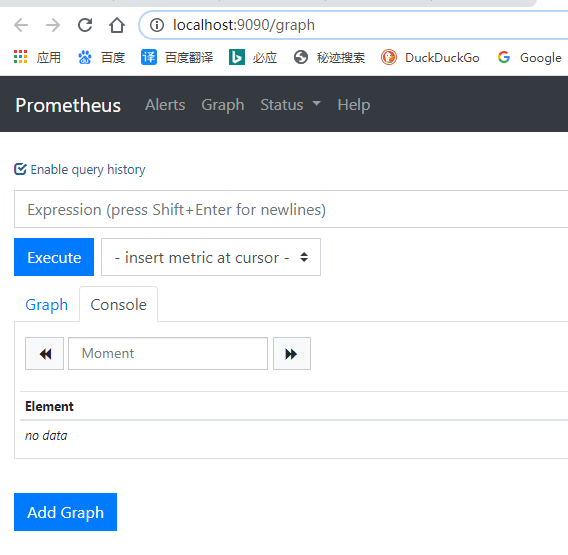
下载完成后解压以管理员运行 prometheus.exe 访问 http://localhost:9090/ 出现一下页面说明启动成功啦
.Net Core获取指标
有了Prometheus,我们还需要给Prometheus提供获取监控数据的接口,我们新建一个WebApi项目,并导入prometheus-net.AspNetCore包,在Configure中加入UseMetricServer中间件
public void Configure(IApplicationBuilder app, IWebHostEnvironment env)

{

    app.UseMetricServer();

}
启动项目访问http://localhost:5000/metrics就可以看基本的一些监控信息啦,包括线程数,句柄数,3个GC的回收计数等信息。
# HELP process_num_threads Total number of threads

# TYPE process_num_threads gauge

process_num_threads 29

# HELP process_working_set_bytes Process working set

# TYPE process_working_set_bytes gauge

process_working_set_bytes 44441600

# HELP process_private_memory_bytes Process private memory size

# TYPE process_private_memory_bytes gauge

process_private_memory_bytes 69660672

# HELP dotnet_total_memory_bytes Total known allocated memory

# TYPE dotnet_total_memory_bytes gauge

dotnet_total_memory_bytes 2464584

# HELP dotnet_collection_count_total GC collection count

# TYPE dotnet_collection_count_total counter

dotnet_collection_count_total{generation="1"} 0

dotnet_collection_count_total{generation="0"} 0

dotnet_collection_count_total{generation="2"} 0

# HELP process_start_time_seconds Start time of the process since unix epoch in seconds.

# TYPE process_start_time_seconds gauge

process_start_time_seconds 1592448124.2853072

# HELP process_open_handles Number of open handles

# TYPE process_open_handles gauge

process_open_handles 413

# HELP process_virtual_memory_bytes Virtual memory size in bytes.

# TYPE process_virtual_memory_bytes gauge

process_virtual_memory_bytes 2225187631104

# HELP process_cpu_seconds_total Total user and system CPU time spent in seconds.

# TYPE process_cpu_seconds_total counter

process_cpu_seconds_total 1.171875
Help 是收集指标的说明,Type收集指标的类型
但是作为HTTP应用怎么能没有HTTP的监控和计数呢,只需要加加入UseHttpMetrics中间件就可以对HTTP请求监控和计数,主要注意的是UseHttpMetrics最好放在UseEndpoints和UseRouting中间
public void Configure(IApplicationBuilder app, IWebHostEnvironment env)

{

    app.UseMetricServer();

    app.UseRouting();

    app.UseHttpMetrics();

    app.UseEndpoints(endpoints => { endpoints.MapControllers(); });

}
启动项目继续访问http://localhost:5000/metrics
# HELP http_requests_in_progress The number of requests currently in progress in the ASP.NET Core pipeline. One series without controller/action label values counts all in-progress requests, with separate series existing for each controller-action pair.

# TYPE http_requests_in_progress gauge
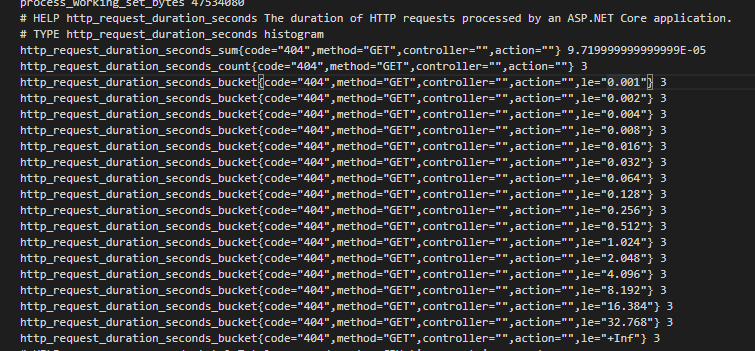
可以看到已经有了,我们随便请求一下服务看看效果,会帮我们记录下总耗时,总请求数,和每次请求的耗时数
但是单单有上面那些数据好像还不太好定位一下很奇葩的问题,这时候我们可以获取Runtime的一些数据,方法童谣很简单。导入prometheus-net.DotNetRuntime 包,它可以帮助我们看到如下指标
- 垃圾回收的收集频率和时间
- 服务占用堆大小
- 对象堆分配的字节
- JIT编译和JIT CPU消耗率
- 线程池大小,调度延迟以及增长/缩小的原因
- 锁争用情况
我们只需要在Program的Main方法中启动收集器就可以啦。
public static void Main(string[] args)

{

    DotNetRuntimeStatsBuilder.Default().StartCollecting();

    CreateHostBuilder(args).Build().Run();

}
启动项目继续访问http://localhost:5000/metrics测试一下
# HELP dotnet_collection_count_total GC collection count

# TYPE dotnet_collection_count_total counter

dotnet_collection_count_total{generation="1"} 0

dotnet_collection_count_total{generation="0"} 0

dotnet_collection_count_total{generation="2"} 0

# HELP process_private_memory_bytes Process private memory size

# TYPE process_private_memory_bytes gauge

process_private_memory_bytes 75141120

# HELP dotnet_gc_pause_ratio The percentage of time the process spent paused for garbage collection

# TYPE dotnet_gc_pause_ratio gauge

dotnet_gc_pause_ratio 0

# HELP http_requests_received_total Provides the count of HTTP requests that have been processed by the ASP.NET Core pipeline.

# TYPE http_requests_received_total counter

# HELP dotnet_gc_collection_seconds The amount of time spent running garbage collections

# TYPE dotnet_gc_collection_seconds histogram

dotnet_gc_collection_seconds_sum 0

dotnet_gc_collection_seconds_count 0

dotnet_gc_collection_seconds_bucket{le="0.001"} 0

dotnet_gc_collection_seconds_bucket{le="0.01"} 0

dotnet_gc_collection_seconds_bucket{le="0.05"} 0

dotnet_gc_collection_seconds_bucket{le="0.1"} 0

dotnet_gc_collection_seconds_bucket{le="0.5"} 0

dotnet_gc_collection_seconds_bucket{le="1"} 0

dotnet_gc_collection_seconds_bucket{le="10"} 0

dotnet_gc_collection_seconds_bucket{le="+Inf"} 0

# HELP dotnet_total_memory_bytes Total known allocated memory

# TYPE dotnet_total_memory_bytes gauge

dotnet_total_memory_bytes 4925936

# HELP dotnet_threadpool_num_threads The number of active threads in the thread pool

# TYPE dotnet_threadpool_num_threads gauge

dotnet_threadpool_num_threads 0

# HELP dotnet_threadpool_scheduling_delay_seconds A breakdown of the latency experienced between an item being scheduled for execution on the thread pool and it starting execution.

# TYPE dotnet_threadpool_scheduling_delay_seconds histogram

dotnet_threadpool_scheduling_delay_seconds_sum 0.015556

dotnet_threadpool_scheduling_delay_seconds_count 10

dotnet_threadpool_scheduling_delay_seconds_bucket{le="0.001"} 0

dotnet_threadpool_scheduling_delay_seconds_bucket{le="0.01"} 10

dotnet_threadpool_scheduling_delay_seconds_bucket{le="0.05"} 10

dotnet_threadpool_scheduling_delay_seconds_bucket{le="0.1"} 10

dotnet_threadpool_scheduling_delay_seconds_bucket{le="0.5"} 10

dotnet_threadpool_scheduling_delay_seconds_bucket{le="1"} 10

dotnet_threadpool_scheduling_delay_seconds_bucket{le="10"} 10

dotnet_threadpool_scheduling_delay_seconds_bucket{le="+Inf"} 10

# HELP process_working_set_bytes Process working set

# TYPE process_working_set_bytes gauge

process_working_set_bytes 50892800

# HELP process_num_threads Total number of threads

# TYPE process_num_threads gauge

process_num_threads 32

# HELP dotnet_jit_method_seconds_total Total number of seconds spent in the JIT compiler

# TYPE dotnet_jit_method_seconds_total counter

dotnet_jit_method_seconds_total 0

dotnet_jit_method_seconds_total{dynamic="false"} 0.44558800000000004

dotnet_jit_method_seconds_total{dynamic="true"} 0.004122000000000001

# HELP dotnet_gc_pinned_objects The number of pinned objects

# TYPE dotnet_gc_pinned_objects gauge

dotnet_gc_pinned_objects 0

# HELP process_start_time_seconds Start time of the process since unix epoch in seconds.

# TYPE process_start_time_seconds gauge

process_start_time_seconds 1592449942.6063592

# HELP dotnet_gc_heap_size_bytes The current size of all heaps (only updated after a garbage collection)

# TYPE dotnet_gc_heap_size_bytes gauge

# HELP http_request_duration_seconds The duration of HTTP requests processed by an ASP.NET Core application.

# TYPE http_request_duration_seconds histogram

# HELP dotnet_contention_seconds_total The total amount of time spent contending locks

# TYPE dotnet_contention_seconds_total counter

dotnet_contention_seconds_total 0

# HELP dotnet_gc_pause_seconds The amount of time execution was paused for garbage collection

# TYPE dotnet_gc_pause_seconds histogram

dotnet_gc_pause_seconds_sum 0

dotnet_gc_pause_seconds_count 0

dotnet_gc_pause_seconds_bucket{le="0.001"} 0

dotnet_gc_pause_seconds_bucket{le="0.01"} 0

dotnet_gc_pause_seconds_bucket{le="0.05"} 0

dotnet_gc_pause_seconds_bucket{le="0.1"} 0

dotnet_gc_pause_seconds_bucket{le="0.5"} 0

dotnet_gc_pause_seconds_bucket{le="1"} 0

dotnet_gc_pause_seconds_bucket{le="10"} 0

dotnet_gc_pause_seconds_bucket{le="+Inf"} 0

# HELP process_virtual_memory_bytes Virtual memory size in bytes.

# TYPE process_virtual_memory_bytes gauge

process_virtual_memory_bytes 2225201872896

# HELP dotnet_gc_finalization_queue_length The number of objects waiting to be finalized

# TYPE dotnet_gc_finalization_queue_length gauge

dotnet_gc_finalization_queue_length 0

# HELP dotnet_threadpool_io_num_threads The number of active threads in the IO thread pool

# TYPE dotnet_threadpool_io_num_threads gauge

dotnet_threadpool_io_num_threads 3

# HELP process_open_handles Number of open handles

# TYPE process_open_handles gauge

process_open_handles 436

# HELP dotnet_gc_collection_reasons_total A tally of all the reasons that lead to garbage collections being run

# TYPE dotnet_gc_collection_reasons_total counter

# HELP process_cpu_seconds_total Total user and system CPU time spent in seconds.

# TYPE process_cpu_seconds_total counter

process_cpu_seconds_total 0.890625

# HELP http_requests_in_progress The number of requests currently in progress in the ASP.NET Core pipeline. One series without controller/action label values counts all in-progress requests, with separate series existing for each controller-action pair.

# TYPE http_requests_in_progress gauge

# HELP dotnet_threadpool_adjustments_total The total number of changes made to the size of the thread pool, labeled by the reason for change

# TYPE dotnet_threadpool_adjustments_total counter

# HELP dotnet_jit_cpu_ratio The amount of total CPU time consumed spent JIT'ing

# TYPE dotnet_jit_cpu_ratio gauge

dotnet_jit_cpu_ratio 0.5728901224489797

# HELP process_cpu_count The number of processor cores available to this process.

# TYPE process_cpu_count gauge

process_cpu_count 8

# HELP dotnet_build_info Build information about prometheus-net.DotNetRuntime and the environment

# TYPE dotnet_build_info gauge

dotnet_build_info{version="3.3.1.0",target_framework=".NETCoreApp,Version=v5.0",runtime_version=".NET Core 5.0.0-preview.2.20160.6",os_version="Microsoft Windows 10.0.18363",process_architecture="X64"} 1

# HELP dotnet_jit_method_total Total number of methods compiled by the JIT compiler

# TYPE dotnet_jit_method_total counter

dotnet_jit_method_total{dynamic="false"} 830

dotnet_jit_method_total{dynamic="true"} 30

# HELP dotnet_gc_cpu_ratio The percentage of process CPU time spent running garbage collections

# TYPE dotnet_gc_cpu_ratio gauge

dotnet_gc_cpu_ratio 0

# HELP dotnet_threadpool_scheduled_total The total number of items the thread pool has been instructed to execute

# TYPE dotnet_threadpool_scheduled_total counter

dotnet_threadpool_scheduled_total 16

# HELP dotnet_gc_allocated_bytes_total The total number of bytes allocated on the small and large object heaps (updated every 100KB of allocations)

# TYPE dotnet_gc_allocated_bytes_total counter

dotnet_gc_allocated_bytes_total{gc_heap="soh"} 3008088

dotnet_gc_allocated_bytes_total{gc_heap="loh"} 805392

# HELP dotnet_contention_total The number of locks contended

# TYPE dotnet_contention_total counter

dotnet_contention_total 0
可以看到非常多的信息啦,但是我们有时候不需要这么多指标也可以自定义。
public static void Main(string[] args)

{

    DotNetRuntimeStatsBuilder

        .Customize()

        .WithContentionStats()

        .WithJitStats()

        .WithThreadPoolSchedulingStats()

        .WithThreadPoolStats()

        .WithGcStats()

        .StartCollecting();

    CreateHostBuilder(args).Build().Run();

}
JIT,GC和线程的监控是会影响到一点点性能,我们可以通过sampleRate这个枚举的值来控制采样频率
public static void Main(string[] args)

{

    DotNetRuntimeStatsBuilder

        .Customize()

        //每5个事件个采集一个

        .WithContentionStats(sampleRate: SampleEvery.FiveEvents)

        //每10事件采集一个

        .WithJitStats(sampleRate: SampleEvery.TenEvents)

        //每100事件采集一个

        .WithThreadPoolSchedulingStats(sampleRate: SampleEvery.HundredEvents)

        .WithThreadPoolStats()

        .WithGcStats()

        .StartCollecting();

    CreateHostBuilder(args).Build().Run();

}
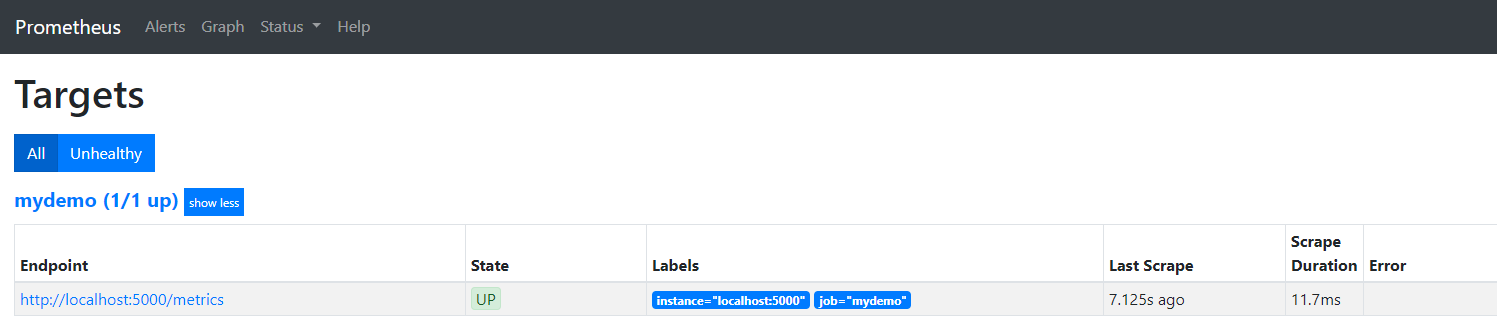
有了这些指标我们需要Prometheus来收集我们Api的指标,只需要修改prometheus.yml文件然后重启Prometheus就可以了。
scrape_configs:

- job_name: mydemo

  scrape_interval: 15s

  scrape_timeout: 10s

  metrics_path: /metrics

  scheme: http

  static_configs:

  - targets:

    - localhost:5000
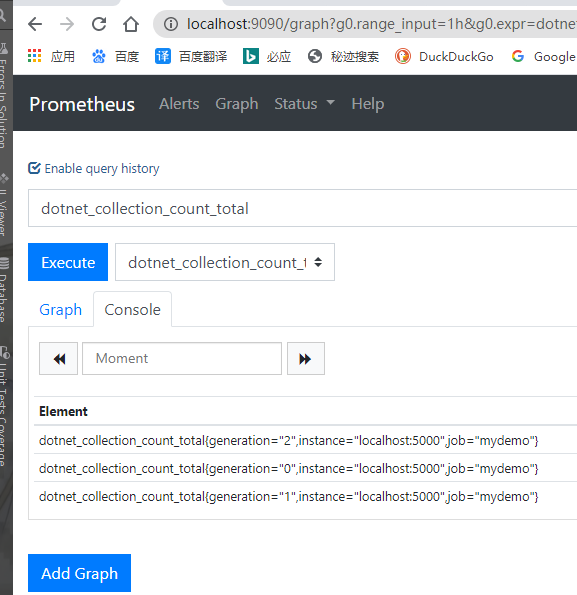
启动Api项目和Prometheus,选中dotnet_collection_count_total点击Excute可以看到Api的指标是正常上报的。
Prometheus有了数据我们就需要一个炫酷的UI去展示上报的数据啦。
Grafana
Prometheus有了数据就差一个漂亮的UI来展示的我们的指标了。Grafana是一个Go编写的开源应用,用于把指标数据可视化。是当下流行的时序数据展示工具。先下载,直接下载exe安装,完成后能打开http://localhost:3000/页面就安装成功了
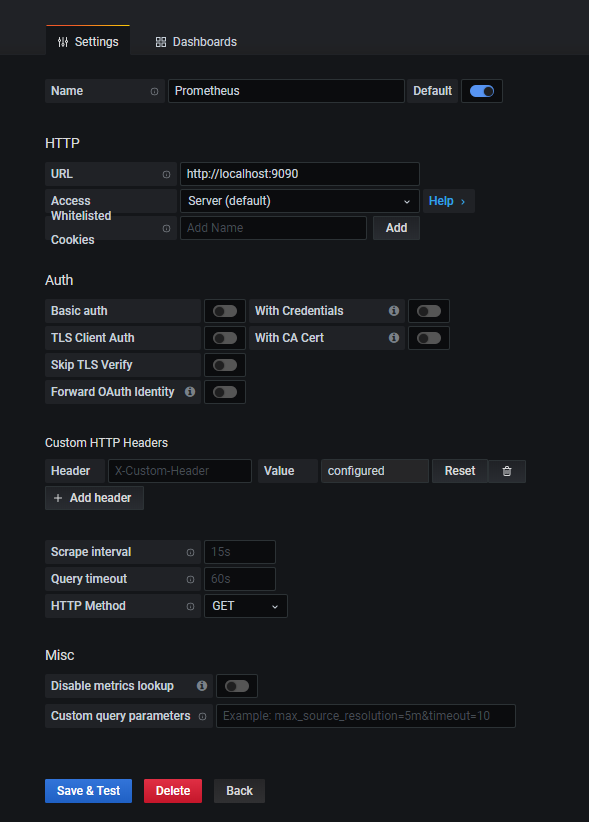
先添加数据源,选择Prometheus为数据源,并配置。
添加仪表盘
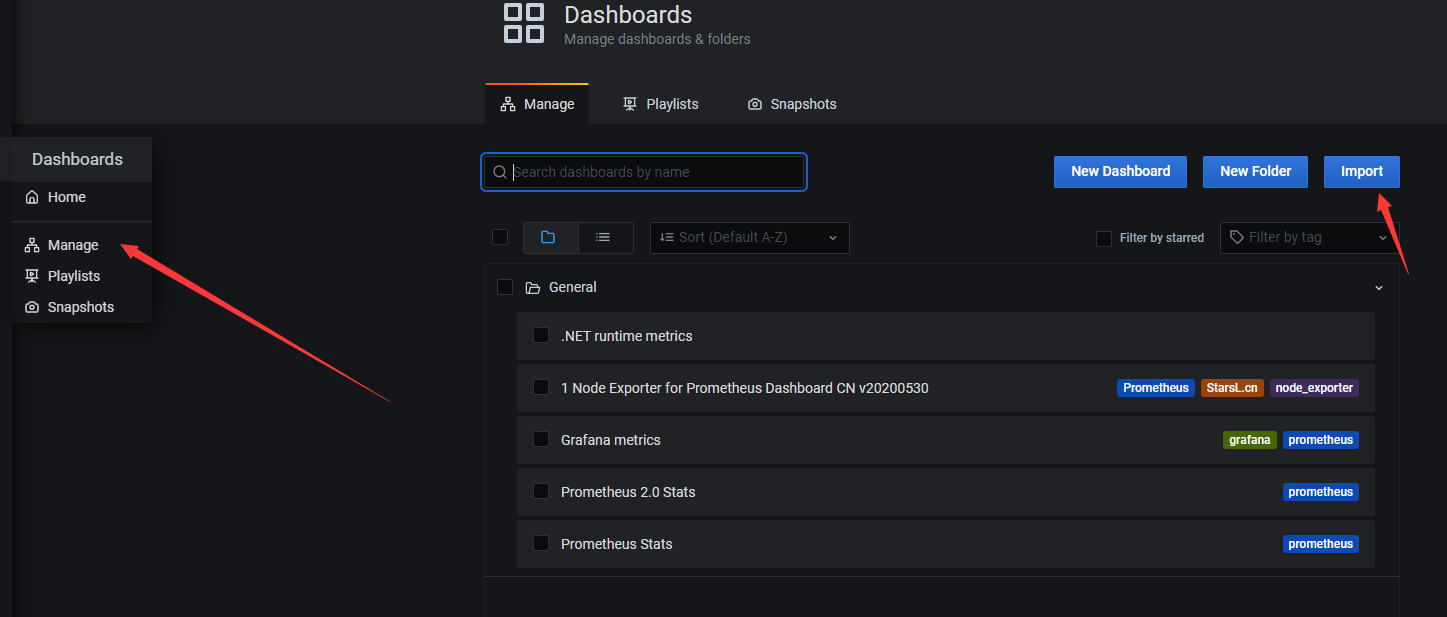
在Import via panel json中加入下面这个json,点击load,
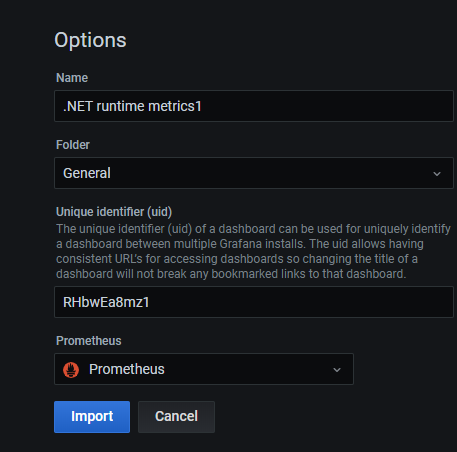
选择数据源,点击Import就能看到仪表盘了
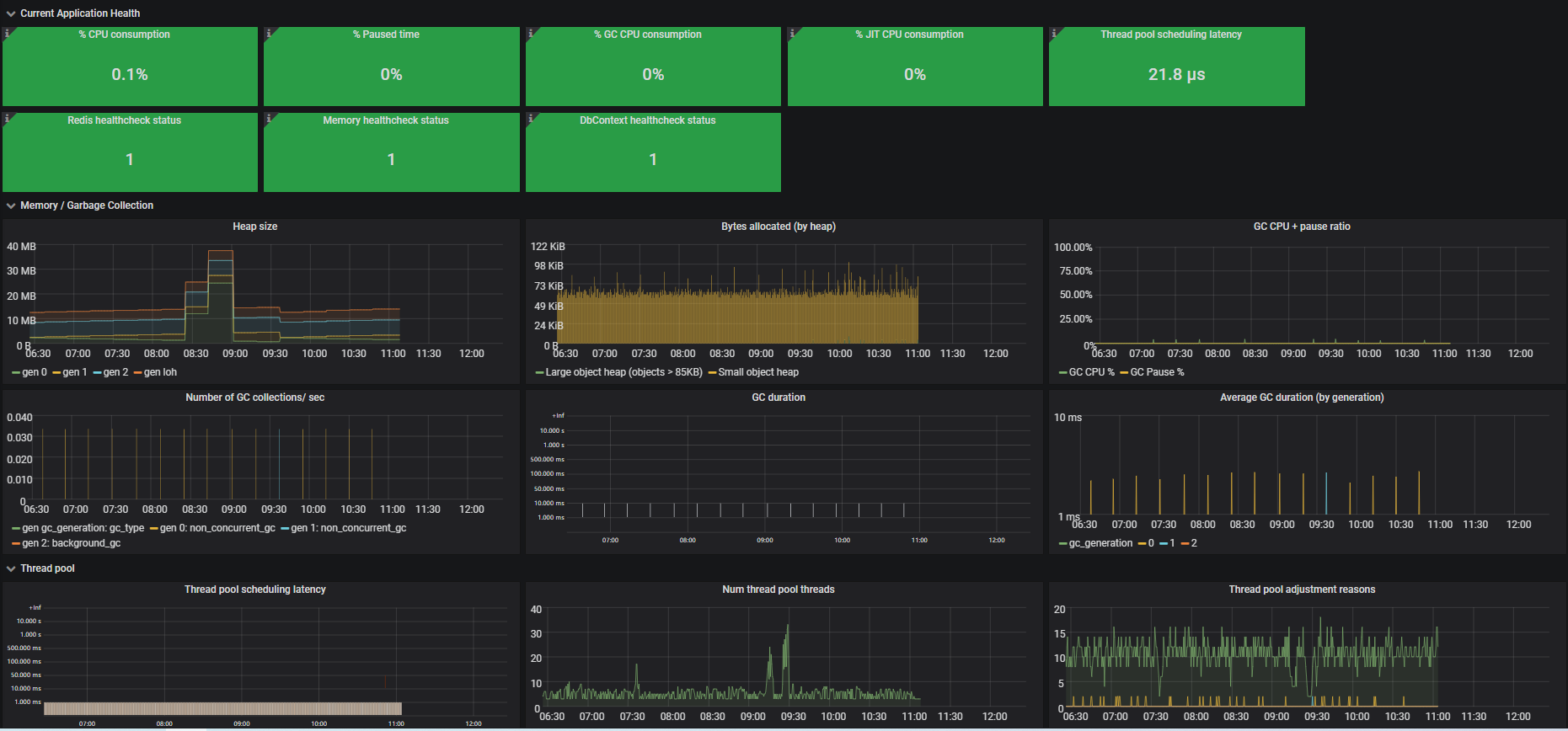
还可以去这里添加很多现有的仪表盘。复制ID添加仪表盘。
参考文章
prometheus-net
.NetCore下使用Prometheus实现系统监控和警报系列
.Net Core服务监控报警指标上报Prometheus+Grafana的更多相关文章
- go-zero docker-compose 搭建课件服务(七):prometheus+grafana服务监控
0.转载 go-zero docker-compose 搭建课件服务(七):prometheus+grafana服务监控 0.1源码地址 https://github.com/liuyuede123/ ...
- Spring Boot 2.x监控数据可视化(Actuator + Prometheus + Grafana手把手)
TIPS 本文基于Spring Boot 2.1.4,理论支持Spring Boot 2.x所有版本 众所周知,Spring Boot有个子项目Spring Boot Actuator,它为应用提供了 ...
- 【集群监控】JMX exporter+Prometheus+Grafana监控Hadoop集群
下载jmx_exporter的jar包 https://repo1.maven.org/maven2/io/prometheus/jmx/jmx_prometheus_javaagent/0.3.1/ ...
- SpringCloud微服务实战——搭建企业级开发框架(四十五):【微服务监控告警实现方式二】使用Actuator(Micrometer)+Prometheus+Grafana实现完整的微服务监控
无论是使用SpringBootAdmin还是使用Prometheus+Grafana都离不开SpringBoot提供的核心组件Actuator.提到Actuator,又不得不提Micrometer ...
- Prometheus+Grafana+kafka_exporter监控kafka
Prometheus+Grafana+kafka_exporter搭建监控系统监控kafka 一.Prometheus+Grafana+kafka_exporter搭建监控系统监控kafka 1.1K ...
- 第七模块 :微服务监控告警Prometheus架构和实践
119.监控模式分类~1.mp4 logging:日志监控,Logging 的特点是,它描述一些离散的(不连续的)事件. 例如:应用通过一个滚动的文件输出 Debug 或 Error 信息,并通过日志 ...
- .NET Core微服务之基于App.Metrics+InfluxDB+Grafana实现统一性能监控
Tip: 此篇已加入.NET Core微服务基础系列文章索引 一.关于App.Metrics+InfluxDB+Grafana 1.1 App.Metrics App.Metrics是一款开源的支持. ...
- 图解JanusGraph系列 - JanusGraph指标监控报警(Monitoring JanusGraph)
大家好,我是洋仔,JanusGraph图解系列文章,实时更新~ 图数据库文章总目录: 整理所有图相关文章,请移步(超链):图数据库系列-文章总目录 源码分析相关可查看github(码文不易,求个sta ...
- SpringBoot+Prometheus+Grafana实现应用监控和报警
一.背景 SpringBoot的应用监控方案比较多,SpringBoot+Prometheus+Grafana是目前比较常用的方案之一.它们三者之间的关系大概如下图: 关系图 二.开发SpringBo ...
随机推荐
- h5 js判断是IOS系统还是android系统
function detect(){ var equipmentType = ""; var agent = navigator.userAgent.toLowerCase(); ...
- 【Java8新特性】面试官问我:Java8中创建Stream流有哪几种方式?
写在前面 先说点题外话:不少读者工作几年后,仍然在使用Java7之前版本的方法,对于Java8版本的新特性,甚至是Java7的新特性几乎没有接触过.真心想对这些读者说:你真的需要了解下Java8甚至以 ...
- Jmeter(三) - 从入门到精通 - 测试计划(Test Plan)的元件(详解教程)
1.简介 上一篇中宏哥已经教你如何通过JMeter来创建一个测试计划(Test Plan),那么这一篇我们就将JMeter启动起来,创建一个测试计划(Test plan),然后宏哥给大家介绍一下测试计 ...
- [书籍分享]0-006.App营销解密:移动互联网时代的营销革命
封面 内容简介 如何在移动互联网上推广和销售自己的产品?如何通过移动互联网为顾客提供服务?如何在移动互联网上树立和传播自己的品牌?这几乎是当下所有互联网企业和传统企业都在思考的问题,企业要想在移动互联 ...
- 【图机器学习】cs224w Lecture 13 & 14 - 影响力最大化 & 爆发检测
目录 Influence Maximization Propagation Models Linear Threshold Model Independent Cascade Model Greedy ...
- 【Spring】JdbcTemplate的使用,查询,增、删、改
数据库名:taobaodb 配置文件: JdbcTemplate主要提供以下五类方法: execute方法:可以用于执行任何SQL语句,一般用于执行DDL语句: update方法及batchUpdat ...
- Java实现 LeetCode 744 寻找比目标字母大的最小字母(二分法)
744. 寻找比目标字母大的最小字母 给定一个只包含小写字母的有序数组letters 和一个目标字母 target,寻找有序数组里面比目标字母大的最小字母. 在比较时,数组里字母的是循环有序的.举个例 ...
- Java实现 蓝桥杯VIP 基础练习 高精度加法
java算法 蓝桥杯 高精度加法 问题描述 在C/C++语言中,整型所能表示的范围一般为-231到231(大约21亿),即使long long型,一般也只能表示到-263到263.要想计算更加规模的数 ...
- Java实现 蓝桥杯VIP 算法提高 棋盘多项式
算法提高 棋盘多项式 时间限制:1.0s 内存限制:256.0MB 棋盘多项式 问题描述 八皇后问题是在棋盘上放皇后,互相不攻击,求方案.变换一下棋子,还可以有八车问题,八马问题,八兵问题 ...
- Java实现 LeetCode 24 两两交换链表中的节点
24. 两两交换链表中的节点 给定一个链表,两两交换其中相邻的节点,并返回交换后的链表. 你不能只是单纯的改变节点内部的值,而是需要实际的进行节点交换. 示例: 给定 1->2->3-&g ...