
Android将数据存储到应用的数据目录下
下面是具体代码,其中MainActivity.java的部分代码有修改,在文章后面给出
logindemo_layout.java
<?xml version="1.0" encoding="utf-8"?>

<RelativeLayout xmlns:android="http://schemas.android.com/apk/res/android"

    android:layout_width="match_parent"

    android:layout_height="match_parent"

    android:background="@mipmap/background1">

    <LinearLayout

        android:layout_width="match_parent"

        android:layout_height="wrap_content"

        android:layout_marginTop="50dp"

        android:padding="30dp"

        android:orientation="vertical">

    <TextView

        android:layout_width="wrap_content"

        android:layout_marginLeft="30dp"

        android:drawableLeft="@mipmap/ic_launcher_round"

        android:text="家庭记账本"

        android:textSize="40sp"

        android:layout_height="wrap_content"/>

        <EditText

            android:layout_width="match_parent"

            android:layout_marginTop="30dp"

            android:id="@+id/et_username"

            android:layout_height="wrap_content"

            android:hint="用户名" />

        <EditText

            android:layout_width="match_parent"

            android:layout_height="wrap_content"

            android:id="@+id/et_password"

            android:hint="密码" />

        <Button

            android:layout_width="match_parent"

            android:text="登录"

            android:textSize="20sp"

            android:id="@+id/bt_login"

            android:layout_height="wrap_content"/>

        <RelativeLayout

            android:layout_width="match_parent"

            android:layout_height="wrap_content"

            android:layout_marginTop="10dp">

            <TextView

                android:layout_width="wrap_content"

                android:layout_height="wrap_content"

                android:layout_centerHorizontal="true"

                android:text="没有账号,立即去注册"

                android:textColor="#00ffff"

                android:textSize="16sp" />

        </RelativeLayout>

    </LinearLayout>

</RelativeLayout>
MainActivity.java
  package com.example.logindemo;

import androidx.appcompat.app.AppCompatActivity;

import android.nfc.Tag;

import android.os.Bundle;

import android.speech.tts.TextToSpeech;

import android.util.Log;

import android.view.View;

import android.widget.Button;

import android.widget.EditText;

import android.widget.TextView;

import java.io.File;

import java.io.FileNotFoundException;

import java.io.FileOutputStream;

    public class MainActivity extends AppCompatActivity {

        private static final String TAG ="MainActivity";

        private TextView mUsername;

        private TextView mPassword;

        private Button   mLogin;

        @Override

    protected void onCreate(Bundle savedInstanceState) {

        super.onCreate(savedInstanceState);

        setContentView(R.layout.logindemo_layout);

        //第一步,找到控件

        initViews();

        //第二步,给我们的登录按钮设置监听事件

        initListener();

    }

    /**

     * 这个方法,我们用来找对应的控件

     */

    private void initViews(){

        mUsername=  (TextView)this.findViewById(R.id.et_username);

        mPassword=  (TextView)this.findViewById(R.id.et_password);

        mLogin   =  (Button)this.findViewById(R.id.bt_login);

}

    /**

    * 这个方法就是给登录按钮设置点击的监听

    */

     private  void  initListener(){

         mLogin.setOnClickListener(new View.OnClickListener() {

             @Override

             public void onClick(View v) {

                 Log.d(TAG,"点击了登录按钮");

                 handlerLoginEvent(v);

             }

         });

     }

        /**

         * 处理登录事件

         * @param v

         */

        private void handlerLoginEvent(View v) {

         //第三部,我们要拿到界面上的信息,包括账号和密码

            //账号

            String usernameText =mUsername.getText().toString();

            //密码

            String passwordText =mPassword.getText().toString();

            //把账号和密码保存起来

            saveUserInfo(usernameText,passwordText);

        }

        private void saveUserInfo(String usernameText,String passwordText){

            Log.d(TAG,"保存用户信息");

            File file =new File("info.txt");

            try  {

                FileOutputStream fileOutputStream = new FileOutputStream(file);

                //以特定的格式存储

                fileOutputStream.write((usernameText+"***"+passwordText).getBytes());

                fileOutputStream.close();

            }catch (Exception e){

                  e.printStackTrace();

            }

        }

    }
点击登录后,发现程序崩了

为什么我们直接写一个文件名的时候,去写文件,报出的异常是read-only。
在安卓系统中,每一个应用就相当于一个用户,每个用户(应用)的权限是特定的,不能够操作其它应用的内容
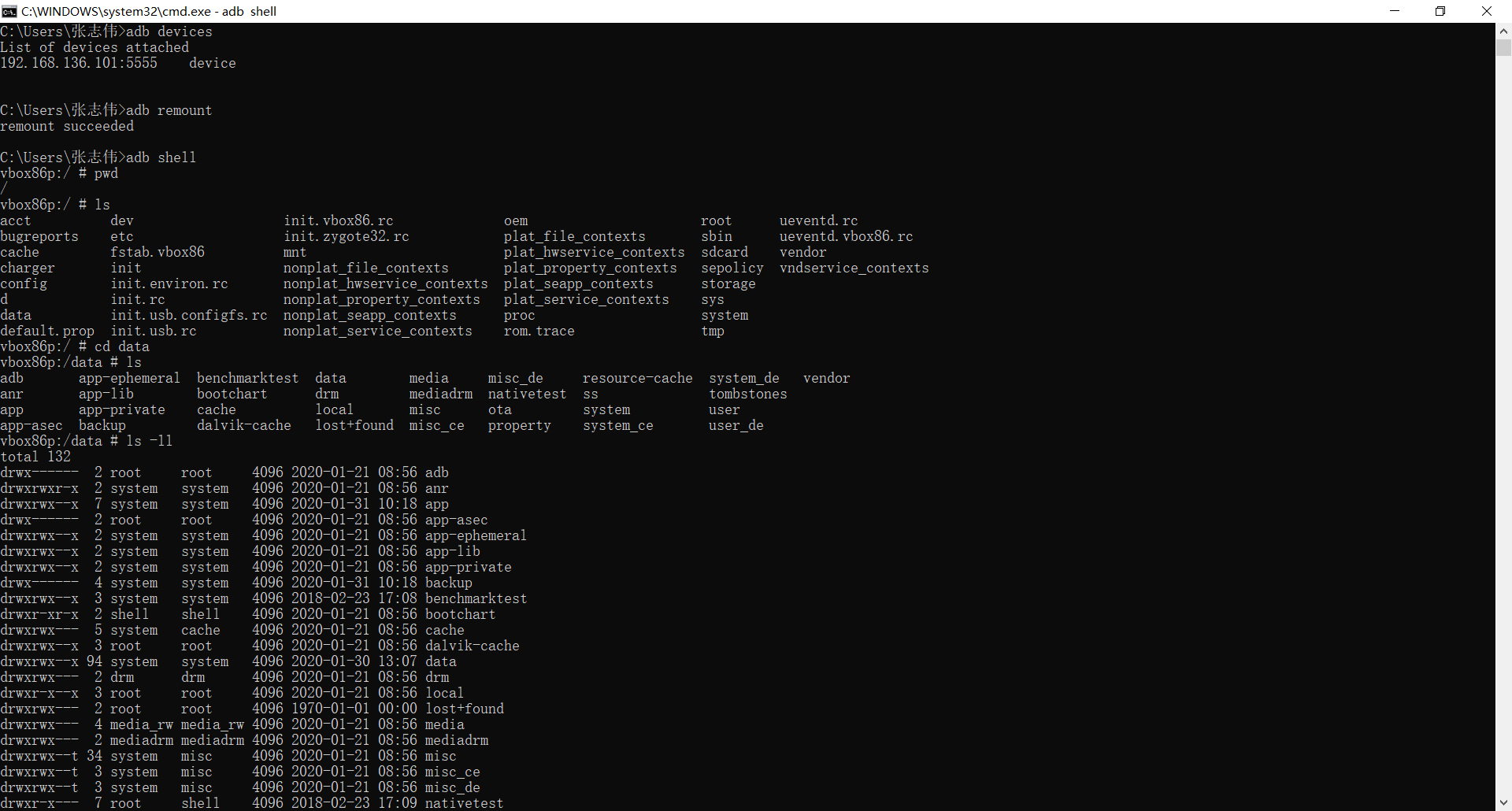
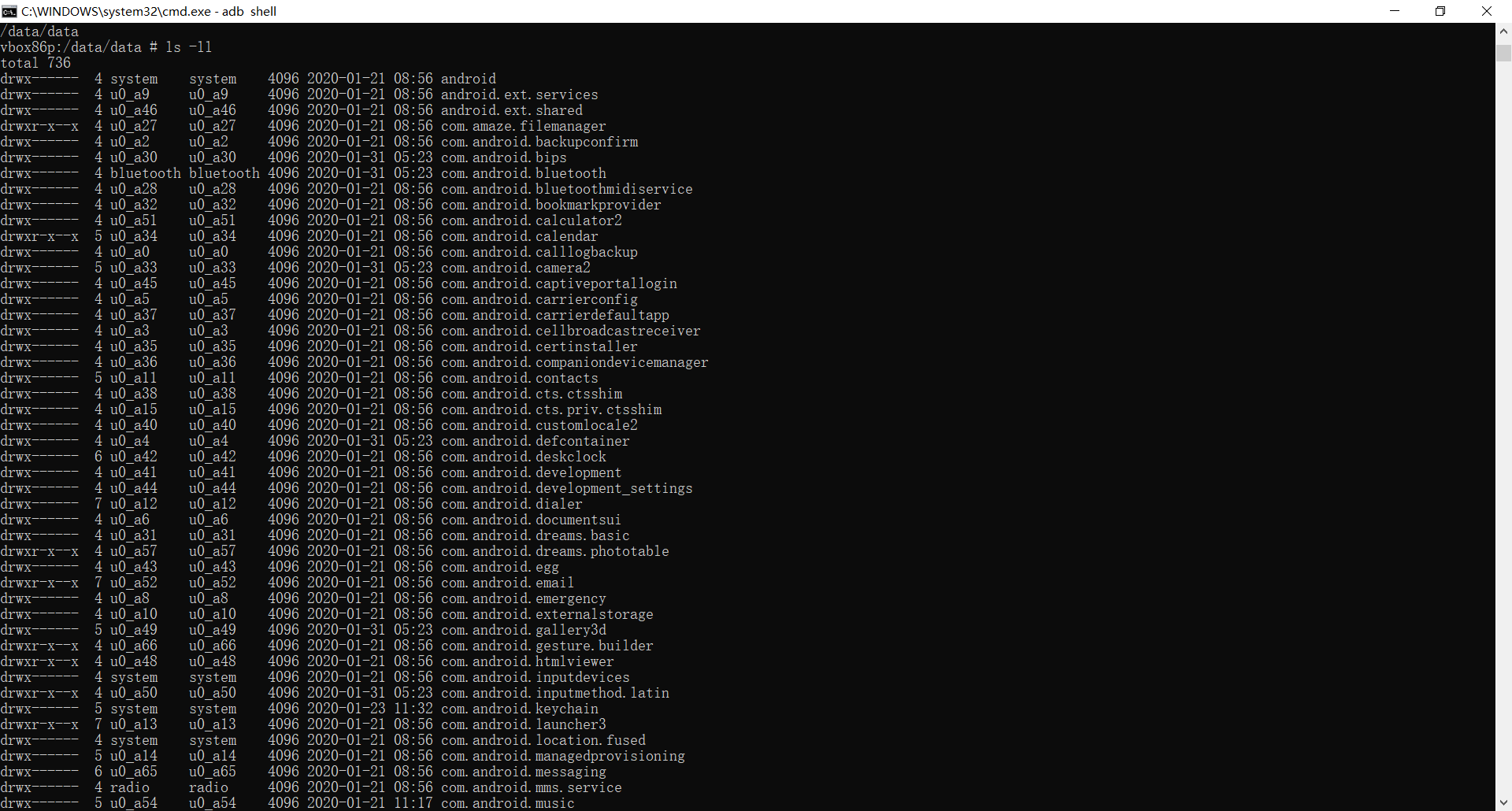
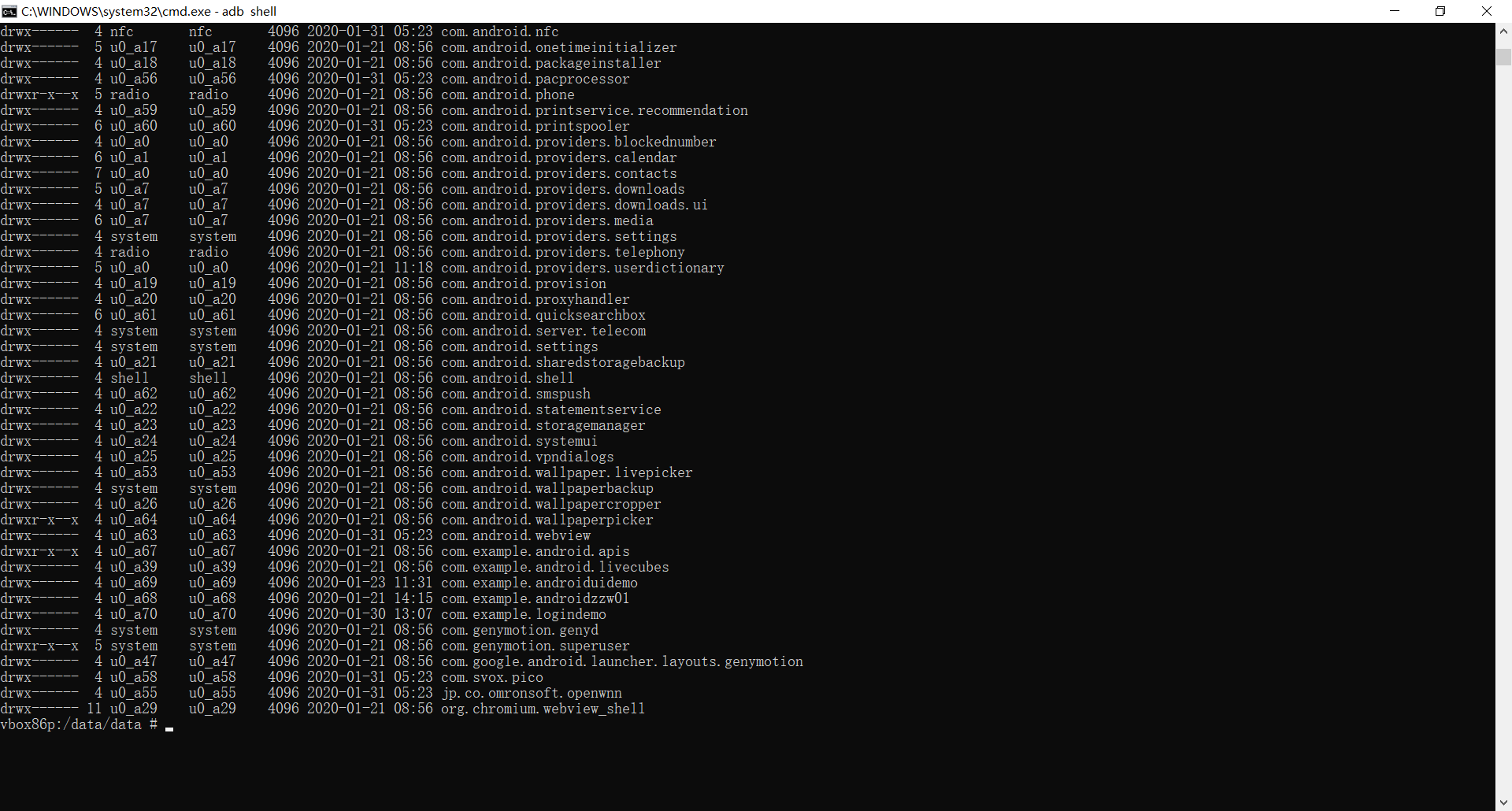
找到我们的项目

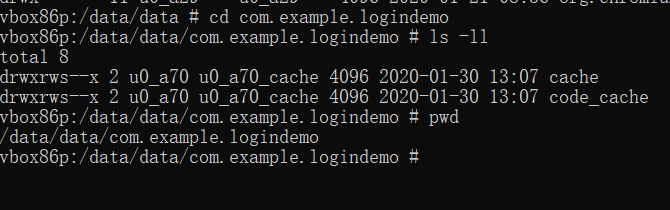
查看我们的info文件应该存放的目录
修改其中saveUserInfo方法
private void saveUserInfo(String usernameText,String passwordText){

            Log.d(TAG,"保存用户信息");

            try  {

            File file =new File("/data/data/com.example.logindemo/info.txt");

            if(file.exists()){

                file.createNewFile();

            }

                FileOutputStream fileOutputStream = new FileOutputStream(file);

                //以特定的格式存储

                fileOutputStream.write((usernameText+"***"+passwordText).getBytes());

                fileOutputStream.close();

            }catch (Exception e){

                  e.printStackTrace();

            }

        }
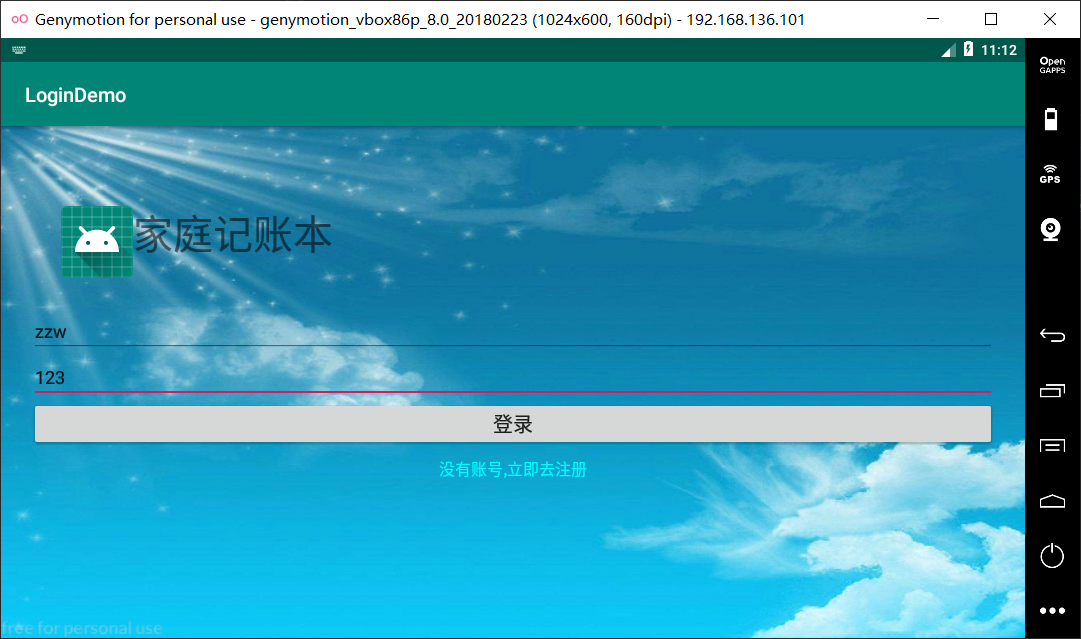
点击登录
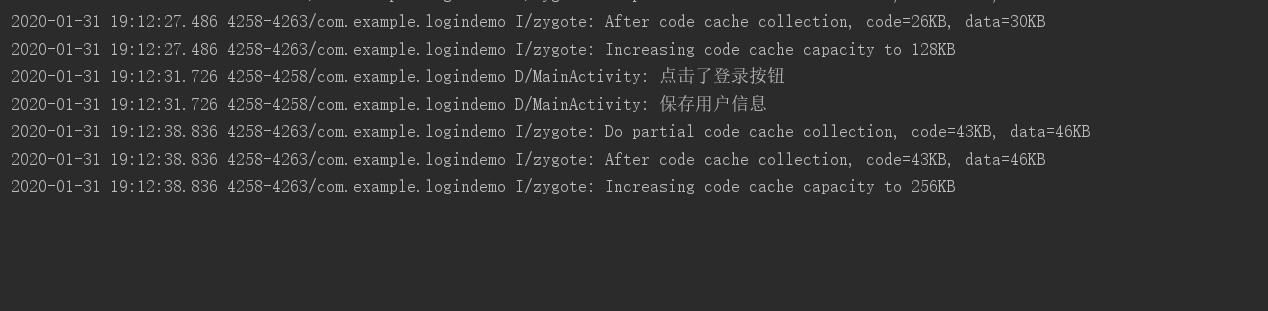
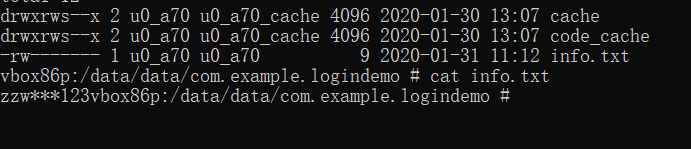
查看发现info.txt文件,且内容为zzw***123说明保存成功。
还有另一种方法
通过Android Devices Monitor查看
https://www.cnblogs.com/rivers-enduring/p/9212111.html
打开后,在File Explorer下找到包/data/data/com.example.logindemo/


选中info.txt,右上角有导出
导出到桌面,进行查看

Android将数据存储到应用的数据目录下的更多相关文章
- Android中数据存储(一)
国庆没有给国家添堵,没有勾搭妹子,乖乖的写着自己的博客..... 本文将为大家介绍Android中数据存储的五种方式,数据存储可是非常重要的知识哦. 一,文件存储数据 ①在ROM存储数据 关于在ROM ...
- Android本地数据存储复习
Android本地数据存储复习 Android无论是应用层还是系统层都需要在本地保存一些数据,尤其在应用层中使用的就更为普遍,大体有这么几种:SharedPreference,file,sqlite数 ...
- android学习笔记45——android的数据存储和IO
android的数据存储和IO SharedPreferences与Editor简介 SharedPreferences保存的数据主要是类似于配置信息格式的数据,因此其保存的数据主要是简单的类型的ke ...
- Android实现数据存储技术
转载:Android实现数据存储技术 本文介绍Android中的5种数据存储方式. 数据存储在开发中是使用最频繁的,在这里主要介绍Android平台中实现数据存储的5种方式,分别是: 1 使用Shar ...
- android中数据存储
android中数据存储 Android 中存储数据的方式有五种:SQLite数据库.文件存储.内容提供者.网络.SharedPreferences(Key----value)五种存储方式. ...
- Android中数据存储(四)——ContentProvider存储数据
目录(?)[+] 当一个应用程序在Android中安装后,我们在使用应用的过程中会产生很多的数据,应用都有自己的数据,那么我们应该如何存储数据呢? 数据存储方式 Android 的数据存储有5种方 ...
- Android中数据存储(三)——SQLite数据库存储数据
当一个应用程序在Android中安装后,我们在使用应用的过程中会产生很多的数据,应用都有自己的数据,那么我们应该如何存储数据呢? 数据存储方式 Android 的数据存储有5种方式: 1. Share ...
- 关于Android开发数据存储的方式(一)
关于Android开发数据存储方式(一) 在厦门做Android开发也有两个月了,快情人节了.我还在弄代码. 在微信平台上开发自己的APP,用到了数据存储的知识,如今总结一下: 整体的来讲.数据存储方 ...
- Android本地数据存储: ASimpleCache
一:前言 在上一篇博客Android本地数据存储: Reservoir 博客中,我提到,除了Reservoir库,还可以采用ASimpleCache开源库,来实现本地数据存储.昨天并没有仔细的对比Re ...
随机推荐
- PAT 1003 Emergency (25分)
As an emergency rescue team leader of a city, you are given a special map of your country. The map s ...
- javascript 原型继承 与class extends 继承对比
//父类 Animal function Animal (name) { this.name = name; this.sleep = function () { console.log(this ...
- 重新梳理IT知识之java-02语法(二)
1.如何获取一个随机数 比如:10-99 调用方法:Math.random //Math.random方法得到的是double类型的值范围在[0.0,1.0),一般需要加工后才可满足开发要求. 代码: ...
- JAVA 开学测试
package StudentScore; public class ScoreInformation { String stunumber; //学号 String name; //姓名 doubl ...
- 5G时代开启,这些新兴职业决定你的后半生
近段时间,高考志愿填报成为牵动千万家庭的头等大事.事实上,除了学校间的差距外,专业的优劣也在很大程度上决定着人们未来职场生涯的潜力.血淋淋的事实告诉我们,只有选对专业,才能让自己的人生实现升华,并避免 ...
- mcast_set_if函数
#include <errno.h> #include <string.h> #include <net/if.h> #include <sys/ioctl. ...
- nyoj 24
素数距离问题 时间限制:3000 ms | 内存限制:65535 KB 难度:2 描述 现在给出你一些数,要求你写出一个程序,输出这些整数相邻最近的素数,并输出其相距长度.如果左右有等距离长度 ...
- 第三节:Vuejs常用特性2和图书案例
一. 常用特性2 1. 监听器 用watch来响应数据的变化, 一般用于异步或者开销较大的操作, watch 中的属性 一定是data 中 已经存在的数据!!! 当需要监听一个对象的改变时,普通的wa ...
- Steam 游戏 《The Vagrant(流浪者)》修改器制作-[先使用CE写,之后有时间的话改用CheatMaker](2020年寒假小目标08)
日期:2020.02.07 博客期:146 星期五 [温馨提示]: 只是想要修改器的网友,可以直接点击此链接下载: 只是想拿CT文件的网友,可以直接点击此链接下载: 没有博客园账号的网友,可以将页面下 ...
- JDBC 操作插入表出现javax.sql.rowset.serial.SerialBlob cannot be cast to oracle.sql.BLOB
/** * 接口方法 */ public void excuteInputDB(SynchServiceConfig synchServiceConfig) throws Exception { tr ...