
在Google Maps 上点击标签显示说明并保持不消失
JS如下:
(function() {
window.onload = function() {
// Creating an object literal containing the properties
// we want to pass to the map
var options = {
zoom: 3,
center: new google.maps.LatLng(37.09, -95.71),
mapTypeId: google.maps.MapTypeId.ROADMAP
};
// Creating the map
var map = new google.maps.Map(document.getElementById('map'), options);
// Creating an array that will contain the coordinates
// for New York, San Francisco, and Seattle
var places = [];
// Adding a LatLng object for each city
places.push(new google.maps.LatLng(40.756, -73.986));
places.push(new google.maps.LatLng(37.775, -122.419));
places.push(new google.maps.LatLng(47.620, -122.347));
// Looping through the places array
for (var i = 0; i < places.length; i++) {
// Adding the marker as usual
var marker = new google.maps.Marker({
position: places[i],
map: map,
title: 'Place number ' + i
});
// Wrapping the event listener inside an anonymous function
// that we immediately invoke and passes the variable i to.
(function(i, marker) {
// Creating the event listener. It now has access to the values of
// i and marker as they were during its creation
google.maps.event.addListener(marker, 'click', function() {
var infowindow = new google.maps.InfoWindow({
content: 'Place number ' + i
});
infowindow.open(map, marker);
});
})(i, marker);
}
}
})();
CSS如下:
body
{
font-family:
Verdana,
Geneva,
Arial,
Helvetica,
sans-serif;
font-size:
small;
background:
#fff;
}
#map
{
width:
100%;
height:
500px;
border:
1px
solid
#000;
}
.info
{
width:
250px;
}
HTML如下:
<html xmlns="http://www.w3.org/1999/xhtml">
<head>
<meta http-equiv="Content-Type" content="text/html; charset=UTF-8" />
<title>My first map</title>
<link type="text/css" href="css/style.css" rel="stylesheet" media="all" />
<script type="text/javascript" src="http://maps.google.com/maps/api/js?sensor=false"></script>
<script type="text/javascript" src="js/map.js"></script>
</head>
<body>
<h1>My first map</h1>
<div id="map"></div>
</body>
</html>
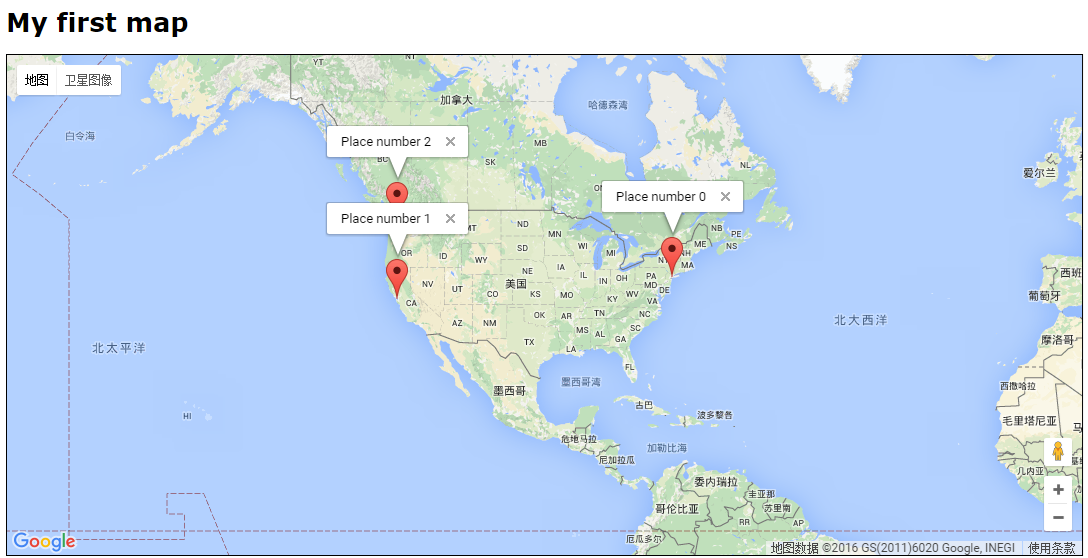
效果如下:
在Google Maps 上点击标签显示说明并保持不消失的更多相关文章
- 在Google Maps 上点击标签后显示说明
JS如下: (function() { window.onload = function() { // Creating an object literal contain ...
- HTML5获取地理位置信息并在Google Maps上显示
<!DOCTYPE HTML> <html lang="en-US"> <head> <meta charset="UTF-8& ...
- Google Maps API显示地图的小示例
来源:http://www.ido321.com/1089.html 效果(新版Firefox中测试): 代码: <!DOCTYPE> <html> <head> ...
- Google Maps API V3 之 图层
Google官方教程: Google 地图 API V3 使用入门 Google 地图 API V3 针对移动设备进行开发 Google 地图 API V3 之事件 Google 地图 API V3 ...
- Google Maps API V3 之绘图库 信息窗口
Google官方教程: Google 地图 API V3 使用入门 Google 地图 API V3 针对移动设备进行开发 Google 地图 API V3 之事件 Google 地图 API V3 ...
- Google maps library的使用
公司的项目中用到了google地图API, 使用Google API开发就会用到Marker, 用来在google 地图上标注位置 但是google marker使用过程中也有个问题,就是如果在goo ...
- [Google Maps API 3]Marker从Clusterer中分离及Marker置于Cluster上一层的解决办法
在Google Maps API的使用中,经常用到Clusterer来避免过密的Marker显示.但仔细看一下Clusterer的设置参数中并没有直接将某些Marker除外的方法,那遇到这样的需求,怎 ...
- google maps js v3 api教程(2) -- 在地图上添加标记
原文链接 google maps javascript官方文档:https://developers.google.com/maps/documentation/javascript/ 我们在创建地图 ...
- MyEclipse导入主题文件epf后xml及jsp等页面中点击标签之后显示灰白
MyEclipse导入主题文件epf后xml及jsp等页面中点击标签之后显示灰白,症状例如以下: watermark/2/text/aHR0cDovL2Jsb2cuY3Nkbi5uZXQvVVAxOT ...
随机推荐
- 【转帖】PostgreSQL之 使用扩展Extension
PostgreSQL之 使用扩展Extension https://www.cnblogs.com/lnlvinso/p/11042677.html 挺好的文章.自己之前没有系统学习过 扩展.. 目前 ...
- Win7 Eclipse 搭建spark java1.8编译环境,JavaRDD的helloworld例子
[学习笔记] Win7 Eclipse 搭建spark java1.8编译环境,JavaRDD的helloworld例子: 在eclipse oxygen上创建一个普通的java项目,然后把spark ...
- Ubuntu 18.04修改默认源为国内源
安装Ubuntu 18.04后,使用国外源太慢了,修改为国内源会快很多. 修改阿里源为Ubuntu 18.04默认的源 备份/etc/apt/sources.list 备份 cp /etc/apt/s ...
- Statefulset的拓扑状态
Statefulset: 实例之间有不对等关系,以及实例对外部数据有依赖关系的应用,就被称为“有状态应用”(Stateful Application). StatefulSet 的设计其实非常容易理解 ...
- 有趣的后渗透工具 Koadic
koadic是DEFCON黑客大会上分享出来的的一个后渗透工具,虽然和msf有些相似,但是Koadic主要是通过使用Windows ScriptHost(也称为JScript / VBScript)进 ...
- 怎样获取Cookie
使用 document.cookie 获取; document.cookie
- Angular6如何引入jQuery-knob
Angular6如何引入jQuery-knob 1.概述 Angular6引入jQuery变得异常简单,请参考https://blog.csdn.net/qq_35321405/article/det ...
- UEditor编辑器
1.UEditor编辑器官网:http://ueditor.baidu.com/website/ 2.下载文件:选择 1.4.3.3 .Net版本 UTF-8板 3.建一个ueditor文件夹,将下 ...
- C调用C++(C++封装以及C对其调用)
C调用C++(C++封装以及C对其调用) 来源 https://blog.csdn.net/wonengguwozai/article/details/89854781 相关知识提点:很经典的exte ...
- LeetCode 腾讯精选50题--求众数
由于众数是指数组中相同元素的个数超过数组长度的一半,所以有两种思路,一. 先排序,后取排序后的数组的中间位置的值:二. 统计,设定一个变量统计相同元素出现的次数,遍历数组,若与选定的元素相同,统计变量 ...