
Azure经典虚拟机(Windows)如何监测单个磁盘的使用空间
Azure云平台创建经典虚拟机(Windows)后,发现仪表板的监测项下默认是没有针对磁盘空间进行检测的指标的
本地机器安装Windows Azure Powershell模块,并通过如下命令登陆并查看到默认的诊断扩展是没有Disk Free Space参数的
Add-AzureAccount -Environment AzureChinaCloud

$vm = Get-AzureVM -ServiceName hlmcloudsn1-*** -Name hlmwin12n1-***

$PublicConfiguration = (Get-AzureVMDiagnosticsExtension -VM $vm).PublicConfiguration

$encodedconfig = (ConvertFrom-Json -InputObject $PublicConfiguration).xmlCfg

$xmlconfig = [System.Text.Encoding]::UTF8.GetString([System.Convert]::FromBase64String($encodedconfig))

Write-Host $xmlconfig
参考Azure官网(https://docs.microsoft.com/zh-cn/azure/virtual-machines/extensions/diagnostics-windows#sample-diagnostics-configuration)说明,了解到可以对诊断扩展的参数进行自定义,因此在原有的配置文件中加入针对单块盘的指控指标即可对单块磁盘的使用量进行检测,编辑后的配置文件见下(标黄内容为新添加的内容,需要根据实际环境进行替换)
<?xml version="1.0" encoding="utf-8"?>

<PublicConfig xmlns="http://schemas.microsoft.com/ServiceHosting/2010/10/DiagnosticsConfiguration">

    <WadCfg>

      <DiagnosticMonitorConfiguration overallQuotaInMB="">

        <DiagnosticInfrastructureLogs scheduledTransferLogLevelFilter="Error"/>

        <PerformanceCounters scheduledTransferPeriod="PT1M">

      <PerformanceCounterConfiguration counterSpecifier="\Processor(_Total)\% Processor Time" sampleRate="PT15S" unit="Percent">

        <annotation displayName="CPU utilization" locale="en-us"/>

      </PerformanceCounterConfiguration>

      <PerformanceCounterConfiguration counterSpecifier="\Processor(_Total)\% Privileged Time" sampleRate="PT15S" unit="Percent">

        <annotation displayName="CPU privileged time" locale="en-us"/>

      </PerformanceCounterConfiguration>

      <PerformanceCounterConfiguration counterSpecifier="\Processor(_Total)\% User Time" sampleRate="PT15S" unit="Percent">

        <annotation displayName="CPU user time" locale="en-us"/>

      </PerformanceCounterConfiguration>

      <PerformanceCounterConfiguration counterSpecifier="\Processor Information(_Total)\Processor Frequency" sampleRate="PT15S" unit="Count">

        <annotation displayName="CPU frequency" locale="en-us"/>

      </PerformanceCounterConfiguration>

      <PerformanceCounterConfiguration counterSpecifier="\System\Processes" sampleRate="PT15S" unit="Count">

        <annotation displayName="Processes" locale="en-us"/>

      </PerformanceCounterConfiguration>

      <PerformanceCounterConfiguration counterSpecifier="\Process(_Total)\Thread Count" sampleRate="PT15S" unit="Count">

        <annotation displayName="Threads" locale="en-us"/>

      </PerformanceCounterConfiguration>

      <PerformanceCounterConfiguration counterSpecifier="\Process(_Total)\Handle Count" sampleRate="PT15S" unit="Count">

        <annotation displayName="Handles" locale="en-us"/>

      </PerformanceCounterConfiguration>

      <PerformanceCounterConfiguration counterSpecifier="\Memory\% Committed Bytes In Use" sampleRate="PT15S" unit="Percent">

        <annotation displayName="Memory usage" locale="en-us"/>

      </PerformanceCounterConfiguration>

      <PerformanceCounterConfiguration counterSpecifier="\Memory\Available Bytes" sampleRate="PT15S" unit="Bytes">

        <annotation displayName="Memory available" locale="en-us"/>

      </PerformanceCounterConfiguration>

      <PerformanceCounterConfiguration counterSpecifier="\Memory\Committed Bytes" sampleRate="PT15S" unit="Bytes">

        <annotation displayName="Memory committed" locale="en-us"/>

      </PerformanceCounterConfiguration>

      <PerformanceCounterConfiguration counterSpecifier="\Memory\Commit Limit" sampleRate="PT15S" unit="Bytes">

        <annotation displayName="Memory commit limit" locale="en-us"/>

      </PerformanceCounterConfiguration>

      <PerformanceCounterConfiguration counterSpecifier="\Memory\Pool Paged Bytes" sampleRate="PT15S" unit="Bytes">

        <annotation displayName="Memory paged pool" locale="en-us"/>

      </PerformanceCounterConfiguration>

      <PerformanceCounterConfiguration counterSpecifier="\Memory\Pool Nonpaged Bytes" sampleRate="PT15S" unit="Bytes">

        <annotation displayName="Memory non-paged pool" locale="en-us"/>

      </PerformanceCounterConfiguration>

      <PerformanceCounterConfiguration counterSpecifier="\PhysicalDisk(_Total)\% Disk Time" sampleRate="PT15S" unit="Percent">

        <annotation displayName="Disk active time" locale="en-us"/>

      </PerformanceCounterConfiguration>

      <PerformanceCounterConfiguration counterSpecifier="\PhysicalDisk(_Total)\% Disk Read Time" sampleRate="PT15S" unit="Percent">

        <annotation displayName="Disk active read time" locale="en-us"/>

      </PerformanceCounterConfiguration>

      <PerformanceCounterConfiguration counterSpecifier="\PhysicalDisk(_Total)\% Disk Write Time" sampleRate="PT15S" unit="Percent">

        <annotation displayName="Disk active write time" locale="en-us"/>

      </PerformanceCounterConfiguration>

      <PerformanceCounterConfiguration counterSpecifier="\PhysicalDisk(_Total)\Disk Transfers/sec" sampleRate="PT15S" unit="CountPerSecond">

        <annotation displayName="Disk operations" locale="en-us"/>

      </PerformanceCounterConfiguration>

      <PerformanceCounterConfiguration counterSpecifier="\PhysicalDisk(_Total)\Disk Reads/sec" sampleRate="PT15S" unit="CountPerSecond">

        <annotation displayName="Disk read operations" locale="en-us"/>

      </PerformanceCounterConfiguration>

      <PerformanceCounterConfiguration counterSpecifier="\PhysicalDisk(_Total)\Disk Writes/sec" sampleRate="PT15S" unit="CountPerSecond">

        <annotation displayName="Disk write operations" locale="en-us"/>

      </PerformanceCounterConfiguration>

      <PerformanceCounterConfiguration counterSpecifier="\PhysicalDisk(_Total)\Disk Bytes/sec" sampleRate="PT15S" unit="BytesPerSecond">

        <annotation displayName="Disk speed" locale="en-us"/>

      </PerformanceCounterConfiguration>

      <PerformanceCounterConfiguration counterSpecifier="\PhysicalDisk(_Total)\Disk Read Bytes/sec" sampleRate="PT15S" unit="BytesPerSecond">

        <annotation displayName="Disk read speed" locale="en-us"/>

      </PerformanceCounterConfiguration>

      <PerformanceCounterConfiguration counterSpecifier="\PhysicalDisk(_Total)\Disk Write Bytes/sec" sampleRate="PT15S" unit="BytesPerSecond">

        <annotation displayName="Disk write speed" locale="en-us"/>

      </PerformanceCounterConfiguration>

      <PerformanceCounterConfiguration counterSpecifier="\PhysicalDisk(_Total)\Avg. Disk Queue Length" sampleRate="PT15S" unit="Count">

        <annotation displayName="Disk average queue length" locale="en-us"/>

      </PerformanceCounterConfiguration>

      <PerformanceCounterConfiguration counterSpecifier="\PhysicalDisk(_Total)\Avg. Disk Read Queue Length" sampleRate="PT15S" unit="Count">

        <annotation displayName="Disk average read queue length" locale="en-us"/>

      </PerformanceCounterConfiguration>

      <PerformanceCounterConfiguration counterSpecifier="\PhysicalDisk(_Total)\Avg. Disk Write Queue Length" sampleRate="PT15S" unit="Count">

        <annotation displayName="Disk average write queue length" locale="en-us"/>

      </PerformanceCounterConfiguration>

      <PerformanceCounterConfiguration counterSpecifier="\LogicalDisk(_Total)\% Free Space" sampleRate="PT15S" unit="Percent">

        <annotation displayName="Disk free space (percentage)" locale="en-us"/>

      </PerformanceCounterConfiguration>

      <PerformanceCounterConfiguration counterSpecifier="\LogicalDisk(_Total)\Free Megabytes" sampleRate="PT15S" unit="Count">

        <annotation displayName="Disk free space (MB)" locale="en-us"/>

      </PerformanceCounterConfiguration>

      <PerformanceCounterConfiguration counterSpecifier="\LogicalDisk(C:)\Free Megabytes" sampleRate="PT15S" unit="Count">

        <annotation displayName="C: free space (MB)" locale="en-us"/>

      </PerformanceCounterConfiguration>

      <PerformanceCounterConfiguration counterSpecifier="\LogicalDisk(D:)\Free Megabytes" sampleRate="PT15S" unit="Count">

        <annotation displayName="D: free space (MB)" locale="en-us"/>

      </PerformanceCounterConfiguration>

      <PerformanceCounterConfiguration counterSpecifier="\LogicalDisk(F:)\Free Megabytes" sampleRate="PT15S" unit="Count">

        <annotation displayName="F: free space (MB)" locale="en-us"/>

      </PerformanceCounterConfiguration>

    </PerformanceCounters>

    <Metrics resourceId="/subscriptions/0b4b20c5-29b3-4dd9-bfdc-40b75f1dc4c9/resourceGroups/hlmrgn1/providers/Microsoft.ClassicCompute/virtualMachines/hlmwin12n1-cla1" >

        <MetricAggregation scheduledTransferPeriod="PT1H"/>

        <MetricAggregation scheduledTransferPeriod="PT1M"/>

    </Metrics>

    <WindowsEventLog scheduledTransferPeriod="PT1M">

      <DataSource name="Application!*[System[(Level = 1 or Level = 2)]]"/>

      <DataSource name="Security!*[System[(Level = 1 or Level = 2)]"/>

      <DataSource name="System!*[System[(Level = 1 or Level = 2)]]"/>

    </WindowsEventLog>

      </DiagnosticMonitorConfiguration>

    </WadCfg>

    <StorageAccount>hlmston1t2cla</StorageAccount>

</PublicConfig>
使用如下命令,跟新诊断扩展(将如上文件保存为DiagnosticsPubConfig.xml文件)
$vm = Get-AzureVM -ServiceName hlmcloudsn1-*** -Name hlmwin12n1-***$Config_Path = "C:\Users\he.liming\Desktop\DiagnosticsPubConfig.xml"

$Storage_Context = New-AzureStorageContext -StorageAccountName "hlmston1t2***" -StorageAccountKey "qlIs3Oc9vPqpkCQsf9Lk6oqKfbHbrPUNz3xNqm9VgcUPug8U7XfX***"

$vm_Update = Set-AzureVMDiagnosticsExtension -DiagnosticsConfigurationPath $Config_Path -VM $vm -StorageContext $Storage_Context

Update-AzureVM -ServiceName hlmcloudsn1-*** -Name hlmwin12n1-*** -VM $vm_Update.VM

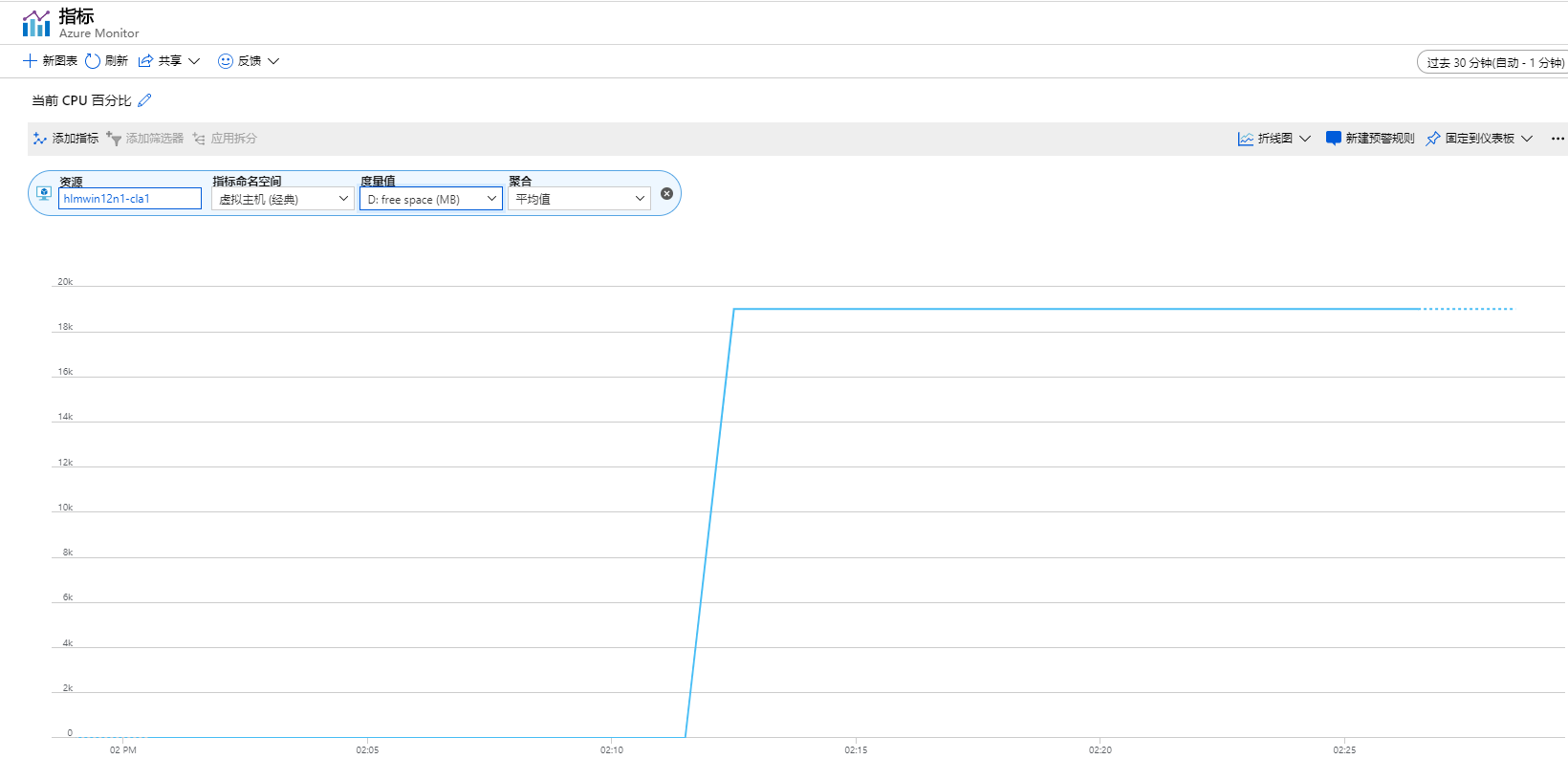
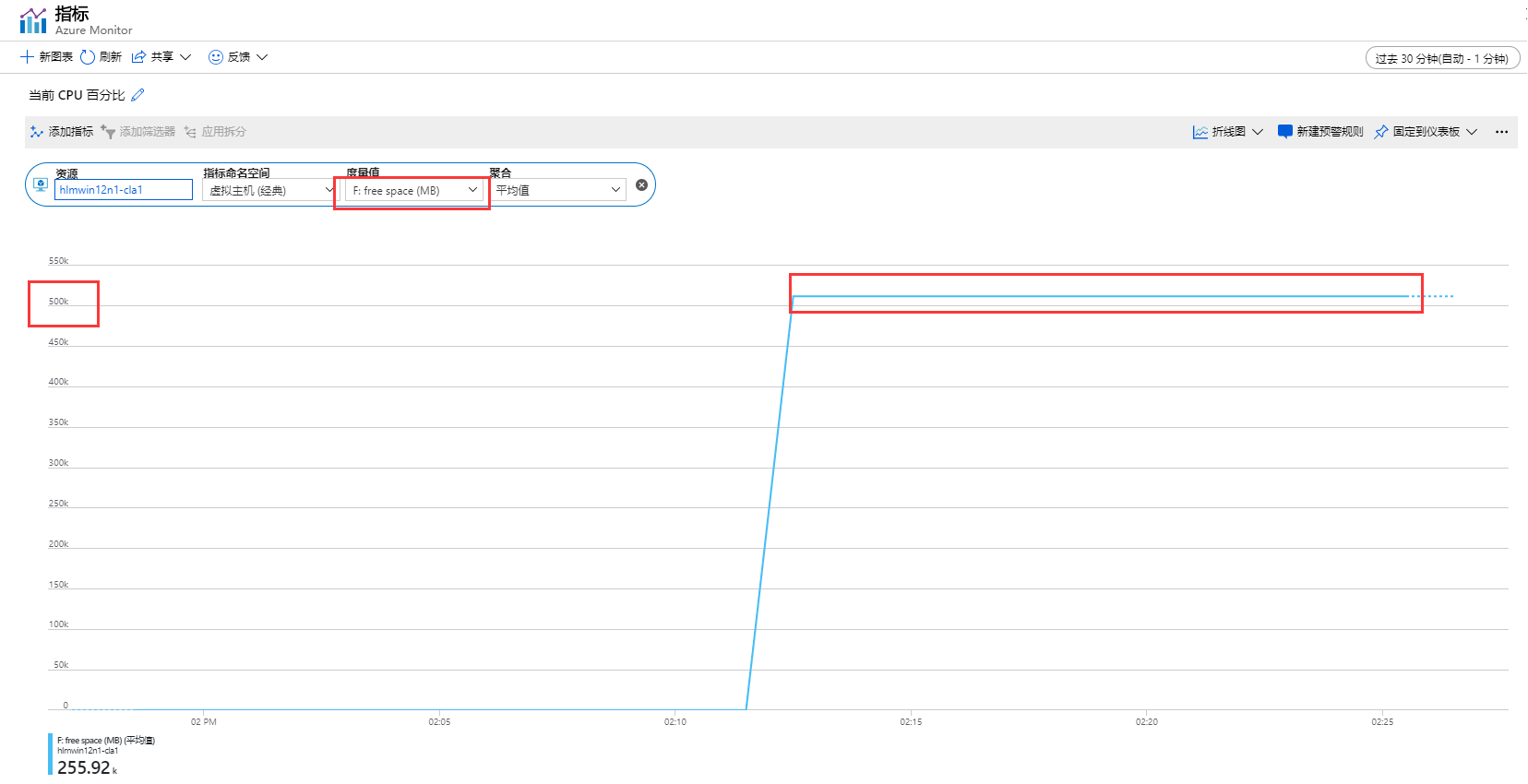
查看虚拟机的仪表板,发现已经可以查看自定义的盘符分区大小了


Azure经典虚拟机(Windows)如何监测单个磁盘的使用空间的更多相关文章
- 排查在 Azure 中新建 Windows 虚拟机时遇到的经典部署问题
尝试创建新的 Azure 虚拟机 (VM) 时,遇到的常见错误是预配失败或分配失败. 当由于准备步骤不当,或者在从门户捕获映像期间选择了错误的设置而导致 OS 映像无法加载时,将发生预配失败. 当群集 ...
- Azure 中的 Windows 虚拟机概述
Azure 虚拟机 (VM) 是 Azure 提供的多种可缩放按需分配计算资源之一. 通常情况下,如果需要以更大的力度(相对于其他控制选项)控制计算环境,则应选择 VM. 本文介绍创建 VM 之前的注 ...
- Windows Azure Virtual Machine (25) 使用SSH登录Azure Linux虚拟机
<Windows Azure Platform 系列文章目录> 本文介绍内容适合于Azure Global和Azure China 为什么使用SSH登录Azure Linux虚拟机? 我们 ...
- 通过xrdp实现远程桌面连接Windows Azure linux虚拟机
本文以Oracle Linux 6.4虚拟机为示例(22及3389端口必须打开,分别用于SSH及RDP连接) 1.在安装xrdp之前,首先需要安装一些必要的包,如: # yum -y install ...
- 【初码干货】【Azure系列】1、再次感受Azure,体验Windows Server 2016并部署BlogEngine.NET
上个月末,在某人的建议下,重新注册了一个1元试用账户(包含1个月期限的1500元订阅),并充值了1000元转为了正式账户,相当于1000元得到了2500的订阅,于是又一次开启了Azure之旅. 在这不 ...
- 超大文件上传到Azure Linux虚拟机最佳实践
客户在实际进行迁移的时候,往往碰到需要将本地数据中心的超大文件,比如单个200GB的文件,或者总共1TB的无数文件上传到Azure上的情况,尤其是传到Azure的Linux虚拟机的场景,这种场景包括: ...
- Azure 中虚拟机的区域和可用性
Azure 在中国的两个数据中心运行. 这些数据中心分组到地理区域,让用户可灵活选择构建应用程序的位置. 请务必了解 Azure 中虚拟机 (VM) 运行的方式和位置,以及最大化性能.可用性和冗余的选 ...
- 从Azure上构建Windows应用程序映像
从Azure上构建windows应用程序映像同构建Linux应用程序映像总体流程比较类似,可以参考上图Linux映像的制作发布等流程,具体细节又有所差别. 具体步骤如下: 从Azure管理平台上申请W ...
- Azure经典门户创建VM,如何设置使用静态IP地址?
使用 Azure 经典管理门户中创建的虚拟机,无法使用静态IP 地址,在管理界面没有该设置.在新的管理门户中虽然有使用静态IP的设置,但是选项是灰色,无法修改,提示错误:This virtual ma ...
随机推荐
- leetcode解题报告(17):Missing Number
描述 Given an array containing n distinct numbers taken from 0, 1, 2, ..., n, find the one that is mis ...
- bzoj 3629
给出数 $n$记 $f(x)$ 表示 $x$ 的因子和求出所有 $x$ 使得 $f(x) = n$考虑 $x = p_1 ^{a_1} * p_2 ^ {a_2} * \cdots * p_k ^ { ...
- gdb 预备知识
1.gcc的-g选项 如果要使用gdb进行调试,必须在编译时在gcc中加入-g选项,使用参数 -g 表示将源代码调试信息编译到可执行文件中. #include <stdio.h> int ...
- AdvanceEast源码理解
目录 文章思路 源码理解 一. 标签点形式 按顺序排列四个点,逆时针旋转,且第一个点为左上角点(刚开始选择最左边的点, 二. 标签切边 三. loss计算 四. NMS 最后说明 文章思路 大神的gi ...
- Shiro + Redis集成思路
首先,确保Spring配置完毕了. 集成Shiro 1.在pom.xml中追加依赖 <dependency> <groupId>org.apache.shiro</gro ...
- 1829:【02NOIP提高组】自由落体
#include<bits/stdc++.h> using namespace std; double h,s1,v,k,l; int n,ans; int main() { cin> ...
- Java基础系列 - 查找数组的最大值和最小值
package com.test6; public class test5 { public static void main(String[] args) { int[] arr = {1, 2, ...
- TynSerial序列(还原)TClientDataSet
TynSerial序列(还原)TClientDataSet 可以一次性序列(还原)多个TClientDataSet. 1)TClientDataSet查询数据 procedure TForm1.Qry ...
- Flutter移动电商实战 --(45)详细页_说明区域UI编写
pages/details_page/details_expain.dart 详情页面引用组件 效果展示: 最终代码: import 'package:flutter/material.dart'; ...
- markdown中如何设置字体为红色?
答: 语法如下: <font color='red'> text </font>