
Android_(控件)使用自定义控件在屏幕中绘制一条虚线
在Android屏幕中绘制虚线,最通用的是自定义控件DashedLine,再将自定义控件放入xml布局中
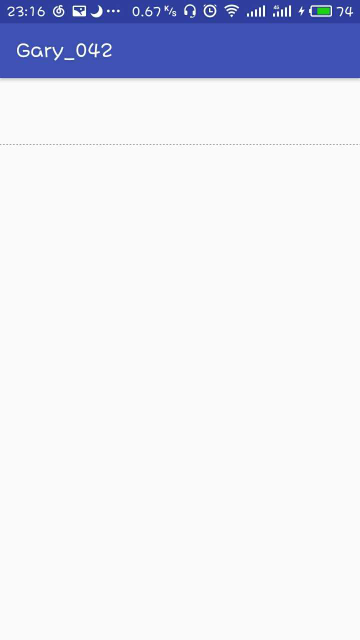
运行截图:
程序结构

package com.example.asus.gary_042;

import android.content.Context;

import android.graphics.Canvas;

import android.graphics.Color;

import android.graphics.DashPathEffect;

import android.graphics.Paint;

import android.graphics.Path;

import android.graphics.PathEffect;

import android.util.AttributeSet;

import android.view.View;

/**

 * Created by ASUS on 2018/5/26.

 */

public class DashedLine extends View{

    public DashedLine(Context context,AttributeSet attrs) {

        super(context,attrs);

    }

    protected void onDraw(Canvas canvas){

        super.onDraw(canvas);

        Paint paint = new Paint();

         paint.setStyle(Paint.Style.STROKE);

        paint.setColor(Color.BLACK);

        Path path = new Path();

        path.moveTo(0,200);

        path.lineTo(1280,200);

        PathEffect effects = new DashPathEffect(new float[]{5,5,5,5},1);

        paint.setPathEffect(effects);

        canvas.drawPath(path,paint);

    }

}
DashedLine
<?xml version="1.0" encoding="utf-8"?>

<LinearLayout xmlns:android="http://schemas.android.com/apk/res/android"

    xmlns:app="http://schemas.android.com/apk/res-auto"

    xmlns:tools="http://schemas.android.com/tools"

    android:layout_width="match_parent"

    android:layout_height="match_parent"

    tools:context="com.example.asus.gary_042.MainActivity">

 <com.example.asus.gary_042.DashedLine

     android:id="@+id/dashedLine"

     android:layout_width="match_parent"

     android:layout_height="match_parent" />

</LinearLayout>
activity_main.xml
一、自定义控件DashedLine,使用这个控件能在屏幕中绘制一条虚线
   protected void onDraw(Canvas canvas){

        super.onDraw(canvas);

        Paint paint = new Paint();

        //给path设置样式(效果)的,STORKE设置虚线

         paint.setStyle(Paint.Style.STROKE);

        //设置虚线颜色

        paint.setColor(Color.BLACK);

        Path path = new Path();

        //起点

        path.moveTo(0,200);

        //终点

        path.lineTo(1280,200);

        //那么虚线的一个单位就是由5像素实线,5像素空白,5像素实线,5像素空白组成的虚线段。

        PathEffect effects = new DashPathEffect(new float[]{5,5,5,5},1);

        //将样式放入直线中

        paint.setPathEffect(effects);

        canvas.drawPath(path,paint);

    }
canvas.drawPath方法:传送门
Path类包含了由直线、二次曲线、三次曲线组成多种符合的集合路径图形,它可以用canvas.drawPath()来绘制,并且可以使填充的或者描边的(是基于paint的style的),并且它可以用于裁剪或者在一条path上面绘制文本。
Canvas只有drawLine方法,没有drawDashLine方法。但是你要知道,画什么虽然是Canvas决定的,但是怎么画却是由画笔Paint决定的
setPathEffect(PathEffect effect)这么一个方法,PathEffect一共有六个子类:传送门二、在activity_main文件中引入自定义控件DashedLine
 <com.example.asus.gary_042.DashedLine

     android:id="@+id/dashedLine"

     android:layout_width="match_parent"

     android:layout_height="match_parent"

     />
Android_(控件)使用自定义控件在屏幕中绘制一条虚线的更多相关文章
- Android利用已有控件实现自定义控件
Android控件的基本介绍及使用自定义控件的意义 Android 本身提供了很多控件,自定义控件在android中被广泛运用,自定义控件给了我们很大的方便.比如说,一个视图为imag ...
- C#继承基本控件实现自定义控件
C#继承基本控件实现自定义控件 摘自:http://www.cnblogs.com/greatverve/archive/2012/04/25/user-control-inherit.html 自定 ...
- Android学习Scroller(三)——控件平移划过屏幕 (Scroller简单使用)
MainActivity例如以下: package cc.cn; import android.os.Bundle; import android.view.View; import android. ...
- 如何使用免费PDF控件从PDF文档中提取文本和图片
如何使用免费PDF控件从PDF文档中提取文本和图片 概要 现在手头的项目有一个需求是从PDF文档中提取文本和图片,我以前也使用过像iTextSharp, PDFBox 这些免费的PD ...
- 因为此控件已在 web.config 中注册并且与该页位于同一个目录中
在web.config文件配置了用户控件 <pages> <controls> <add tagPrefix="my" tagName="l ...
- 《ASP.NET1200例》解决母版页报错“内容控件必须是内容页中的顶级控件,或是引用母版页的嵌套母版页。”
VS2005下,添加了母版页这个控件,我们可以讲N个页面中共同的部分放在母版页来实现,并让WEB窗体集成自我们的母版页,就可以让我们的站点具有统一的风格了.在VS2005SP1之前的版本中,我们只能创 ...
- VS2010 Chart控件(一)Chart控件在ASP.NET网站中的应用示例详解(C#语言)
步骤如下: 1. Chart控件(一)Chart控件在ASP.NET网站中的应用示例详解(C#语言)" title="VS2010 Chart控件(一)Chart控件在ASP.NE ...
- 玩转控件:重绘DEVEXPRESS中DateEdit控件 —— 让DateEdit支持只选择年月 (提供源码下载)
前言 上一篇博文<玩转控件:重绘ComboBox —— 让ComboBox多列显示>中,根据大家的回馈,ComboBox已经支持筛选了,更新见博文最后最后最后面. 奇葩 这两天遇到 ...
- MFC中给控件添加变量,DoDataExchange中
DoDataExchange函数其实是一项数据动态绑定技术.比如你在写动态按钮过程中须对按钮添加变量时,怎么添加?控件类已经写好了,其变量是已经固定的.你要添加新的变量就要用到DoDataExchan ...
随机推荐
- 微信小程序中button去除默认的边框
button { position:relative; display:block; margin-left:auto; margin-right:auto; padding-left:14px; p ...
- HTML之盒子变形动画
4个圆形球作圆周运动 代码: <div class="box"> <div class="box1"></div> < ...
- es6字符串扩展(+模板字符串拼接)
includes() 判断字符串中是否包含指定的字串(有的话返回true,否则返回false) console.log('hello world'.includes('world' , 7)); // ...
- Caused by: java.lang.UnsatisfiedLinkError: Couldn't load 。。。。
最近需要做个有地图搜索功能的模块,用到百度地图SDK,但是从官网上下载SDK后导入工程,修改apiKey后,还是无法运行,总是抱这个错误:Caused by: java.lang.Unsatisfie ...
- axios+post获取并下载后台返回的二进制流
axios+post获取并下载后台返回的二进制流 let url = $.getCookie('prefixUrl')+'/expenseword/exportWords'; let vm = thi ...
- mysql 关于字符串搜索的函数
与like作用相似 FIND_IN_SET LOCATE POSITION
- STM32 stm32fxxx_flash.icf文件的作用详解
文章转载自:https://blog.csdn.net/weibo1230123/article/details/80142210 每个芯片开发商都会针对每款芯片来编写一个.icf文件就是传说中的链接 ...
- Winfrom UI 美化 MetroModernUI库应用实例
使用方式: 选择项目==>右键==>管理NuGet安装包==>输入Metro==> ==>添加选项卡(自定义命名,例如Metrol UI)==>浏览 ==>加 ...
- ble ic
ti cc25xxnordic nrf24xx nrf51xx nrf52xx Beken bk34xx
- C#在Oralce环境执行查询时报"Arithmetic operation resulted in an overflow"
问题描述:C#代码在Oralce环境执行分组求和的Sql时报错,提示“Arithmetic operation resulted in an overflow”,即算术运算导致溢出 (1).执行Sql ...