
Spring学习随笔(2):Eclipse下Spring环境配置+入门项目
1 准备工作
(按需下载)
- Eclipse 下载:http://www.eclipse.org/downloads/eclipse-packages/ ;
- Spring 下载:http://repo.spring.io/libs-release-local/org/springframework/spring/ 版本自选;
- Spring aop另需的3个包:http://download.csdn.net/download/lk_lxn/6397895
2 Spring IDE
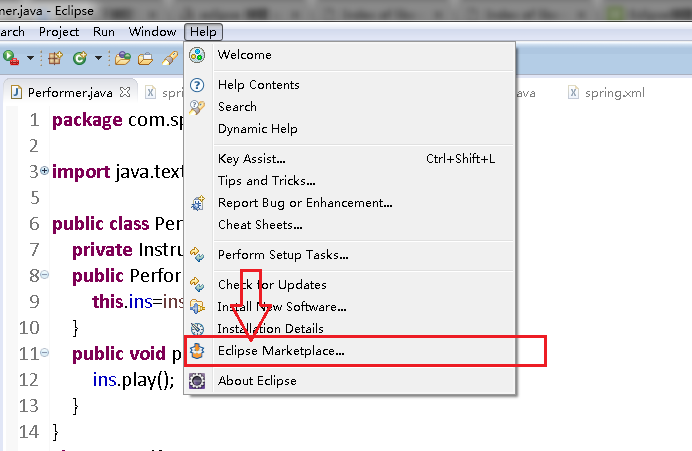
help->Eclipse Marketplace->Find"Spring"->install
选择需要的项目安装,重启Eclipse.

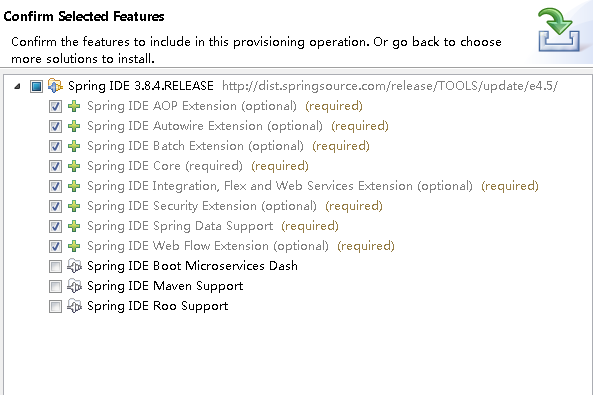
安装完记得重启
3 导入所需的包
方法有多种,我贴下我的方法。
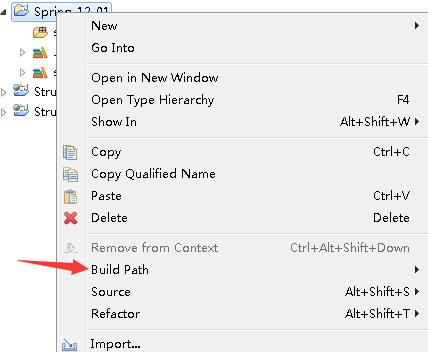
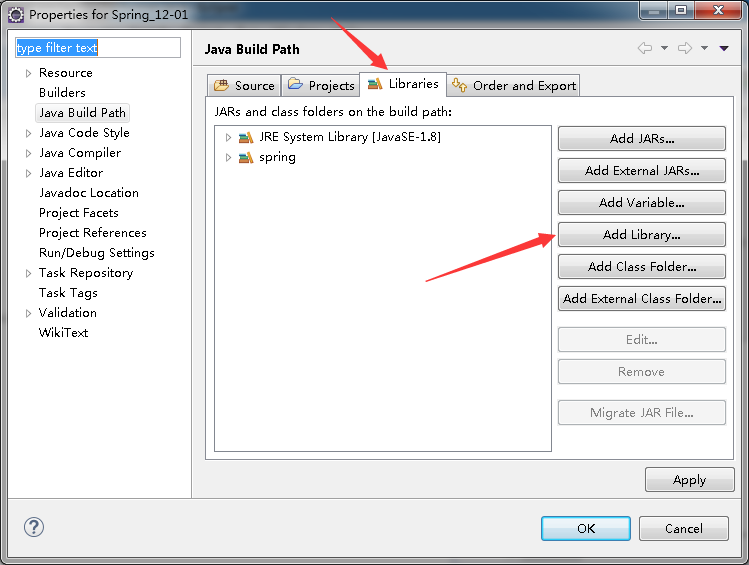
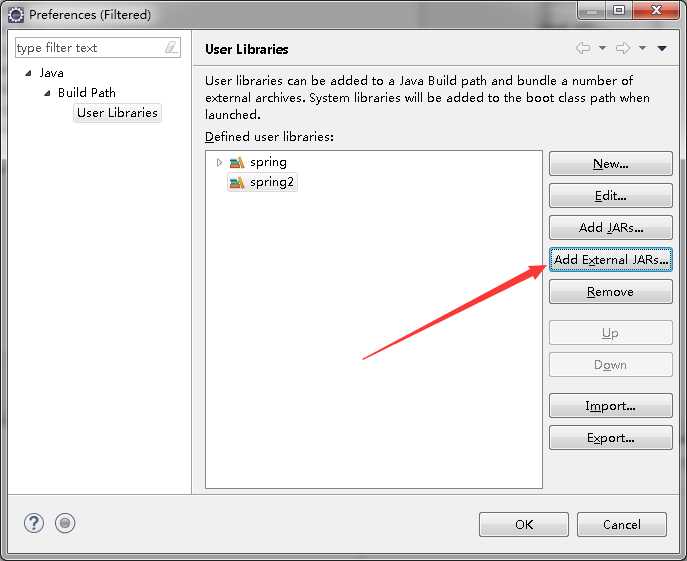
项目右键->build path->configure build path->Libraries->add Library->User Library->User Librarys
->New->输入Library name->add External JARs->选择需要的包
->在add Library处勾选刚才的Lib->finish->ok;
我这种办法好像比较麻烦.......
4 入门项目
完整目录

Performer.java
 package com.spring;

 import java.text.SimpleDateFormat;

 import java.util.Date;

 public class Performer {

     private Instrument ins;

     public Performer(Instrument ins){

         this.ins=ins;            //与Violin紧密耦合

     }

     public void play(){

         ins.play();

     }

 }

 class Record{

     private SimpleDateFormat df = new SimpleDateFormat("yyyy-MM-dd HH:mm:ss");

     public void starttime(){

         System.out.println(df.format(new Date()));

     }

     public void endtime(){

         System.out.println(df.format(new Date()));

     }

 }

 class Violin extends Instrument {

     public void play() {

         System.out.println("Violin music!");

     }

 }

 class Instrument {

     void play(){};

 }
PerformerMain.java
package com.spring;

import org.springframework.context.ApplicationContext;

import org.springframework.context.support.ClassPathXmlApplicationContext;

public class PerformerMain {

    public static void main(String[] args) {

        // TODO Auto-generated method stub

        ApplicationContext apc = new ClassPathXmlApplicationContext("spring.xml");

        Performer hello = (Performer) apc.getBean("performer");

        hello.play();

    }

}
Spring.xml
<?xml version="1.0" encoding="UTF-8"?>

<beans xmlns="http://www.springframework.org/schema/beans"

    xmlns:aop="http://www.springframework.org/schema/aop" xmlns:xsi="http://www.w3.org/2001/XMLSchema-instance"

    xsi:schemaLocation="http://www.springframework.org/schema/beans

                           http://www.springframework.org/schema/beans/spring-beans-3.0.xsd

                           http://www.springframework.org/schema/aop

                           http://www.springframework.org/schema/aop/spring-aop.xsd">

    <bean id="performer" class="com.spring.Performer">

        <constructor-arg ref="violin" />

    </bean>

    <bean id="violin" class="com.spring.Violin"></bean>

    <bean id="record" class="com.spring.Record"></bean>

    <aop:config>

        <aop:aspect ref="record">

            <aop:pointcut expression="execution(* com.spring.Performer.play(..))"  id="play"/>

            <aop:before method="starttime" pointcut-ref="play"/>

            <aop:after method="endtime" pointcut-ref="play"/>

        </aop:aspect>

    </aop:config>

</beans>
运行结果:

注意事项:
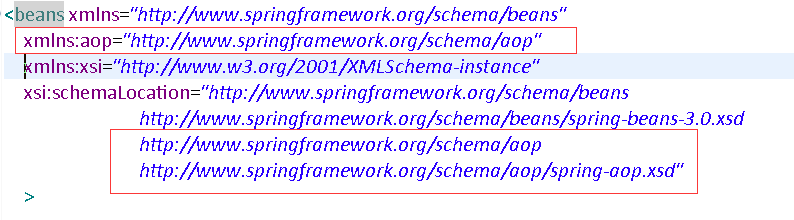
xml文件中使用aop标签引入头文件配置
报错:
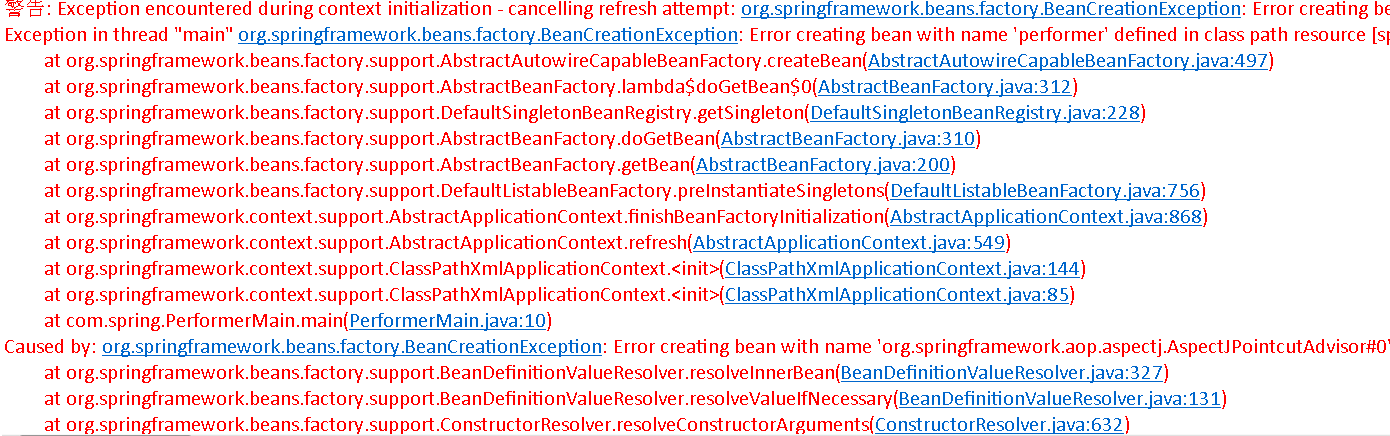
需要AspectJ的三个包,已在开头给出。
Spring学习随笔(2):Eclipse下Spring环境配置+入门项目的更多相关文章
- Spring学习记录(二)---容器和bean属性配置
下载spring包,在eclipse搭建spring环境. 这步我在eclipse中无法导入包,看网上的: http://sishuok.(和谐)com/forum/blogPost/list/242 ...
- spring 学习(五):spring 事务
spring 学习(五):spring 事务 事务概要 一个数据库事务通常包含了一个序列的对数据库的读/写操作.它的存在包含有以下两个目的: 为数据库操作序列提供了一个从失败中恢复到正常状态的方法,同 ...
- (转)Maven学习总结(七)——eclipse中使用Maven创建Web项目
孤傲苍狼只为成功找方法,不为失败找借口! Maven学习总结(七)——eclipse中使用Maven创建Web项目 一.创建Web项目 1.1 选择建立Maven Project 选择File -&g ...
- Maven学习归纳(一)——简单的环境配置入门
一.Maven的基本概念 Maven是基于项目对象模型(POM),可以通过一小段描述信息来管理项目的编译,测试,构建,报告和文档的软件项目管理工具和解决依赖关系的工具. 1.1 项目的构建 项目的构建 ...
- Ant学习-001-ant 基础知识及windows环境配置
一.Ant 概要基础知识 Apache Ant 是一个将软件编译.测试.部署等步骤联系在一起加以自动化的一个工具,大多用于Java环境中的软件开发,用以构建应用,或结合其他开源测试工具例如 git.T ...
- Eclipse下安装及配置maven项目管理工具
①eclipse下maven插件安装. 本地maven安装.环境变量配置完成后,打开eclipse,点击eclipse菜单栏Help->Eclipse Marketplace搜索关键字maven ...
- eclipse php 开发环境配置
一般常用的是eclipse+pdt.我是直接下载的Eclipse for php :http://www.eclipse.org/downloads/packages/eclipse-php-deve ...
- [eShopOnContainers 学习系列] - 02 - vs 2017 开发环境配置
[eShopOnContainers 学习系列] - 02 - vs 2017 开发环境配置 https://github.com/dotnet-architecture/eShopOnContain ...
- 【Mac + Appium + Python3.6学习(三)】之IOS自动化测试环境配置
在做这一节之前先配置我的另一篇文章所需要安装的前提准备条件:<[Mac + Appium学习(一)]之安装Appium环境前提准备> 一.安装IOS自动化测试环境 配置环境: Appium ...
随机推荐
- MongoDB查询操作 返回指定字段(C#官方驱动)
首先,MongoDB中返回指定的字段的查询方法如下: db.person.find({Name:"小丑"},{Age:1,Sex:1}) 该语句表示:查询person表中name为 ...
- css div嵌套层中button的margin-top不起作用解决方法
首先声明本人资质尚浅,本文只用于个人总结.如有错误,欢迎指正.共同提高. --------------------------------------------------------------- ...
- web开发:javascript基础
一.js引入 二.变量的定义 三.三种弹出框 四.调试方式 五.数据类型 六.数据类型转换 七.运算符 八.分支机构 九.循环结构 十.异常处理 十一.函数 一.js引入 - ES: ECMAScri ...
- 图像处理---《在图片上打印文字 FreeType库》
图像处理---<在图片上打印文字 FreeType库> 目的:想在处理之后的图像上打印输出结果.方法: (1)只在图像上打印 数字.字母的话: 1.Mat格式 ...
- Caffe---Pycaffe转换均值文件:xxx_mean.binaryproto成为xxx_mean.npy
Pycaffe转换均值文件:xxx_mean.binaryproto成为xxx_mean.npy 为什么需要mean.binaryproto转mean.npy? 使用Caffe的C++接口进行操作时, ...
- bzoj 1787 && bzoj 1832: [Ahoi2008]Meet 紧急集合(倍增LCA)算法竞赛进阶指南
题目描述 原题连接 Y岛风景美丽宜人,气候温和,物产丰富. Y岛上有N个城市(编号\(1,2,-,N\)),有\(N-1\)条城市间的道路连接着它们. 每一条道路都连接某两个城市. 幸运的是,小可可通 ...
- CodeForces - 1221E Game With String 分类讨论
首先分析A能获胜的情况 A能获胜 当且仅当A拿完后所有剩下的都<b 所以一旦存在一个大小为X的 且 b<=X<a 则必是后手赢 当X为 a<=x<2*b 的时候 无论A或 ...
- C#原子操作(Interlocked.Decrement和Interlocked.Increment)
一.概念 在多线程环境中,不会被线程调度机制打断的操作:这种操作一旦开始,就一直运行到结束,中间不会有任何 context switch (切换到另一个线程). 二.类 System.Threadin ...
- 【转载】@Component, @Repository, @Service的区别
@Component, @Repository, @Service的区别 官网引用 引用spring的官方文档中的一段描述: 在Spring2.0之前的版本中,@Repository注解可以标记在任何 ...
- Vue完成页面切换中加载数据
created() { // 拿到路由传递来的car主键 let pk = this.$route.query.pk || this.$route.params.pk; // 主键不存在,就直接结束方 ...