
Linux 安装环境初始化检查 安装Nginx
一 、阿里云 centos 6.8 32 位裸环境
实现:Linux Nginx mysql php redis
查看当前安装的服务
[root@iZgahlk1l73998Z etc]# service --status-all

Aegis is running

status: Unknown job: agentwatch

atd (pid  1562) is running...

auditd (pid  1029) is running...

Checking for service cloud-init:Checking for service cloud-init:Checking for service cloud-init:Checking for service cloud-init:Checking for service cloud-init-upgrade:crond (pid  1547) is running...

Usage: /etc/init.d/ecs_mq-service {start|stop|restart}

Usage: /etc/init.d/eni-service {start|stop|restart}

ip6tables: Firewall is not running.

iptables: Firewall is not running.

irqbalance is stopped

iscsi is stopped

iscsid is stopped

lvmetad is stopped

dmeventd is stopped

mdmonitor is stopped

multipathd is stopped

netconsole module not loaded

Configured devices:

lo eth0

Currently active devices:

lo eth0

nscd is stopped

ntpd (pid  1434) is running...

master (pid  1525) is running...

rdisc is stopped

rsyslogd (pid  1051) is running...

sandbox is stopped

saslauthd is stopped

openssh-daemon (pid  1423) is running...
安装顺序是 Nginx > php> mysql>redis
查看:

[root@iZgahlk1l73998Z /]# rpm -qa |grep mysql

mysql-libs-5.1.73-8.el6_8.i686

卸载mysql

[root@iZgahlk1l73998Z /]# rpm -e mysql-libs-5.1.73-8.el6_8.i686 --nodeps

[root@iZgahlk1l73998Z /]# rpm -qa |grep php
1、安装编译工具和库文件
[root@iZgahlk1l73998Z /]# yum -y install make zlib zlib-devel gcc-c++ libtool openssl openssl-devel
2、安装PCRE
PCRE 作用是让 Nginx 支持 Rewrite 功能
下载 PCRE 安装包,下载地址: http://downloads.sourceforge.net/project/pcre/pcre/8.35/pcre-8.35.tar.gz
[root@iZgahlk1l73998Z src]# wget http://downloads.sourceforge.net/project/pcre/pcre/8.35/pcre-8.35.tar.gz
[root@iZgahlk1l73998Z src]# tar zxvf pcre-8.35.tar.gz
3、进入pcre 编译安装 默认安装 没有指定位置:
[root@iZgahlk1l73998Z pcre-8.35]# ./configure

[root@iZgahlk1l73998Z pcre-8.35]#  make & make install
4、查看PCRE 版本
[root@iZgahlk1l73998Z pcre-8.35]#  pcre-config --version

8.35
安装Nginx:
1、下载 Nginx,下载地址:http://nginx.org/download/nginx-1.6.2.tar.gz
[root@iZgahlk1l73998Z src]# wget http://nginx.org/download/nginx-1.6.2.tar.gz

[root@iZgahlk1l73998Z src]# tar zxvf nginx-1.6.2.tar.gz
2、安装
[root@iZgahlk1l73998Z nginx-1.6.2]# ./configure --prefix=/usr/local/webserver/nginx --with-http_stub_status_module --with-http_ssl_module --with-pcre=/usr/local/src/pcre-8.35
[root@iZgahlk1l73998Z nginx-1.6.2]# make
[root@iZgahlk1l73998Z nginx]# /usr/local/webserver/nginx/sbin/nginx -v
3、配置Nginx.conf
创建运行Nginx 用户和用户组
groupadd nginx

useradd nginx -g nginx -s /sbin/nologin -M

或者在编译安装的时候指定,先创建

--with-user=nginx

--with-group=nginx

在编译Nginx.config的时候 记得使用

user nginx nginx;
#user  nobody;

user nginx nginx;

worker_processes  1;

#error_log  logs/error.log;

#error_log  logs/error.log  notice;

#error_log  logs/error.log  info;

#pid        logs/nginx.pid;

events {

    worker_connections  1024;

}

http {

    include       mime.types;

    default_type  application/octet-stream;

 #   log_format  main  '$remote_addr - $remote_user [$time_local] "$request" '

  #                    '$status $body_bytes_sent "$http_referer" '

   #                   '"$http_user_agent" "$http_x_forwarded_for"';

    #access_log  logs/access.log  main;

   server_names_hash_bucket_size 128;

   client_header_buffer_size 32k;

   large_client_header_buffers 4 32k;

   client_max_body_size 8m;

sendfile on;

   tcp_nopush on;

   keepalive_timeout 60;

   tcp_nodelay on;

   fastcgi_connect_timeout 300;

   fastcgi_send_timeout 300;

   fastcgi_read_timeout 300;

   fastcgi_buffer_size 64k;

   fastcgi_buffers 4 64k;

   fastcgi_busy_buffers_size 128k;

   fastcgi_temp_file_write_size 128k;

   gzip on;

   gzip_min_length 1k;

   gzip_buffers 4 16k;

   gzip_http_version 1.0;

   gzip_comp_level 2;

   gzip_types text/plain application/x-javascript text/css application/xml;

   gzip_vary on;

   #charset koi8-r;

 server

  {

    listen 80;#监听端口

    server_name localhost;#域名

    index index.html index.htm index.php;

    root /usr/local/webserver/nginx/html;#站点目录

      location ~ .*\.(php|php5)?$

    {

     # fastcgi_pass unix:/tmp/php-cgi.sock;

fastcgi_pass 127.0.0.1:9000;

      fastcgi_index index.php;

      include fastcgi.conf;

      }

    location ~ .*\.(gif|jpg|jpeg|png|bmp|swf|ico)$

     {

        expires 30d;

      # access_log off;

      }

     location ~ .*\.(js|css)?$

     {

      expires 15d;

     # access_log off;

      }

      access_log off;

      }

   }
4、测试下
[root@iZgahlk1l73998Z conf]# /usr/local/webserver/nginx/sbin/nginx -t
nginx: the configuration file /usr/local/webserver/nginx/conf/nginx.conf syntax is ok
nginx: configuration file /usr/local/webserver/nginx/conf/nginx.conf test is successful
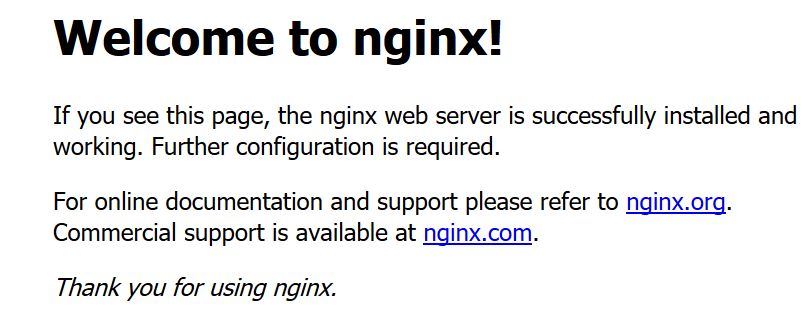
5、启动
[root@iZgahlk1l73998Z conf]# /usr/local/webserver/nginx/sbin/nginx

[root@iZgahlk1l73998Z conf]# ps -ef |grep nginx

root     21160     1  0 14:47 ?        00:00:00 nginx: master process /usr/local/webserver/nginx/sbin/nginx

nginx    21161 21160  0 14:47 ?        00:00:00 nginx: worker process

root     21163  1546  0 14:48 pts/0    00:00:00 grep nginx
/usr/local/webserver/nginx/sbin/nginx -s reload            # 重新载入配置文件

/usr/local/webserver/nginx/sbin/nginx -s reopen            # 重启 Nginx

/usr/local/webserver/nginx/sbin/nginx -s stop              # 停止 Nginx
Linux 安装环境初始化检查 安装Nginx的更多相关文章
- Linux centos7环境下安装Nginx
Linux centos7环境下安装Nginx的步骤详解 1. 首先到Nginx官网下载Nginx安装包 http://nginx.org/download/nginx-1.5.9.tar.gz ...
- Linux中编译、安装nginx
Nginx ("engine x") 是一个高性能的HTTP和反向代理服务器,也是一个IMAP/POP3/SMTP 代理服务器. Nginx 是由Igor Sysoev为俄罗斯访问 ...
- linux环境手动编译安装Nginx实践过程 附异常解决
1.下载nginx源码包并解压 可在http://nginx.org/en/download.html下载.tar.gz的源码包,如(nginx-1.4.7.tar.gz) 或者使用云盘下载 ht ...
- linux系统虚拟机下安装nginx基础
虽然安装nginx什么的 .以及如何配置等等一系列的资料案例已经很多了 但是作为菜鸟的我还是搞了半天哈 官网上面也有.但是一些细节方面的并没有说明.导致踩了半天坑才搞好 本案例的系统环境 wi ...
- 【Linux】Centos之安装Nginx及注意事项
相关内容链接 [Linux]nginx常用命令 [nginx]详细配置说明 1.Nginx的简单说明 a. Nginx是一个高性能的HTTP和反向代理服务器,也是一个IMAP/POP3/SMTP服务 ...
- linux系统或centos7安装nginx
一.Linux下安装nginx 1.添加源 sudo rpm -Uvh http://nginx.org/packages/centos/7/noarch/RPMS/nginx-release-cen ...
- Linux(CentOS7)安装Nginx(附简单配置)
1. 安装make yum -y install gcc automake autoconf libtool make 2. 安装gcc yum -y install gcc gcc-c++ 3. 安 ...
- linux服务器使用yum安装nginx
一,安装nginx和php-fpm yum install nginx php-fpm 二, 找到nginx.conf find / -name nginx.conf 三,添加解析php配置 在ser ...
- Linux之源码安装nginx,并按照作业一描述的那样去测试使用
作业五:源码安装nginx,并按照作业一描述的那样去测试使用 [root@localhost nginx]# yum install gcc-* glibc-* openssl openssl-dev ...
随机推荐
- Elasticsearch 调优之 shrink
对于索引分片数量,我们一般在模板中统一定义,在数据规模比较大的集群中,索引分片数一般也大一些,在我的集群中设置为 24.但是,并不是所有的索引数据量都很大,这些小数据量的索引也同样有较大的分片数.在 ...
- 008_Python3 列表
序列是Python中最基本的数据结构.序列中的每个元素都分配一个数字 - 它的位置,或索引,第一个索引是0,第二个索引是1,依此类推. Python有6个序列的内置类型,但最常见的是列表 ...
- nowcoder 181045 / 克洛涅的多项式 构造+思维
题意:有多项式 $F(x),G(x)$,最高次项分别为 $n,m$.$F(x)$ 最高次项系数为 $1$. $m<n$ 给定 $n$ 个不同的点值,满足 $F(x[i])=G(x[i])$ 给定 ...
- hdu6731 Angle Beats(ccpc秦皇岛A,计算几何)
题目链接: http://acm.hdu.edu.cn/showproblem.php?pid=6731 题意: 给出$n$个点,有$q$次询问 每次询问给出一个点$b$,求这$n+1$个点,组成直角 ...
- docker 搭建registry
Docke官方提供了Docker Hub网站来作为一个公开的集中仓库.然而,本地访问Docker Hub速度往往很慢,并且很多时候我们需要一个本地的私有仓库只供网内使用.Docker仓库实际上提供两方 ...
- vue从一个组件跳转到另一个组件页面router-link的试用
需求从helloworld.vue页面跳到good.vue页面 1.helloworld.vue页面代码 <template> <div class="hello" ...
- redis能否对set数据的每个member设置过期时间
第一种方法,拆分成多个key,每个key设置过期时间.第二种方法改为hashMap存储,加一个过期时间的字段.可以用sorted set,把要过期的member和key的信息放在sorted set的 ...
- ICEM-缺角正方体(2D转3D)
原视频下载地址:https://yunpan.cn/cqKYEeSsQhJHt 访问密码 1cce
- ML_Homework_Porject_1_KMeans
第一次机器学习的作业完成了,按照先前做实作的习惯来写一下总结和思考. 作业要求:对COIL20,Yale_32x32,data_batch_1(Cifar)三个数据集,分别运用KMeans对其中的图片 ...
- unittest 的用法
一.discover方法 discover方法可以根据标准加载用例,并将结果返回给测试套件(suite),start_dir:待测试的目录,pattern:测试用例文件名的匹配规. 如: start_ ...