
申请 Let's Encrypt 通配符 HTTPS 证书
一、背景知识
1.1、什么是通配符证书
通配符证书,又叫泛域名证书,一张通配符的证书可以保护一个域名下同级子域名,使他们都变成 https 加密链接,不需要配置一个子域名再申请一个新证书了,而且不限制子域名数量,这也使得随时增加子域名的同时并不需要额外的付费,对于有多个子域名尤其是子域名数量很多的用户,性价比很高,大大的节约了大量的时间和金钱成本。
1.2、什么是 Let’s Encrypt
部署 HTTPS 网站的时候需要证书,证书由 CA 机构签发,大部分传统 CA 机构签发证书是需要收费的,这不利于推动 HTTPS 协议的使用。
Let’s Encrypt 也是一个 CA 机构,但这个 CA 机构是免费的!!!也就是说签发证书不需要任何费用。
Let’s Encrypt 由于是非盈利性的组织,需要控制开支,他们搞了一个非常有创意的事情,设计了一个 ACME 协议,目前该协议的版本是 v1。
那为什么要创建 ACME 协议呢,传统的 CA 机构是人工受理证书申请、证书更新、证书撤销,完全是手动处理的。而 ACME 协议规范化了证书申请、更新、撤销等流程,只要一个客户端实现了该协议的功能,通过客户端就可以向 Let’s Encrypt 申请证书,也就是说 Let’s Encrypt CA 完全是自动化操作的。
任何人都可以基于 ACME 协议实现一个客户端,官方推荐的客户端是 Certbot 。
官方客户端列表请查看 https://letsencrypt.org/docs/client-options/ 。
二、证书申请(certbot)
2.1、系统确定
我们使用的是 aws 的 lightsail 服务创建的系统,系统是 CentOS 7。
2.2、工具安装
首先给系统添加 epel 源。
curl -o /etc/yum.repos.d/epel-7.repo https://mirrors.aliyun.com/repo/epel-7.repo
安装证书申请工具 Certbot。
yum install -y certbot
2.3、证书申请
certbot certonly  -d *.wzlinux.com --manual \

--preferred-challenges dns \

--server https://acme-v02.api.letsencrypt.org/directory
- --manual交互式获取,
- --preferred-challenges dns使用DNS验证的方式(泛域名只能使用DNS验证),如果取消此选项,将会默认使用 http 形式认证(.well-known),
- --server指明支持acme-v02的Server地址,默认是acme-v01的地址。
申请过程如下,为了确保域名是在你的管理权限之内,我们中间需要做一条 TXT 的 DNS 解析。
Saving debug log to /var/log/letsencrypt/letsencrypt.log

Plugins selected: Authenticator manual, Installer None

Enter email address (used for urgent renewal and security notices) (Enter 'c' to

cancel): wangzan18@126.com

Starting new HTTPS connection (1): acme-v02.api.letsencrypt.org

- - - - - - - - - - - - - - - - - - - - - - - - - - - - - - - - - - - - - - - -

Please read the Terms of Service at

https://letsencrypt.org/documents/LE-SA-v1.2-November-15-2017.pdf. You must

agree in order to register with the ACME server at

https://acme-v02.api.letsencrypt.org/directory

- - - - - - - - - - - - - - - - - - - - - - - - - - - - - - - - - - - - - - - -

(A)gree/(C)ancel: A

- - - - - - - - - - - - - - - - - - - - - - - - - - - - - - - - - - - - - - - -

Would you be willing to share your email address with the Electronic Frontier

Foundation, a founding partner of the Let's Encrypt project and the non-profit

organization that develops Certbot? We'd like to send you email about our work

encrypting the web, EFF news, campaigns, and ways to support digital freedom.

- - - - - - - - - - - - - - - - - - - - - - - - - - - - - - - - - - - - - - - -

(Y)es/(N)o: N

Obtaining a new certificate

Performing the following challenges:

dns-01 challenge for wzlinux.com

- - - - - - - - - - - - - - - - - - - - - - - - - - - - - - - - - - - - - - - -

NOTE: The IP of this machine will be publicly logged as having requested this

certificate. If you're running certbot in manual mode on a machine that is not

your server, please ensure you're okay with that.

Are you OK with your IP being logged?

- - - - - - - - - - - - - - - - - - - - - - - - - - - - - - - - - - - - - - - -

(Y)es/(N)o: Y

- - - - - - - - - - - - - - - - - - - - - - - - - - - - - - - - - - - - - - - -

Please deploy a DNS TXT record under the name

_acme-challenge.wzlinux.com with the following value:

Fd-T8Q_R_9k4UqerXohPkTWu-aZOaU0mxxozERPRU5M

Before continuing, verify the record is deployed.

- - - - - - - - - - - - - - - - - - - - - - - - - - - - - - - - - - - - - - - -

Press Enter to Continue

Waiting for verification...

Cleaning up challenges

Resetting dropped connection: acme-v02.api.letsencrypt.org

IMPORTANT NOTES:

 - Congratulations! Your certificate and chain have been saved at:

   /etc/letsencrypt/live/wzlinux.com/fullchain.pem

   Your key file has been saved at:

   /etc/letsencrypt/live/wzlinux.com/privkey.pem

   Your cert will expire on 2019-09-04. To obtain a new or tweaked

   version of this certificate in the future, simply run certbot

   again. To non-interactively renew *all* of your certificates, run

   "certbot renew"

 - Your account credentials have been saved in your Certbot

   configuration directory at /etc/letsencrypt. You should make a

   secure backup of this folder now. This configuration directory will

   also contain certificates and private keys obtained by Certbot so

   making regular backups of this folder is ideal.

 - If you like Certbot, please consider supporting our work by:

   Donating to ISRG / Let's Encrypt:   https://letsencrypt.org/donate

   Donating to EFF:                    https://eff.org/donate-le
我们看到上面有一条 DNS 解析需求,我这里是在阿里云进行设定的。
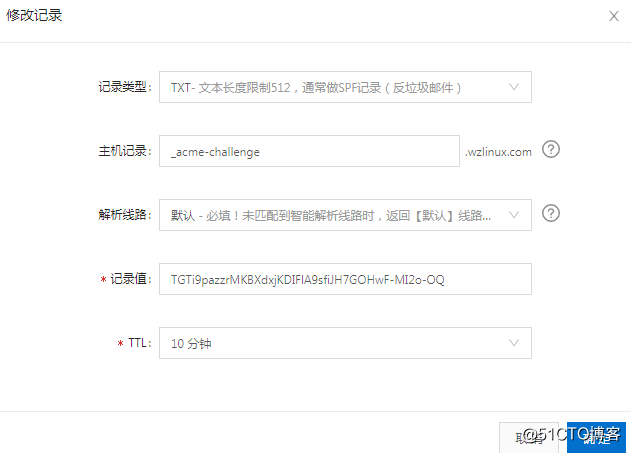
解析好之后,我们在服务器上面验证一下解析记录。
[root@ip-172-26-5-120 ~]# dig -t txt _acme-challenge.wzlinux.com

; <<>> DiG 9.9.4-RedHat-9.9.4-73.el7_6 <<>> -t txt _acme-challenge.wzlinux.com

;; global options: +cmd

;; Got answer:

;; ->>HEADER<<- opcode: QUERY, status: NOERROR, id: 47252

;; flags: qr rd ra; QUERY: 1, ANSWER: 1, AUTHORITY: 0, ADDITIONAL: 1

;; OPT PSEUDOSECTION:

; EDNS: version: 0, flags:; udp: 4096

;; QUESTION SECTION:

;_acme-challenge.wzlinux.com.INTXT

;; ANSWER SECTION:

_acme-challenge.wzlinux.com. 58INTXT"Fd-T8Q_R_9k4UqerXohPkTWu-aZOaU0mxxozERPRU5M"

;; Query time: 0 msec

;; SERVER: 172.26.0.2#53(172.26.0.2)

;; WHEN: Thu Jun 06 07:04:07 UTC 2019

;; MSG SIZE  rcvd: 112
2.4、证书查看
[root@ip-172-26-5-120 ~]# ll /etc/letsencrypt/live/wzlinux.com/

total 4

lrwxrwxrwx. 1 root root  35 Jun  6 06:53 cert.pem -> ../../archive/wzlinux.com/cert1.pem

lrwxrwxrwx. 1 root root  36 Jun  6 06:53 chain.pem -> ../../archive/wzlinux.com/chain1.pem

lrwxrwxrwx. 1 root root  40 Jun  6 06:53 fullchain.pem -> ../../archive/wzlinux.com/fullchain1.pem

lrwxrwxrwx. 1 root root  38 Jun  6 06:53 privkey.pem -> ../../archive/wzlinux.com/privkey1.pem

-rw-r--r--. 1 root root 692 Jun  6 06:53 README
2.5、证书使用
我们这里以 nginx 服务为例,配置证书,nginx 的配置文件为下:
server

        {

        listen 443 ssl http2;

        #listen [::]:443 ssl http2;

        server_name  bbs.wzlinux.com bbs1.wzlinux.com;

        index index.html index.htm index.php default.html default.htm default.php;

        root  /usr/share/nginx/html/;

        ssl on;

        ssl_certificate /etc/letsencrypt/live/wzlinux.com/fullchain.pem;

        ssl_certificate_key /etc/letsencrypt/live/wzlinux.com/privkey.pem;

        ssl_session_timeout 5m;

        ssl_protocols TLSv1 TLSv1.1 TLSv1.2;

        ssl_prefer_server_ciphers on;

        ssl_ciphers "EECDH+CHACHA20:EECDH+CHACHA20-draft:EECDH+AES128:RSA+AES128:EECDH+AES

256:RSA+AES256:EECDH+3DES:RSA+3DES:!MD5";

        ssl_session_cache builtin:1000 shared:SSL:10m;

        # openssl dhparam -out /usr/local/nginx/ssl/dhparam.pem 2048

        #ssl_dhparam /usr/local/nginx/ssl/dhparam.pem;

        #error_page   404   /404.html;

        # Deny access to PHP files in specific directory

        #location ~ /(wp-content|uploads|wp-includes|images)/.*\.php$ { deny all; }

        location ~ .*\.(gif|jpg|jpeg|png|bmp|swf)$

        {

            expires      30d;

        }

        location ~ .*\.(js|css)?$

        {

            expires      12h;

        }

        location ~ /.well-known {

            allow all;

        }

        location ~ /\.

        {

            deny all;

        }

        access_log  off;

}

server

        {

        listen          80;

        server_name bbs.wzlinux.com;

        return 301 https://$server_name$request_uri;

}
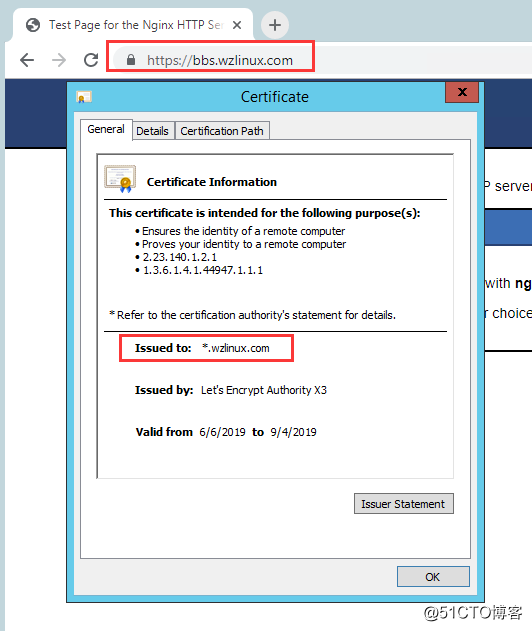
查看访问结果如下:
2.6、证书更新
可以使用指令certbot renew进行更新,添加一个定时任务。
[root@ip-172-26-5-120 ~]# certbot renew

Saving debug log to /var/log/letsencrypt/letsencrypt.log

- - - - - - - - - - - - - - - - - - - - - - - - - - - - - - - - - - - - - - - -

Processing /etc/letsencrypt/renewal/wzlinux.com.conf

- - - - - - - - - - - - - - - - - - - - - - - - - - - - - - - - - - - - - - - -

Cert not yet due for renewal

- - - - - - - - - - - - - - - - - - - - - - - - - - - - - - - - - - - - - - - -

The following certs are not due for renewal yet:

  /etc/letsencrypt/live/wzlinux.com/fullchain.pem expires on 2019-09-04 (skipped)

No renewals were attempted.

- - - - - - - - - - - - - - - - - - - - - - - - - - - - - - - - - - - - - - - -
定时任务。
30 1 10 * * /usr/bin/certbot renew && systemctl reload nginx
2.7、证书申请(Docker)
如果装有 docker 环境的话,也可以用 docker 镜像来获取证书,只需一行命令即可。
docker run -it --rm --name certbot \

-v "/etc/letsencrypt:/etc/letsencrypt" \

-v "/var/lib/letsencrypt:/var/lib/letsencrypt" \

certbot/certbot certonly --manual -d  '*.wzlinux.com'
具体步骤和上面一致。
2.8、申请多域名
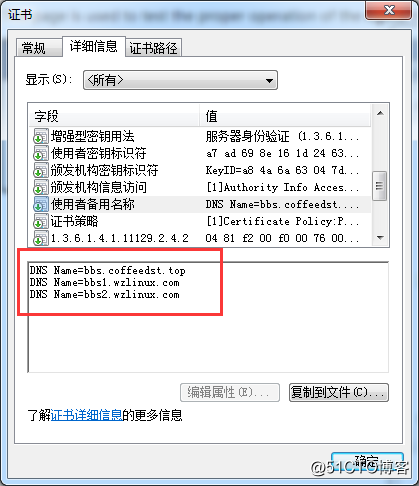
使用此方法,我们也可以申请多域名的证书,比如我申请的这个:
certbot certonly  -d bbs1.wzlinux.com,bbs2.wzlinux.com,bbs.coffeedst.top \

--manual --preferred-challenges dns \

--server https://acme-v02.api.letsencrypt.org/directory
如果不想做DNS解析,可以去掉选项--preferred-challenges dns,直接使用 http 认证。
三、证书申请(acme.sh)
参考地址,也非常简单
https://github.com/Neilpang/acme.sh
3.1、Install online
curl https://get.acme.sh | sh
3.2、Just issue a cert
申请单域名:
acme.sh --issue -d example.com -w /home/wwwroot/example.com
申请多域名在一个证书:
acme.sh --issue -d example.com -d www.example.com -d cp.example.com -w /home/wwwroot/example.com
3.3、Install the cert to Apache/Nginx etc.
Apache example:
acme.sh --install-cert -d example.com \

--cert-file      /path/to/certfile/in/apache/cert.pem  \

--key-file       /path/to/keyfile/in/apache/key.pem  \

--fullchain-file /path/to/fullchain/certfile/apache/fullchain.pem \

--reloadcmd     "service apache2 force-reload"
Nginx example:
acme.sh --install-cert -d example.com \

--key-file       /path/to/keyfile/in/nginx/key.pem  \

--fullchain-file /path/to/fullchain/nginx/cert.pem \

--reloadcmd     "service nginx force-reload"
3.4、Automatic DNS API integration
If your DNS provider supports API access, we can use that API to automatically issue the certs.
You don't have to do anything manually!
https://github.com/Neilpang/acme.sh/wiki/dnsapi
申请 Let's Encrypt 通配符 HTTPS 证书的更多相关文章
- Nginx 学习笔记(九)申请Let's Encrypt通配符HTTPS证书
Let's Encrypt 宣布 ACME v2 正式支持通配符证书,并将继续清除 Web 上采用 HTTPS 的障碍,让每个网站轻松获取管理证书.消息一出,马上就有热心用户分享出了 Let's En ...
- 申请Let’s Encrypt通配符HTTPS证书(certbot ACME v2版)
1.获取certbot-auto# 下载 # 下载 wget https://dl.eff.org/certbot-auto # 设为可执行权限 chmod a+x certbot-auto 2.开始 ...
- 申请Let's Encrypt通配符HTTPS证书
./certbot-auto --server https://acme-v02.api.letsencrypt.org/directory -d "*.xxx.com" --ma ...
- sdm 使用阿里云域名申请 Let’s Encrypt 通配符 域名证书
安装acme 进入 套件中心 点击安装 Git Server 之后进入SSh会使用git命令 方法1--------------------------------------- 获取代码 git c ...
- 【http转https】其之二:申请Let's Encrypt颁发SSL证书
文:铁乐猫 2017年1月12日 申请Let's Encrypt颁发SSL证书 由 ISRG(Internet Security Research Group,互联网安全研究小组)提供服务, ISRG ...
- Centos7 通配符HTTPS证书申请 实测 笔记
环境: 免费通配符HTTPS证书网址: https://letsencrypt.org/ 1.下载证书申请工具 [root@centos ~]# mkdir /opt/letsencrypt -p [ ...
- 申请 Let’s Encrypt 泛域名证书 及 Nginx/Apache 证书配置
什么是 Let’s Encrypt? 部署 HTTPS 网站的时候需要证书,证书由 CA (Certificate Authority )机构签发,大部分传统 CA 机构签发证书是需要收费的,这不利于 ...
- 免费靠谱的 Let’s Encrypt 免费 https 证书申请全过程
申请 Let’s Encrypt证书的原因: 现在阿里云等都有免费的 https 证书,为什么还要申请这个呢(估计也是因为阿里云这些有免费证书的原因,所以 Let’s Encrypt 知道的人其实并不 ...
- 生成 Let's Encrypt 免费https证书
1.打开 SSL For Free 官网:https://www.sslforfree.com/ 2.在输入框内输入你要申请证书的域名,输入完点击 Create Free SSL Certificat ...
随机推荐
- C# MVC中直接执行Js
.NET MVC里如何在服务器端执行JS: 三种解决方案: 1.直接返回JavaScript. public ActionResult XXXAction1() { return JavaS ...
- currentTimeMillis与 nanoTime
时间单位换算 1s=10^3ms(毫秒)=10^6μs(微秒)=10^9ns(纳秒)=10^12ps(皮秒)=10^15fs(飞秒)=10^18as(阿秒)=10^21zm(仄秒)=10^24ym(幺 ...
- linux重启之后No CUDA-supporting devices found!
实验室做并行计算的服务重启后,采用cuda接口的应用程序vasp_gpu,运行时提示: CUDA Error in cuda_main.cu, line 144: unknown error No C ...
- VC/DDK/DriverWorks开发环境配置
1·前言开发windows内核驱动程序是一个非常具有挑战性的工作,你得忍耐调试过程中操作系统 不断蓝屏.不断崩溃的噩梦,所以强烈建议你采用虚拟机做开发平台,这样即使把整个系统都搞蹦了,大不了从新装过虚 ...
- 7月清北学堂培训 Day 1
今天是林永迪老师的讲授~ 基础算法 1. 模拟算法 面向测试算法 模拟算法的关键就是将人类语言翻译成机器语言. 要做到以下两点: 1.优秀的读题能力: 2.优秀的代码能力: 程序流程图: 读入,循环处 ...
- input上传mp3格式文件,预览并且获取时间
<input type="file" id="file" name="file" class="upfile" o ...
- 小程序开发:用原生还是选框架(wepy/mpvue/uni-app/taro)?
小程序开发:用原生还是选框架(wepy/mpvue/uni-app/taro)? 自 2017-1-9微信小程序诞生以来,历经2年多的迭代升级,已有数百万小程序上线,成为继Web.iOS.Androi ...
- Ubuntu14.04-OpenCV2和3共存相关设置
文章转自:http://blog.csdn.net/a356337092/article/details/73529635 安装依赖项: sudo apt-get install build-esse ...
- PyTricks-json dumps优雅的输出字典
import json my_mapping = {'a': 23, 'b': 42, 'c': 0xc0ffee} print(json.dumps(my_mapping, indent=4, so ...
- WIN10环境下点击通知栏图标时自动切换输入法导致图标位置变动
这个问题由来已久,每当点击系统右下角任务栏中的按钮时,原本是搜狗输入法就会自动变成“US [ 中文(简体,中国) ]”,图标会自动错位,导致响应的是其他功能. 假设上图是正常的环境,此时我点击电池图标 ...