
matplotlib画图总结--多子图布局
1、subplot布局
subplot(nrows, ncols, index, **kwargs)
subplot(pos, **kwargs)
subplot(ax)
x=[1,2,3]

values = [10, 15, 25]

p1=plt.subplot(221)

plt.bar(x, values)

p1.set_ylabel('yy')

p1.set_title('p1')

plt.subplot(222)

plt.scatter(x, values)

plt.subplot(223)

plt.plot(x, values)

plt.suptitle('subplot')

plt.show()
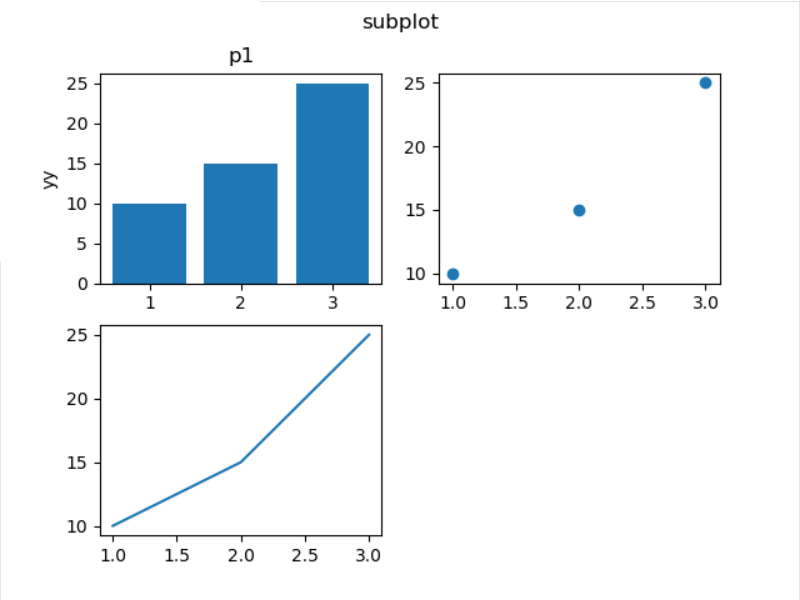
上面的图第三张只占半个图纸长度,不美观。那么使用subplot怎么画非对阵图呢?重新定义子图的分布行列即可。
plt.subplot(212) 或plt.subplot(2,1,2)把图纸分为2行1列,当前子图是第二个。
x=[1,2,3]

values = [10, 15, 25]

p1=plt.subplot(221)

plt.bar(x, values)

p1.set_ylabel('yy')

p1.set_title('p1')

plt.subplot(222)

plt.scatter(x, values)

plt.subplot(212)

plt.plot(x, values)

plt.suptitle('subplot')

plt.show()
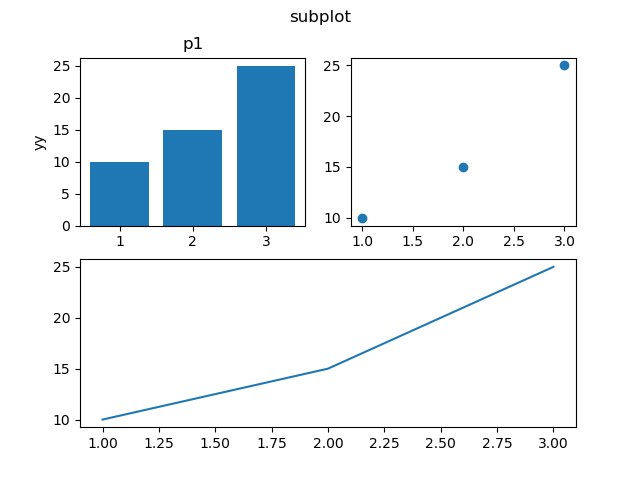
先把图纸分为2行2列,先画图1和图3,然后再把图纸划分为1行2列,对第二列绘图。
x=[1,2,3]

values = [10, 15, 25]

p1=plt.subplot(221)

plt.bar(x, values)

p1.set_ylabel('yy')

p1.set_title('p1')

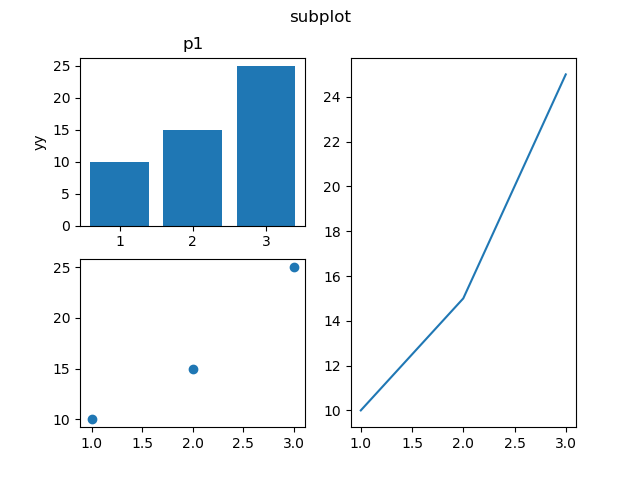
plt.subplot(223)

plt.scatter(x, values)

plt.subplot(1,2,2)

plt.plot(x, values)

plt.suptitle('subplot')

plt.show()
2、subplots布局
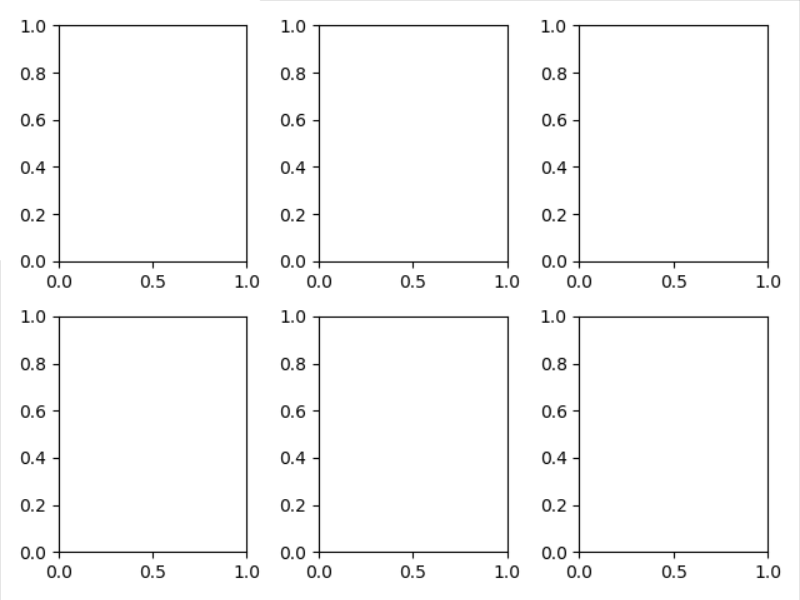
matplotlib.pyplot.subplots(nrows=1, ncols=1, sharex=False, sharey=False, squeeze=True, subplot_kw=None, gridspec_kw=None, **fig_kw) :创建一个图形和一组子图。
fig, ax = plt.subplots(2, 3)

fig.tight_layout()

ax[0].text(0.5,0.5, 'sss')

plt.show()
3、subplot2grid布局
matplotlib.pyplot.subplot2grid(shape, loc, rowspan=1, colspan=1, fig=None, **kwargs)
shape : sequence of 2 ints
loc : sequence of 2 ints
rowspan : int
Number of rows for the axis to span to the right.
colspan : int
Number of columns for the axis to span downwards.
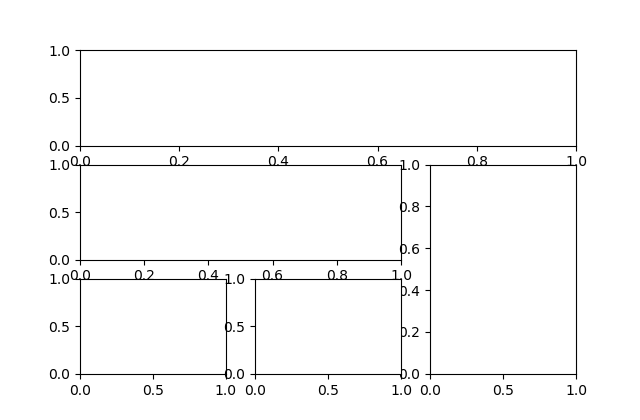
fig = plt.figure()

ax1 = plt.subplot2grid((3, 3), (0, 0), colspan=3)

ax2 = plt.subplot2grid((3, 3), (1, 0), colspan=2)

ax3 = plt.subplot2grid((3, 3), (1, 2), rowspan=2)

ax4 = plt.subplot2grid((3, 3), (2, 0))

ax5 = plt.subplot2grid((3, 3), (2, 1))

plt.show()
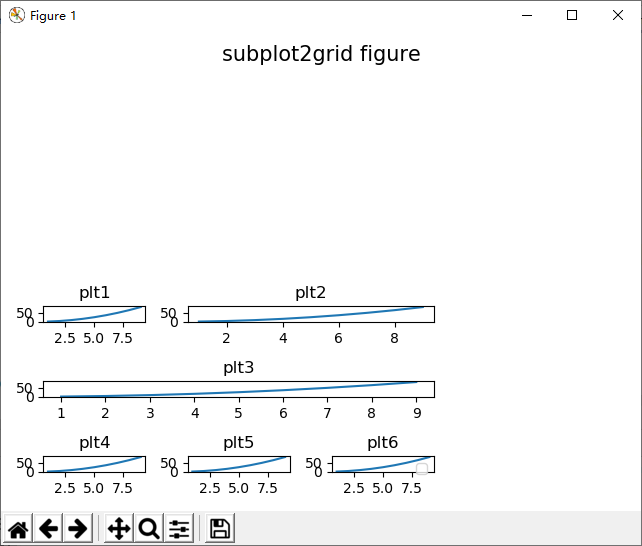
x = np.arange(1,10)

fig = plt.figure()

ax1 = plt.subplot2grid((3, 3), (0, 0), colspan=1, title = 'plt1')

ax1.plot(x,x*x)

ax2 = plt.subplot2grid((3, 3), (0, 1), colspan=2, title = 'plt2')

ax2.plot(x,x*x)

ax3 = plt.subplot2grid((3, 3), (1, 0), colspan=3, title = 'plt3')

ax3.plot(x,x*x)

ax4 = plt.subplot2grid((3, 3), (2, 0), title = 'plt4')

ax4.plot(x,x*x)

ax5 = plt.subplot2grid((3, 3), (2, 1), title = 'plt5')

ax5.plot(x,x*x)

ax6 = plt.subplot2grid((3, 3), (2, 2), title = 'plt6')

ax6.plot(x,x*x)

plt.legend()

plt.suptitle('subplot2grid figure',  x=0.5,y=0.95, ha='center', va='center', fontsize=15)

plt.show()
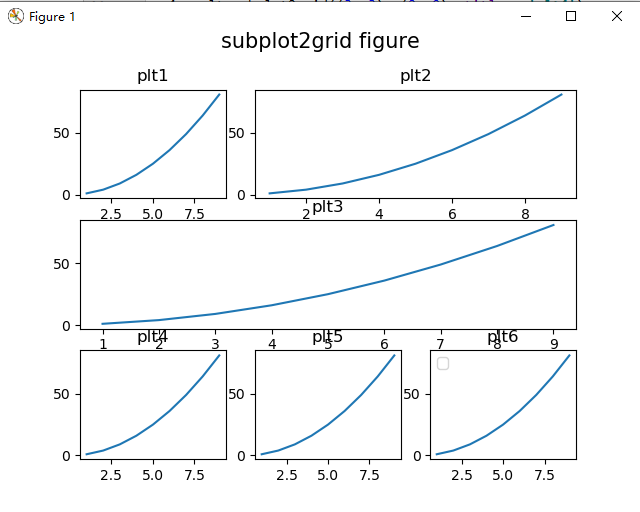
可见上面的图,x周名称和附件的图互相干涉。需要缩小图或者加大间隙。
使用layout函数plt.tight_layout()。但是图的title和第一行干涉。
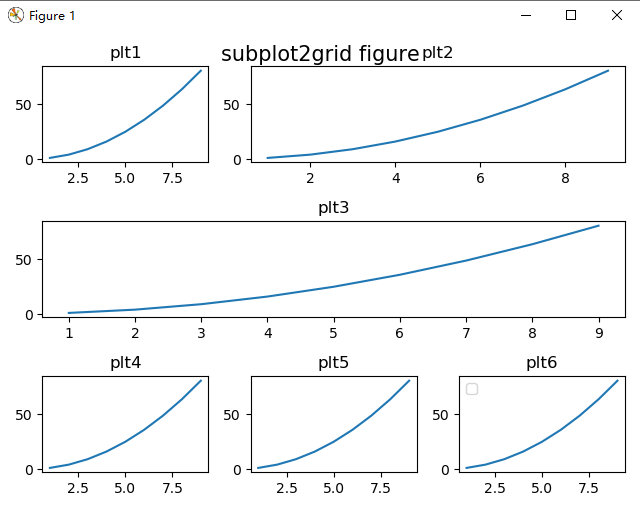
plt.tight_layout(rect=[0, 0, 1, 0.95]) 或者添加一句fig.subplots_adjust(top=0.85)即可。
matplotlib.pyplot.tight_layout(pad=1.08, h_pad=None, w_pad=None, rect=None)
其中rect可以这样定义:[left, bottom, right, top] in normalized (0, 1) figure coordinates,所以可以定义right和top,进行图的缩放。
A rectangle (left, bottom, right, top) in the normalized figure coordinate that the whole subplots area (including labels) will fit into. Default is (0, 0, 1, 1).
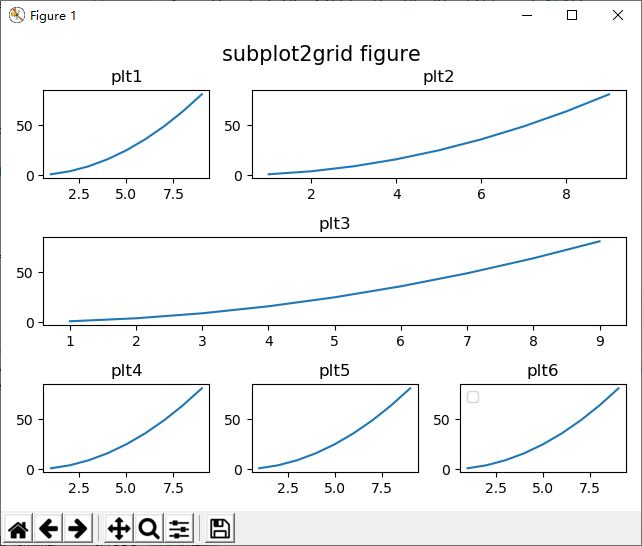
图的缩放,做个实验plt.tight_layout(rect=[0, 0, 0.7, 0.5])
matplotlib画图总结--多子图布局的更多相关文章
- matplotlib 画图
matplotlib 画图 1. 画曲线图 Tompson = np.array([0, 0, 0, 0, 0.011, 0.051, 0.15, 0.251, 0.35, 0.44, 0 ...
- matplotlib画图实例:pyplot、pylab模块及作图參数
http://blog.csdn.net/pipisorry/article/details/40005163 Matplotlib.pyplot画图实例 {使用pyplot模块} matplotli ...
- matplotlib画图报错This figure includes Axes that are not compatible with tight_layout, so results might be incorrect.
之前用以下代码将实验结果用matplotlib show出来 plt.plot(np.arange(len(aver_reward_list)), aver_reward_list) plt.ylab ...
- python matplotlib画图产生的Type 3 fonts字体没有嵌入问题
ScholarOne's 对python matplotlib画图产生的Type 3 fonts字体不兼容,更改措施: 在程序中添加如下语句 import matplotlib matplotlib. ...
- 使用python中的matplotlib 画图,show后关闭窗口,继续运行命令
使用python中的matplotlib 画图,show后关闭窗口,继续运行命令 在用python中的matplotlib 画图时,show()函数总是要放在最后,且它阻止命令继续往下运行,直到1.0 ...
- matplotlib画图
matplotlib画图 import numpy as np import matplotlib.pyplot as plt x1=[20,33,51,79,101,121,132,145,162, ...
- python3 使用matplotlib画图出现中文乱码的情况
python3使用matplotlib画图,因python3默认使用中unicode编码,所以在写代码时不再需要写 plt.xlabel(u’人数’),而是直接写plt.xlabel(‘人数’). 注 ...
- python使用matplotlib画图
python使用matplotlib画图 matplotlib库是python最著名的画图库.它提供了一整套和matlab类似的命令API.十分适合交互式地进行制图. 先介绍了怎样使用matplotl ...
- matplotlib画图出现乱码情况
python3使用matplotlib画图,因python3默认使用中unicode编码,所以在写代码时不再需要写 plt.xlabel(u’人数’),而是直接写plt.xlabel(‘人数’). 注 ...
随机推荐
- Luogu SP839 OPTM - Optimal Marks(按位最小割)
这道题和 BZOJ 2400 是一道题,不多讲了 CODE #include <cstdio> #include <cstring> #include <vector&g ...
- C# 未能加载项目文件
在使用VS打开从网上下载或者从其他地方复制得来的解决方案时,经常会出现这样一个错误,"在解决方案中的一个或多个项目由于以下原因未能加载项目文件或网站已移动或已重命名,或者不在您的计算机上.& ...
- P2587 [ZJOI2008]泡泡堂 神仙贪心
思路:贪心 提交:1次(看了题解$QwQ$) 题解: 若我方最弱可以干掉对方最弱,则干: 否则若我方最强可以干掉对方最强,则干: 否则若我方最弱与对方最强平手,则平: 其实貌似一二条是可以互换的,主要 ...
- electron 打包成桌面运用
最近在学习nodejs,得知Electron是通过将Chromium和Node.js合并到同一个运行时环境中,用HTML,CSS和JavaScript来构建跨平台桌面应用程序的一门技术.对于之前一直从 ...
- js的数组在内存中是如何存储的
前言:本来想自己总结下,但发现以下文章已经写得很好,就直接放链接了. 英文文章:http://voidcanvas.com/javascript-array-evolution-performance ...
- [Luogu] 矩形覆盖
https://www.luogu.org/problemnew/show/P1034 数据太水 爆搜过掉 #include <iostream> #include <cstdio& ...
- [Luogu] 兽径管理
题面:https://www.luogu.org/problemnew/show/P1340 题解:https://www.zybuluo.com/wsndy-xx/note/1153773
- Codeforces 1221 E Game With String
题面 第一眼以为是SG函数找规律题,然后发现并不是公平游戏.... 不过后来想了想,其实这样反而更好做. 这个游戏的一个显然的特性是,任何时候当场上存在长度 ∈[b,a)的块时,Bob必胜.(考虑贪心 ...
- win7虚拟机MAC系统
http://www.cnblogs.com/xiangshancuizhu/p/3379860.html 结果是一个周末的四分之三整进去还到处不行,然后剩下的四分之一卸载.
- postman学习总结
从网上各处学习总结,会有不足之处,后期不断补充中... 一.get\post请求参数 1.get类型 (1)选择请求方式GET (2)输入完整的URL (3)在param中填写参数,点击send发送请 ...