
19 Flutter仿京东商城项目 商品详情 底部浮动导航布局 商品页面布局
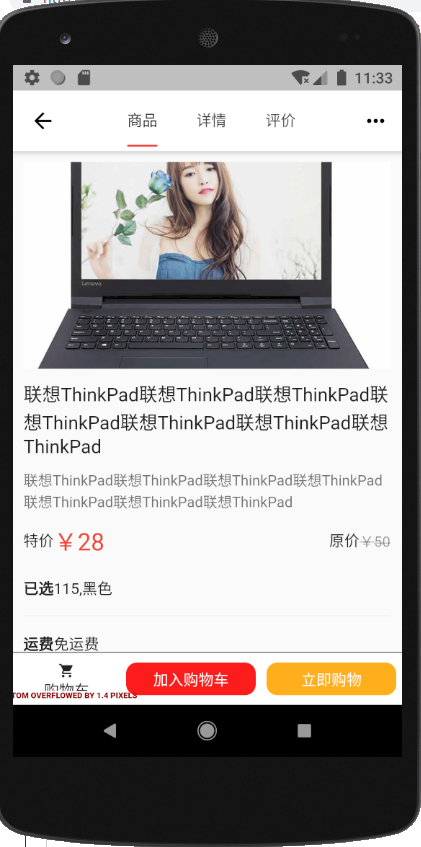
效果:
widget/JdButton.dart
import 'package:flutter/material.dart';

import '../services/ScreenAdaper.dart';

class JdButton extends StatelessWidget {

  final Color color;

  final String text;

  final Object cb;

  JdButton({Key key,this.color=Colors.black,this.text='按钮',this.cb=null}) : super(key: key);

  @override

  Widget build(BuildContext context) {

    return InkWell(

      onTap:this.cb,

      child: Container(

        margin: EdgeInsets.all(),

        padding: EdgeInsets.all(),

        height: ScreenAdaper.height(),

        width: double.infinity,

        decoration: BoxDecoration(

            color: color,

            borderRadius: BorderRadius.circular()),

        child: Center(

          child: Text(text, style: TextStyle(color: Colors.white)),

        ),

      ),

    );

  }

}
pages/ProductContent.dart
import 'package:flutter/material.dart';

import '../services/ScreenAdaper.dart';

import 'ProductContent/ProductContentFirst.dart';

import 'ProductContent/ProductContentSecond.dart';

import 'ProductContent/ProductContentThird.dart';

import '../widget/JdButton.dart';

class ProductContentPage extends StatefulWidget {

  final Map arguments;

  ProductContentPage({Key key, this.arguments}) : super(key: key);

  _ProductContentPageState createState() => _ProductContentPageState();

}

class _ProductContentPageState extends State<ProductContentPage> {

  @override

  Widget build(BuildContext context) {

    return DefaultTabController(

      length: ,

      child: Scaffold(

        appBar: AppBar(

          title: Row(

            mainAxisAlignment: MainAxisAlignment.center,

            children: <Widget>[

              Container(

                width: ScreenAdaper.width(),

                child: TabBar(

                  indicatorColor: Colors.red,

                  indicatorSize: TabBarIndicatorSize.label,

                  tabs: <Widget>[

                    Tab(

                      child: Text('商品'),

                    ),

                    Tab(

                      child: Text('详情'),

                    ),

                    Tab(

                      child: Text('评价'),

                    )

                  ],

                ),

              )

            ],

          ),

          actions: <Widget>[

            IconButton(

              icon: Icon(Icons.more_horiz),

              onPressed: () {

                showMenu(

                    context: context,

                    position: RelativeRect.fromLTRB(

                        ScreenAdaper.width(), , , ),

                    items: [

                      PopupMenuItem(

                        child: Row(

                          children: <Widget>[Icon(Icons.home), Text('首页')],

                        ),

                      ),

                      PopupMenuItem(

                        child: Row(

                          children: <Widget>[Icon(Icons.search), Text('搜索')],

                        ),

                      ),

                    ]);

              },

            )

          ],

        ),

        body: Stack(

          children: <Widget>[

            TabBarView(

              children: <Widget>[

                ProductContentFirst(),

                ProductContentSecond(),

                ProductContentThird()

              ],

            ),

            Positioned(

              width: ScreenAdaper.width(),

              height: ScreenAdaper.height(),

              bottom: ,

              child: Container(

                decoration: BoxDecoration(

                    border: Border(

                        top: BorderSide(color: Colors.black54, width: )),

                    color: Colors.white),

                child: Row(

                  children: <Widget>[

                    Container(

                      padding: EdgeInsets.only(top: ScreenAdaper.height()),

                      width: ,

                      height: ScreenAdaper.height(),

                      child: Column(

                        children: <Widget>[

                          Icon(

                            Icons.shopping_cart,

                            size: ,

                          ),

                          Text('购物车')

                        ],

                      ),

                    ),

                    Expanded(

                      flex: ,

                      child: JdButton(

                        color: Color.fromRGBO(, , , 0.9),

                        text: "加入购物车",

                        cb: (){

                          print('加入购物车');

                        },

                      ),

                    ),

                    Expanded(

                      flex: ,

                      child: JdButton(

                        color: Color.fromRGBO(, , , 0.9),

                        text: "立即购物",

                        cb: (){

                          print('立即购物');

                        },

                      ),

                    )

                  ],

                ),

              ),

            )

          ],

        ),

      ),

    );

  }

}
pages/ProductContent/ProductContentFirst.dart
import 'package:flutter/material.dart';

import '../../services/ScreenAdaper.dart';

class ProductContentFirst extends StatefulWidget {

  ProductContentFirst({Key key}) : super(key: key);

  _ProductContentFirstState createState() => _ProductContentFirstState();

}

class _ProductContentFirstState extends State<ProductContentFirst> {

  @override

  Widget build(BuildContext context) {

    return Container(

      padding: EdgeInsets.all(),

      child:ListView(

        children: <Widget>[

          AspectRatio(

            aspectRatio: /,

            child: Image.network("https://www.itying.com/images/flutter/p1.jpg",fit: BoxFit.cover,)

          ),

          Container(

            padding: EdgeInsets.only(top: ),

            child: Text("联想ThinkPad联想ThinkPad联想ThinkPad联想ThinkPad联想ThinkPad联想ThinkPad联想ThinkPad",style: TextStyle(

              color: Colors.black87,

              fontSize: ScreenAdaper.size()

            )),

          ),

          Container(

            padding: EdgeInsets.only(top: ),

            child: Text("联想ThinkPad联想ThinkPad联想ThinkPad联想ThinkPad联想ThinkPad联想ThinkPad联想ThinkPad",style: TextStyle(

              color: Colors.black54,

              fontSize: ScreenAdaper.size()

            )),

          ),

          Container(

            padding: EdgeInsets.only(top:),

            child: Row(

              children: <Widget>[

                Expanded(

                  flex: ,

                  child: Row(

                    children: <Widget>[

                      Text('特价'),

                      Text('¥28',style: TextStyle(

                        color: Colors.red,

                        fontSize: ScreenAdaper.size()

                      ))

                    ],

                  ),

                ),

                Expanded(

                  flex: ,

                  child: Row(

                    mainAxisAlignment: MainAxisAlignment.end,

                    children: <Widget>[

                      Text('原价'),

                      Text('¥50',style: TextStyle(

                        color: Colors.black38,

                        fontSize: ScreenAdaper.size(),

                        decoration: TextDecoration.lineThrough

                      ))

                    ],

                  ),

                )

              ],

            ),

          ),

          //筛选:

          Container(

             margin: EdgeInsets.only(top:),

            height: ScreenAdaper.height(),

            child: Row(

              children: <Widget>[

                Text('已选',style: TextStyle(

                  fontWeight: FontWeight.bold

                )),

                Text('115,黑色')

              ],

            ),

          ),

          Divider(),

          Container(

            height: ScreenAdaper.height(),

            child: Row(

              children: <Widget>[

                Text('运费',style: TextStyle(

                  fontWeight: FontWeight.bold

                )),

                Text('免运费')

              ],

            ),

          ),

          Divider()

        ],

      )

    );

  }

}
pages/ProductContent/ProductContentSecond.dart
import 'package:flutter/material.dart';

class ProductContentSecond extends StatefulWidget {

  ProductContentSecond({Key key}) : super(key: key);

  _ProductContentSecondState createState() => _ProductContentSecondState();

}

class _ProductContentSecondState extends State<ProductContentSecond> {

  @override

  Widget build(BuildContext context) {

    return Container(

       child: Text('商品详情'),

    );

  }

}
pages/ProductContent/ProductContentThird.dart
import 'package:flutter/material.dart';

class ProductContentThird extends StatefulWidget {

  ProductContentThird({Key key}) : super(key: key);

  _ProductContentThirdState createState() => _ProductContentThirdState();

}

class _ProductContentThirdState extends State<ProductContentThird> {

  @override

  Widget build(BuildContext context) {

    return Container(

       child: Text('商品评论'),

    );

  }

}
19 Flutter仿京东商城项目 商品详情 底部浮动导航布局 商品页面布局的更多相关文章
- 01-02 Flutter仿京东商城项目 功能分析、底部导航Tab切换以及路由配置、架构搭建:(Flutter仿京东商城项目 首页布局以及不同终端屏幕适配方案)
Flutter和Dart交流学习群:交流群:452892873 01Flutter仿京东商城项目 功能分析.底部导航Tab切换以及路由配置.架构搭建 02Flutter仿京东商城项目 首页布局以及不同 ...
- 18 Flutter仿京东商城项目 商品详情顶部tab切换 顶部下拉菜单 底部浮动导航
ProductContent.dart import 'package:flutter/material.dart'; import '../services/ScreenAdaper.dart'; ...
- 42 Flutter仿京东商城项目 修改默认收货地址 显示默认收货地址
CheckOut.dart import 'package:flutter/material.dart'; import '../services/ScreenAdapter.dart'; impor ...
- 41 Flutter 仿京东商城项目签名验证 增加收货地址、显示收货地址 事件广播
加群452892873 下载对应41课文件,运行方法,建好项目,直接替换lib目录 AddressAdd.dart import 'package:dio/dio.dart'; import 'pac ...
- 36 Flutter仿京东商城项目 用户登录 退出登录 事件广播更新状态
Login.dart import 'dart:convert'; import 'package:dio/dio.dart'; import 'package:flutter/material.da ...
- 20 Flutter仿京东商城项目 商品详情 底部弹出筛选属性 以及筛选属性页面布局
ProductContentFirst.dart import 'package:flutter/material.dart'; import '../../widget/JdButton.dart' ...
- 22 Flutter仿京东商城项目 inappbrowser 加载商品详情、保持页面状态、以及实现属性筛选业务逻辑
加群452892873 下载对应21可文件,运行方法,建好项目,直接替换lib目录,在往pubspec.yaml添加上一下扩展. cupertino_icons: ^0.1.2 flutter_swi ...
- 21 Flutter仿京东商城项目 商品详情 请求接口渲染数据 商品属性数据渲染
加群452892873 下载对应21可文件,运行方法,建好项目,直接替换lib目录,在往pubspec.yaml添加上一下扩展. cupertino_icons: ^0.1.2 flutter ...
- 13 Flutter仿京东商城项目 商品列表筛选以及上拉分页加载更多
ProductList.dart import 'package:flutter/material.dart'; import '../services/ScreenAdaper.dart'; imp ...
随机推荐
- vuejs开发流程
https://www.cnblogs.com/yexiaowang/p/8489250.html
- 《python解释器源码剖析》第12章--python虚拟机中的函数机制
12.0 序 函数是任何一门编程语言都具备的基本元素,它可以将多个动作组合起来,一个函数代表了一系列的动作.当然在调用函数时,会干什么来着.对,要在运行时栈中创建栈帧,用于函数的执行. 在python ...
- Linux高级网络设置——给网卡绑定多个IP
假设这样一种场景: 某运营商的Linux服务器上装配了2家互联网公司的Web服务,每个Web服务分配了一个公网IP地址.但是运营商的Linux服务器只有一块网卡.这就需要在一块网卡上绑定多个IP地址. ...
- 用js刷剑指offer(二维数组中的查找)
题目描述 在一个二维数组中(每个一维数组的长度相同),每一行都按照从左到右递增的顺序排序,每一列都按照从上到下递增的顺序排序.请完成一个函数,输入这样的一个二维数组和一个整数,判断数组中是否含有该整数 ...
- Ubuntu系统---进行C++项目开发的工具
Ubuntu系统---进行C++项目开发的工具 在Ubuntu系统下进行C++工作任务,还没接触过.像 Windows + vs 一样,Ubuntu应该也有自己的C++开发工具.网上搜罗了一圈,发现有 ...
- zend studio 13.6.1中文乱码的解决办法
进入窗口--->首选项--->常规--->工作空间 window=>preference=>General=>workspace 照图设置后重启软件即可
- 使用pyinstaller打包使用scrapy模块的程序运行时出现No such file or directory的问题解决
解决的方案是利用pyinstaller的hook特性,步骤如下: 1.在项目目录新建hooks目录,目录中新建hooks-scrapy.py 文件,文件内容如下: from PyInstaller.u ...
- Js获取字符串的显示宽度/高度
重点:1.在H5页面,文字大小单位为rem2.不同的font-family,文字的宽度不一样3.文字宽度同时受font-size和font-family影响 思路:在页面动态创建一个节点,设置节点的f ...
- java之数据结构与算法
1.了解基本数据结构及特点 如,有哪些二叉树,各有什么特点 树二叉搜索树 每个节点都包含一个值,每个节点至多有两棵子树,左孩子小于自己,右孩子大于自己,时间复杂度是O(log(n)),随着不断插入节点 ...
- mysql总复习
目录 数据库操作 库操作 表操作 数据行操作 表关系操作 单表操作 外键创建 多表联查 pymysql模块 索引 主键索引 唯一索引 普通索引 数据库操作 库操作 create database 库名 ...