
Hbase shell操作表
启动hbase shell
./bin/hbase shell
1、创建表,查看表
create 'tableName', 'familykey1','familykey2',....

   eg.

     create 'student','info','course'
list #查看表
2、查看表信息
desc 'student'
3、 修改表结构
alter 'student',{'NAME'=>'course','VERSIONS'=>'3'}
4、insert数据到表中
table-->student  rowkey-->201601  familykey:column-->info:name  4:timestamp

    put 'tableName' ,'rowkey','familykey:column' ,'columnValue',timestamp

    eg.

        put 'student','201601','info:name','liu',4

        put 'student','201601','info:age',15

        put 'student','201601','info:sex','nv'

        put 'student','201601','info:dept','PE'
5、获取数据
get 'tableName','rowkey'

    eg.

        get 'student','201601'  #获取student表中rowkey为201601的所有列族数据

        get 'student','201601','info:name'  #获取student表中rowkey为201601且info列族中name的值
6、更新数据(和插入数据一样,只是少了timestamp)
put 'tableName','rowkey','familykey:column' , 'columnValue'

eg.

   put 'student','201601','info:name','yangwj'
7、使用scan进行查询
scan 'student',{COLUMN => 'info:dept'}  #查询student表中所有列为info:dept的值

scan 'student',FILTER=>"RowFilter(=,'substring:2')"  ###?????
8、表的快照
   snapshot 'student','stu_snap'  #创建表的快照

    list_snapshots #显示所有快照表

    clone_snapshot 'stu_snap','stu_info' #克隆快照从而生成新的表

    delete_snapshot 'stu_snap' #删除快照
9、删除表 (先禁用表再删除)
   disable 'student'  #禁用表

    is_disabled 'student' #查看表是否被禁用 true:禁用

    drop 'student' #删除表
10、总结
完毕!
Hbase shell操作表的更多相关文章
- HBase Shell操作
Hbase 是一个分布式的.面向列的开源数据库,其实现是建立在google 的bigTable 理论之上,并基于hadoop HDFS文件系统. Hbase不同于一般的关系型数据库(RDBMS ...
- HBase Shell 常用命令及例子
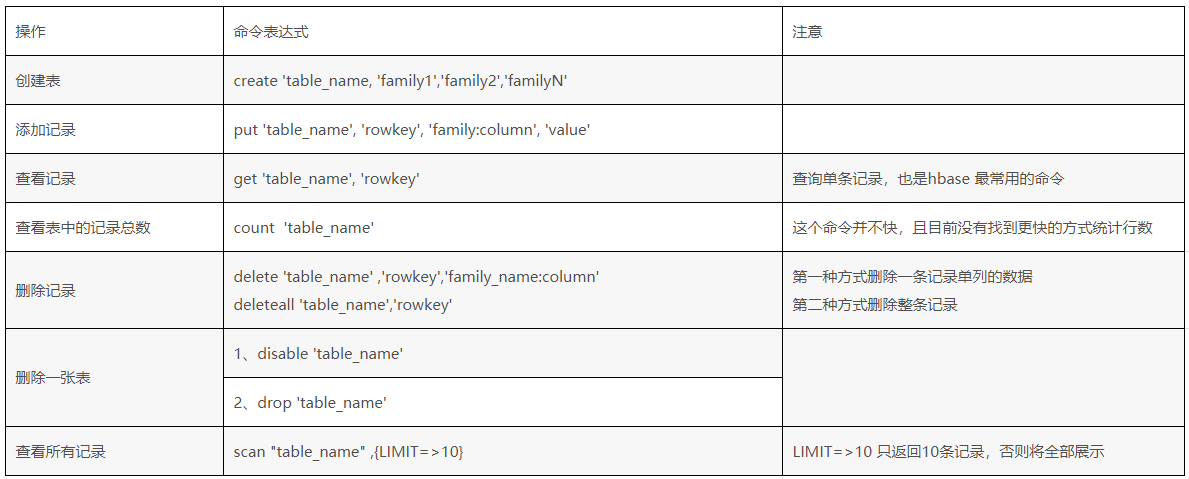
下面我们看看HBase Shell的一些基本操作命令,我列出了几个常用的HBase Shell命令,如下: 名称 命令表达式 创建表 create '表名称', '列名称1','列名称2','列名称N ...
- hbase shell command
进入hbase shell console $HBASE_HOME/bin/hbase shell 如果有kerberos认证,需要事先使用相应的keytab进行一下认证(使用kinit命令),认证成 ...
- hbase shell基础和常用命令详解(转)
HBase shell的基本用法 hbase提供了一个shell的终端给用户交互.使用命令hbase shell进入命令界面.通过执行 help可以看到命令的帮助信息. 以网上的一个学生成绩表的例子来 ...
- hbase shell 基本命令总结
访问hbase,以及操作hbase,命令不用使用分号hbase shell 进入hbase list 查看表hbase shell -d hbase(main):024:0> scan '.ME ...
- hbase shell 常用命令
进入hbase shell console$HBASE_HOME/bin/hbase shell如果有kerberos认证,需要事先使用相应的keytab进行一下认证(使用kinit命令),认证成功之 ...
- Hbase Shell常用命令
hbase shell常用的操作命令有create,describe,disable,drop,list,scan,put,get,delete,deleteall,count,status等,通过h ...
- hbase shell中log4j重复问题
[root@centos ~]# hbase shellSLF4J: Class path contains multiple SLF4J bindings.SLF4J: Found binding ...
- (转)Hbase shell 常用命令(1)
Hbase shell 常用命令(1) link:http://blog.csdn.net/scutshuxue/article/details/6988348 下面我们看看HBase Shell的一 ...
随机推荐
- Vue.js面试题整理(转载)
一.什么是MVVM? MVVM是Model-View-ViewModel的缩写.MVVM是一种设计思想.Model 层代表数据模型,也可以在Model中定义数据修改和操作的业务逻辑:View 代表UI ...
- Tornado目录
第一篇:白话tornado源码之一个脚本引发的血案 第二篇:白话tornado源码之待请求阶段 第三篇:白话tornado源码之请求来了 第四篇:白话tornado源码之褪去模板外衣的前戏 第五篇:白 ...
- ubuntu 14.04 登录 界面 root
打开终端. sudo gedit /usr/share/lightdm/lightdm.conf.d/50-ubuntu.conf 在弹出的编辑框里输入:greeter-show-manual-log ...
- python之新的开始
Day 1-Morning 终于开通了新的博客(等待审核的过程用着备忘录敲...)~感谢几位大佬们愿意带我一起学习 大家一起加油!(苟富贵,勿相忘!/doge 哈哈哈) 初学python,以下 ...
- linux 服务器常规巡检并生成报表(一)
背景 最近接到一个需求要求每天巡检各台业务设备,并导出报表,但一想到设备有N台,一台台每天巡检这样的重复劳作实在是太伤神了,因此决定写一个脚本来搞定这件事. 首先,第一个要解决的问题是批量服务器执行命 ...
- Procomm Plus 与ASPECT脚本语言在基于远程终端设备上的测试应用
产测 ---------------------------------------------------- 原文:http://www.bixuanzl.com/20180801/1084478. ...
- win10 专业版永久密钥
激活码/密匙: 1.专业版: W269N-WFGWX-YVC9B-4J6C9-T83GXMH37W-N47XK-V7XM9-C7227-GCQG92X7P3-NGJTH-Q9TJF-8XDP9-T83 ...
- linux实操_rpm包和yum包
rpm包的简单查询指令: 查询已安装的rpm列表 rpm -qa | grep xxx 查询火狐浏览器 查询安装的rpm包软件的信息 查询rpm软件包的文件安装在哪里 查询文件属于哪个软件包 卸载rp ...
- Display Tag Lib Table进行分页
Display Tag Lib是一个标签库,用来处理jsp网页上的Table,功能非常强,可以对的Table进行分页.数据导出.分组.对列排序等等,反正我在做项目时需要的功能它都给我提供了,而且使用起 ...
- BZOJ 2127 / Luogu P1646 [国家集训队]happiness (最小割)
题面 BZOJ传送门 Luogu传送门 分析 这道题又出现了二元关系,于是我们只需要解方程确定怎么连边就行了 假设跟SSS分在一块是选文科,跟TTT分在一块是选理科,先加上所有的收益,再来考虑如何让需 ...