
asp.net 3.三层架构
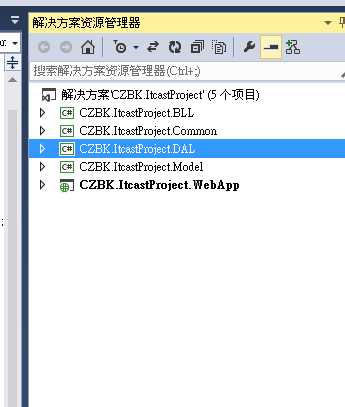
1.新建项目和类库
CZBK.ItcastProject (空白项目)
CZBK.ItcastProject.BLL (类库) -- 逻辑业务
CZBK.ItcastProject.Common (类库) -- 工具层
CZBK.ItcastProject.DAL
CZBK.ItcastProject.Model
CZBK.ItcastProject.WebApp -- web项目
2. DAL
2.1 SqlHelper类 :ADO.Net 连接数据库的相关
using System;

using System.Collections.Generic;

using System.Configuration;

using System.Linq;

using System.Text;

using System.Threading.Tasks;

using System.Data;

using System.Data.SqlClient;

namespace CZBK.ItcastProject.DAL

{

   public class SqlHelper

    {

       private static readonly string connStr = ConfigurationManager.ConnectionStrings["connStr"].ConnectionString;

       public static DataTable GetDataTable(string sql,CommandType type,params SqlParameter[]pars)

       {

           using (SqlConnection conn = new SqlConnection(connStr))

           {

               using (SqlDataAdapter apter = new SqlDataAdapter(sql, conn))

               {

                   if (pars != null)

                   {

                       apter.SelectCommand.Parameters.AddRange(pars);

                   }

                   apter.SelectCommand.CommandType = type;

                   DataTable da = new DataTable();

                   apter.Fill(da);

                   return da;

               }

           }

       }

       public static int ExecuteNonquery(string sql, CommandType type, params SqlParameter[] pars)

       {

           using (SqlConnection conn = new SqlConnection(connStr))

           {

               using (SqlCommand cmd = new SqlCommand(sql, conn))

               {

                   if (pars != null)

                   {

                       cmd.Parameters.AddRange(pars);

                   }

                   cmd.CommandType = type;

                   conn.Open();

                   return cmd.ExecuteNonQuery();

               }

           }

       }

    }

}
2.UserInfoDall类 针对表对象UserInfo的SQL语句操作,增删改查,还有将datatable转成对象
using CZBK.ItcastProject.Model;

using System;

using System.Collections.Generic;

using System.Linq;

using System.Text;

using System.Threading.Tasks;

using System.Data;

using System.Data.SqlClient;

namespace CZBK.ItcastProject.DAL

{

    public class UserInfoDal

    {

        /// <summary>

        /// 获取用户列表

        /// </summary>

        /// <returns></returns>

        public List<UserInfo> GetList()

        {

            string sql = "select * from UserInfo";

            DataTable da = SqlHelper.GetDataTable(sql, CommandType.Text);

            List<UserInfo> list = null;

            if (da.Rows.Count > )

            {

                list = new List<UserInfo>();

                UserInfo userInfo = null;

                foreach (DataRow row in da.Rows)

                {

                    userInfo = new UserInfo();

                    LoadEntity(userInfo, row);

                    list.Add(userInfo);

                }

            }

            return list;

        }

        /// <summary>

        /// 获取一条用户信息 By ID

        /// </summary>

        /// <param name="id"></param>

        /// <returns></returns>

        public UserInfo GetDeail(int id)

        {

            string sql = "SELECT id,username,userpass,regtime,email FROM UserInfo where id = @id";

            SqlParameter [] pars ={

                                      new SqlParameter("@id",SqlDbType.Int)

                                  };

            pars[].Value=id;

            DataTable dt = SqlHelper.GetDataTable(sql, CommandType.Text, pars);

            UserInfo instance = null;

            if(dt.Rows.Count>)

            {

                instance = new UserInfo();

                LoadEntity(instance, dt.Rows[]);

            }

            return instance;

        }

        /// <summary>

        /// 添加用户信息

        /// </summary>

        /// <param name="userInfo"></param>

        /// <returns></returns>

        public int AddUserInfo(UserInfo userInfo)

        {

            string sql = "insert into UserInfo(UserName,UserPass,RegTime,Email) values(@UserName,@UserPass,@RegTime,@Email)";

            SqlParameter[] pars = {

                                new SqlParameter("@UserName",SqlDbType.NVarChar,),

                                  new SqlParameter("@UserPass",SqlDbType.NVarChar,),

                                         new SqlParameter("@RegTime",SqlDbType.DateTime),

                                    new SqlParameter("@Email",SqlDbType.NVarChar,)

                                  };

            pars[].Value = userInfo.UserName;

            pars[].Value = userInfo.UserPass;

            pars[].Value = userInfo.RegTime;

            pars[].Value = userInfo.Email;

            return SqlHelper.ExecuteNonquery(sql, CommandType.Text, pars);

        }

        /// <summary>

        /// 更新用户信息

        /// </summary>

        /// <param name="userInfo"></param>

        /// <returns></returns>

        public int UpdateUserInfo(UserInfo userInfo)

        {

            string sql = "UPDATE UserInfo SET username = @username,userpass = @userpass,regtime = @regtime,email = @email WHERE id = @id";

            SqlParameter[] pars = {

                                       new SqlParameter("@username",SqlDbType.NVarChar,),

                                       new SqlParameter("@userpass",SqlDbType.NVarChar,),

                                       new SqlParameter("@regtime",SqlDbType.DateTime),

                                       new SqlParameter("@email",SqlDbType.NVarChar,),

                                       new SqlParameter("@id",SqlDbType.Int)

                                   };

            pars[].Value = userInfo.UserName;

            pars[].Value = userInfo.UserPass;

            pars[].Value = userInfo.RegTime;

            pars[].Value = userInfo.Email;

            pars[].Value = userInfo.Id;

            return SqlHelper.ExecuteNonquery(sql, CommandType.Text, pars);

        }

        /// <summary>

        /// 删除用户信息

        /// </summary>

        /// <param name="id"></param>

        /// <returns></returns>

        public int DeleteUserInfo(int id)

        {

            string sql = "DELETE FROM UserInfo WHERE id = @id";

            SqlParameter[] pars ={

                                      new SqlParameter("@id",SqlDbType.Int)

                                  };

            pars[].Value = id;

            return SqlHelper.ExecuteNonquery(sql, CommandType.Text, pars);

        }

        private void LoadEntity(UserInfo userInfo, DataRow row)

        {

            userInfo.UserName = row["UserName"] != DBNull.Value ? row["UserName"].ToString() : string.Empty;

            userInfo.UserPass = row["UserPass"] != DBNull.Value ? row["UserPass"].ToString() : string.Empty;

            userInfo.Email = row["Email"] != DBNull.Value ? row["Email"].ToString() : string.Empty;

            userInfo.Id = Convert.ToInt32(row["ID"]);

            userInfo.RegTime = row["RegTime"] != DBNull.Value ? Convert.ToDateTime(row["RegTime"]) : DateTime.Now;

        }

    }

}
3.Model
3.1 UserInfo类
using System;

using System.Collections.Generic;

using System.Linq;

using System.Text;

using System.Threading.Tasks;

namespace CZBK.ItcastProject.Model

{

   public class UserInfo

    {

       public int Id { get; set; }

       public string UserName { get; set; }

       public string UserPass { get; set; }

       public DateTime RegTime { get; set; }

       public string Email { get; set; }

    }

}
4. Common
4.1 CacheControl类 --> .net框架 HttpRuntime.Cache缓存类的操作
using System;

using System.Collections.Generic;

using System.Linq;

using System.Reflection;

using System.Text;

using System.Threading.Tasks;

using System.Web;

using System.Web.Caching;

namespace CZBK.ItcastProject.Common

{

    public class CacheControl

    {

        private static string devMode;

        public static TimeSpan DefaultCacheTime()

        {

            return new TimeSpan(, , );

        }

        public static T Get<T>() where T : new()

        {

            string fullName = typeof(T).FullName;

            object cache = GetCache(fullName);

            if (cache == null)

            {

                T objObject = (T)Activator.CreateInstance(typeof(T));

                SetCache(fullName, objObject, DefaultCacheTime());

                return objObject;

            }

            return (T)cache;

        }

        public static object GetCache(string cacheKey)

        {

            if (devMode == "Y")

            {

                return null;

            }

            return HttpRuntime.Cache[cacheKey];

        }

        public static object GetObject(Type type)

        {

            string fullName = type.FullName;

            object cache = GetCache(fullName);

            if (cache == null)

            {

                object objObject = Activator.CreateInstance(type);

                SetCache(fullName, objObject, DefaultCacheTime());

                return objObject;

            }

            return cache;

        }

        public static object GetObject(Type type, Assembly dll)

        {

            string fullName = type.FullName;

            object cache = GetCache(fullName);

            if (cache == null)

            {

                object objObject = dll.CreateInstance(type.FullName, true);

                SetCache(fullName, objObject, DefaultCacheTime());

                return objObject;

            }

            return cache;

        }

        public static void RemoveCache(string cacheKey)

        {

            HttpRuntime.Cache.Remove(cacheKey);

        }

        public static void SetCache(string cacheKey, object objObject, TimeSpan slidingExpiration)

        {

            HttpRuntime.Cache.Insert(cacheKey, objObject, null, Cache.NoAbsoluteExpiration, slidingExpiration);

        }

    }

}
5.BLL
5.1 UserInfoService类 UserInfo表对象的相关业务逻辑, 运用.net缓存Dal层的对象
using CZBK.ItcastProject.Model;

using System;

using System.Collections.Generic;

using System.Linq;

using System.Text;

using System.Threading.Tasks;

using CZBK.ItcastProject.DAL;

namespace CZBK.ItcastProject.BLL

{

   public class UserInfoService

    {

       UserInfoDal UserInfoDal = CZBK.ItcastProject.Common.CacheControl.Get<UserInfoDal>();

       /// <summary>

       /// 返回数据列表

       /// </summary>

       /// <returns></returns>

       public List<UserInfo> GetList()

       {

           return UserInfoDal.GetList();

       }

       /// <summary>

       /// 返回用户信息 一条

       /// </summary>

       /// <param name="id"></param>

       /// <returns></returns>

       public UserInfo GetDeail(int id)

       {

           return UserInfoDal.GetDeail(id);

       }

       /// <summary>

       /// 添加数据

       /// </summary>

       /// <param name="userInfo"></param>

       /// <returns></returns>

       public bool AddUserInfo(UserInfo userInfo)

       {

           return UserInfoDal.AddUserInfo(userInfo)>;

       }

       /// <summary>

       /// 更新数据

       /// </summary>

       /// <param name="userInfo"></param>

       /// <returns></returns>

       public bool UpdateUserInfo(UserInfo userInfo)

       {

           return UserInfoDal.UpdateUserInfo(userInfo) > ;

       }

       /// <summary>

       /// 删除数据

       /// </summary>

       /// <param name="id"></param>

       /// <returns></returns>

       public bool DeleteUserInfo(int id)

       {

           return UserInfoDal.DeleteUserInfo(id) > ;

       }

    }

}
6. UI
6.1 用户列表
UserInfoList.ashx
using CZBK.ItcastProject.Model;

using System;

using System.Collections.Generic;

using System.IO;

using System.Linq;

using System.Text;

using System.Web;

namespace CZBK.ItcastProject.WebApp

{

    /// <summary>

    /// UserInfoList 的摘要说明

    /// </summary>

    public class UserInfoList : IHttpHandler

    {

        public void ProcessRequest(HttpContext context)

        {

           context.Response.ContentType = "text/html";

           BLL.UserInfoService UserInfoService = CZBK.ItcastProject.Common.CacheControl.Get<BLL.UserInfoService>();

           List<UserInfo>list= UserInfoService.GetList();

           StringBuilder sb = new StringBuilder();

           foreach (UserInfo userInfo in list)

           {

              sb.AppendFormat("<tr><td>{0}</td><td>{1}</td><td>{2}</td><td>{3}</td><td>{4}</td><td><a href='ShowDetail.ashx?id={0}'>详细</a></td><td><a href='DeleteUser.ashx?id={0}' class='deletes'>删除</a></td><td><a href='ShowEdit.ashx?id={0}' class='edits'>编辑</a></td></tr>", userInfo.Id, userInfo.UserName, userInfo.UserPass, userInfo.Email, userInfo.RegTime);

           }

            //读取模板文件

           string filePath = context.Request.MapPath("UserInfoList.html");

           string fileCotent = File.ReadAllText(filePath);

           fileCotent = fileCotent.Replace("@tbody",sb.ToString());

           context.Response.Write(fileCotent);

        }

        public bool IsReusable

        {

            get

            {

                return false;

            }

        }

    }

}
UserInfoList.html
<!DOCTYPE html>

<html xmlns="http://www.w3.org/1999/xhtml">

<head>

<meta http-equiv="Content-Type" content="text/html; charset=utf-8"/>

    <title></title>

    <link href="Css/tableStyle.css" rel="stylesheet" />

    <script src="Js/jquery-1.7.1.js"></script>

    <script type="text/javascript">

        $(function () {

            $(".deletes").click(function () {

                if (!confirm("确定要删除吗?")) {

                    return false;

                }

            });

            $(".edits").click(function () {

                if (!confirm("确定要编辑吗?")) {

                    return false;

                }

            });

        });

    </script>

</head>

<body>

    <a href="AddUserInfo.html">添加</a>

    <table>

        <tr>

          <th>编号</th>

          <th>用户名</th>

          <th>密码</th>

          <th>邮箱</th>

          <th>时间</th>

          <th>详细</th>

          <th>删除</th>

          <th>编辑</th>

        </tr>

       @tbody

    </table>

</body>

</html>
6.2 添加用户
AddUser.ashx
using CZBK.ItcastProject.Model;

using System;

using System.Collections.Generic;

using System.Linq;

using System.Web;

namespace CZBK.ItcastProject.WebApp

{

    /// <summary>

    /// AddUser 的摘要说明

    /// </summary>

    public class AddUser : IHttpHandler

    {

        public void ProcessRequest(HttpContext context)

        {

            context.Response.ContentType = "text/plain";

            string userName=context.Request.Form["txtName"];

            string userPwd=context.Request.Form["txtPwd"];

            string userEmail=context.Request.Form["txtMail"];

            UserInfo userInfo = new UserInfo();

            userInfo.UserName = userName;

            userInfo.UserPass = userPwd;

            userInfo.Email = userEmail;

            userInfo.RegTime = DateTime.Now;

            BLL.UserInfoService UserInfoService = new BLL.UserInfoService();

            if (UserInfoService.AddUserInfo(userInfo))

            {

                context.Response.Redirect("UserInfoList.ashx");

            }

            else

            {

                context.Response.Redirect("Error.html");

            }

        }

        public bool IsReusable

        {

            get

            {

                return false;

            }

        }

    }

}
AddUserInfo.html
<!DOCTYPE html>

<html xmlns="http://www.w3.org/1999/xhtml">

<head>

<meta http-equiv="Content-Type" content="text/html; charset=utf-8"/>

    <title>添加用户</title>

</head>

<body>

      <form method="post" action="AddUser.ashx">

        用户名:<input type="text" name="txtName" /><br />

        密码:<input type="password" name="txtPwd" /><br />

        邮箱:<input type="text" name="txtMail" /><br />

        <input type="submit" value="添加用户" />

    </form>

</body>

</html>
6.3 删除用户
DeleteUser.ashx
using CZBK.ItcastProject.Model;

using System;

using System.Collections.Generic;

using System.Linq;

using System.Web;

namespace CZBK.ItcastProject.WebApp

{

    /// <summary>

    /// DeleteUser 的摘要说明

    /// </summary>

    public class DeleteUser : IHttpHandler

    {

        public void ProcessRequest(HttpContext context)

        {

            context.Response.ContentType = "text/plain";

            //context.Response.Write("Hello World");

            BLL.UserInfoService UserInfoService = CZBK.ItcastProject.Common.CacheControl.Get<BLL.UserInfoService>();

            string id = context.Request.QueryString["id"];

            int iid;

            if (int.TryParse(id, out iid))

            {

                if (UserInfoService.DeleteUserInfo(iid))

                {

                    context.Response.Redirect("UserInfoList.ashx");

                }

                else

                {

                    context.Response.Redirect("Error.html");

                }

            }

            else

            {

                context.Response.Redirect("Error.html");

            }

        }

        public bool IsReusable

        {

            get

            {

                return false;

            }

        }

    }

}
6.4 显示用户详细信息
ShowDetail.ashx
using System;

using System.Collections.Generic;

using System.IO;

using System.Linq;

using System.Web;

using CZBK.ItcastProject.Model;

namespace CZBK.ItcastProject.WebApp

{

    /// <summary>

    /// ShowDetail 的摘要说明

    /// </summary>

    public class ShowDetail : IHttpHandler

    {

        public void ProcessRequest(HttpContext context)

        {

            context.Response.ContentType = "text/html";

            //context.Response.Write("Hello World");

            BLL.UserInfoService UserInfoService = CZBK.ItcastProject.Common.CacheControl.Get<BLL.UserInfoService>();

            string id = context.Request.QueryString["id"];

            int iid;

            if (int.TryParse(id, out iid))

            {

                UserInfo instance = UserInfoService.GetDeail(Convert.ToInt32(id));

                //读取模板文件

                string filePath = context.Request.MapPath("ShowDetail.html");

                string fileCotent = File.ReadAllText(filePath);

                fileCotent = fileCotent.Replace("$username", instance.UserName).Replace("$pwd", instance.UserPass).Replace("$email", instance.Email);

                context.Response.Write(fileCotent);

            }

            else

            {

                context.Response.Redirect("Error.html");

            }

        }

        public bool IsReusable

        {

            get

            {

                return false;

            }

        }

    }

}
ShowDetail.html
<!DOCTYPE html>

<html xmlns="http://www.w3.org/1999/xhtml">

<head>

<meta http-equiv="Content-Type" content="text/html; charset=utf-8"/>

    <title></title>

</head>

<body>

    <form>

        用户名:<input type="text" name="txtName" value="$username" readonly="readonly" /><br />

        密码:<input type="password" name="txtPwd" value="$pwd" readonly="readonly" /><br />

        邮箱:<input type="text" name="txtMail" value="$email" readonly="readonly" /><br />

    </form>

</body>

</html>
6.5 编辑用户
ShowEdit.ashx
using CZBK.ItcastProject.Model;

using System;

using System.Collections.Generic;

using System.IO;

using System.Linq;

using System.Web;

namespace CZBK.ItcastProject.WebApp

{

    /// <summary>

    /// ShowEdit 的摘要说明

    /// </summary>

    public class ShowEdit : IHttpHandler

    {

        public void ProcessRequest(HttpContext context)

        {

            context.Response.ContentType = "text/html";

            //context.Response.Write("Hello World");

            BLL.UserInfoService UserInfoService = CZBK.ItcastProject.Common.CacheControl.Get<BLL.UserInfoService>();

            string id = context.Request.QueryString["id"];

            int iid;

            if (int.TryParse(id, out iid))

            {

                UserInfo instance = UserInfoService.GetDeail(Convert.ToInt32(id));

                //读取模板文件

                string filePath = context.Request.MapPath("ShowEdit.html");

                string fileCotent = File.ReadAllText(filePath);

                fileCotent = fileCotent.Replace("$username", instance.UserName).Replace("$pwd", instance.UserPass).Replace("$email", instance.Email).Replace("$hid_id", id);

                context.Response.Write(fileCotent);

            }

            else

            {

                context.Response.Redirect("Error.html");

            }

        }

        public bool IsReusable

        {

            get

            {

                return false;

            }

        }

    }

}
ShowEdit.html
<!DOCTYPE html>

<html xmlns="http://www.w3.org/1999/xhtml">

<head>

<meta http-equiv="Content-Type" content="text/html; charset=utf-8"/>

    <title></title>

</head>

<body>

    <form method="post" action="UpdateUser.ashx">

        用户名:<input type="text" name="txtName" value="$username" /><br />

        密码:<input type="password" name="txtPwd" value="$pwd" /><br />

        邮箱:<input type="text" name="txtMail" value="$email" /><br />

        <input type="hidden" name="hid_id" value="$hid_id" />

        <input type="submit" value="更新用户" />

    </form>

</body>

</html>
UpdateUser.ashx
using CZBK.ItcastProject.Model;

using System;

using System.Collections.Generic;

using System.Linq;

using System.Web;

namespace CZBK.ItcastProject.WebApp

{

    /// <summary>

    /// UpdateUser 的摘要说明

    /// </summary>

    public class UpdateUser : IHttpHandler

    {

        public void ProcessRequest(HttpContext context)

        {

            context.Response.ContentType = "text/plain";

            string userName = context.Request.Form["txtName"];

            string userPwd = context.Request.Form["txtPwd"];

            string userEmail = context.Request.Form["txtMail"];

            string id = context.Request.Form["hid_id"];

            UserInfo userInfo = new UserInfo();

            userInfo.Id = Convert.ToInt32(id);

            userInfo.UserName = userName;

            userInfo.UserPass = userPwd;

            userInfo.Email = userEmail;

            userInfo.RegTime = DateTime.Now;

            BLL.UserInfoService UserInfoService = new BLL.UserInfoService();

            if (UserInfoService.UpdateUserInfo(userInfo))

            {

                context.Response.Redirect("UserInfoList.ashx");

            }

            else

            {

                context.Response.Redirect("Error.html");

            }

        }

        public bool IsReusable

        {

            get

            {

                return false;

            }

        }

    }

}
asp.net 3.三层架构的更多相关文章
- ASP.NET的三层架构(DAL,BLL,UI)
ASP.NET的三层架构(DAL,BLL,UI) BLL 是业务逻辑层 Business Logic Layer DAL 是数据访问层 Data Access Laye ...
- Asp.Net之三层架构
三层架构之理论: 通常意义上讲的三层架构就是将整个项目应用划分为:表现层(UI),业务逻辑层(BLL),数据访问层(DAL).与传统的二层架构的区别在于在用户界面(UI)和数据库服务器之间,添加中间层 ...
- Asp.Net MVC三层架构之autofac使用教程
开发环境:vs2015..net4.5.2.mvc5.ef6 Autofac简介 IOC控制反转(Inversion of Control,缩写为IOC),Autofac是一个开源的依赖注入框架,Au ...
- asp.net中三层架构与mvc之区别?
对于标题中的问题,如果是没有同时接触三层架构和mvc的初级.net开发人员,想必一定会非常糊涂和混淆.关于此我也百度过N回,看过N多帖子和 回答,但几乎没有人能表述清楚.近期我从典型mvc+entit ...
- ASP.NET创建三层架构图解详细教程
1.新建项目 2.创建Visual Studio解决方案 3.再创建项目 4.选择类库类型 5.依次创建bll(业务逻辑层),dal(数据访问层)和model(模型层也可以叫实体层) 6.添加一个网站 ...
- asp也玩三层架构(有源代码)
实体类 <% Class UserInfo Private mintId Public Property Let UserId(intUserId) mintId = intUserId End ...
- ASP.NET三层架构的分析
BLL 是业务逻辑层 Business Logic Layer DAL 是数据访问层 Data Access Layer ASP.NET的三层架构(DAL,BLL,UI ...
- mvc和三层架构到底有什么区别
原文地址:http://zhidao.baidu.com/question/82001542.html?qbl=relate_question_3&word=MVC%20%CA%FD%BE%D ...
- ASP.Net MVC+EF架构
ASP.Net MVC是UI层的框架,EF是数据访问的逻辑. 如果在Controller中using DbContext,把查询的结果的对象放到cshtml中显示,那么一旦在cshtml中访问关联属性 ...
随机推荐
- 微信小程序之scroll-view的坑
好久没动小程序了,今天打算复习复习,结果刚写了一个scroll-view就遇到了一个坑,这怎么能忍,对比看文档也没发现那里出了问题,没办法只能去翻翻微信给的demo,发现scroll-view一个必要 ...
- NProgress的使用 及 路由 token 定向的使用
主要配合路由生命周期使用 实现一个进度条的效果 使用方法: 1. 下载:npm install --save nprogress 使用:NProgress.start(); 开始 NProgress ...
- Java-LockSupport
LockSupport 和 CAS 是 Java 并发包中很多并发工具控制机制的基础,它们底层其实都是依赖 Unsafe 实现. LockSupport 提供 park() 和 unpark() 方法 ...
- Rocketmq同步发送消息
package com.bfxy.rocketmq.quickstart; import org.apache.rocketmq.client.exception.MQBrokerException; ...
- Mysql 逗号分隔行列转换总结
方法一 存储过程实现: -- 修改结束符,防止在mysql命令行中默认分号直接运行 delimiter $$ -- 创建一个计算拆分后字符串的个数函数 drop function if exists ...
- C#WinForm程序显示控制台窗口Console
启动一个WINFORM项目,使用一些API函数将控制台显示出来: AllocConsole 和 FreeConsole. 本程序只在DEBUG模式下显示控制台 [DllImport("ker ...
- C# 打包安装部署 属性中找不到 查找目标或打开文件位置
用第三方工具OrcaMis (一个可以修改msi文件的工具)来实现的 最后我又试了几次,以为是再程序打包的时候设置有问题,结果都没有找到原因,没有办法只有需求网络资源,网络上有朋友说VS创建的快捷方式 ...
- Spring Security在登录验证中增加额外数据(如验证码)
在使用Spring Security框架过程中,经常会有这样的需求,即在登录验证时,附带增加额外的数据,如验证码.用户类型等.下面将介绍如何实现. 注:我的工程是在Spring Boot框架基础上的, ...
- 【Linux】CentOS7安装mysql5.7
官网下载地址 https://dev.mysql.com/downloads/file/?id=471503 本文所用MySQL版本为5.7.19; 上传包 将mysql-5.7.19-1 ...
- ASP.NET Core 入门笔记3,使用ASP.NET Core MVC框架构建Web应用
一.ASP.NET Core MVC 输出Hello World,Friend! 1.引入 ASP.NET Core MVC 修改应用启动类(Startup.cs),引入MVC模块并配置默认路由 pu ...