
MVC中的Action过滤器
Action过滤器可以用在调用动作方法之前或之后,执行一些特殊的逻辑,比如用登录验证:
Action过滤器实现IActionFilter接口,该接口有两个方法:
 public interface IActionFilter

    {

        void OnActionExecuted(ActionExecutedContext filterContext);

        void OnActionExecuting(ActionExecutingContext filterContext);

    }
我们先创建一个BaseController,在这个基类中重写OnActionExecuting方法,用于让其他的控制器继承此基类。如:
using System;

using System.Collections.Generic;

using System.Configuration;

using System.Linq;

using System.Web;

using System.Web.Mvc;

using System.Web.Script.Serialization;

using XFK.PICCInsureTravel.Common;

using XinfuMall.XinfuWeb.PublicClass;

namespace XFK.PICCInsureTravel.Controllers

{

    public abstract class BaseController : Controller

    {

        public JavaScriptSerializer js = new JavaScriptSerializer();

        public LogHelper log = null;

        public UserSession user { get; set; }

        public EnterpriseAccountSession enterprise { get; set; }

        protected override void OnActionExecuting(ActionExecutingContext filterContext)

        {

            base.OnActionExecuting(filterContext);

            LogHelper.WriteLog("进入BaseController");

            TempData["xinfuUrl"] = System.Configuration.ConfigurationManager.AppSettings["xinfuUrl"];

            if (XFK.Infrastructure.Util.SessionManager.Read(UserUtil.user_sessionStr) != null)

            {

                user = XFK.Infrastructure.Util.SessionManager.Read(UserUtil.user_sessionStr) as UserSession;

                object enterpriseId = XFK.Infrastructure.Util.SessionManager.Read(EnterpriseUtil.enterprise_sessionId);

                enterprise = new EnterpriseAccountSession();

                enterprise.Id = Convert.ToInt32(enterpriseId);

                ViewBag.UserName = user.AccountName;

                ViewBag.Enterpriseid = Convert.ToInt32(enterpriseId);

                var limitEnterprise = String.IsNullOrEmpty(ConfigurationManager.AppSettings["limitEnterprise"]) ? "" : ConfigurationManager.AppSettings["limitEnterprise"];

                if (limitEnterprise.Split(',').Contains(enterprise.Id.ToString()))

                {

                    System.Web.HttpContext.Current.Response.Write("对不起,所属的企业没有订购此产品的权限!");

                }

            }

            else

            {

                filterContext.Result = new RedirectResult(ConfigurationManager.AppSettings["xinfuUrl"] + "mall/Login?originUrl=" + HttpUtility.UrlEncode(Request.Url.ToString()));

                LogHelper.WriteLog("当前访问的路径是:" + ConfigurationManager.AppSettings["xinfuUrl"] + "mall/Login?originUrl=" + HttpUtility.UrlEncode(Request.Url.ToString()));

            }

        }

    }

}
注意,当验证不通过时,我们给filterContext.Result赋值,用于跳转页面。这个filterContext.Result属性是一个ActionResult类型的子集---RedirectResult:
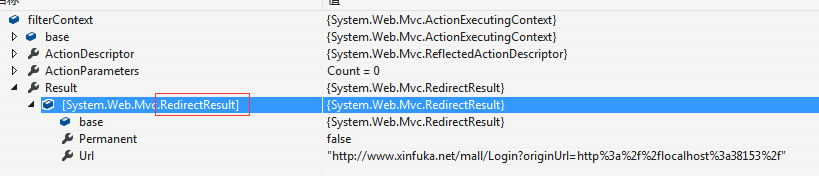
当执行到filterContext.Result时,我们给它赋值以后,便会执行跳转。
这个BaseController建好以后,下面的工作就是在其他控制器中使用了:
using System;

using System.Collections.Generic;

using System.Linq;

using System.Web;

using System.Web.Mvc;

namespace XFK.PICCInsureTravel.Controllers

{

    public class HomeController : BaseController

    {

        public ActionResult Index()

        {

            return View();

        }

    }

}
参考:http://skybirdzw.blog.163.com/blog/static/72570626201781465310313/
MVC中的Action过滤器的更多相关文章
- MVC中使用Action全局过滤器出现:网页无法正常运作 将您重定向的次数过多。解决办法
前言当我们访问某个网站的时候需要检测用户是否已经登录(通过Session是否为null),我们知道在WebForm中可以定义一个BasePage类让他继承System.Web.UI.Page,重写它的 ...
- MVC中的错误过滤器无法拦截URL路径错误的解决办法
“/”应用程序中的服务器错误. 无法找到资源. 说明: HTTP 404.您正在查找的资源(或者它的一个依赖项)可能已被移除,或其名称已更改,或暂时不可用.请检查以下 URL 并确保其拼写正确. 请求 ...
- mvc中的action验证登录(ActionFilterAttribute)
方法一 : 1.创建一个全局action过滤器 (在appstart 的filterconfig中注册 filters.Add(new LoginAttribute());) 2.不需要登 ...
- ASP.NET MVC中在Action获取提交的表单数据方法总结 (4种方法,转载备忘)
有Index视图如下: 视图代码如下: <%@ Page Language="C#" MasterPageFile="~/Views/Shared/Site.Mas ...
- ASP.NET MVC中在Action获取提交的表单数据方法
有Index视图如下: 视图代码如下: <%@ Page Language="C#" MasterPageFile="~/Views/Shared/Site.Mas ...
- MVC中@Html.Action的用法
MVC项目中如果有公共部分的代码就可以单独拿出来作为控件来用(比如头部和底部代码).跟ASP.NET中的ASCX实现的效果一样,但MVC比它方便的多. 想要实现该效果,需要知道@Html.Action ...
- MVC中@Html.Action的用法(类似自定义控件)
MVC项目中如果有公共部分的代码就可以单独拿出来作为控件来用(比如头部和底部代码).跟ASP.NET中的ASCX实现的效果一样,但MVC比它方便的多. 一.@Html.Action的用法 @Html. ...
- .NET MVC中登陆授权过滤器的使用
1.写个类LoginAuthorityAttribute,继承自AuthorizeAttribute using System; using System.Collections.Generic; u ...
- mvc中在Action里调用另一个Action
今天做东西时发现一个新东西.即在一个Action调用另一Action.前提是同一个控制器.(没在一个控制里的没试过) 调用方法: public ActionResult Test1(){ //to ...
随机推荐
- Android跨进程通信Content Provider
Content Provider ContentProvider在android中的作用是对外共享数据,也就是说你可以通过ContentProvider把应用中的数据共享给其他应用访问,其他应用可以通 ...
- Mysql查询某字段重复值并删除重复值
1.查询重复值: select code,count(*) as count from hospital group by code having count>1; 该语句查询code重复值大于 ...
- redis数据类型及订阅操作
Redis数据类型详解 Redis键/值介绍 Redis key值是二进制安全的,这意味着可以用任何二进制序列作为key值,从形如“foo”的简单字符串到一个JPG文件的内容都可以.空字符串也是有效k ...
- ubuntu更换源的方法
1.查看ubuntu版本的方法: 使用命令 sudo lsb_release -a 输出如下: root@localhost:/etc/apt# sudo lsb_release -aNo LSB m ...
- 02 MySQL之数据表的基本操作
01-创建数据表 # 切换数据库 use test_db; # 创建数据表 语法规则如下: create table 表名 ( 字段名1, 数据类型 [列级别约束条件] [默认值], 字段名2, 数据 ...
- RabbitMQ学习之:(九)Headers Exchange (转贴+我的评论)
From: http://lostechies.com/derekgreer/2012/05/29/rabbitmq-for-windows-headers-exchanges/ RabbitMQ f ...
- CentOS 7系统配置上的变化
http://www.linuxidc.com/Linux/2014-09/107375p4.htm CentOS 7系统配置上的变化解析 ip ss指令替代 ifconfig route arp n ...
- Android云端APP
使用HbuilderX打包APP 首先创建一个 5+APP+使用MUI项目 <!DOCTYPE html> <html> <head> <meta chars ...
- 通过Xshell 执行压缩.zip文件出现unzip: command not found错误的解决办法
利用unzip命令解压缩的时候,出现 -bash: unzip: command not found 的错误. unzip——命令没有找到,其原因肯定是没有安装unzip. 利用一句命令就可以解决了. ...
- centos7安装kvm及kvm管理
一.安装kvm 查看CPU是否支持虚拟化 grep -E 'svm|vmx' /proc/cpuinfo - vmx is for Intel processors - svm is for AMD ...