
cell展开的几种方式
一.插入新的cell
原理:
(1)定义是否展开,和展开的cell的下标
@property (assign, nonatomic) BOOL isExpand; //是否展开

@property (strong, nonatomic) NSIndexPath *selectedIndexPath;//展开的cell的下标
(2)创建两个不同的cell

- (UITableViewCell *)tableView:(UITableView *)tableView cellForRowAtIndexPath:(NSIndexPath *)indexPath {

    UITableViewCell *cell;

    if (self.isExpand && self.selectedIndexPath.row < indexPath.row && indexPath.row <= self.selectedIndexPath.row + ExpandCount) {   // Expand cell

        cell = [tableView dequeueReusableCellWithIdentifier:@"CsutomExpansionCell" forIndexPath:indexPath];

    } else {    // Normal cell

        cell = [tableView dequeueReusableCellWithIdentifier:@"CustomCell" forIndexPath:indexPath];

    }

    return cell;

}
(3)创建你需要的cell的数量
 if (self.isExpand) {

        return CellCount + ExpandCount;

    }

    return CellCount;
(4)点击的时候向点击的cell下面插入你需要展示的cell(可展开多个),再次点击删除
- (void)tableView:(UITableView *)tableView didSelectRowAtIndexPath:(NSIndexPath *)indexPath {

    if (!self.selectedIndexPath) {

        self.isExpand = YES;

        self.selectedIndexPath = indexPath;

        [self.tavleView beginUpdates];

        [self.tavleView insertRowsAtIndexPaths:[self indexPathsForExpandRow:indexPath.row] withRowAnimation:UITableViewRowAnimationTop];

        [self.tavleView endUpdates];

    } else {

        if (self.isExpand) {

            if (self.selectedIndexPath == indexPath) {

                self.isExpand = NO;

                [self.tavleView beginUpdates];

                [self.tavleView deleteRowsAtIndexPaths:[self indexPathsForExpandRow:indexPath.row] withRowAnimation:UITableViewRowAnimationTop];

                [self.tavleView endUpdates];

                self.selectedIndexPath = nil;

            } else if (self.selectedIndexPath.row < indexPath.row && indexPath.row <= self.selectedIndexPath.row + ExpandCount) {

            } else {

                self.isExpand = NO;

                [self.tavleView beginUpdates];

                [self.tavleView deleteRowsAtIndexPaths:[self indexPathsForExpandRow:self.selectedIndexPath.row] withRowAnimation:UITableViewRowAnimationTop];

                [self.tavleView endUpdates];

                self.selectedIndexPath = nil;

            }

        }

    }

}

#pragma mark - other

- (NSArray *)indexPathsForExpandRow:(NSInteger)row {

    NSMutableArray *indexPaths = [NSMutableArray array];

    for (int i = ; i <= ExpandCount; i++) {

        NSIndexPath *idxPth = [NSIndexPath indexPathForRow:row + i inSection:];

        [indexPaths addObject:idxPth];

    }

    return [indexPaths copy];

}
二.在不同的section里插入cell
原理:
(1)定义是否展开,和展开的cell的下标
(2)创建两个不同的cell
- (UITableViewCell *)tableView:(UITableView *)tableView cellForRowAtIndexPath:(NSIndexPath *)indexPath {

    UITableViewCell *cell;

    if (self.isExpand && self.selectedIndexPath.section == indexPath.section) {     // Expand Cell

        cell = [tableView dequeueReusableCellWithIdentifier:@"CsutomExpansionCell" forIndexPath:indexPath];

    } else {    // Normal Cell

        cell = [tableView dequeueReusableCellWithIdentifier:@"CustomCell" forIndexPath:indexPath];

    }

    return cell;

}
(3)创建你需要展示普通状态下cell,section的数量
- (NSInteger)numberOfSectionsInTableView:(UITableView *)tableView {

    return SectionCount;

}
(4)改变你展开的时候,展开的section的cell的数量
- (NSInteger)tableView:(UITableView *)tableView numberOfRowsInSection:(NSInteger)section {

    if (self.isExpand && self.selectedIndexPath.section == section) {

        return  + ExpandCount; //多个数量

    }

    return ;

}
(5)点击的时候向点击的cell的section内插入你需要展示的cell(可展开多个),再次点击删除
- (void)tableView:(UITableView *)tableView didSelectRowAtIndexPath:(NSIndexPath *)indexPath {

    if (!self.selectedIndexPath) {

        self.isExpand = YES;

        self.selectedIndexPath = indexPath;

        [self.tableView beginUpdates];

        [self.tableView insertRowsAtIndexPaths:[self indexPathsForExpandSection:indexPath.section] withRowAnimation:UITableViewRowAnimationTop];

        [self.tableView endUpdates];

    } else {

        if (self.isExpand) {

            if (self.selectedIndexPath == indexPath) {

                self.isExpand = NO;

                [self.tableView beginUpdates];

                [self.tableView deleteRowsAtIndexPaths:[self indexPathsForExpandSection:indexPath.section] withRowAnimation:UITableViewRowAnimationTop];

                [self.tableView endUpdates];

                self.selectedIndexPath = nil;

            } else if (self.selectedIndexPath.row != indexPath.row && indexPath.section <= self.selectedIndexPath.section) {

                // Select the expand cell, do the relating dealing.

            } else {

                self.isExpand = NO;

                [self.tableView beginUpdates];

                [self.tableView deleteRowsAtIndexPaths:[self indexPathsForExpandSection:self.selectedIndexPath.section] withRowAnimation:UITableViewRowAnimationTop];

                [self.tableView endUpdates];

                self.selectedIndexPath = nil;

            }

        }

    }

}

- (NSArray *)indexPathsForExpandSection:(NSInteger)section {

    NSMutableArray *indexPaths = [NSMutableArray array];

    for (int i = ; i <= ExpandCount; i++) {

        NSIndexPath *idxPth = [NSIndexPath indexPathForRow:i inSection:section];

        [indexPaths addObject:idxPth];

    }

    return [indexPaths copy];

}
三.更改cell的高度
原理:
(1)定义是否展开,和展开的cell的下标
(2)创建一个的cell,分上半部分和下半部分
(3)创建cell的高度,分普通情况下的高度和展开后的高度
- (CGFloat)tableView:(UITableView *)tableView heightForRowAtIndexPath:(NSIndexPath *)indexPath {

    if (self.isExpand && self.selectedIndexPath == indexPath) {

        return ;

    } else {

        return ;

    }

}
(4)点击的时候向点击的cell刷新点击的cell
- (void)tableView:(UITableView *)tableView didSelectRowAtIndexPath:(NSIndexPath *)indexPath {

    if (!self.selectedIndexPath) {

        self.isExpand = YES;

        self.selectedIndexPath = indexPath;

        [self.tableView beginUpdates];

        [self.tableView reloadRowsAtIndexPaths:@[indexPath] withRowAnimation:UITableViewRowAnimationFade];

        [self.tableView endUpdates];

    } else {

        if (self.isExpand) {

            if (self.selectedIndexPath == indexPath) {

                self.isExpand = NO;

                [self.tableView beginUpdates];

                [self.tableView reloadRowsAtIndexPaths:@[indexPath] withRowAnimation:UITableViewRowAnimationFade];

                [self.tableView endUpdates];

                self.selectedIndexPath = nil;

            } else {

                self.isExpand = NO;

                [self.tableView beginUpdates];

                [self.tableView reloadRowsAtIndexPaths:@[self.selectedIndexPath] withRowAnimation:UITableViewRowAnimationFade];

                [self.tableView endUpdates];

                self.selectedIndexPath = nil;

            }

        }

    }

}
四.自定义section,点击展开相应的cell(下午有空写...)
demo链接
http://pan.baidu.com/s/1c0YQDNE
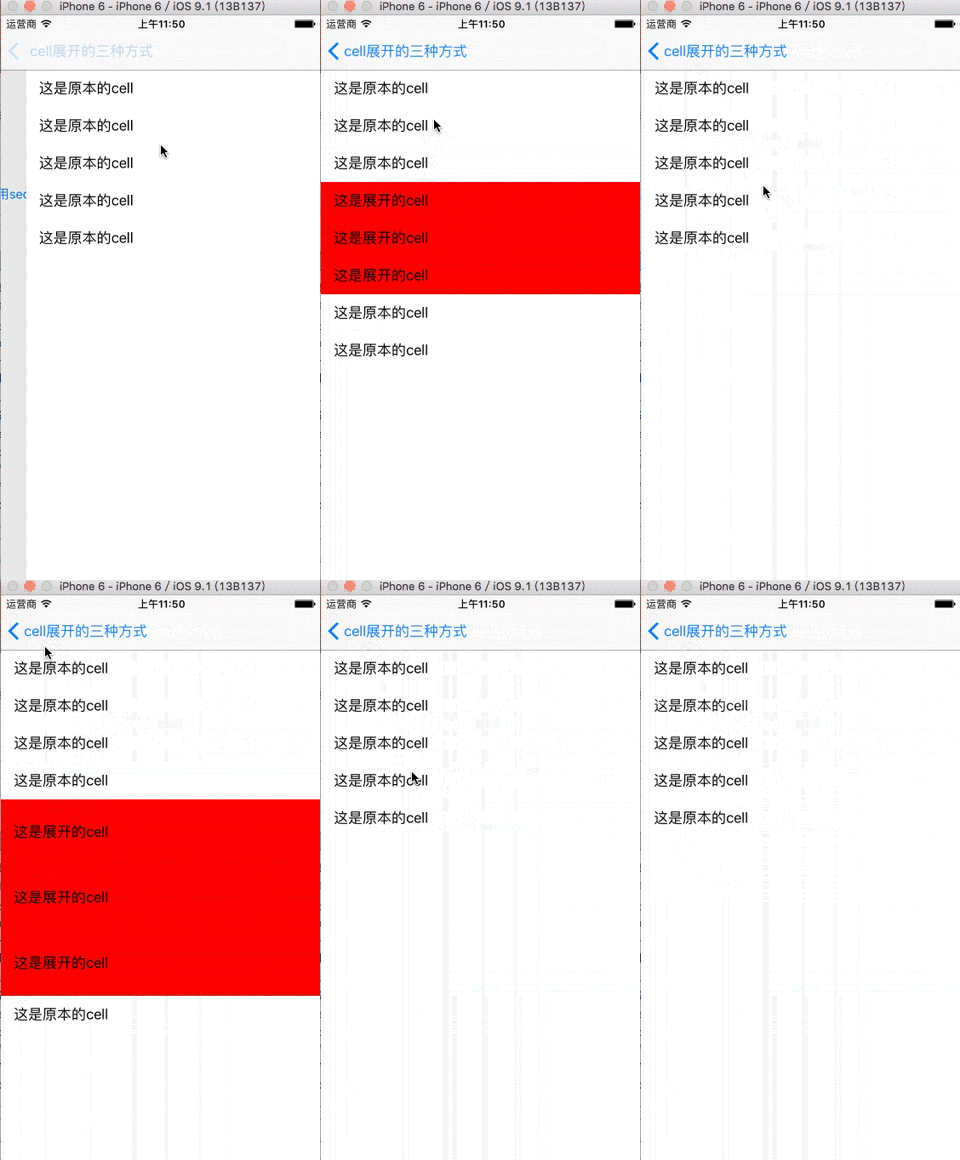
效果图
cell展开的几种方式的更多相关文章
- cell重用的几种方式
1.使用xib重用 //ios6 之后推荐大家使用的重用方式 //动态的使用self获得当前类名,来作为唯一的标示 NSString * identifier = NSStringFromClass( ...
- .NET环境下导出Excel表格的两种方式和导入两种类型的Excel表格
一.导出Excel表格的两种方式,其中两种方式指的是导出XML数据类型的Excel(即保存的时候可以只需要修改扩展名为.xls)和真正的Excel这两种. using System; using Sy ...
- Android数据存储五种方式总结
本文介绍Android平台进行数据存储的五大方式,分别如下: 1 使用SharedPreferences存储数据 2 文件存储数据 3 SQLite数据库存储数据 4 使用Cont ...
- Excel导出的几种方式
1.html 前台html与js代码(文件:ExportExcelByHtml.aspx): <html xmlns="http://www.w3.org/1999/xhtml&quo ...
- C++创建对象的两种方式
C++创建对象有两种方式,在栈上创建对象(Objects on the Stack)和在堆上创建对象(Objects on the Heap). 假设我们有以下的类: #include <str ...
- Linux就这个范儿 第15章 七种武器 linux 同步IO: sync、fsync与fdatasync Linux中的内存大页面huge page/large page David Cutler Linux读写内存数据的三种方式
Linux就这个范儿 第15章 七种武器 linux 同步IO: sync.fsync与fdatasync Linux中的内存大页面huge page/large page David Cut ...
- 实现顶部轮播,下部listview经典布局的两种方式
开头: 在做android开发的时候,我们经常会遇到这样的布局,上面是一个图片轮播图,下面是一些列表的项目.很多新闻app,视频类app都采用这样的布局.起初的时候 由于没有很多参考,我自己想到了一种 ...
- java开发webservice的几种方式(转载)
webservice的应用已经越来越广泛了,下面介绍几种在Java体系中开发webservice的方式,相当于做个记录. 1.Axis2方式 Axis是apache下一个开源的webservice开发 ...
- 加载xib文件的两种方式
一.加载xib文件的两种方式 1.方法一(NewsCell是xib文件的名称) NSArray *objects = [[NSBundle mainBundle] loadNibNamed:@&quo ...
随机推荐
- jQuery deferred应用之ajax详细源码分析(二)
在上一节中,我只贴出了$.Deferred的源码分析,并没用讲解怎么使用它,现在我们先看看$.ajax是如何使用它,让我们进行异步任务的处理. 如果没看上节的代码,请先稍微了解一下jQuery Def ...
- ubuntu中使用eclipse开发android,logcat显示问题
〜/工作区/ .metadata / .plugins / org.eclipse.core.runtime / .settings / com.android.ide.eclipse.ddms.pr ...
- 原生js格式化json的方法
<!DOCTYPE html> <html lang="en"> <head> <meta charset="UTF-8&quo ...
- shell脚本,awk合并一列的问题。
文件 file2内容如下:0 qwert1 asdfghjk2 asdjkl2 zxcvbn3 dfghjkll4 222224 tyuiop4 bnm 让第一列相等的合并成一行,不要第一列,也就是变 ...
- Xcode 6 创建 Empty Application
1.创建一个 Single View Application: 2.删除工程目录下的 Main.storyboard 和 LaunchScreen.xib: 3.打开 Supporting Files ...
- 初涉平衡树「treap」
treap:一种平衡的二叉搜索树 什么是treap(带旋) treap=tree+heap,这大家都知道.因为二叉搜索树(BST)非常容易被卡成一条链而影响效率,所以我们需要一种更加平衡的树形结构,从 ...
- Mac OS 终端强化美化:iterm2 + zsh + oh~my~zsh 设置教程
为了获得更好的排版效果,文章改用markdown撰写,故重发一次. 前言 mac自带的terminal终端没有文件名高亮等功能,而且界面不是很好看,故今晚学舍友折腾了终端,可以让自己使用起来更加方便, ...
- mysql存储过程详解及基于PHP使用实例
mysql存储过程详解 1. 存储过程简介 我们常用的操作数据库语言SQL语句在执行的时候需要要先编译,然后执行,而存储过程(Stored Procedure)是一组为了完成特定功能的S ...
- python:json
json是用来传输数据的字符串,{"key1":"values1","key2":{"key3":"value ...
- python爬虫(爬取段子)
python爬取段子 爬取某个网页的段子 第一步 不管三七二十一我们先导入模块 #http://baijiahao.baidu.com/s?id=1598724756013298998&wfr ...