
Flutter实战视频-移动电商-33.列表页_子类和商品列表交互效果
33.列表页_子类和商品列表交互效果
主要实现点击小类下面的列表跟着切换
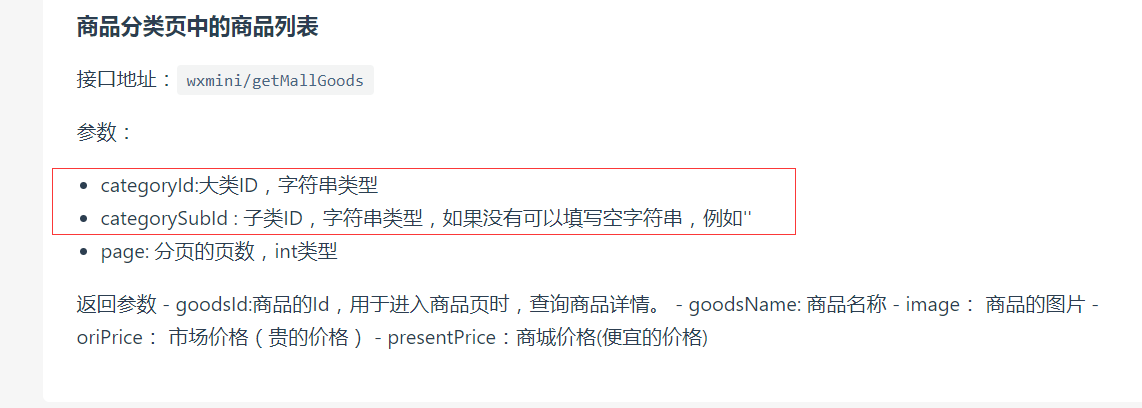
获取右侧下面的列表信息,即要传递大类的id也要传递小类的,所以需要把左侧的大类的id也要Provide化
可以看下网站上的接口说明:
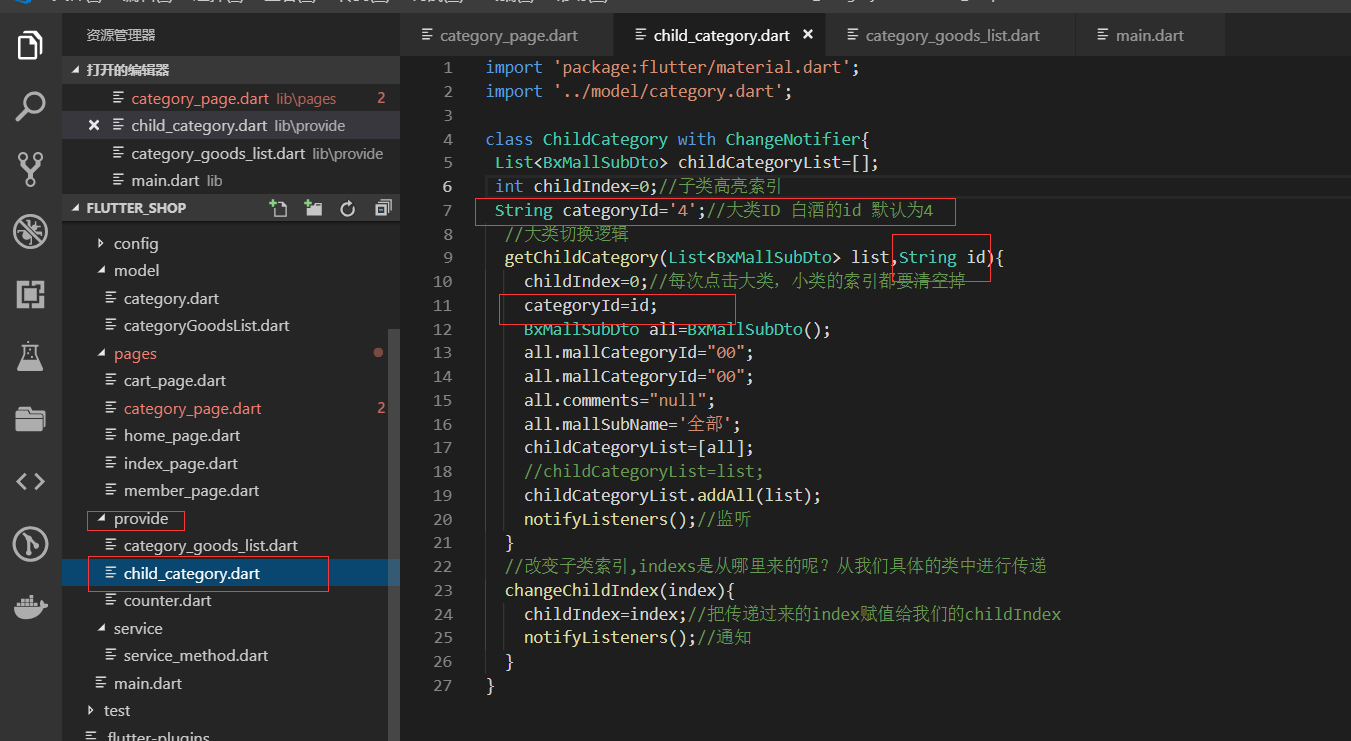
大类id Provide化
当我们点击左侧的大类的时候,要把当前的大类id存起来。
category_page.dart
我们修改了上面的多传递了参数以后,那么category_page.dart页面地方就会报错了。
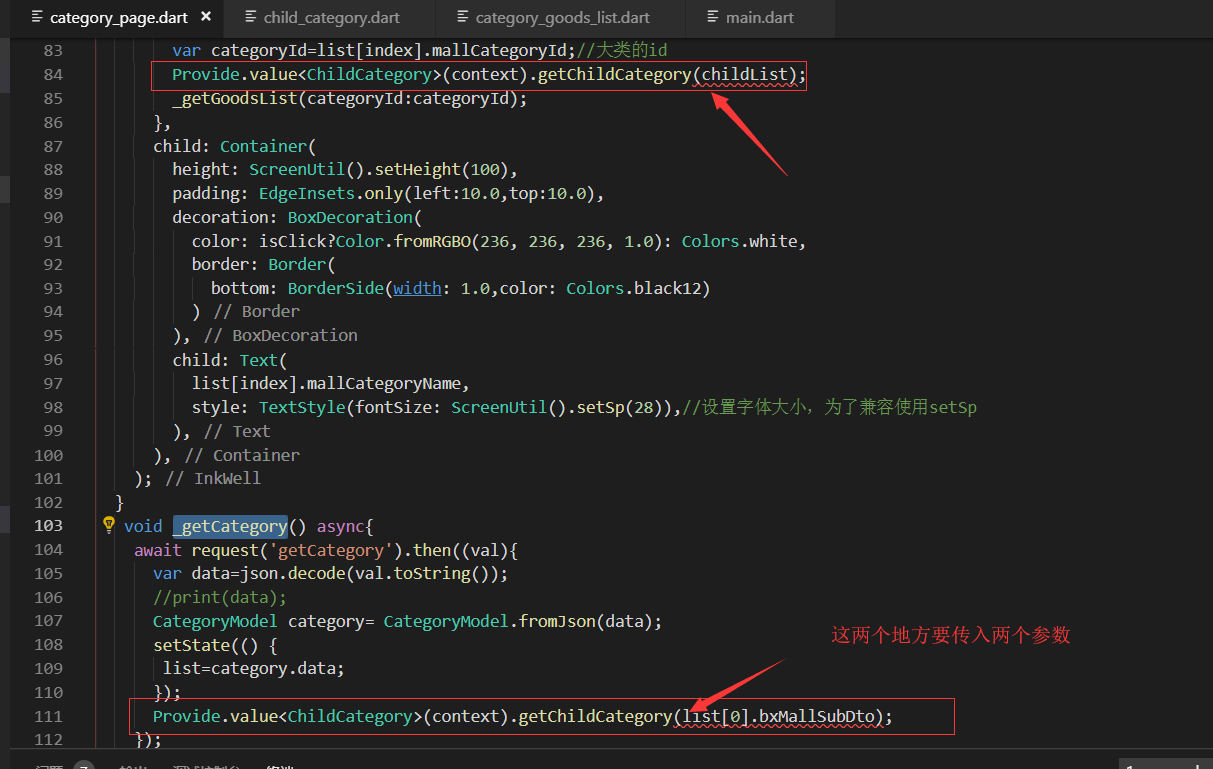
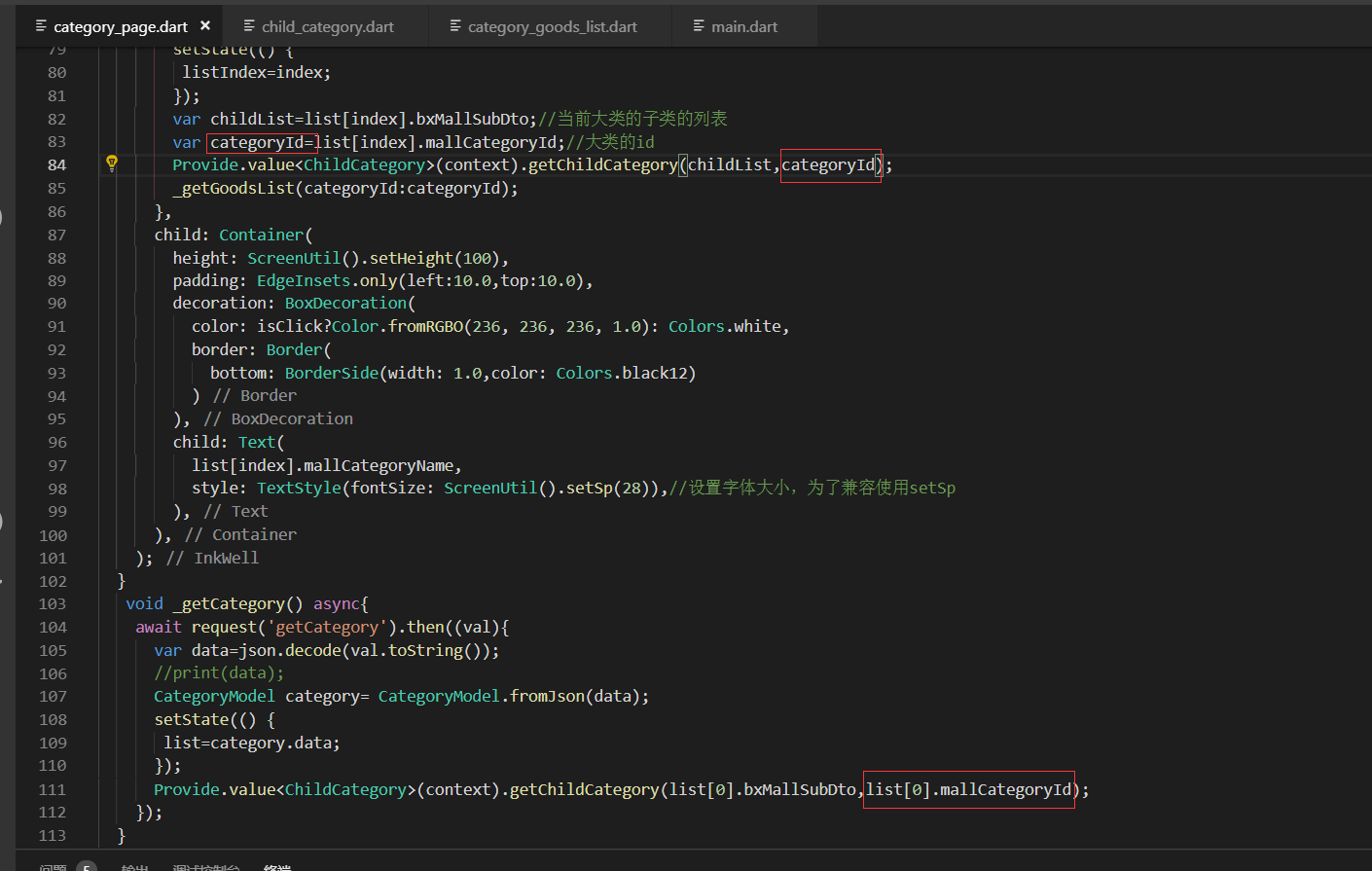
分别传入我们的大类id
这我们去掉async和await修饰符

我们把这个_getGoodsList方法复制一个 到下面
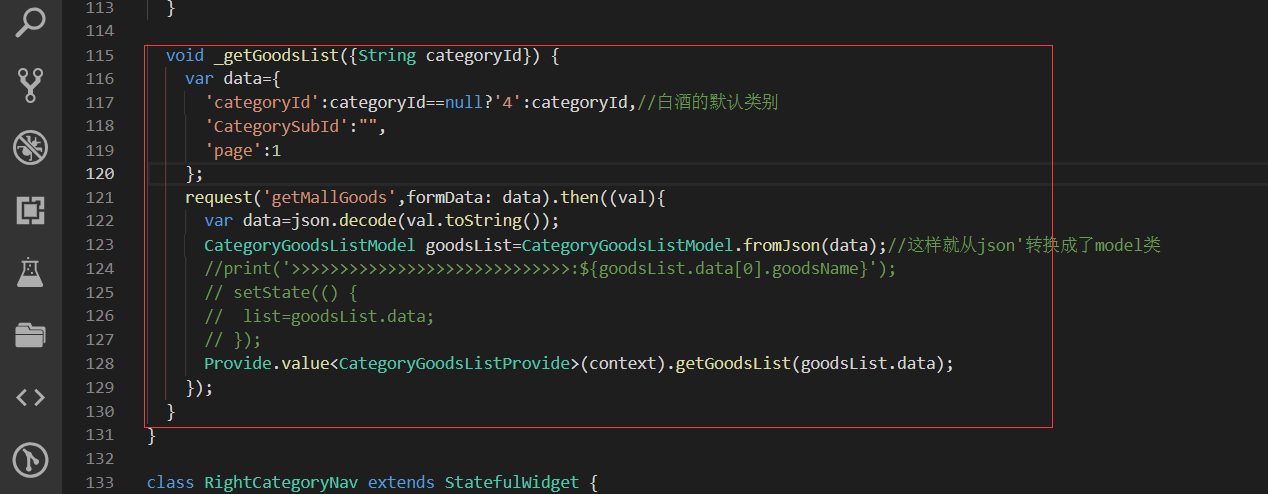
复制到 _rightInkWell方法下面
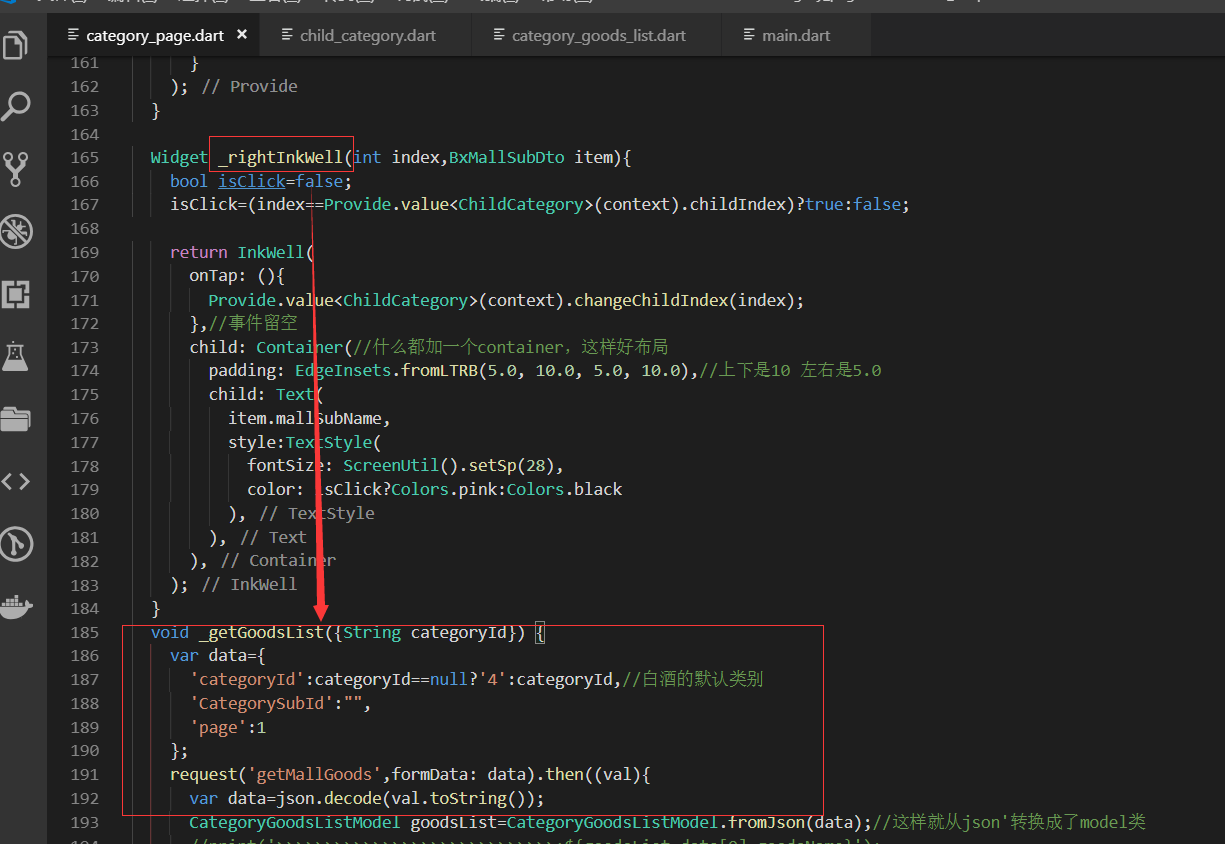
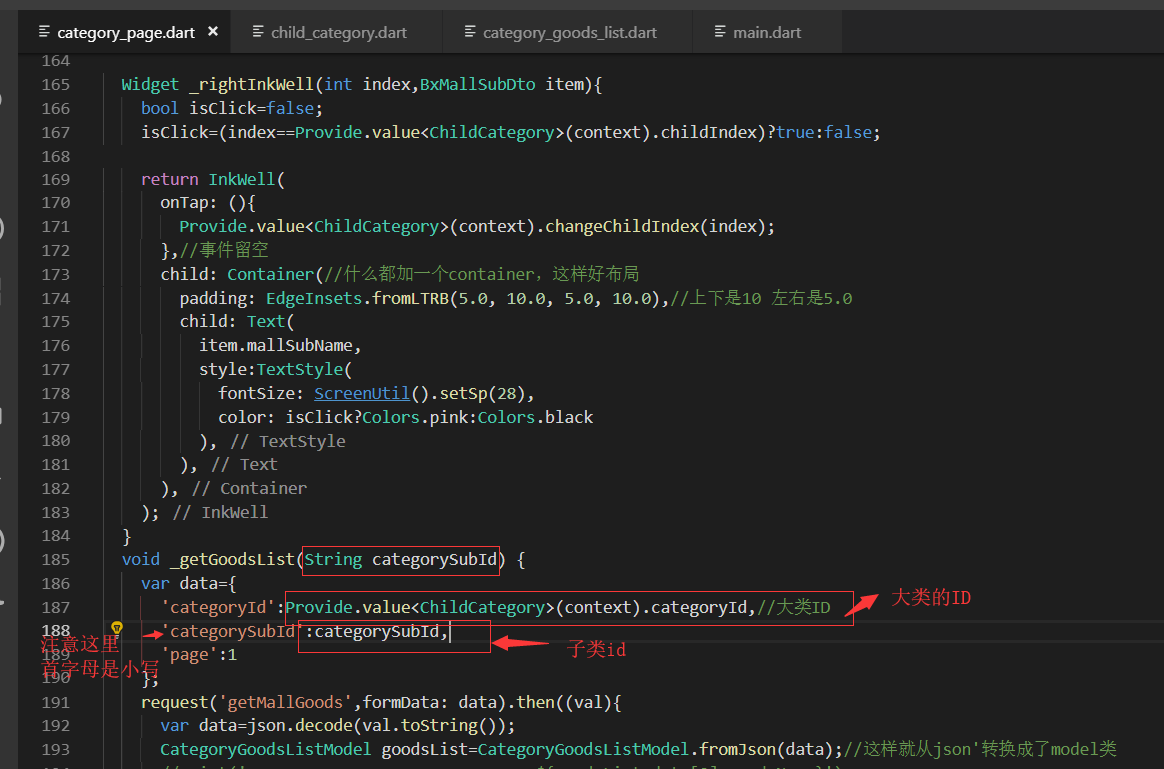
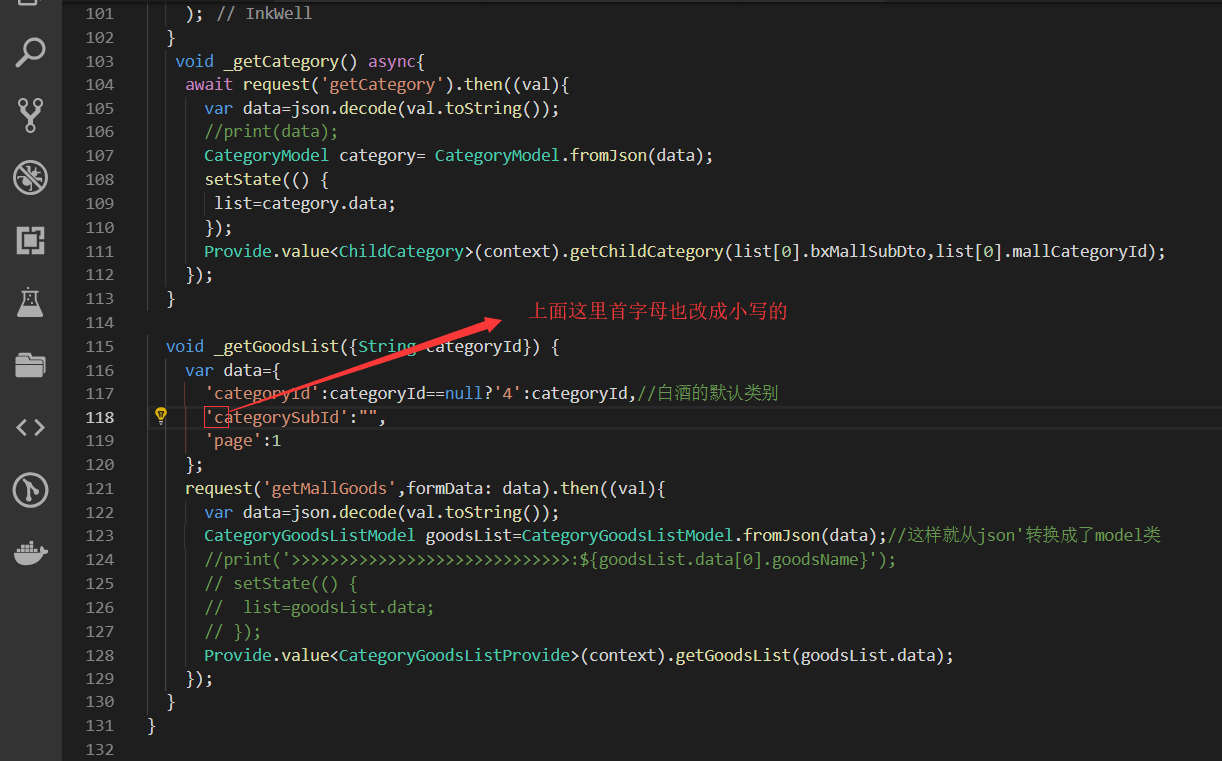
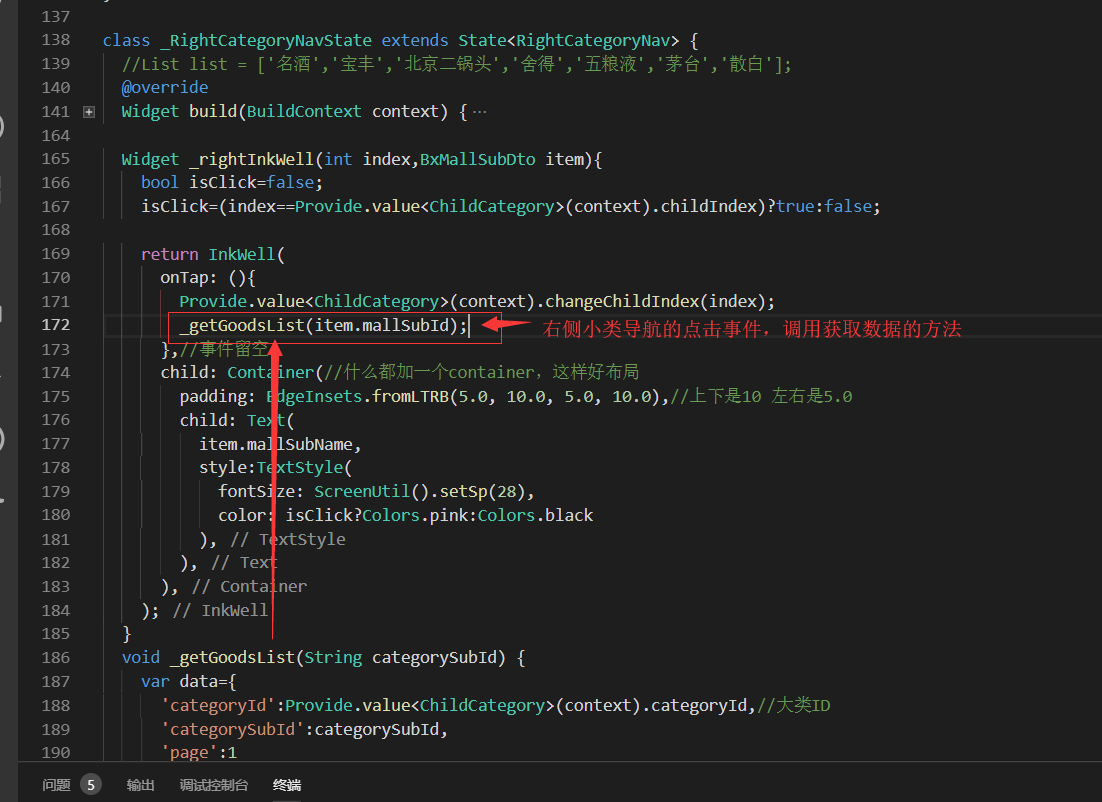
已经有这个访问数据的方法,下一步就是调用我们的方法
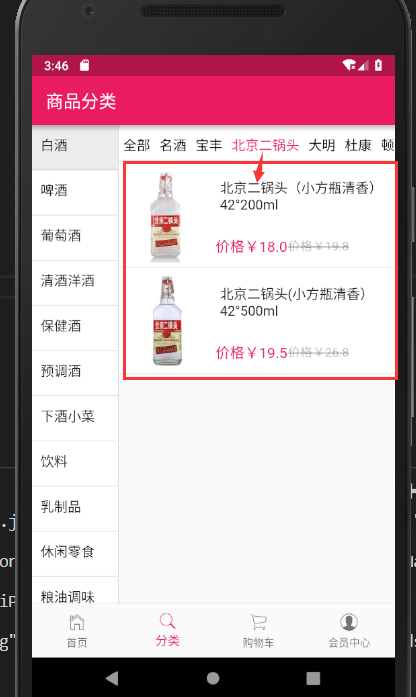
数据展示:
最终代码:
provide/child_category.dart
import 'package:flutter/material.dart';

import '../model/category.dart';

class ChildCategory with ChangeNotifier{

 List<BxMallSubDto> childCategoryList=[];

 int childIndex=;//子类高亮索引

 String categoryId='';//大类ID 白酒的id 默认为4

  //大类切换逻辑

  getChildCategory(List<BxMallSubDto> list,String id){

    childIndex=;//每次点击大类,小类的索引都要清空掉

    categoryId=id;

    BxMallSubDto all=BxMallSubDto();

    all.mallCategoryId="";

    all.mallCategoryId="";

    all.comments="null";

    all.mallSubName='全部';

    childCategoryList=[all];

    //childCategoryList=list;

    childCategoryList.addAll(list);

    notifyListeners();//监听

  }

  //改变子类索引,indexs是从哪里来的呢?从我们具体的类中进行传递

  changeChildIndex(index){

    childIndex=index;//把传递过来的index赋值给我们的childIndex

    notifyListeners();//通知

  }

}
import 'package:flutter/material.dart';

import '../service/service_method.dart';

import 'dart:convert';

import '../model/category.dart';

import '../model/categoryGoodsList.dart';

import 'package:flutter_screenutil/flutter_screenutil.dart';

import 'package:provide/provide.dart';

import '../provide/child_category.dart';

import '../provide/category_goods_list.dart';

class CategoryPage extends StatefulWidget {

  @override

  _CategoryPageState createState() => _CategoryPageState();

}

class _CategoryPageState extends State<CategoryPage> {

  @override

  Widget build(BuildContext context) {

    //_getCategory();

    return Scaffold(

      appBar: AppBar(title: Text('商品分类'),),

      body: Container(

        child: Row(

          children: <Widget>[

            LeftCategoryNav(),

            Column(

              children: <Widget>[

                RightCategoryNav(),

                CategoryGoodsList()

              ],

            )

          ],

        ),

      ),

    );

  }

}

//左侧大类导航

class LeftCategoryNav extends StatefulWidget {

  @override

  _LeftCategoryNavState createState() => _LeftCategoryNavState();

}

class _LeftCategoryNavState extends State<LeftCategoryNav> {

  List list=[];

  var listIndex=;

  @override

  void initState() {

    super.initState();

    _getCategory();//请求接口的数据

    _getGoodsList();//参数是可选的默认是4 所以这里可以不用传值

  }

  @override

  Widget build(BuildContext context) {

    return Container(

      width: ScreenUtil().setWidth(),

      decoration: BoxDecoration(

        border: Border(

          right: BorderSide(width:1.0,color: Colors.black12),//有边框

        )

      ),

      child: ListView.builder(

        itemCount: list.length,

        itemBuilder: (contex,index){

          return _leftInkWell(index);

        },

      ),

    );

  }

  Widget _leftInkWell(int index){

    bool isClick=false;

    isClick=(index==listIndex)?true:false;

    return InkWell(

      onTap: (){

        setState(() {

         listIndex=index;

        });

        var childList=list[index].bxMallSubDto;//当前大类的子类的列表

        var categoryId=list[index].mallCategoryId;//大类的id

        Provide.value<ChildCategory>(context).getChildCategory(childList,categoryId);

        _getGoodsList(categoryId:categoryId);

      },

      child: Container(

        height: ScreenUtil().setHeight(),

        padding: EdgeInsets.only(left:10.0,top:10.0),

        decoration: BoxDecoration(

          color: isClick?Color.fromRGBO(, , , 1.0): Colors.white,

          border: Border(

            bottom: BorderSide(width: 1.0,color: Colors.black12)

          )

        ),

        child: Text(

          list[index].mallCategoryName,

          style: TextStyle(fontSize: ScreenUtil().setSp()),//设置字体大小,为了兼容使用setSp

        ),

      ),

    );

  }

   void _getCategory() async{

    await request('getCategory').then((val){

      var data=json.decode(val.toString());

      //print(data);

      CategoryModel category= CategoryModel.fromJson(data);

      setState(() {

       list=category.data;

      });

      Provide.value<ChildCategory>(context).getChildCategory(list[].bxMallSubDto,list[].mallCategoryId);

    });

  }

  void _getGoodsList({String categoryId}) {

    var data={

      'categoryId':categoryId==null?'':categoryId,//白酒的默认类别

      'categorySubId':"",

      'page':

    };

    request('getMallGoods',formData: data).then((val){

      var data=json.decode(val.toString());

      CategoryGoodsListModel goodsList=CategoryGoodsListModel.fromJson(data);//这样就从json'转换成了model类

      //print('>>>>>>>>>>>>>>>>>>>>>>>>>>>>>:${goodsList.data[0].goodsName}');

      // setState(() {

      //  list=goodsList.data;

      // });

      Provide.value<CategoryGoodsListProvide>(context).getGoodsList(goodsList.data);

    });

  }

}

class RightCategoryNav extends StatefulWidget {

  @override

  _RightCategoryNavState createState() => _RightCategoryNavState();

}

class _RightCategoryNavState extends State<RightCategoryNav> {

  //List list = ['名酒','宝丰','北京二锅头','舍得','五粮液','茅台','散白'];

  @override

  Widget build(BuildContext context) {

    return Provide<ChildCategory>(

      builder: (context,child,childCategory){

        return  Container(

          height: ScreenUtil().setHeight(),

          width: ScreenUtil().setWidth(),//总的宽度是750 -180

          decoration: BoxDecoration(

            color: Colors.white,//白色背景

            border: Border(

              bottom: BorderSide(width: 1.0,color: Colors.black12)//边界线

            )

          ),

          child: ListView.builder(

            scrollDirection: Axis.horizontal,

            itemCount: childCategory.childCategoryList.length,

            itemBuilder: (context,index){

              return _rightInkWell(index,childCategory.childCategoryList[index]);

            },

          ),

        );

      }

    );

  }

  Widget _rightInkWell(int index,BxMallSubDto item){

    bool isClick=false;

    isClick=(index==Provide.value<ChildCategory>(context).childIndex)?true:false;

    return InkWell(

      onTap: (){

        Provide.value<ChildCategory>(context).changeChildIndex(index);

        _getGoodsList(item.mallSubId);

      },//事件留空

      child: Container(//什么都加一个container,这样好布局

        padding: EdgeInsets.fromLTRB(5.0, 10.0, 5.0, 10.0),//上下是10 左右是5.0

        child: Text(

          item.mallSubName,

          style:TextStyle(

            fontSize: ScreenUtil().setSp(),

            color: isClick?Colors.pink:Colors.black

          ),

        ),

      ),

    );

  }

  void _getGoodsList(String categorySubId) {

    var data={

      'categoryId':Provide.value<ChildCategory>(context).categoryId,//大类ID

      'categorySubId':categorySubId,

      'page':

    };

    request('getMallGoods',formData: data).then((val){

      var data=json.decode(val.toString());

      CategoryGoodsListModel goodsList=CategoryGoodsListModel.fromJson(data);//这样就从json'转换成了model类

      Provide.value<CategoryGoodsListProvide>(context).getGoodsList(goodsList.data);

    });

  }

}

//商品列表 ,可以上拉加载

class CategoryGoodsList extends StatefulWidget {

  @override

  _CategoryGoodsListState createState() => _CategoryGoodsListState();

}

class _CategoryGoodsListState extends State<CategoryGoodsList> {

  @override

  void initState() {

    //_getGoodsList();

    super.initState();

  }

  @override

  Widget build(BuildContext context) {

    return Provide<CategoryGoodsListProvide>(

      builder: (context,child,data){

        return  Expanded(

          child: Container(

            width: ScreenUtil().setWidth(),

            //height: ScreenUtil().setHeight(974),

            child: ListView.builder(

              itemCount: data.goodsList.length,

              itemBuilder: (contex,index){

                return _listWidget(data.goodsList,index);

              },

            ),

          ),

        );

      },

    );

  }

  Widget _goodsImage(List newList,index){

    return Container(

      width: ScreenUtil().setWidth(),//设置200的宽度 限制

      child: Image.network(newList[index].image),

    );

  }

  Widget _goodsName(List newList,index){

    return Container(

      padding: EdgeInsets.all(5.0),//上下左右都是5.0的内边距

      width: ScreenUtil().setWidth(),//370是一个大约的值

      child: Text(

        newList[index].goodsName,

        maxLines: ,//最多显示2行内容

        overflow: TextOverflow.ellipsis,

        style: TextStyle(fontSize: ScreenUtil().setSp()),//字体大小

      ),

    );

  }

  Widget _goodsPrice(List newList,index){

    return Container(

      margin: EdgeInsets.only(top:20.0),//和上面的外间距

      width: ScreenUtil().setWidth(),//370是一个大约的值

      child: Row(

        children: <Widget>[

          Text(

            '价格¥${newList[index].presentPrice}',

            style: TextStyle(color: Colors.pink,fontSize: ScreenUtil().setSp()),

          ),

          Text(

            '价格¥${newList[index].oriPrice}',

            style: TextStyle(

              color: Colors.black26,

              decoration: TextDecoration.lineThrough

            ),//删除线的样式

          )

        ],

      ),

    );

  }

  Widget _listWidget(List newList,int index){

    return InkWell(

      onTap: (){},

      child: Container(

        padding: EdgeInsets.only(top:5.0,bottom:5.0),

        decoration: BoxDecoration(

          color: Colors.white,

          border: Border(

            bottom: BorderSide(width: 1.0,color: Colors.black12)

          )

        ),

        child: Row(

          children: <Widget>[

            _goodsImage(newList,index),

            Column(

              children: <Widget>[

                _goodsName(newList,index),

                _goodsPrice(newList,index)

              ],

            )

          ],

        ),

      ),

    );

  }

}
category_page.dart
Flutter实战视频-移动电商-33.列表页_子类和商品列表交互效果的更多相关文章
- Flutter实战视频-移动电商-43.详细页_补充首页跳转到详细页
43.详细页_补充首页跳转到详细页 首页轮播点击到详细页 修改我们轮播这里的代码:SwiperDiy这个类这里的代码 return InkWell( onTap: (){ Application.ro ...
- Flutter实战视频-移动电商-21.分类页_类别信息接口调试
21.分类页_类别信息接口调试 先解决一个坑 取消上面的GridVIew的回弹效果.就是在拖这个gridview的时候有一个滚动的效果 physics: NeverScrollableScrollPh ...
- Flutter实战视频-移动电商-44.详细页_首屏自定义Widget编写
44.详细页_首屏自定义Widget编写 把详细页的图片.标题.编号和价格形成一个单独的widget去引用 详情页的顶部单独封装个插件 在pages下面新建detials_page的文件件并在里面新建 ...
- Flutter实战视频-移动电商-45.详细页_说明区域UI编写
45.详细页_说明区域UI编写 pages/details_page/details_expain.dart 详情页面引用组件 效果展示: 最终代码: import 'package:flutter/ ...
- Flutter实战视频-移动电商-46.详细页_自定义TabBar Widget
46.详细页_自定义TabBar Widget 主要实现详情和评论的tab provide定义变量 自己做一个tab然后用provide去控制 定义两个变量来判断是左侧选中了还是右侧选中了.并定义一个 ...
- Flutter实战视频-移动电商-48.详细页_详情和评论的切换
48.详细页_详情和评论的切换 增加切换的效果,我们主要是修改这个地方 这样我们的评论的内容就显示出来了 最终代码 details_web.dart import 'package:flutter/m ...
- Flutter实战视频-移动电商-41.详细页_数据接口的调试
41.详细页_数据接口的调试 建立数据模型层,我们的业务逻辑分开,然后进行后台数据的调试 生成model类 json数据: { ", "message": "s ...
- Flutter移动电商实战 --(33)列表页_子类和商品列表交互效果
主要实现点击小类下面的列表跟着切换 获取右侧下面的列表信息,即要传递大类的id也要传递小类的,所以需要把左侧的大类的id也要Provide化 可以看下网站上的接口说明: https://jspang. ...
- Flutter实战视频-移动电商-47.详细页_Flutter_html插件的使用
47.详细页_Flutter_html插件的使用 详情里面是hemlt和图片组成的,但是flutter是不支持html的所以需要其他插件 flutter webview plugin:这个不太好用 f ...
随机推荐
- Vue 资源
一. 资源教程 综合类 vuejs 英文资料 Vue中文资料总汇 Vue.js 的一些资源索引 vue资料 入门类 vue 快速入门 Vue.js 中文系列视频教程 on Laravist 英文教程 ...
- caffe2--ubuntu16.04--14.04--install
Install Welcome to Caffe2! Get started with deep learning today by following the step by step guide ...
- PE添加Style
1. <style id="NumberStyle"> <setting> <param name="option"> ...
- vuex 介绍
vuex是为vue.js开发的状态管理模式,负责vue的状态管理,状态管理是干啥的呢,举个栗子,比如一个酒店,哪间屋子入住了客人,哪间屋子客人退房了,客人退房后,房间有没有清扫过,这些都需要去记录,以 ...
- 将txt文件数据存入excel表格
前言 最近使用Appium自动化在测试设备配网的情况,需要记录每次成功与否和耗时时间. 由于App不是很稳定,执行一段时间会奔溃,因此数据只能通过追加的形式写入到txt文件. 实现过程 存储在txt文 ...
- javascript和c#的深度拷贝的一种通用方法
很简单,序列化后反序列化...
- asp.net mvc4 之Webapi之客户端或服务器端安全控制
一.WebAPI的工作方式 WebAPI的工作方式:HTTP的请求最先是被传递到HOST中的,如果WebAPI是被寄宿在IIS上的,这个HOST就是IIS上,HOST是没有能力也没有必 要进行请求的处 ...
- java socket InputStream和OutputStream
从java socket对象获取的InputSteam的read方法其实是对linux的recv()函数的调用,OutputStream也同理. 也就是说,InputStream和OutputStre ...
- 清理yum 缓存
两条命令 yum clean all 以及 rm -rf /var/cache/yum/* 如何有效的清理yum缓存 - CSDN博客 https://blog.csdn.net/nsrainbow/ ...
- TTimer很特殊
TTimer = class(TComponent) private FInterval: Cardinal; FWindowHandle: HWND; FOnTimer: TNotifyEvent; ...