
《Entity Framework 6 Recipes》中文翻译系列 (17) -----第三章 查询之分页、过滤和使用DateTime中的日期部分分组
翻译的初衷以及为什么选择《Entity Framework 6 Recipes》来学习,请看本系列开篇
3-12 分页和过滤
问题
你想使用分页和过滤来创建查询。
解决方案
假设你有如图3-13所示的模型,模型中有一个Custormer实体类型。
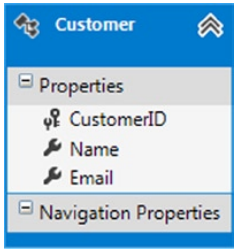
图3-13 包含一个Customer实体类型的模型
你有一个基于过滤条件来显示客户信息的应用。你的公司有许多客户(也许数百万!),为了保证尽可能响应的用户体验,你想在每一页上只显示一定数量的客户。创建一个查询,它能过虑客户并按页返回可控数量的结果集。如代码清单3-26所示。
代码清单3-26. 一个包含过滤和分页的查询
 using (var context = new EFRecipesEntities())

             {

                 // 删除之前的数据

                 context.Database.ExecuteSqlCommand("delete from chapter3.customer");

                 // 添加新的测试数据

                 context.Customers.Add(new Customer

                 {

                     Name = "Roberts, Jill",

                     Email = "jroberts@abc.com"

                 });

                 context.Customers.Add(new Customer

                 {

                     Name = "Robertson, Alice",

                     Email = "arob@gmail.com"

                 });

                 context.Customers.Add(new Customer

                 {

                     Name = "Rogers, Steven",

                     Email = "srogers@termite.com"

                 });

                 context.Customers.Add(new Customer

                 {

                     Name = "Roe, Allen",

                     Email = "allenr@umc.com"

                 });

                 context.Customers.Add(new Customer

                 {

                     Name = "Jones, Chris",

                     Email = "cjones@ibp.com"

                 });

                 context.SaveChanges();

             }

             using (var context = new EFRecipesEntities())

             {

                 string match = "Ro";

                 int pageIndex = ;

                 int pageSize = ;

                 var customers = context.Customers.Where(c => c.Name.StartsWith(match))

                 //var customers = context.Customers.Where(c => c.Name.Contains(match))

                                     .OrderBy(c => c.Name)

                                     .Skip(pageIndex * pageSize)

                                     .Take(pageSize);

                 Console.WriteLine("Customers Ro*");

                 foreach (var customer in customers)

                 {

                     Console.WriteLine("{0} [email: {1}]", customer.Name, customer.Email);

                 }

             }

             using (var context = new EFRecipesEntities())

             {

                 string match = "Ro%";

                 int pageIndex = ;

                 int pageSize = ;

                 var esql = @"select value c from Customers as c

                  where c.Name like @Name

                  order by c.Name

                  skip @Skip limit @Limit";

                 Console.WriteLine("\nCustomers Ro*");

                 var customers = ((IObjectContextAdapter)context).ObjectContext.CreateQuery<Customer>(esql, new[]

                       {

                         new ObjectParameter("Name",match),

                         new ObjectParameter("Skip",pageIndex * pageSize),

                         new ObjectParameter("Limit",pageSize)

                       });

                 foreach (var customer in customers)

                 {

                     Console.WriteLine("{0} [email: {1}]", customer.Name, customer.Email);

                 }

             }

             Console.WriteLine("\nPress <enter> to continue...");

             Console.ReadLine();
代码清单3-26的输出如下:
Customers Ro*

Roberts, Jill [email: jroberts@abc.com]

Robertson, Alice [email: arob@gmail.com]

Roe, Allen [email: allenr@umc.com]

Customers Ro*

Roberts, Jill [email: jroberts@abc.com]

Robertson, Alice [email: arob@gmail.com]

Roe, Allen [email: allenr@umc.com]
原理
在代码清单3-26中,针对这个问题,我们展示了不同的方法。在第一种方法中,我们使用了LINQ to Entities扩展方法创建了一个LINQ查询。我们使用Where()方法过滤结果集,过虑条件为,姓以“Ro“开头。因为我们在lambda表达工中使用了扩展方法StartsWith()。我们不需要使用SQL的通配符表达式“Ro%"。
过滤后,我们使用OrderBy()方法对结果集排序,排序后的结果集通过方法Skip()来获取。我们使用Skip()方法跳过PageIndex页,每页的大小为PageSize. 使用Take()方法来获取受限的结果集(译注:从结果集获取指定页大小的记录数),我们只需要获取结果集中的一页。
注意,在代码块中,我们使用LINQ扩展方法创建了一个完整的查询,而不是我们之前看到的SQL查询表达式。Skip()和Take()方法只在扩展方法中公布,不是查询语法。
第二种方法,我们构建了一个完整的参数化的Entity SQL表达式,这也许是你最熟悉的方式,但是这在使用字符串和可执行代码(C#)来表示查询的两种方式间产生了固有的不匹配风险。
3-13 按日期分组
问题
你有一个包含DateTime类型属性的实体,你想通过DateTime类型属性的Date部分来对实体的实例进行分组。
解决方案
假设你有如图3-14所示的模型,模型中有一个Registration实体类型,该实体类型包含一个DateTime类型的属性。
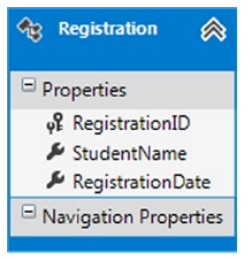
图3-14 模型中有一个Registration实体类型,该实体类型包含一个DateTime类型的属性
该示例使用Code-First方法,在代码清单3-27中,我们创建了一些实体。
代码清单3-27. Registration实体类型
 public class Registration

 {

     public int RegistrationId { get; set; }

     public string StudentName { get; set; }

     public DateTime? RegistrationDate { get; set; }

 }
接下来,代码清单3-28中创建了上下文对象,它是用Code-First方法访问实体框架功能的入口。
代码清单3-28. 上下文对象
 public class EFRecipesEntities : DbContext

 {

     public EFRecipesEntities()

         : base("ConnectionString") {}

     public DbSet<Registration> Registrations { get; set; }

     protected override void OnModelCreating(DbModelBuilder modelBuilder)

     {

         modelBuilder.Entity<Registration>().ToTable("Chapter3.Registration");

         base.OnModelCreating(modelBuilder);

     }

 }
我们使用RegistrationDate属性的Date部分对所有的registrations进行分组,你可能会对LINQ中的 group by RegistrationDate.Date动心.虽然能过编译,但是你仍会得到一个运行时错误,该错误描述Date不能转换成SQL。 为了能使用RegistrationDate属性的Date部分来分组,请看代码清单3-29.
代码清单3-29. 使用DateTime类型属性的Date部分对实例进行分组
 using (var context = new EFRecipesEntities())

             {

                 // 删除之前的测试数据

                 context.Database.ExecuteSqlCommand("delete from chapter3.registration");

                 // 添加新的测试数据

                 context.Registrations.Add(new Registration

                 {

                     StudentName = "Jill Rogers",

                     RegistrationDate = DateTime.Parse("12/03/2009 9:30 pm")

                 });

                 context.Registrations.Add(new Registration

                 {

                     StudentName = "Steven Combs",

                     RegistrationDate = DateTime.Parse("12/03/2009 10:45 am")

                 });

                 context.Registrations.Add(new Registration

                 {

                     StudentName = "Robin Rosen",

                     RegistrationDate = DateTime.Parse("12/04/2009 11:18 am")

                 });

                 context.Registrations.Add(new Registration

                 {

                     StudentName = "Allen Smith",

                     RegistrationDate = DateTime.Parse("12/04/2009 3:31 pm")

                 });

                 context.SaveChanges();

             }

             using (var context = new EFRecipesEntities())

             {

                 var groups = from r in context.Registrations

                              // 凭借内置的TruncateTime函数提取Date部分

                              group r by DbFunctions.TruncateTime(r.RegistrationDate)

                                  into g

                                  select g;

                 foreach (var element in groups)

                 {

                     Console.WriteLine("\nRegistrations for {0}",

                            ((DateTime)element.Key).ToShortDateString());

                     foreach (var registration in element)

                     {

                         Console.WriteLine("\t{0}", registration.StudentName);

                     }

                 }

             }

             Console.WriteLine("\nPress <enter> to continue...");

             Console.ReadLine();
代码清单3-29输出如下:
Registrations for //

Jill Rogers

Steven Combs

Registrations for //

Robin Rosen

Allen Smit
原理
对registrations分组的分组键是通过Truncate()函数提RegistrationDate属性中的Date部分。这是实体框架的内置函数,包含在DbFunctions类中,它只提取DateTime中的Date部分。内置的DbFunctions类,包含着大量的,格式化、聚合、字符串操作、日期和数字服务。它在命名空间System.Data.Entity中。遗留类,EntityFunctios,是在EF6之前的版本中使用的,它仍然能在EF6中使用,但你会得到一个编译警告,它建议你使用最亲的DbFunctions类。我们将在11章继续讨论它。
实体框架交流QQ群: 458326058,欢迎有兴趣的朋友加入一起交流
谢谢大家的持续关注,我的博客地址:http://www.cnblogs.com/VolcanoCloud/
《Entity Framework 6 Recipes》中文翻译系列 (17) -----第三章 查询之分页、过滤和使用DateTime中的日期部分分组的更多相关文章
- 《Entity Framework 6 Recipes》中文翻译系列 (16) -----第三章 查询之左连接和在TPH中通过派生类排序
翻译的初衷以及为什么选择<Entity Framework 6 Recipes>来学习,请看本系列开篇 3-10应用左连接 问题 你想使用左外连接来合并两个实体的属性. 解决方案 假设你有 ...
- 《Entity Framework 6 Recipes》中文翻译系列 (11) -----第三章 查询之异步查询
翻译的初衷以及为什么选择<Entity Framework 6 Recipes>来学习,请看本系列开篇 第三章 查询 前一章,我们展示了常见数据库场景的建模方式,本章将向你展示如何查询实体 ...
- 《Entity Framework 6 Recipes》中文翻译系列 (12) -----第三章 查询之使用SQL语句
翻译的初衷以及为什么选择<Entity Framework 6 Recipes>来学习,请看本系列开篇 3-2使用原生SQL语句更新 问题 你想在实体框架中使用原生的SQL语句,来更新底层 ...
- 《Entity Framework 6 Recipes》中文翻译系列 (13) -----第三章 查询之使用Entity SQL
翻译的初衷以及为什么选择<Entity Framework 6 Recipes>来学习,请看本系列开篇 3-4使用实体SQL查询模型 问题 你想通过执行Entity SQL语句来查询你的实 ...
- 《Entity Framework 6 Recipes》中文翻译系列 (14) -----第三章 查询之查询中设置默认值和存储过程返回多结果集
翻译的初衷以及为什么选择<Entity Framework 6 Recipes>来学习,请看本系列开篇 3-6在查询中设置默认值 问题 你有这样一个用例,当查询返回null值时,给相应属性 ...
- 《Entity Framework 6 Recipes》中文翻译系列 (15) -----第三章 查询之与列表值比较和过滤关联实体
翻译的初衷以及为什么选择<Entity Framework 6 Recipes>来学习,请看本系列开篇 3-8与列表值比较 问题 你想查询一个实体,条件是给定的列表中包含指定属性的值. 解 ...
- 《Entity Framework 6 Recipes》中文翻译系列 (18) -----第三章 查询之结果集扁平化和多属性分组
翻译的初衷以及为什么选择<Entity Framework 6 Recipes>来学习,请看本系列开篇 3-14 结果集扁平化 问题 你有一对多关联的两个实体,你想通过一个查询,获取关联 ...
- 《Entity Framework 6 Recipes》中文翻译系列 (19) -----第三章 查询之使用位操作和多属性连接(join)
翻译的初衷以及为什么选择<Entity Framework 6 Recipes>来学习,请看本系列开篇 3-16 过滤中使用位操作 问题 你想在查询的过滤条件中使用位操作. 解决方案 假 ...
- 《Entity Framework 6 Recipes》翻译系列 (1) -----第一章 开始使用实体框架之历史和框架简述
微软的Entity Framework 受到越来越多人的关注和使用,Entity Framework7.0版本也即将发行.虽然已经开源,可遗憾的是,国内没有关于它的书籍,更不用说好书了,可能是因为EF ...
随机推荐
- yii2的分页和ajax分页
要想使用Yii分页类第一步:在控制器层加载分页类 use yii\data\Pagination;第二步: 使用model层查询数据,并用分分页,限制每页的显示条数$data = User::find ...
- 转:工具类之SpannableStringUtils(相信你会爱上它)
这个工具类真是构思了良久才设计出来,采用了建造者模式,然后你们就可以用链式调用了,talk is cheap, let me show the demo. demo code 有没有心动一下哈,下面就 ...
- 多栏多列布局(display:flex)
display:flex 多栏多列布局浏览器支持情况:火狐直接支持w3c无前缀写法,谷歌和opera支持-webkit- 前缀写法,比较适合移动端开发使用, display:flex 这个牛逼的css ...
- 获取html 中的内容 将前台的数据获取到后台
使用js创建一个form表单 ,使用post上传到后台中 下面是代码.在获取html内容的时候使用了js节点来获取内容. parent:父节点.上一级的节点 siblings:兄弟节点.同一级别的节点 ...
- [转]MSI安装程序中的文件替换
原文链接:http://teach.hanzify.org/article/652-1233562028.html 前言 最近有汉化朋友问起如何不重新制作MSI文件,而直接用汉化好的文件替换MSI安装 ...
- 在CentOS 7中安装与配置JDK8
参考命令:http://www.jb51.net/os/RedHat/73016.html来进行安装 安装说明 系统环境:centos7 安装方式:rpm安装 软件:jdk-8u25-linux-x6 ...
- http://devdocs.io/【文档收藏】
http://devdocs.io http://bower.io/ www.bower.iobrowserify.org jsPlumb布局 https://github.com/lndb/jsPl ...
- Python框架之Tornado(二)请求阶段
概述 上图是tornado程序启动以及接收到客户端请求后的整个过程,对于整个过程可以分为两大部分: 启动程序阶段,又称为待请求阶段(上图1.2所有系列和3.0) 接收并处理客户端请求阶段(上图3系列) ...
- Java_类似java.lang.VerifyError: Expecting a stackmap frame at branch target 22 in method的解决方法
报异常的方法内使用了Java 7的新特性:自动资源释放,类似于try(){},即在try后面跟一括号,在括号里面对一些资源赋值,try里面的代码块执行完毕之后会自动释放try后面的括号中声明的资源. ...
- dictionary 应用(绑定dgv)
dictionary的用法://初始化添加所有车位进这队列 Utility.Effectlist.Add(); //每触发一次,用这个增加数量 Utility.Effectlist["Car ...