
js实现考试随机选题
考试的时候经常用到,发在这里记录一下
基本信息包括: 学号、姓名、题号、题目名称
实现原理:给每一个题目添加一个编号,JS生成随机数,遍历每一个学生,把题目根据生成的随机数作为题目编号放入学生信息中
效果图:
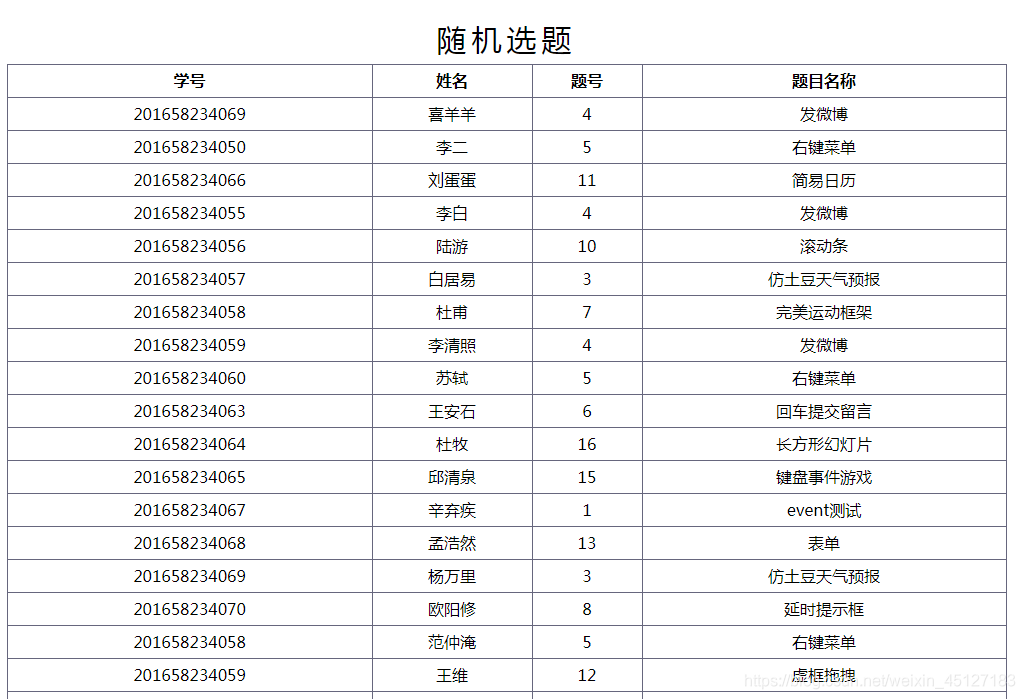
代码:
<!DOCTYPE html>

<html lang="en">

<head>

    <meta charset="UTF-8">

    <title>Title</title>

</head>

<style>

    table{

        width: 1000px;

        margin: 50px auto;

        border-collapse: collapse;

        line-height: 30px;

        text-align: center;

    }

    caption{

        font-size: 30px;

        letter-spacing: 5px;

        line-height: 50px;

    }

    th,td{

        border: 1px #66667d solid;

    }

</style>

<body>

<table>

    <caption>随机选题</caption>

    <thead>

    <th>学号</th>

    <th>姓名</th>

    <th>题号</th>

    <th>题目名称</th>

    </thead>

    <tbody id="tbody">

    </tbody>

</table>

<template id="temp1">

    <tr>

        <td>{{student}}</td>

        <td>{{student_name}}</td>

        <td>{{topic}}</td>

        <td>{{topic_name}}</td>

    </tr>

</template>

<script src="js/data.js"></script>

<script>

    var htmlText='';

    var tbody=document.getElementById('tbody');

    var str=document.getElementById('temp1').innerHTML;

    var i,len=topic.length,arr=[];

    // 模板方法,适用于文本结构复杂情况

    student.forEach(function (el) {

        i=parseInt(Math.random()*len);

        arr.push(str.replace('{{student}}',el.no).replace('{{student_name}}',el.name)

            .replace('{{topic}}',topic[i].no).replace('{{topic_name}}',topic[i].name));

    });

    tbody.innerHTML=arr.join('');

    // 常用方法

    // student.forEach(function (el) {

    //     i=parseInt(Math.random()*len);

    //     htmlText+= '<tr><td>'+el.no+'</td><td>'+el.name+'</td><td>'+topic[i].no+'</td><td>'+topic[i].name+'</td></tr>'

    // });

    // tbody.innerHTML=htmlText;

</script>

</body>

</html>
学生数据表:
var student=[];

student[student.length]={no:'201658234069',name:'喜羊羊'};

student[student.length]={no:'201658234050',name:'李二'};

student[student.length]={no:'201658234066',name:'刘蛋蛋'};

student[student.length]={no:'201658234055',name:'李白'};

student[student.length]={no:'201658234056',name:'陆游'};

student[student.length]={no:'201658234057',name:'白居易'};

student[student.length]={no:'201658234058',name:'杜甫'};

student[student.length]={no:'201658234059',name:'李清照'};

student[student.length]={no:'201658234060',name:'苏轼'};

student[student.length]={no:'201658234063',name:'王安石'};

student[student.length]={no:'201658234064',name:'杜牧'};

student[student.length]={no:'201658234065',name:'邱清泉'};

student[student.length]={no:'201658234067',name:'辛弃疾'};

student[student.length]={no:'201658234068',name:'孟浩然'};

student[student.length]={no:'201658234069',name:'杨万里'};

student[student.length]={no:'201658234070',name:'欧阳修'};

student[student.length]={no:'201658234058',name:'范仲淹'};

student[student.length]={no:'201658234059',name:'王维'};

student[student.length]={no:'201658234060',name:'陶渊明'};

student[student.length]={no:'201658234063',name:'诗经'};

student[student.length]={no:'201658234064',name:'黄庭坚'};

student[student.length]={no:'201658234065',name:'屈原'};

student[student.length]={no:'201658234067',name:'司马迁'};

student[student.length]={no:'201658234068',name:'袁枚'};

student[student.length]={no:'201658234069',name:'韩非'};

student[student.length]={no:'201658234070',name:'范成大'};

var topic=[];

topic[topic.length]={no:'1',name:'event测试'};

topic[topic.length]={no:'2',name:'flash动画框架'};

topic[topic.length]={no:'3',name:'仿土豆天气预报'};

topic[topic.length]={no:'4',name:'发微博'};

topic[topic.length]={no:'5',name:'右键菜单'};

topic[topic.length]={no:'6',name:'回车提交留言'};

topic[topic.length]={no:'7',name:'完美运动框架'};

topic[topic.length]={no:'8',name:'延时提示框'};

topic[topic.length]={no:'9',name:'数字时钟'};

topic[topic.length]={no:'10',name:'滚动条'};

topic[topic.length]={no:'11',name:'简易日历'};

topic[topic.length]={no:'12',name:'虚框拖拽'};

topic[topic.length]={no:'13',name:'表单'};

topic[topic.length]={no:'14',name:'运行代码'};

topic[topic.length]={no:'15',name:'键盘事件游戏'};

topic[topic.length]={no:'16',name:'长方形幻灯片'};
js实现考试随机选题的更多相关文章
- Gremlins.js – 模拟用户随机操作的 JS 测试库
Gremlins.js 是基于 JavaScript 编写的 Monkey 测试库,支持 Node.js 平台和浏览器中使用.Gremlins.js 随机模拟用户操作:单击窗口中的任意位置,在表格中输 ...
- JS实现的随机乱撞的彩色圆球特效代码
<!doctype html> <html lang="en"> <head> <meta charset="UTF-8&quo ...
- !JS实战之随机像素图
JavaScript实例分享之----画随机像素图.随机像素图(作者自己取得名字)指的是一张图片上每一个像素的颜色都是随机的.此时应该能联想到这幅图多么眼花缭乱,好吧,我们用JS来实现它的原因是JS很 ...
- js javascript 简易随机值穿插加解密【原】
适用场景 本方法适用于需要对敏感信息进行加密传输,但加解密要求又不高的场景,因为是前台的javascript加解密,所以其实还是能通过js代码分析出原始值来的. 如果您对信息极其敏感, 比例登录密码这 ...
- js指定范围随机整数
js获取指定范围内随机整数,例如 6-10 (m-n) 计算公式: Math.floor(Math.random()*(n-m))+m // 6-10随机数,用循环得出一组测试随机数 var str ...
- JS操作CSS随机改变网页背景
今天有个朋友在weibo上问我可不可以用JS和CSS让页面每次刷新随机产生一张背景图,当然我的回答是可以的.具体可以这样做: 1.用JS定义一个图片数组,里面存放你想要随机展示的图片 1 2 3 4 ...
- js抽奖概率随机取出数据(简单示例)
在平常活动开发当中,经常会碰到抽奖等类似的js功能,那么下面我们随机取数组中的一条来展示出来. ( 一 ) 无概率问题 var gift_ = ['apple pro一台','iphoneX一台',' ...
- 原生JS实现简易随机点名功能
定时器的工作原理,这里将用引用How JavaScript Timers Work中的例子来解释定时器的工作原理,该图为一个简单版的原理图.· 上图中,左侧数字代表时间,单位毫秒:左侧文字代表某一个操 ...
- JS对象实现随机满天小星星实例
<!DOCTYPE html> <html> <head> <meta charset="UTF-8"> <title> ...
随机推荐
- rails debug
=debug @thesis config下配置 东西需要重启之后才管用
- flask的请求上下文源码解读
一.flask请求上下文源码解读 通过上篇源码分析( ---Flask中的CBV和上下文管理--- ),我们知道了有请求发来的时候就执行了app(Flask的实例化对象)的__call__方法,而__ ...
- Android Weekly Notes Issue #319
Android Weekly Issue #319 July 22nd, 2018. Android Weekly Issue #319 本期内容包括: MotionLayout加动画; Kotlin ...
- BZOJ 1614 [Usaco2007 Jan]Telephone Lines架设电话线:spfa + 二分【路径中最大边长最小】
题目链接:http://www.lydsy.com/JudgeOnline/problem.php?id=1614 题意: 给你一个无向图,n个点,m条边. 你需要找出一条从1到n的路径,使得这条路径 ...
- VC++动态链接库(DLL)编程深入浅出(转帖:基础班)
1.概论 先来阐述一下DLL(Dynamic Linkable Library)的概念,你可以简单的把DLL看成一种仓库,它提供给你一些可以直接拿来用的变量.函数或类.在仓库的发展史上经历了“无库-静 ...
- leetcode 102 Binary Tree Level Order Traversal(DFS||BFS)
Given a binary tree, return the level order traversal of its nodes' values. (ie, from left to right, ...
- NO0:重新拾起C语言
因工作所需,重新捡起C语言,之前在学校里有接触过,但现在已经忘的一干二净了,现决定重新开始学习,为工作,为生活. 以<标准 C程序设计 第5版>的课程进行基础学习,同时以另外两本书为辅助, ...
- UOJ_407_【IOI2018】狼人
http://uoj.ac/problem/407 分析: 分别建立最小/最大kruskal重构树. 每次询问给出的两个点能走到的部分分别对应两棵树\(dfs\)序的一段区间. 转化成判断矩形中是否有 ...
- Ubuntu——Python3.x——scikit-learn 安装
修改默认Python (默认的是Python2.7) rm -rf /usr/bin/python ln -s /usr/bin/ptyhon3 /usr/bin/python 安装所需依赖: apt ...
- C++的函数重载与C参数个数不一致时的编译
C++的函数重载意味着函数名和返回值类型相同,但是参数个数和/或类型不同.在编译过程中编译器一般会把各个参数的类型连接到函数名内组成新的函数名,以区分各个重载函数. C语言不支持函数重载.但是有时候虽 ...