
VA助手添加扩展文件后缀名
Allow C/C++ files with a non-standard extension
Follow these steps to make Visual Assist consider as C/C++ files with a non-standard extension.
Changes for Visual Assist
Exit all instances of Visual Studio before editing the registry.
If your extension denotes a header file, use regedit to add the extension to ExtHeader in the following location. Remember to include the dot and terminating semicolon:
HKEY_CURRENT_USER\ Software \ Whole Tomato \ Visual Assist X \ <IDE spec>\
If your extension denotes a source file that is not a header file, add the extension to ExtSource in the following location. Remember to include the dot and terminating semicolon:
HKEY_CURRENT_USER \ Software \ Whole Tomato \ Visual Assist X \ <IDE spec> \
Press Rebuild on the Performance tab of the Visual Assist options dialog and restart your IDE.
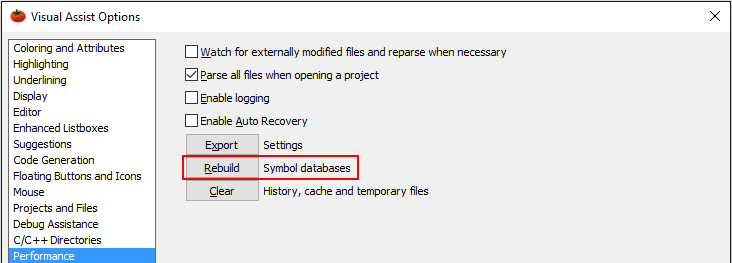
Changes for Visual Studio
Make version-specific changes to your IDE as well:
Visual Studio 2010 and newer
Add your extension to:
Tools | Options | Text Editor | File Extension | Microsoft Visual C++

Also add your extension to:
Visual Studio 2008 and 2005
Add your extension to:
Tools | Options | Text Editor | File Extension | Microsoft Visual C++
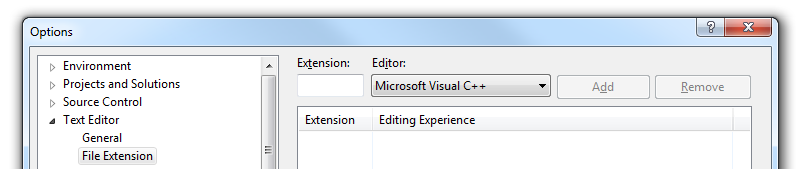
Also add your extension to:
Visual Studio 2003
Add your extension to:
Tools | Options | Projects | VC++ Build | C/C++ File Extensions
Exit the IDE and use regedit to clone the following entry to a like entry that ends in your extension:
HKEY_LOCAL_MACHINE\SOFTWARE\Microsoft\VisualStudio\7.1\Languages\File Extensions\.cpp
If you are using a 64-bit OS, then clone the registry key:
HKEY_LOCAL_MACHINE\SOFTWARE\Wow6432Node\Microsoft\VisualStudio\7.1\Languages\File Extensions\.cpp
Clone means create a new key for your extension and copy the default .cpp key value to the key you created.
Visual Studio 2002
Add your extension to:
Tools | Options | Projects | VC++ Build | C/C++ File Extensions
Exit the IDE and use regedit to clone the following entry to a like entry that ends in your extension:
HKEY_LOCAL_MACHINE\SOFTWARE\Microsoft\VisualStudio\7.0\Languages\File Extensions\.cpp
If you are using a 64-bit OS, then clone the registry key:
HKEY_LOCAL_MACHINE\SOFTWARE\Wow6432Node\Microsoft\VisualStudio\7.0\Languages\File Extensions\.cpp
Clone means create a new key for your extension and copy the default .cpp key value to the key you created.
Visual C++ 6.0
Exit your IDE and use regedit to add the extension to:
HKEY_CURRENT_USER\Software\Microsoft\DevStudio\6.0\Text Editor\Tabs/Language Settings\C/C++\FileExtensions.
VA助手添加扩展文件后缀名的更多相关文章
- windows服务器设置文件属性设置去掉隐藏已知文件类型的扩展名(即文件后缀名可见)
摘要: 1.文件后缀名不可见,系统运维过程容易发生同名不同后缀的文件操作混淆的情况 2.windows系统默认是文件后缀名不可见 3.所以需要更改一下配置. 4.操作步骤如下图: (1)点击组织-文件 ...
- Linux下的文件及文件后缀名
Linux下的文件及文件后缀名 2013-03-14 15:34 6969人阅读 评论(0) 收藏 举报 ++++++++++++++++++++++++++++++++++++++正文+++++++ ...
- js 上传文件后缀名的判断 var flag=false;应用
js 上传文件后缀名的判断 var flag=false;应用 <!DOCTYPE html PUBLIC "-//W3C//DTD XHTML 1.0 Transitional// ...
- -05 08:57 ARCGIS地统计学计算文件后缀名为.shp文件制作
2011-07-05 08:57 ARCGIS地统计学计算文件后缀名为.shp文件制作 ARCAMP软件要进行地统计计算的文件后格式后缀名必须为.shp的文件,网上介绍的方法复杂难懂,那么制作.shp ...
- C#文件后缀名详解
C#文件后缀名详解 .sln:解决方案文件,为解决方案资源管理器提供显示管理文件的图形接口所需的信息. .csproj:项目文件,创建应用程序所需的引用.数据连接.文件夹和文件的信息. .aspx:W ...
- PHP获取文件后缀名
PHP获取文件后缀名是PHP学习者常见的一种操作,无论是在面试过程中还是PHP新手自学中.PHP获取文件后缀名都是很普遍的需要掌握的一个知识点. 下面我们就给大家总结介绍PHP获取文件扩展名也就是后缀 ...
- python修改文件后缀名
修改文件后缀名 # -*- coding: utf-8 -*- import os # # 列出当前目录下所有的文件 # filedir = 'C:\\Users\\WT\\Desktop\\test ...
- 关于Windows下的文件后缀名问题
一.背景说明 有很多的小伙伴对windows下的文件后缀名不能很好地理解作用和区别,更不用说高深的使用了,在这里给大家说一下这些文件后缀名到底有什么区别,有什么作用呢? 二.说明 简单的说来,wind ...
- [Java] 03 String获取文件后缀名,判断文件是否合法
package test.string; import java.util.Arrays; import java.util.List; public class GetFileType { priv ...
随机推荐
- 浅谈Unity的渲染优化(1): 性能分析和瓶颈判断(上篇)
http://www.taidous.com/article-667-1.html 前言 首先,这个系列文章做个大致的介绍,题目"浅谈Unity",因为公司和国内大部分3D手游开发 ...
- [Xcode 实际操作]六、媒体与动画-(6)使用UIBlurEffect给图片添加模糊效果
目录:[Swift]Xcode实际操作 本文将演示如何给图像添加模糊效果. 在项目导航区,打开视图控制器的代码文件[ViewController.swift] import UIKit class V ...
- 剑指Offer的学习笔记(C#篇)-- 二叉搜索树的后序遍历序列
题目描述 输入一个整数数组,判断该数组是不是某二叉搜索树的后序遍历的结果.如果是则输出Yes,否则输出No.假设输入的数组的任意两个数字都互不相同. 一 . 解题思想与二叉搜索树概念 (1). 二叉树 ...
- java基础第八篇之jdk1.5、jdk1.7、jdk1.8新特性
JDK5新特性 自动装箱和拆箱 泛型 增强for循环 静态导入 可变参数 枚举 枚举概述 是指将变量的值一一列出来,变量的值只限于列举出来的值的范围内.举例:一周只有7天,一年只有12个月等. 回想单 ...
- Glassfish DeploymentException: Error in linking security policy for
http://stackoverflow.com/questions/7322476/glassfish-deploymentexception-error-in-linking-security-p ...
- Net Core 分布式微服务框架
Jimu : .Net Core 分布式微服务框架介绍 https://www.cnblogs.com/grissom007/p/9291345.html 一.前言 近些年一直浸淫在 .Net 平台做 ...
- BNU 4096 逆序 思维题
https://www.bnuoj.com/v3/problem_show.php?pid=4096 对于一个序列a,我们定义它的逆序数为满足a[i]>a[j]且i<j的有序对<i, ...
- spring assert 用法
spring在提供一个强大的应用开发框架的同时也提供了很多优秀的开发工具类,合理的运用这些工具,将有助于提高开发效率.增强代码质量.下面就最常用的Assert工具类,简要介绍一下它的用法.Assert ...
- 简述null undefined NaN的异同
1. 类型类型分析: JS中数据类型有5种:string,number,boolean,undefined,object,前四种值类型(基础数据类型),object是引用类型 var a1; //un ...
- html学习笔记-DOM
html学习笔记-DOM Table of Contents 1. 什么是 DOM? 2. DOM 节点 3. DOM 方法 4. DOM 属性 5. DOM 访问 6. DOM 修改 7. DOM ...