
iOS 容联离线消息推送
容联 SDK 是包含离线消息推送的。首先我们要在控制台上传P12证书,(生产证书和开发证书),(证书的配置这里就不多说了)只能有一个证书是生效中的
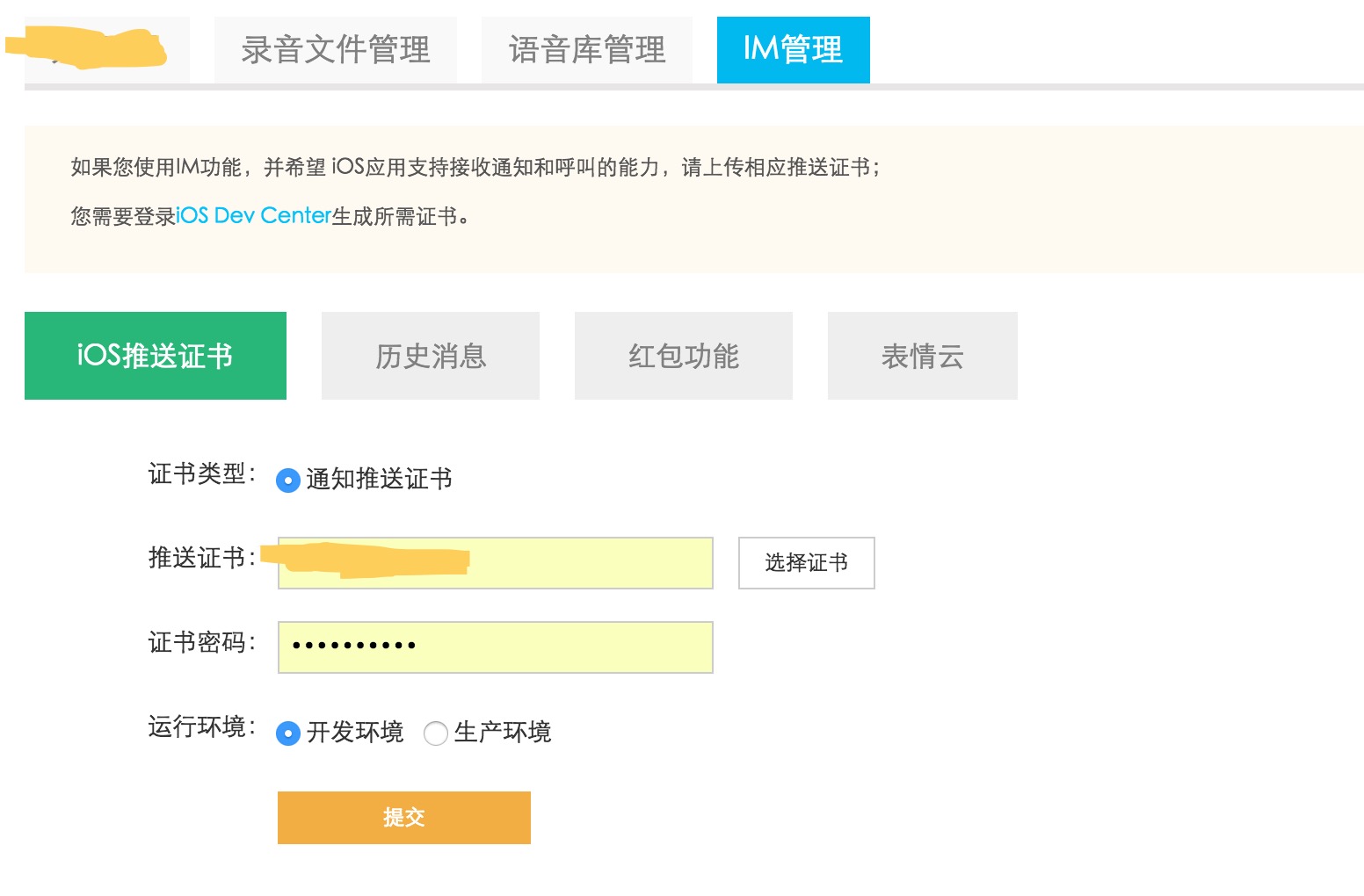
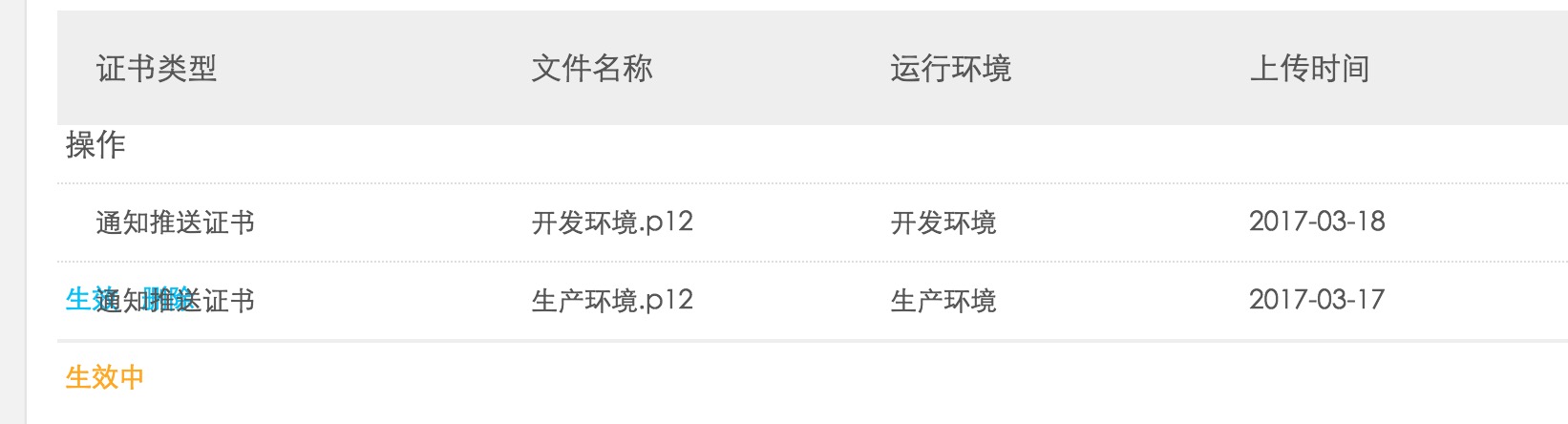
生产证书需要打包成 ipa 包才能测试离线推送
然后在看下代码中的配置
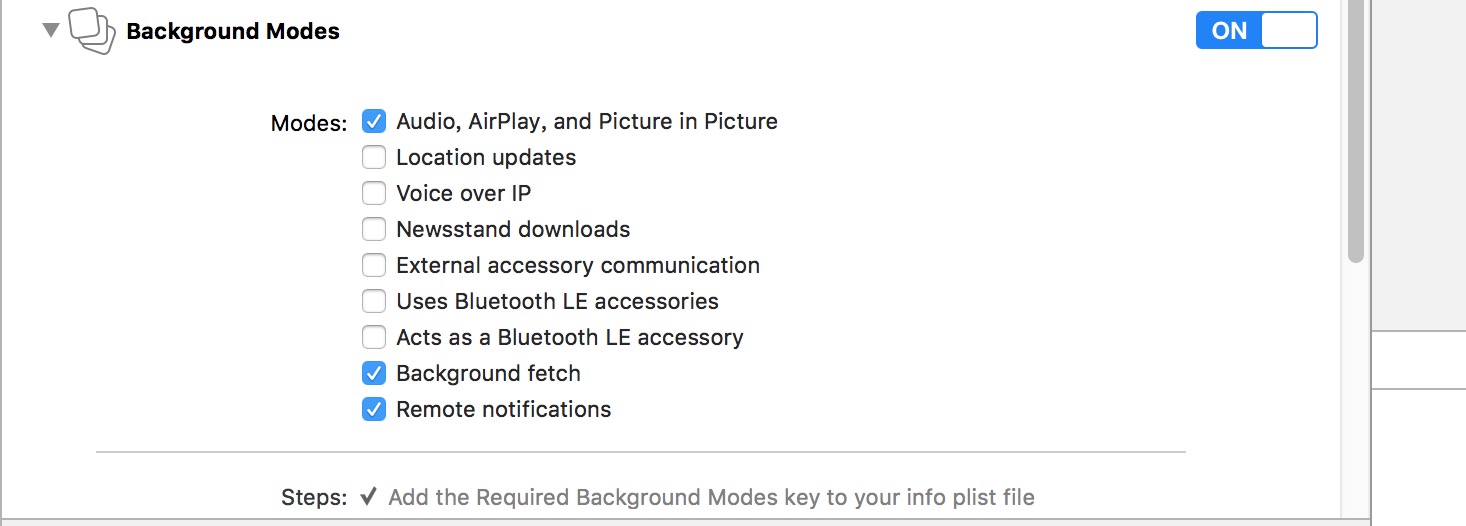
注册 APNS
/** 注册远程通知 */

- (void)registerRemoteNotification {

    if ([[UIDevice currentDevice].systemVersion floatValue] >= 10.0) {

#if __IPHONE_OS_VERSION_MAX_ALLOWED >= __IPHONE_10_0 // Xcode 8编译会调用

        UNUserNotificationCenter *center = [UNUserNotificationCenter currentNotificationCenter];

        [center requestAuthorizationWithOptions:(UNAuthorizationOptionBadge | UNAuthorizationOptionSound | UNAuthorizationOptionAlert | UNAuthorizationOptionCarPlay) completionHandler:^(BOOL granted, NSError *_Nullable error) {

            if (!error) {

                NSLog(@"request authorization succeeded!");

            }

        }];

        [[UIApplication sharedApplication] registerForRemoteNotifications];

#else // Xcode 7编译会调用

        UIUserNotificationType types = (UIUserNotificationTypeAlert | UIUserNotificationTypeSound | UIUserNotificationTypeBadge);

        UIUserNotificationSettings *settings = [UIUserNotificationSettings settingsForTypes:types categories:nil];

        [[UIApplication sharedApplication] registerUserNotificationSettings:settings];

        [[UIApplication sharedApplication] registerForRemoteNotifications];

#endif

    } else if ([[[UIDevice currentDevice] systemVersion] floatValue] >= 8.0) {

        UIUserNotificationType types = (UIUserNotificationTypeAlert | UIUserNotificationTypeSound | UIUserNotificationTypeBadge);

        UIUserNotificationSettings *settings = [UIUserNotificationSettings settingsForTypes:types categories:nil];

        [[UIApplication sharedApplication] registerUserNotificationSettings:settings];

        [[UIApplication sharedApplication] registerForRemoteNotifications];

    } else {

        UIRemoteNotificationType apn_type = (UIRemoteNotificationType)(UIRemoteNotificationTypeAlert |

                                                                       UIRemoteNotificationTypeSound |

                                                                       UIRemoteNotificationTypeBadge);

        [[UIApplication sharedApplication] registerForRemoteNotificationTypes:apn_type];

    }

}
#pragma mark - APP运行中接收到通知(推送)处理

/** APP已经接收到“远程”通知(推送) - (App运行在后台/App运行在前台)  */

- (void)application:(UIApplication *)application didReceiveRemoteNotification:(NSDictionary *)userInfo fetchCompletionHandler:(void (^)(UIBackgroundFetchResult result))completionHandler

{

    /////////下面是 IM

    self.callid = nil;

    NSString *userdata = [userInfo objectForKey:@"c"];

    NSLog(@"远程推送userdata:%@",userdata);

    if (userdata) {

        NSDictionary*callidobj = [NSJSONSerialization JSONObjectWithData:[userdata dataUsingEncoding:NSUTF8StringEncoding] options:NSJSONReadingMutableLeaves error:nil];

        NSLog(@"远程推送callidobj:%@",callidobj);

        if ([callidobj isKindOfClass:[NSDictionary class]]) {

            self.callid = [callidobj objectForKey:@"callid"];

        }

    }

    NSLog(@"远程推送 callid=%@",self.callid);

}
角标的显示
- (void)applicationWillResignActive:(UIApplication *)application {

    NSInteger count = ;

    UINavigationController * rootView = (UINavigationController*)self.window.rootViewController;

    if ([rootView.viewControllers[] isKindOfClass:[MainViewController class]]) {

        count = [[IMMsgDBAccess sharedInstance] getUnreadMessageCountFromSession];

    }

    application.applicationIconBadgeNumber = count;

    //离线消息的角标数显示

    [[ECDevice sharedInstance] setAppleBadgeNumber:count completion:^(ECError *error) {

    }];

    usleep();

}
注意,在容联登录的地方要设置对应的环境.不设置默认代表是生产环境要对应生产环境的证书
-(void)resetResourceServer {
[self setAppKey:DefaultAppKey AndAppToken:DefaultAppToke];
//Caches文件路径
NSArray *paths = NSSearchPathForDirectoriesInDomains(NSCachesDirectory, NSUserDomainMask, YES);
//服务器配置文件夹
NSString * config = [[paths objectAtIndex:0] stringByAppendingPathComponent:@"config.data"];
if ([[NSFileManager defaultManager] fileExistsAtPath:config]) {
[[NSFileManager defaultManager] removeItemAtPath:config error:nil];
}
#ifdef DEBUG
[[ECDevice sharedInstance] SwitchServerEvn:YES];
#else
[[ECDevice sharedInstance] SwitchServerEvn:NO];
#endif
}
iOS 容联离线消息推送的更多相关文章
- Push:iOS基于APNS的消息推送
1. Push的三个步骤,如下图所示: (1)Push服务应用程序把要发送的消息.目的iPhone的标识打包,发给APNS: (2)APNS在自身的已注册Push服务的iPhone列表中,查找有相应标 ...
- 使用PushSharp进行IOS发布应用的消息推送
在做.NET向IOS设备的App进行消息推送时候,采用的是PushSharp开源类库进行消息的推送,而在开发过程中,采用的是测试版本的app,使用的是测试的p12证书采用的是ApnsConfigura ...
- iOS开发如何实现消息推送机制
一.关于推送通知 推送通知,也被叫做远程通知,是在iOS 3.0以后被引入的功能.是当程序没有启动或不在前台运行时,告诉用户有新消息的一种途径,是从外部服务器发送到应用程序上的.一般说来,当要显示消息 ...
- ios 消息推送流程 转载
iOS开发:推送通知简述及开发实践热度 1已有 706 次阅读 2013-10-15 09:23 |个人分类:经验之谈|系统分类:ios| IOS, 推送一.关于推送通知 推送通知,也被叫做远程通知, ...
- 基于APNs最新HTTP/2接口实现iOS的高性能消息推送(服务端篇)
1.前言 本文要分享的消息推送指的是当iOS端APP被关闭或者处于后台时,还能收到消息/信息/指令的能力. 这种在APP处于后台或关闭情况下的消息推送能力,通常在以下场景下非常有用: 1)IM即时通讯 ...
- iOS 之消息推送(个推)---个人小结
前言:自从上个星期开始整这个推送,弄了差不多一个星期,今天终于给整好了,因此现在来记录这段"奇妙"的旅程. 我们公司使用的消息推送是用的第三方--个推,这里不得不说一下,个推的技术 ...
- 了解iOS消息推送一文就够:史上最全iOS Push技术详解
本文作者:陈裕发, 腾讯系统测试工程师,由腾讯WeTest整理发表. 1.引言 开发iOS系统中的Push推送,通常有以下3种情况: 1)在线Push:比如QQ.微信等IM界面处于前台时,聊天消息和指 ...
- ios手机app消息推送
h5+app项目,推送平台 " 个推 " 首先在manifest.json配置文件中点击模块权限配置,勾选push消息推送配置如图1-1 第二部在manifest.json配置文件 ...
- 分分钟搞定IOS远程消息推送
一.引言 IOS中消息的推送有两种方式,分别是本地推送和远程推送,本地推送在http://my.oschina.net/u/2340880/blog/405491这篇博客中有详细的介绍,这里主要讨论远 ...
随机推荐
- ACM学习历程——NOJ1113 Game I(贪心 || 线段树)
Description 尼克发明了这样一个游戏:在一个坐标轴上,有一些圆,这些圆的圆心都在x轴上,现在给定一个x轴上的点,保证该点没有在这些圆内(以及圆上),尼克可以以这个点为圆心做任意大小的圆,他想 ...
- 开发工作之外的修炼Live笔记
“开发工作之外的修炼”这期Live分享了下列话题: [1] 如何发现自己的兴趣 [2] 财富.资源与被动收入 [3] 目标管理 [4] 快速做选择 [5] 时间管理 [6] 如何投资自己 >&g ...
- MySql 官方存储引擎
存储引擎是为不同的表类型处理 SQL 操作的 MySql 组件.InnoDB 是默认的.最通用的存储引擎,也是官方推荐使用的存储引擎,除非一些特定案例.MySql 5.6 中的 CREATE TABL ...
- kkkk
monkey -p com.alfl.www -v -v -v --throttle 50 --pct-touch 30 --pct-motion 15 --pct-nav 15 --pct-ma ...
- Java对象序列化详解
深入理解Java对象序列化 1. 什么是Java对象序列化 Java平台允许我们在内存中创建可复用的Java对象,但一般情况下,只有当JVM处于运行时,这些对象才可能存在,即,这些对象的生命周期不会比 ...
- failed to create rwlayer: lstat /var/lib/docker/overlay2/ no such file or directory
在使用Docker构建微服务镜像时出现的错误.第一天构建好好的,第二天就出现了这样的错误.通过百度这条错误的信息非常少,只在 stackoverflow.com 上找到一条,问题指向了 dockerf ...
- LightOJ - 1234 LightOJ - 1245 Harmonic Number(欧拉系数+调和级数)
Harmonic Number In mathematics, the nth harmonic number is the sum of the reciprocals of the first n ...
- Shader 模板缓冲和模板测试
http://blog.sina.com.cn/s/blog_6e159df70102xa67.html 模板缓冲的概念 Unity官方的Shader文档根本没有提到这个玩意,这个概念也是看到了UGU ...
- solidity 学习笔记(6)call 函数
call() 方法 call()是一个底层的接口,用来向一个合约发送消息,也就是说如果你想实现自己的消息传递,可以使用这个函数.函数支持传入任意类型的任意参数,并将参数打包成32字节,相互拼接后向合约 ...
- 洛谷P1633 二进制
P1633 二进制 题目描述 有三个整数A.B.C,以下用N(2)表示N的二进制(没有前导0). 设A(2).B(2).C(2)的最大长度为L,你需要构造三个正整数X.Y.Z,满足以下条件: (1) ...