
OpenStack之Glance源码简析
Glance简介
OpenStack镜像服务器是一套虚拟机镜像发现、注册、检索。
glance架构图:

Glance源码结构:

glance/api:主要负责接收响应镜像管理命令的Restful请求,分析消息请求信息并分发其所带的命令(如新增,删除,更新等)。默认绑定端口是9292。
glance/registry:主要负责接收响应镜像元数据命令的Restful请求。分析消息请求信息并分发其所带的命令(如获取元数据,更新元数据等)。默认绑定的端口是9191。
glance/db:主要负责与数据库Mysql的交互
glance/store:主要负责存储适配
本次主要从简单的查询来简析glance源码,看一下glance代码是如何执行的。
查询的API:/v1/images/detail,method:GET,有兴趣的朋友可以用火狐浏览器自带的RESTClient来进行REST服务的测试。
好了,废话不多说,源码走起。
源码分析

图为glance/api/v1中的源码目录树。
此次就从glance的查询来分析glance的源码,从horizon的传过来的HTTP请求首先来到glance/api/v1/router.py中,查找匹配的HTTP请求:
代码如下:
 mapper.connect("/images/detail",

                        controller=images_resource,

                        action='detail',

                        conditions={'method': ['GET']})
可以看到,这与Glance的API文档是相符的,GET请求,然后是/v1/images/detail。
而后,找到匹配的请求之后,就会进入glance/api/v1/images.py文件中,下面是有关的代码:
 def detail(self, req):

         """

         Returns detailed information for all available images

         :param req: The WSGI/Webob Request object

         :retval The response body is a mapping of the following form::

             {'images': [

                 {'id': <ID>,

                  'name': <NAME>,

                  'size': <SIZE>,

                  'disk_format': <DISK_FORMAT>,

                  'container_format': <CONTAINER_FORMAT>,

                  'checksum': <CHECKSUM>,

                  'min_disk': <MIN_DISK>,

                  'min_ram': <MIN_RAM>,

                  'store': <STORE>,

                  'status': <STATUS>,

                  'created_at': <TIMESTAMP>,

                  'updated_at': <TIMESTAMP>,

                  'deleted_at': <TIMESTAMP>|<NONE>,

                  'properties': {'distro': 'Ubuntu 10.04 LTS', ...}}, ...

             ]}

         """

         self._enforce(req, 'get_images')

         params = self._get_query_params(req)

         try:

             images = registry.get_images_detail(req.context, **params)

             # Strip out the Location attribute. Temporary fix for

             # LP Bug #755916. This information is still coming back

             # from the registry, since the API server still needs access

             # to it, however we do not return this potential security

             # information to the API end user...

             for image in images:

                 redact_loc(image, copy_dict=False)

                 self._enforce_read_protected_props(image, req)

         except exception.Invalid as e:

             raise HTTPBadRequest(explanation="%s" % e)

         return dict(images=images)
26行是根据获取查询条件,在此不深入谈,想了解的朋友可以留言,主要查询语句在try里面,也就是第28行:
images = registry.get_images_detail(req.context, **params)
从这里,查询就跳入了glance/registry/client/v1/api.py文件中。
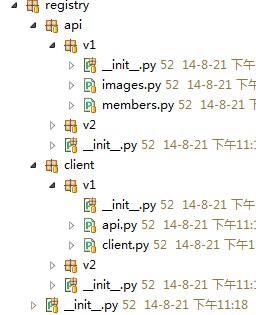
图为glance/registry的目录树,glance/registry/client/v1/api.py中相关代码如下:
 def get_images_detail(context, **kwargs):

     c = get_registry_client(context)

     return c.get_images_detailed(**kwargs)
首先,会在glance/registry/client/v1/api.py文件进行registry端口的认证连接,
 def get_registry_client(cxt):

     global _CLIENT_CREDS, _CLIENT_KWARGS, _CLIENT_HOST, _CLIENT_PORT

     global _METADATA_ENCRYPTION_KEY

     kwargs = _CLIENT_KWARGS.copy()

     if CONF.use_user_token:

         kwargs['auth_tok'] = cxt.auth_tok

     if _CLIENT_CREDS:

         kwargs['creds'] = _CLIENT_CREDS

     if CONF.send_identity_headers:

         identity_headers = {

             'X-User-Id': cxt.user,

             'X-Tenant-Id': cxt.tenant,

             'X-Roles': ','.join(cxt.roles),

             'X-Identity-Status': 'Confirmed',

             'X-Service-Catalog': jsonutils.dumps(cxt.service_catalog),

         }

         kwargs['identity_headers'] = identity_headers

     return client.RegistryClient(_CLIENT_HOST, _CLIENT_PORT,

                                  _METADATA_ENCRYPTION_KEY, **kwargs)
然后第三行返回查询,进入glance/registry/client/v1/client.py中:
 def get_images_detailed(self, **kwargs):

         """

         Returns a list of detailed image data mappings from Registry

         :param filters: dict of keys & expected values to filter results

         :param marker: image id after which to start page

         :param limit: max number of images to return

         :param sort_key: results will be ordered by this image attribute

         :param sort_dir: direction in which to to order results (asc, desc)

         """

         params = self._extract_params(kwargs, images.SUPPORTED_PARAMS)

         res = self.do_request("GET", "/images/detail", params=params)

         image_list = jsonutils.loads(res.read())['images']

         for image in image_list:

             image = self.decrypt_metadata(image)

         return image_list
在12行再次发出请求,然后在glance/registry/api/v1/__init__.py中查找匹配的请求:
 mapper.connect("/images/detail",

                        controller=images_resource,

                        action="detail",

                        conditions={'method': ['GET']})
在glance/registry/api/v1/images.py中找到相应的方法进行查询:
 def detail(self, req):

         """Return a filtered list of public, non-deleted images in detail

         :param req: the Request object coming from the wsgi layer

         :retval a mapping of the following form::

             dict(images=[image_list])

         Where image_list is a sequence of mappings containing

         all image model fields.

         """

         params = self._get_query_params(req)

         images = self._get_images(req.context, **params)

         image_dicts = [make_image_dict(i) for i in images]

         LOG.info(_("Returning detailed image list"))

         return dict(images=image_dicts)
第14行又调用glance/registry/api/v1/images.py的_get_images(req.context, **params)方法:
 def _get_images(self, context, filters, **params):

         """Get images, wrapping in exception if necessary."""

         # NOTE(markwash): for backwards compatibility, is_public=True for

         # admins actually means "treat me as if I'm not an admin and show me

         # all my images"

         if context.is_admin and params.get('is_public') is True:

             params['admin_as_user'] = True

             del params['is_public']

         try:

             return self.db_api.image_get_all(context, filters=filters,

                                              **params)

         except exception.NotFound:

             LOG.info(_("Invalid marker. Image %(id)s could not be "

                        "found.") % {'id': params.get('marker')})

             msg = _("Invalid marker. Image could not be found.")

             raise exc.HTTPBadRequest(explanation=msg)

         except exception.Forbidden:

             LOG.info(_("Access denied to image %(id)s but returning "

                        "'not found'") % {'id': params.get('marker')})

             msg = _("Invalid marker. Image could not be found.")

             raise exc.HTTPBadRequest(explanation=msg)

         except Exception:

             LOG.exception(_("Unable to get images"))

             raise
在第10行中,进入glance/db/sqlalchemy/api.py中:
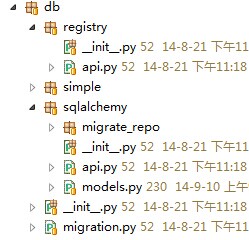
图为glance/db的目录树。下面是调用的glance/db/sqlalchemy/api.py中的image_get_all方法,
 def image_get_all(context, filters=None, marker=None, limit=None,

                   sort_key='created_at', sort_dir='desc',

                   member_status='accepted', is_public=None,

                   admin_as_user=False):

     """

     Get all images that match zero or more filters.

     :param filters: dict of filter keys and values. If a 'properties'

                     key is present, it is treated as a dict of key/value

                     filters on the image properties attribute

     :param marker: image id after which to start page

     :param limit: maximum number of images to return

     :param sort_key: image attribute by which results should be sorted

     :param sort_dir: direction in which results should be sorted (asc, desc)

     :param member_status: only return shared images that have this membership

                           status

     :param is_public: If true, return only public images. If false, return

                       only private and shared images.

     :param admin_as_user: For backwards compatibility. If true, then return to

                       an admin the equivalent set of images which it would see

                       if it were a regular user

     """

     filters = filters or {}

     visibility = filters.pop('visibility', None)

     showing_deleted = 'changes-since' in filters or filters.get('deleted',

                                                                 False)

     img_conditions, prop_conditions, tag_conditions = \

         _make_conditions_from_filters(filters, is_public)

     query = _select_images_query(context,

                                  img_conditions,

                                  admin_as_user,

                                  member_status,

                                  visibility)

     if visibility is not None:

         if visibility == 'public':

             query = query.filter(models.Image.is_public == True)

         elif visibility == 'private':

             query = query.filter(models.Image.is_public == False)

     if prop_conditions:

         for prop_condition in prop_conditions:

             query = query.join(models.ImageProperty, aliased=True)\

                 .filter(sa_sql.and_(*prop_condition))

     if tag_conditions:

         for tag_condition in tag_conditions:

             query = query.join(models.ImageTag, aliased=True)\

                 .filter(sa_sql.and_(*tag_condition))

     marker_image = None

     if marker is not None:

         marker_image = _image_get(context,

                                   marker,

                                   force_show_deleted=showing_deleted)

     sort_keys = ['created_at', 'id']

     sort_keys.insert(0, sort_key) if sort_key not in sort_keys else sort_keys

     query = _paginate_query(query, models.Image, limit,

                             sort_keys,

                             marker=marker_image,

                             sort_dir=sort_dir)

     query = query.options(sa_orm.joinedload(models.Image.properties))\

                  .options(sa_orm.joinedload(models.Image.locations))

     return [_normalize_locations(image.to_dict()) for image in query.all()]
此方法最后将查询结果返回字典,至此,glance查询方法就此结束。
如果有不对的地方,欢迎各位大神指出。
PS:本博客欢迎转发,但请注明博客地址及作者~
博客地址:http://www.cnblogs.com/voidy/
<。)#)))≦
OpenStack之Glance源码简析的更多相关文章
- SpringMVC学习(一)——概念、流程图、源码简析
学习资料:开涛的<跟我学SpringMVC.pdf> 众所周知,springMVC是比较常用的web框架,通常整合spring使用.这里抛开spring,单纯的对springMVC做一下总 ...
- Flink源码阅读(一)——Flink on Yarn的Per-job模式源码简析
一.前言 个人感觉学习Flink其实最不应该错过的博文是Flink社区的博文系列,里面的文章是不会让人失望的.强烈安利:https://ververica.cn/developers-resource ...
- django-jwt token校验源码简析
一. jwt token校验源码简析 1.1 前言 之前使用jwt签发了token,里面的头部包含了加密的方式.是否有签名等,而载荷中包含用户名.用户主键.过期时间等信息,最后的签名还使用了摘要算法进 ...
- 0002 - Spring MVC 拦截器源码简析:拦截器加载与执行
1.概述 Spring MVC中的拦截器(Interceptor)类似于Servlet中的过滤器(Filter),它主要用于拦截用户请求并作相应的处理.例如通过拦截器可以进行权限验证.记录请求信息的日 ...
- AFNetworking源码简析
AFNetworking基本是苹果开发中网络请求库的标配,它是一个轻量级的网络库,专门针对iOS和OS X的网络应用设计,具有模块化的架构和丰富的APIs接口,功能强大并且使用简单,深受苹果应用开发人 ...
- ElementUI 源码简析——源码结构篇
ElementUI 作为当前运用的最广的 Vue PC 端组件库,很多 Vue 组件库的架构都是参照 ElementUI 做的.作为一个有梦想的前端(咸鱼),当然需要好好学习一番这套比较成熟的架构. ...
- DRF之APIView源码简析
一. 安装djangorestframework 安装的方式有以下三种,注意,模块就叫djangorestframework. 方式一:pip3 install djangorestframework ...
- spring ioc源码简析
ClassPathXmlApplicationContext 首先我们先从平时启动spring常用的ClassPathXmlApplicationContext开始解析 ApplicationCont ...
- 并发系列(二)——FutureTask类源码简析
背景 本文基于JDK 11,主要介绍FutureTask类中的run().get()和cancel() 方法,没有过多解析相应interface中的注释,但阅读源码时建议先阅读注释,明白方法的主要的功 ...
随机推荐
- iis6.0 建立站点
公司网站的服务器甚多 其中还包括早期的iis6.0 的网站服务器 由于之前没有接触过 特此记录建立站点过程和注意事项 1.每个站点最好都新建一个用户名 方便管理 这里操作系统是 winXP 现在运行界 ...
- Oracle SQL Developer-3.2.20.09.87 Windows 10启动问题处理&配置
用了好多年的工具,准备在笔记本上使用时启动不了,但在办公室PC上可以正常使用.两者电脑OS都一样,一个是全新安装.一个是从Windows 7升级而来.下载了最新版发现版本到17了,Oracle刷版本号 ...
- Ubuntu 16.04 远程登入root 用户
安装 open ssh: sudo apt-get install openssh-server 修改 root 密码 sudo passwd root 以其他账户登录,通过 sudo nan ...
- 菜鸟 学注册机编写之 “MD5”
测试环境 系统: xp sp3 调试器 :od 1.10 sc_office_2003_pro 高手不要见笑,仅供小菜玩乐,有不对或不足的地方还请多多指教,不胜感激! 一:定位关键CALL 1. 因 ...
- mysql 5.7以上安装遇到的问题
参考地址: https://blog.csdn.net/u012278016/article/details/80455439 本人在window上安装mysql 5.7版本以上的mysql,出现很 ...
- javascript设计模式之外观模式
/* * 外观模式 * 外观模式的主要意义在于简化类的接口,使其易于调用 */ // 你常常在不经意中使用了外观模式,尤其类库中更多(处理兼容性问题) var addEvent = function ...
- 重置 file input
有时用户上传相同附件时也需要触发input[type='file']的change事件,除了将form重置外,还可以将input的value设为空 <input type="file& ...
- app后台管理系统框架metronic的学习笔记
先来看效果: 给出当前页面的代码: <!DOCTYPE html> <!--[if IE 8]> <html lang="zh" class=&quo ...
- C++中调用Python脚本(转载)
转载▼ 标签: 杂谈 C++中调用Python脚本的意义就不讲了,至少你可以把它当成文本形式的动态链接库,需要的时候还可以改一改,只要不改变接口, C++的程序一旦编译好了,再改就没那么方便了先看Py ...
- shrio中去掉 login;JSESSIONID
shrio中去掉 login;JSESSIONID 在session管理器配置页面中新增一条记录