
基于百度OCR的图片文字识别
先上图,有图有真相
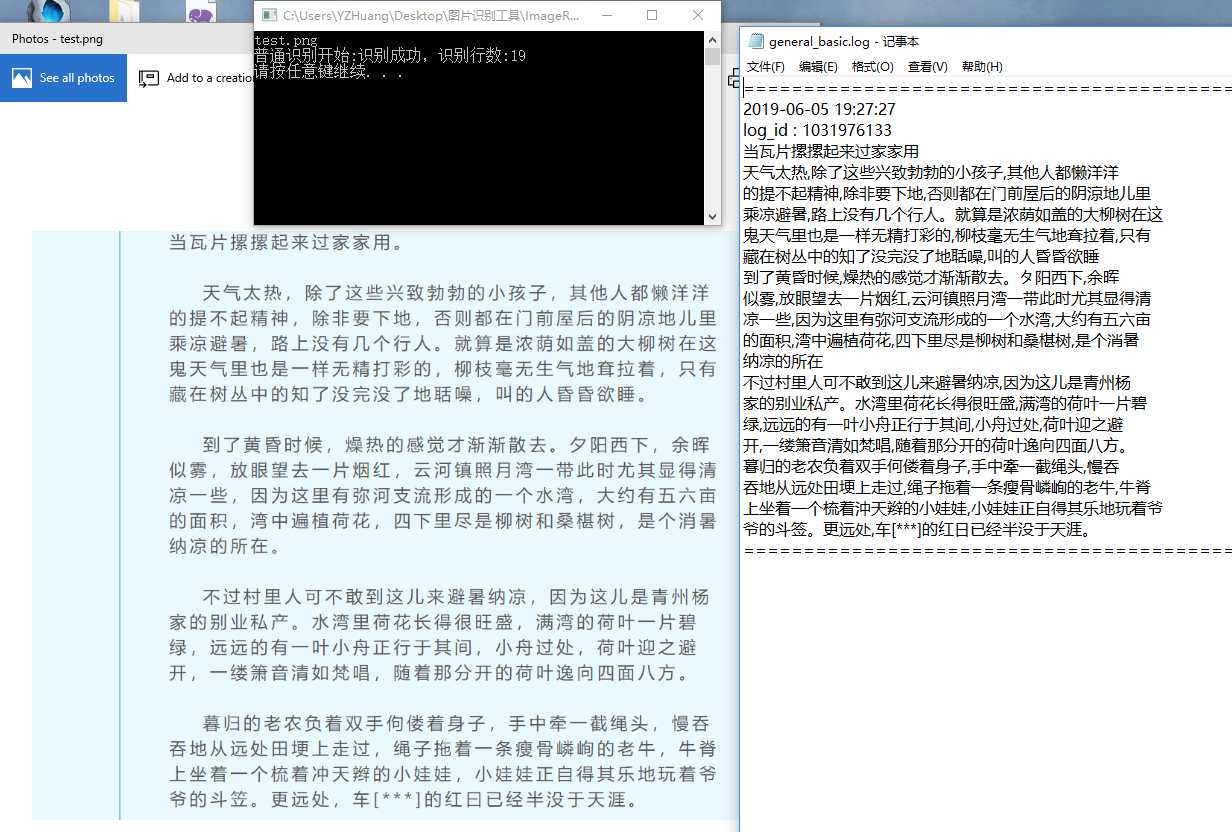
首先在百度开通ORC服务,目前是免费的,普通识别每天50000次免费,非常棒!
百度文档:http://ai.baidu.com/docs#/OCR-API/top
下载百度SDK神马的就不多说了,需要包含CURL和JSON库,注意版本要求
windows下的openssl 32位和64位一键安装包顺便分享下,自己安装太麻烦
链接:https://pan.baidu.com/s/1HAuplB3deQGFk2eO8zC13A
提取码:mh34
CURL和JSON库就不贴出来了,网上随便都能找到,需要的朋友可以找我,我私发给你。
接下来进入正题,贴代码:
ImageRecogition.h
 #pragma once

 #include "json/json.h"

 class CImageRecogition

 {

 public:

     CImageRecogition();

     ~CImageRecogition();

 public:

     /*accurate_basic*/

     Json::Value static accurate_basic(std::string szFile);

     /*general_basic*/

     Json::Value static general_basic(std::string szFile);

     /*general_enhanced*/

     Json::Value static general_enhanced(std::string szFile);

     /*receipt*/

     Json::Value static receipt(std::string szFile);

     /*custom*/

     Json::Value static custom(std::string szFile);     /*save result to file*/

     void static SaveResultToFile(Json::Value & result, std::string szFile);

 private:

 };
ImageRecogition.cpp
#include "stdafx.h"

#include "ImageRecogition.h"

#include "baiduapi/ocr.h"

#define APP_ID        "xxxxxxx"

#define API_KEY        "xxxxxxx"

#define SECRET_KEY    "xxxxx"

CImageRecogition::CImageRecogition()

{

}

CImageRecogition::~CImageRecogition()

{

}

Json::Value CImageRecogition::accurate_basic(std::string szFile)

{

    aip::Ocr client(APP_ID, API_KEY, SECRET_KEY);

    std::string image;

    aip::get_file_content(szFile.c_str(), &image);

    std::map<std::string, std::string> options;

    options["detect_direction"] = "true";

    options["probability"] = "true";

    std::cout << "高精识别开始:";

    return client.accurate_basic(image, options);

}

Json::Value CImageRecogition::general_basic(std::string szFile)

{

    aip::Ocr client(APP_ID, API_KEY, SECRET_KEY);

    std::string image;

    aip::get_file_content(szFile.c_str(), &image);

    std::map<std::string, std::string> options;

    //options["language_type"] = "KOR";

    options["detect_direction"] = "true";

    options["detect_language"] = "true";

    options["probability"] = "true";

    std::cout << "普通识别开始:";

    return client.general_basic(image, options);

}

Json::Value CImageRecogition::general_enhanced(std::string szFile)

{

    aip::Ocr client(APP_ID, API_KEY, SECRET_KEY);

    std::string image;

    aip::get_file_content(szFile.c_str(), &image);

    std::map<std::string, std::string> options;

    //options["language_type"] = "KOR";

    options["detect_direction"] = "true";

    options["detect_language"] = "true";

    options["probability"] = "true";

    std::cout << "生僻字识别开始:";

    return client.general_enhanced(image, options);

}

Json::Value CImageRecogition::receipt(std::string szFile)

{

    aip::Ocr client(APP_ID, API_KEY, SECRET_KEY);

    std::string image;

    aip::get_file_content(szFile.c_str(), &image);

    std::map<std::string, std::string> options;

    //options["recognize_granularity"] = "small";

    options["probability"] = "true";

    //options["accuracy"] = "normal";

    options["detect_direction"] = "true";

    std::cout << "通用票据识别开始:";

    return client.receipt(image, options);

}

Json::Value CImageRecogition::custom(std::string szFile)

{

    aip::Ocr client(APP_ID, API_KEY, SECRET_KEY);

    std::string image;

    aip::get_file_content(szFile.c_str(), &image);

    std::map<std::string, std::string> options;

    std::string templateSign = "354b9b4fd9b0e4b38aedb8096260c6de";

    std::cout << "自定义模板识别开始:";

    return client.custom(image, templateSign, options);

}

void CImageRecogition::SaveResultToFile(Json::Value & result, std::string szFile)

{

    FILE* fp = nullptr;

    auto error_no = fopen_s(&fp, szFile.c_str(), "a+");

    if (fp != nullptr)

    {

        fprintf_s(fp, "==============================================================================\n");

        SYSTEMTIME st;

        ::GetLocalTime(&st);

        fprintf_s(fp, "%04d-%02d-%02d %02d:%02d:%02d\n", st.wYear, st.wMonth, st.wDay, st.wHour, st.wMinute, st.wSecond);

        fprintf_s(fp, "log_id : %d\n", result["log_id"].asInt64());

        auto result_num = result["words_result"].size();

        if (result_num > )

            std::cout << "识别成功,识别行数:" << result_num << std::endl;

        else

            std::cout << "识别失败,未识别数据" << std::endl;

        for (int i = ; i < result_num; ++i)

            fprintf_s(fp, "%s\n", result["words_result"][i]["words"].asString().c_str());

        fprintf_s(fp, "==============================================================================\n");

        fprintf_s(fp, "\n");

        fclose(fp);

    }

}
然后就是main函数的调用了
#include "stdafx.h"

#include <iostream>

#include "ServiceLogic/ImageRecogition.h"

#include "curl/curl.h"

#include "DirFile/DirFile.h"

int _tmain(int argc, char* argv[])

{

    std::vector<std::string> vecFiles;

    DirFile::ListFiles(".", vecFiles, FILETYPE_JPG | FILETYPE_PNG | FILETYPE_JPEG);

    for (auto it : vecFiles)

    {

        std::cout << it << std::endl;

        std::string szFileName = it.substr(, it.rfind("."));

        std::string szPath = "./Log_" + szFileName + "/";

        DirFile::CreatePath(szPath);

        //CImageRecogition::SaveResultToFile(CImageRecogition::accurate_basic(it), szPath + "accurate_basic.log");

        CImageRecogition::SaveResultToFile(CImageRecogition::general_basic(it), szPath + "general_basic.log");

        //CImageRecogition::SaveResultToFile(CImageRecogition::general_enhanced(it), szPath + "general_enhanced.log");

        //CImageRecogition::SaveResultToFile(CImageRecogition::receipt(it), szPath + "receipt.log");

        //CImageRecogition::SaveResultToFile(CImageRecogition::custom(it), szPath + "custom.log");

    }

    system("pause");

    return ;

}
DirFile.h是遍历当前目录下对应格式的文件,以及Log目录的创建的,这里就不贴出来了,毕竟不是这次的主题。
百度ORC的识别率,对图片要求还是比较高的,本人给朝鲜族的朋友测试韩文的发票,效果还是挺差强人意的。看大家的需求吧。
基于百度OCR的图片文字识别的更多相关文章
- 【图片识别】java 图片文字识别 ocr (转)
http://www.cnblogs.com/inkflower/p/6642264.html 最近在开发的时候需要识别图片中的一些文字,网上找了相关资料之后,发现google有一个离线的工具,以下为 ...
- java 图片文字识别 ocr
最近在开发的时候需要识别图片中的一些文字,网上找了相关资料之后,发现google有一个离线的工具,以下为java使用的demo 在此之前,使用这个工具需要在本地安装OCR工具: 下面一个是一定要安装的 ...
- 一篇文章搞定百度OCR图片文字识别API
一篇文章搞定百度OCR图片文字识别API https://www.jianshu.com/p/7905d3b12104
- 小试Office OneNote 2010的图片文字识别功能(OCR)
原文:小试Office OneNote 2010的图片文字识别功能(OCR) 自Office 2003以来,OneNote就成为了我电脑中必不可少的软件,它集各种创新功能于一身,可方便的记录下各种类型 ...
- 【原】Coursera—Andrew Ng机器学习—课程笔记 Lecture 18—Photo OCR 应用实例:图片文字识别
Lecture 18—Photo OCR 应用实例:图片文字识别 18.1 问题描述和流程图 Problem Description and Pipeline 图像文字识别需要如下步骤: 1.文字侦测 ...
- [C13] 应用实例:图片文字识别(Application Example: Photo OCR)
应用实例:图片文字识别(Application Example: Photo OCR) 问题描述和流程图(Problem Description and Pipeline) 图像文字识别应用所作的事是 ...
- python3 图片文字识别
最近用到了图片文字识别这个功能,从网上搜查了一下,决定利用百度的文字识别接口.通过测试发现文字识别率还可以.下面就测试过程简要说明一下 1.注册用户 链接:https://login.bce.baid ...
- 刚破了潘金莲的身份信息(图片文字识别),win7、win10实测可用(免费下载)
刚破了潘金莲的身份信息(图片文字识别),win7.win10实测可用 效果如下: 证照,车牌.身份证.名片.营业执照 等图片文字均可识别 电脑版 本人出品 大小1.3MB 下载地址:https://p ...
- Python人工智能之图片识别,Python3一行代码实现图片文字识别
1.Python人工智能之图片识别,Python3一行代码实现图片文字识别 2.tesseract-ocr安装包和中文语言包 注意:
随机推荐
- 洛谷P1057 传球游戏
f[i][j]表示第i轮j拿到球的方案数 转移:f[i][j]=f[i-1][j+1] +f[i-1][j+-1].注意: 边界f[0][1]=1; 还有当j=1或N时 #include<ios ...
- (译)Cg Programming/Unity(Cg编程/Unity)
最近在学习Unity3d中的shader编程,能找到的中文资料比较少,于是,尝试翻译一下wiki Books上的资料,以方便其他跟我一样的入门学习者.由于是第一次翻译技术资料,经验不足,难免出错,请路 ...
- 【转】说说Runnable与Callable
说说Runnable与Callable Callable接口: Runnable接口: 相同点: 两者都是接口:(废话) 两者都可用来编写多线程程序: 两者都需要调用Thread.start( ...
- 【css】css2实现两列三列布局的方法
前言 对于 flex 弹性布局相信大家都有所了解,它是 css3 中的属性,然而它具有一定的兼容性问题.楼主前几天面试时遇到了面试官需要设计一个两列布局,我当然就说父元素 flex 吧哩吧啦,然而需要 ...
- bug {was not declared in this scope}
使用自己定义的结构体作为返回值的时候,出现了 ...was not declared in this scope 检查了各种头文件,把缓存也都删掉了还是不行. 结果,发现,应该这样用vector< ...
- WAMP安装提示缺少 msvcr100.dll文件解决方法
WAMP安装提示缺少wamp msvcr100.dll文件解决方法 因为wamp基于vs c++2010开发,需要提前安装这个组件才可以正常运行 微软官方组件下载地址: 32位:http://www. ...
- HDU Rabbit and Grass 兔子和草 (Nim博弈)
思路:简单Nim博弈,只需要将所给的数字全部进行异或,结果为0,则先手必败.否则必胜. #include <iostream> using namespace std; int main( ...
- 洛谷 P2002 消息扩散
题目背景 本场比赛第一题,给个简单的吧,这 100 分先拿着. 题目描述 有n个城市,中间有单向道路连接,消息会沿着道路扩散,现在给出n个城市及其之间的道路,问至少需要在几个城市发布消息才能让这所有n ...
- python基础教程总结3—字典
1.字典 1.1 字典类型与序列类型的区别: 存取和访问数据的方式不同. 序列类型只用数字类型的键(从序列的开始按数值顺序索引): 映射类型可以用其他对象类型作键(如:数字.字符串.元祖,一般用字符串 ...
- ES6, Angular,React和ABAP中的String Template(字符串模板)
String Template(字符串模板)在很多编程语言和框架中都支持,是一个很有用的特性.本文将Jerry工作中使用到的String Template的特性做一个总结. ES6 阮一峰老师有一个专 ...