
Creating Lists and Cards 创建列表和卡片
To create complex lists and cards with material design styles in your apps, you can use the RecyclerView and CardView widgets.
//想要创建复杂的带有material design风格的列表,使用RecyclerView 和 CardView widget
Create Lists
The RecyclerView widget is a more advanced and flexible version of ListView. This widget is a container for displaying large data sets that can be scrolled very efficiently by maintaining a limited number of views. Use the RecyclerView widget when you have data collections whose elements change at runtime based on user action or network events.
The RecyclerView class simplifies the display and handling of large data sets by providing:
- Layout managers for positioning items
- Default animations for common item operations, such as removal or addition of items //对移除或者添加等常用条目的行为都有默认的动画
You also have the flexibility to define custom layout managers and animations for RecyclerView widgets.

Figure 1. The RecyclerView widget.
To use the RecyclerView widget, you have to specify an adapter and a layout manager. To create an adapter, extend the RecyclerView.Adapter class. The details of the implementation depend on the specifics of your dataset and the type of views. For more information, see the examples below.
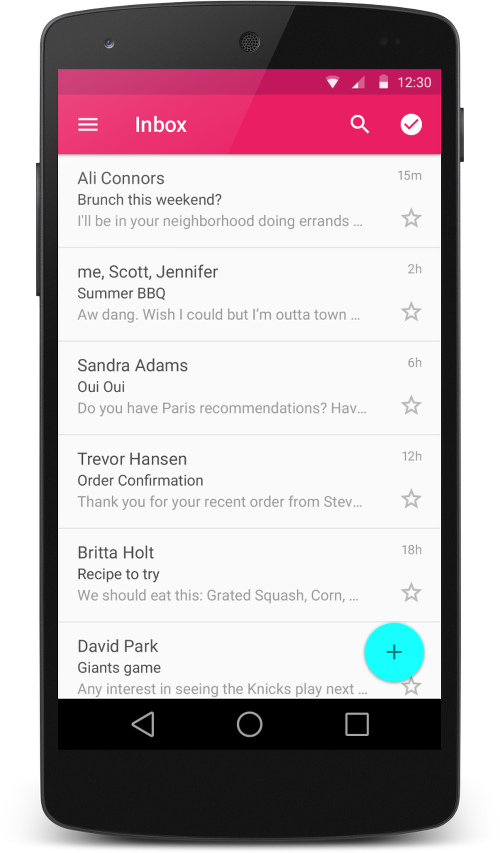
Figure 2 - Lists with RecyclerView.
A layout manager positions item views inside a RecyclerView and determines when to reuse item views that are no longer visible to the user. To reuse (or recycle) a view, a layout manager may ask the adapter to replace the contents of the view with a different element from the dataset. Recycling views in this manner improves performance by avoiding the creation of unnecessary views or performing expensive findViewById() lookups.
//layout manager负责排布recyclerview中的视图条目,并且决定当一些条目不在可见时什么时候重用条目。为了重用view,layout manager可能会向adapter请求用不同的数据库的数据带替换view中的内容。
RecyclerView provides these built-in layout managers:
LinearLayoutManagershows items in a vertical or horizontal scrolling list. //以水平或者垂直的滚动列表形式显示条目GridLayoutManagershows items in a grid. //以网格形式显示StaggeredGridLayoutManagershows items in a staggered grid.//以交错网格形式展示
To create a custom layout manager, extend the RecyclerView.LayoutManager class.
Animations
Animations for adding and removing items are enabled by default in RecyclerView. To customize these animations, extend the RecyclerView.ItemAnimator class and use the RecyclerView.setItemAnimator()method.
//为了定制动画,继承RecyclerView.ItemAnimator 类,并且使用RecyclerView.setItemAnimator()方法来设置
Examples
The following code example demonstrates how to add the RecyclerView to a layout:
<!-- A RecyclerView with some commonly used attributes -->
<android.support.v7.widget.RecyclerView
    android:id="@+id/my_recycler_view"
    android:scrollbars="vertical"
    android:layout_width="match_parent"
    android:layout_height="match_parent"/>
Once you have added a RecyclerView widget to your layout, obtain a handle to the object, connect it to a layout manager, and attach an adapter for the data to be displayed:
public class MyActivity extends Activity {
    private RecyclerView mRecyclerView;
    private RecyclerView.Adapter mAdapter;
    private RecyclerView.LayoutManager mLayoutManager;

    @Override
    protected void onCreate(Bundle savedInstanceState) {
        super.onCreate(savedInstanceState);
        setContentView(R.layout.my_activity);
        mRecyclerView = (RecyclerView) findViewById(R.id.my_recycler_view);

        // use this setting to improve performance if you know that changes
        // in content do not change the layout size of the RecyclerView
        //使用这个设置来提高性能,如果你已经知道了内容的修改不会改变recyclerview的布局大小
        mRecyclerView.setHasFixedSize(true);

        // use a linear layout manager
        mLayoutManager = new LinearLayoutManager(this);
        mRecyclerView.setLayoutManager(mLayoutManager);

        // specify an adapter (see also next example)
        mAdapter = new MyAdapter(myDataset);
        mRecyclerView.setAdapter(mAdapter);
    }
    ...
}
The adapter provides access to the items in your data set, creates views for items, and replaces the content of some of the views with new data items when the original item is no longer visible. The following code example shows a simple implementation for a data set that consists of an array of strings displayed using TextView widgets:
public class MyAdapter extends RecyclerView.Adapter<MyAdapter.ViewHolder> {
    private String[] mDataset;

    // Provide a reference to the views for each data item
    // Complex data items may need more than one view per item, and
    // you provide access to all the views for a data item in a view holder
    public static class ViewHolder extends RecyclerView.ViewHolder {
        // each data item is just a string in this case
        public TextView mTextView;
        public ViewHolder(TextView v) {
            super(v);
            mTextView = v;
        }
    }

    // Provide a suitable constructor (depends on the kind of dataset)
    public MyAdapter(String[] myDataset) {
        mDataset = myDataset;
    }

    // Create new views (invoked by the layout manager)
    @Override
    public MyAdapter.ViewHolder onCreateViewHolder(ViewGroup parent,
                                                   int viewType) {
        // create a new view
        View v = LayoutInflater.from(parent.getContext())
                               .inflate(R.layout.my_text_view, parent, false);
        // set the view's size, margins, paddings and layout parameters
        ...
        ViewHolder vh = new ViewHolder(v);
        return vh;
    }

    // Replace the contents of a view (invoked by the layout manager)
    @Override
    public void onBindViewHolder(ViewHolder holder, int position) {
        // - get element from your dataset at this position
        // - replace the contents of the view with that element
        holder.mTextView.setText(mDataset[position]);

    }

    // Return the size of your dataset (invoked by the layout manager)
    @Override
    public int getItemCount() {
        return mDataset.length;
    }
}

Figure 3. Card examples.
Create Cards
CardView extends the FrameLayout class and lets you show information inside cards that have a consistent look across the platform. CardView widgets can have shadows and rounded corners.
To create a card with a shadow, use the card_view:cardElevation attribute. CardView uses real elevation and dynamic shadows on Android 5.0 (API level 21) and above and falls back to a programmatic shadow implementation on earlier versions. For more information, see Maintaining Compatibility.
//为了创建带有阴影的卡片,使用card_view:cardElevation属性,cardview使用真是的正视图和动态的阴影效果在Android 5.0及以上的平台上,在较早版本上使用代码来实现。
Use these properties to customize the appearance of the CardView widget:
- To set the corner radius in your layouts, use the
card_view:cardCornerRadiusattribute. //为了设置布局的圆角,使用card_view:cardCornerRadius属性 - To set the corner radius in your code, use the
CardView.setRadiusmethod. //在代码中设置圆角,使用CardView.setRadius方法 - To set the background color of a card, use the
card_view:cardBackgroundColorattribute. //给卡片设置背景的属性
The following code example shows you how to include a CardView widget in your layout:
<LinearLayout xmlns:android="http://schemas.android.com/apk/res/android"
    xmlns:tools="http://schemas.android.com/tools"
    xmlns:card_view="http://schemas.android.com/apk/res-auto"
    ... >
    <!-- A CardView that contains a TextView -->
    <android.support.v7.widget.CardView
        xmlns:card_view="http://schemas.android.com/apk/res-auto"
        android:id="@+id/card_view"
        android:layout_gravity="center"
        android:layout_width="200dp"
        android:layout_height="200dp"
        card_view:cardCornerRadius="4dp">

        <TextView
            android:id="@+id/info_text"
            android:layout_width="match_parent"
            android:layout_height="match_parent" />
    </android.support.v7.widget.CardView>
</LinearLayout>
For more information, see the API reference for CardView.
Add Dependencies
The RecyclerView and CardView widgets are part of the v7 Support Libraries. To use these widgets in your project, add these Gradle dependencies to your app's module:
dependencies {
    ...
    compile 'com.android.support:cardview-v7:21.0.+'
    compile 'com.android.support:recyclerview-v7:21.0.+'
}
Creating Lists and Cards 创建列表和卡片的更多相关文章
- Android Material Design-Creating Lists and Cards(创建列表和卡)-(三)
转载请注明出处:http://blog.csdn.net/bbld_/article/details/40430319 翻译自:http://developer.android.com/trainin ...
- Material Design系列第八篇——Creating Lists and Cards
Creating Lists and Cards //创建列表和卡片 To create complex lists and cards with material design styles in ...
- Android(Lollipop/5.0) Material Design(四) 创建列表和卡片
Material Design系列 Android(Lollipop/5.0)Material Design(一) 简单介绍 Android(Lollipop/5.0)Material Design( ...
- Creating Apps With Material Design —— Creating Lists and Cards
转载请注明 http://blog.csdn.net/eclipsexys 翻译自Developer Android.时间仓促,有翻译问题请留言指出,谢谢 创建Lisst和Cards 在你的应用程序创 ...
- 使用Material Design 创建App翻译系列---列表和卡片集的创建
上一篇是使用Material Design 创建App翻译系列--材料主题的使用(Using Material Theme),进入正题: 想要在应用里创建Material Design风格的复杂列表和 ...
- sharepoint 2010 使用自定义列表模版创建列表(2)
前面用的方法是通过界面上操作,根据自定义模版,创建的列表.sharepoint 2010 使用自定义列表模版创建列表(1) 这里顺便记录多另一种方法,通过程序来创建. ---------------- ...
- SharePoint 创建列表并使用Windows Presentation Foundation应用程序管理列表
SharePoint创建列表并使用程序管理列表 列表是SharePoint开发者输入数据的方式之中的一个.使用Web界面创建一个列表并加入一些数据.过程例如以下: 1. 打开站点. 2 ...
- SharePoint2010新特性:InfoPath定义创建列表的界面
在SharePoint2007的时候,自定义的列表可以使用CAML修改其展示页面,但是对于创建列表的页面,不容易自定义.现在在SharePoint2010中,增强了InfoPath Form Serv ...
- 《Python CookBook2》 第四章 Python技巧 - 若列表中某元素存在则返回之 && 在无须共享引用的条件下创建列表的列表
若列表中某元素存在则返回之 任务: 你有一个列表L,还有一个索引号i,若i是有效索引时,返回L[i],若不是,则返回默认值v 解决方案: 列表支持双向索引,所以i可以为负数 >>> ...
随机推荐
- js apply
1.作用 函数的apply方法的作用与call方法类似,也是改变this指向,然后再调用该函数.唯一的区别就是,它接收一个数组作为函数执行时的参数 Fn.apply(obj, [arg1, arg2, ...
- 重新开始学习javase_控制程序流程
@学习thinking in java 二.控制程序流程 负数使用 Java 运算符:运算符以一个或多个自变量为基础,可生成一个新值.自变量采用与原始方法调用不同的一种形式,但效果是相同的.根据以前写 ...
- C#实现的异步Socket服务器
介绍 我最近需要为一个.net项目准备一个内部线程通信机制. 项目有多个使用ASP.NET,Windows 表单和控制台应用程序的服务器和客户端构成. 考虑到实现的可能性,我下定决心要使用原生的soc ...
- Java学习----变量是什么
1.变量必须拥有的类型 2.变量必须拥有的名字 变量:具备名字和类型的可以存放类型匹配的数据的量 public class Student { public static void main(Stri ...
- SOLID (面向对象设计) 基本原则
SOLID (面向对象设计) 基本原则 在 程序设计领域, SOLID (单一功能.开闭原则.里氏替换.接口隔离以及依赖反转)是由罗伯特•C•马丁在21世纪早期[1] 引入的记忆术首字母缩略 ...
- java-base64
1.encode public static String encode(byte[] bValue, String encode) { ByteArrayOutputStream o = new B ...
- jdom学习:读取xml文件
用JDOM读取XML文件需先用org.jdom.input.SAXBuilder对象的build()方法创建Document对象,然后用Document类.Element类等的方法读取所需的内容.IB ...
- 牛人总结python中string模块各属性以及函数的用法,果断转了,好东西
http://blog.chinaunix.net/uid-25992400-id-3283846.html http://blog.csdn.net/xiaoxiaoniaoer1/article/ ...
- Scut:GameWebSocketHost 解析
想使用 Scut 做的是一个短连接项目,所以先直接看 GameWebSocketHost 了. 先来看下 GameWebSocketHost 的成员: protected bool EnableHtt ...
- Multiplication Table
CF#256D:http://codeforces.com/contest/448/problem/D 题意:给你一个n*m的表格,第i行第j列的数据是i*j,然后询问第k小的数,这里的排序是不去重的 ...