
android-wear开发之定义布局
Android Wear使用跟手机一样的布局技术,但需要对特定情况进行设计。不要把手机的UI直接照搬过来。更多可查看:Android Wear Design Guidelines
当创建android wear布局的时候,要考虑设备有两种屏幕,方形和圆形。任何位于屏幕角落的内容都会被圆形屏幕裁剪掉。
Wearable UI Library提供两种方式解决这个问题:
1、为圆形和方形屏幕的设备定义两套布局。在运行时检测设备屏幕并渲染不同的布局。
2、使用Wearable UI Library中一种特殊的布局来包住你的布局。这个布局会根据设备屏幕来加载不同的布局文件。
典型的办法是第一种,如果布局简单可以直接使用第二种。
添加Wearable UI Library的关联
如果使用Android studio的创建向导来创建你的工程,Wearable UI Library会默认包含在你的wear模块中。
dependencies {

compile fileTree(dir: 'libs', include: ['*.jar'])

compile 'com.google.android.support:wearable:+'

compile 'com.google.android.gms:play-services-wearable:+'

}
为圆形和方形屏幕定义不同的布局
Wearable UI Library中的WatchViewStub这个类可以让你为圆形和方形屏幕定义不同的布局。这个类会在运行时检测屏幕形状并渲染相应的布局。
1、在你的activity布局文件中添加WatchViewStub元素
2、使用rectLayout属性为方形屏幕指定布局文件
3、使用roundLayout属性为圆形屏幕指定布局文件
<android.support.wearable.view.WatchViewStub

xmlns:android="http://schemas.android.com/apk/res/android"

xmlns:app="http://schemas.android.com/apk/res-auto"

xmlns:tools="http://schemas.android.com/tools"

android:id="@+id/watch_view_stub"

android:layout_width="match_parent"

android:layout_height="match_parent"

app:rectLayout="@layout/rect_activity_wear"

app:roundLayout="@layout/round_activity_wear">

</android.support.wearable.view.WatchViewStub>

@Override

protected void onCreate(Bundle savedInstanceState) {

super.onCreate(savedInstanceState);

setContentView(R.layout.activity_wear);

}
访问布局控件
渲染布局文件不是同步的,所以要设置一个回调来监听WatchViewStub渲染完成。
@Override

protected void onCreate(Bundle savedInstanceState) {

super.onCreate(savedInstanceState);

setContentView(R.layout.activity_wear);

WatchViewStub stub = (WatchViewStub) findViewById(R.id.watch_view_stub);

stub.setOnLayoutInflatedListener(new WatchViewStub.OnLayoutInflatedListener() {

@Override public void onLayoutInflated(WatchViewStub stub) {

// Now you can access your views

TextView tv = (TextView) stub.findViewById(R.id.text);

...

}

});

}
使用Shape-Aware布局

Wearable UI库中包含的类BoxInsetLayout继承自FrameLayout,能让你定义一个单一布局,来同时适用于方形和圆形屏幕
为了显示进这个区域,子view需要设定layout_box属性,top, bottom, left和right可以结合使用,例如"left|top"
在方形屏幕中,layout_box属性会被忽略。
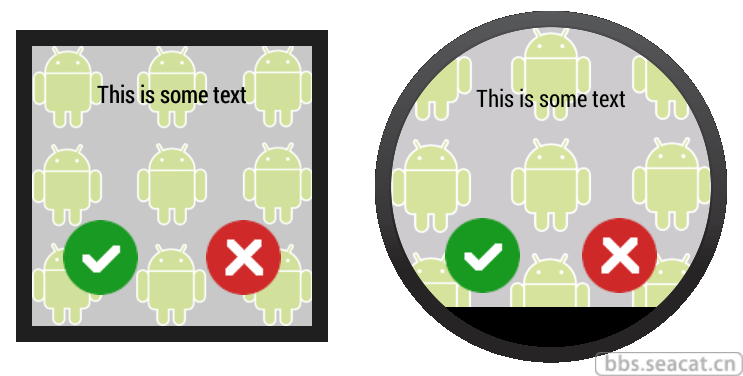
<android.support.wearable.view.BoxInsetLayout

xmlns:android="http://schemas.android.com/apk/res/android"

xmlns:app="http://schemas.android.com/apk/res-auto"

android:background="@drawable/robot_background"

android:layout_height="match_parent"

android:layout_width="match_parent"

android:padding="15dp">

<FrameLayout

android:layout_width="match_parent"

android:layout_height="match_parent"

android:padding="5dp"

app:layout_box="all">

<TextView

android:gravity="center"

android:layout_height="wrap_content"

android:layout_width="match_parent"

android:text="@string/sometext"

android:textColor="@color/black" />

<ImageButton

android:background="@null"

android:layout_gravity="bottom|left"

android:layout_height="50dp"

android:layout_width="50dp"

android:src="@drawable/ok" />

<ImageButton

android:background="@null"

android:layout_gravity="bottom|right"

android:layout_height="50dp"

android:layout_width="50dp"

android:src="@drawable/cancel" />

</FrameLayout>

</android.support.wearable.view.BoxInsetLayout>
android-wear开发之定义布局的更多相关文章
- Android Wear 开发入门
大家好,我是陆嘉杰,我是一名Android开发者.我想和大家进行一些技术交流,希望越来越多的人能和我成为好朋友. 大家都知道,智能手表是下一个开发的风口,而这方面的技术又属于前沿,所以和大家分享下An ...
- IDEA搭建Android wear开发环境,Android wear,I'm comming!
随着google公布了android wear这个东西.然后又有了三星的gear,LG的G watch以及moto 360,苹果由公布了apple watch.未来可能在智能手表行业又有一场战争. 当 ...
- Android Wear开发 - 卡片通知 - 第二节 : 自定义Wear卡片样式
一.前言说明 在上一节添加Android Wear通知特性我们实现了简单的Android Wear卡片拓展,但是默认提供给我们的多张卡片只能实现简单的文字展示,如果想要自定义布局,添加图片等等,则需要 ...
- android wear开发:为可穿戴设备创建一个通知 - Creating a Notification for Wearables
注:本文内容来自:https://developer.android.com/training/wearables/notifications/creating.html 翻译水平有限,如有疏漏,欢迎 ...
- Android Wear开发
Android Wear从2014年3月发布到现在已经从1.0发展到2.0(目前还没正式发布).其产品定位也发化了巨大变化,因为Android Wear 1.0通讯方式只有蓝牙,限定了系统,比较依赖手 ...
- Android Wear开发 - 数据通讯 - 第二节 : 数据的发送与接收
本节由介绍3种数据的发送接收:1.Data Items : 比特类型数据,限制100KB以内2.Assets : 资源类型数据,大小无上限3.Message : 发送消息,触发指令 http://de ...
- Android Wear开发 - 卡片通知 - 第一节 : 添加Android Wear通知特性
一. 前言说明 Android Wear大部分显示形式是卡片的形式,而最简单地支持Android Wear方式就是用通知**Notification**.而实现最简单的,非高度自定义的通知,则只需要在 ...
- Android Wear开发 - 入门指引 - Eclipse开发平台搭建
开发平台配置 下载最新版本的ADT,详情见官网:http://developer.android.com/sdk/installing/installing-adt.html .(之前一直习惯于Goo ...
- 想做Android Wear开发?你得先搞明白这四件事
手环和手表的腕上穿戴之争,随着Apple Watch发布和Android Wear不断完善而告一段落.尽管续航上略有缺陷,但手表以其类似手机可扩展的生态环境赢得了众多巨头的支持. Google曾透露, ...
随机推荐
- 支付宝手机网站支付流程(Node实现)
前言 公司M站要接入支付宝,借机研究了一下支付宝的支付流程.毕竟,只有公司才能拿到支付接口权限. 主要参考文档: https://doc.open.alipay.com/doc2/detail?tre ...
- linux文件系统和mount(硬盘,win分区,光驱,U盘)
fdisk –l查看dos/win/ext2分区(partiton,不是slice,slice是solaris分区) [root@localhost etc]# /sbin/fdisk -l Disk ...
- Android应用发布后的统计——百度移动统计的应用
一个App发布到各个渠道之后,我们需要采集不同渠道的一些信息,比如app在运行过程中产生的一些异常信息,app在各个android版本的分布,以及各个app版本的分布,各渠道的用户数,用户忠诚度等等信 ...
- JMeter 使用
Jmeter工具和其他性能工具在原理上完全一致,工具包含4个部分: (1)负载发生器:用于产生负载,通常以多线程或是多进程的方式模拟用户行为. (2)用户运行器:通常是一个脚本运行引擎,用户运行器附加 ...
- iOS 数据持久化(2):SQLite3
@import url(http://i.cnblogs.com/Load.ashx?type=style&file=SyntaxHighlighter.css); @import url(/ ...
- 关于C#中的DateTime类型的技巧
* datetime.now.tostring()方法默认的你是无法得到全部的时间的格式的,只能得到日期,得不到具体时间,如果要具体时间,就应该使用 datetime的tostring()重载,dat ...
- [转载]CentOS6.4+Mono3.0.7+Jexus5.2.5
本文章来自互联网,但是本人已经在VM虚拟机里面测试成功,所以分享给大家 1.更新 yum -y update 2.安装Mono源码安装需要的库 yum -y install gcc gcc-c++ a ...
- VS中监视窗口,即时窗口和输出窗口的使用
一.监视窗口 1.配置应用程序,使应用程序处于调试状态. 2.点击“调试”----“窗口”----“监视”----“监视1”,打开监视窗口. 3.在监视窗口中“名称”栏中输入变量名称或html元素id ...
- 后台线程,优先级,sleep,yield
1.后台线程,是指在程序运行的时候在后台提供一种通用服务的线程,并且这种线程并不属于程序中不可获取的部分.当所有非后台线程结束时,程序也就 终止了,同时会杀死进程中所有后台线程.main()是一个非后 ...
- 关于@property()的那些属性及ARC简介【nonatomic,atomic,assign,retain,strong,weak,copy。】
@property()常用的属性有:nonatomic,atomic,assign,retain,strong,weak,copy. 其中atomic和nonatomic用来决定编译器生成的gette ...