
【转载】Using the Web Service Callbacks in the .NET Application
Introduction
The Web Services can be used as a simple connectable service for a Web Page consumer in the request-respond manner. Usually these services are using a local resources such as application servers, databases, file servers, etc. In this case, the Web Service looks like an Internet wrapper to the local application. This article describes using the Web Service as a url address driven connectable component in the application model. I will show you how can be invoked virtually any Web Service in the loosely coupled design model included their callbacks. Based on these features, the application-distributed model can be virtualized and driven by metadata known as the Application Knowledge Base. In the details you will find implementation of the Virtual Web Service Proxy and callback mechanism between the Web Services using the C# language.
The Concept and Design
The client invoking the Web Service using the proxy (wrapper) class derived from the base class for ASP.NET Web Service - HttpWebClientProtocol. This class does all underlying work of the WebMethod mapping into the SOAP message method invocations (the SOAP is the default protocol). The proxy class can be generated by thewsdl.exe utility and incorporated into the project. Note that the proxy class is created for each Web Service separately. The client needs to know about the Web Services in advance of the compiling project. This approach is suitable for the tightly coupled application models. What about the situation, where client doesn't know which Web Service is going to be invoked? Well, for this "logical" connectivity the proxy class has to be created on the fly, based on the wsdl description of the requested Web Service. The concept of the Logical connectivity has the loosely coupled design pattern driven by the Knowledge Base (KB), which is a database of the application metadata such as wsdl source, url, state, etc.
The following picture shows the position of the Web Services in the .NET Application model:
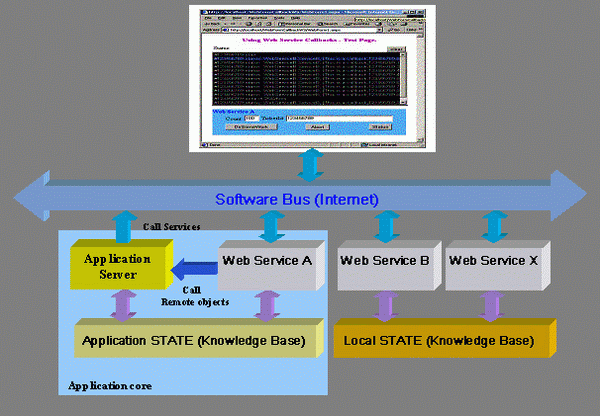
The concept of the Web Service allows to "plug&play" service to the "Software Bus", which is represented by the Internet. Note that the Web Services run behind the firewall. After that point they can use others .NET Technologies such as .NET Remoting, .NET Services (COM+ Services), etc.
The Web Services connectivity to the Software Bus is bidirectional - listening or sending messages. On the other hand, the Application Services or Web clients are passive and they have only capability to consume the Web Service. Typically, the Application Server using less one Web Service to dispatch incoming messages from the Software Bus. This architecture model is opened also for "legacy" applications, where the Web Service play role of the gateway to map the Web Methods to the application specific service.
The other feature of the Software Bus advantage is data exchange and their abstract definitions. This is achieved using the XML technology, which it allows to use different platforms or implementations for the Web Services.
Using the Web Services in your application model has some rules similar to components which running in the COM+/MTS environment, the following are major:
WebMethodis stateless; the Web Service has responsibility to keep a state between the calls. Some good idea is to use a "travelling" message in the business model to keep a job state (similar to transaction stream)WebMethodruns synchronously, the client should be use asynchronously invoking method, which it will yield its process to perform another calls.WebMethodis a root of the transaction stream; there is no option for "transaction support". If theWebMethodhas been declared as a transactional (required or new), then this place is a root of the new transaction. Note that transaction over Internet is not supported by Web services in the current version of the .NET Framework. The transaction has to be divided into more local transactions, see a concept and model of the MSMQ transactions.- Object reference cannot be used in arguments or return value; it means that only object state can be exchange between consumer and Web Service. Practically, the sender serializing an object - its public state into the XML format and receiver as opposite side making its de-serialization.
The above architecture model organized around the Software Bus allows building incrementally any business model in the true distributed hierarchy. The picture shows only typically browser-based client, but practically it can be any devices which have an access to the Internet included bridges and gateways (for instance; wireless internet gateway).
Now, let's look at the details of the connectable Web Service mechanism.
The Web Service Callback
The following picture shows an example of the Web Service callbacks:
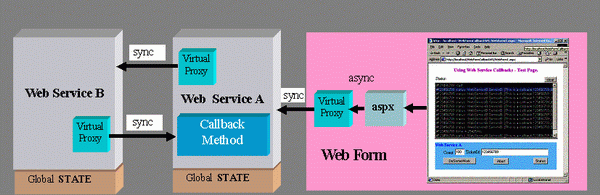
The Web Service "A" has a dedicated WebMethod to handle callbacks from the Web Service "B". Each Web Service has own global State to keep the state between the calls. The access to the Web Method is via the Virtual Proxy class and it is divided into two phases:
- Client calling a proxy class in either the sync or async manner using the
BeginInvoke/EndInvokedesign pattern. - Proxy class calling the Web Method over Internet in the sync manner.
The Web Service "A" needs to pass an additional two callback's arguments to the Web Service "B"; the first one is a callback service and the other one is its state. This mechanism is similar to the BeginInvoke/EndInvokedesign pattern. The callback Web Method signature should have two arguments; senderId and EventArgsclass. The return value is a bool, which is a processing flag (continue or abort). The calls are in the loosely coupled design pattern based on the metadata (url address of the wsdl).
How is it working? Well, the browser-based client sending a request to the Web Service "A" to make some work. The Web Service "A" needs a help from the Web Service "B" which it will take some certain time. During this time the Web Service "A" will receive callbacks from the Web Service "B". The client can refresh a page about the current status or send a new request to abort its original request.
The following code snippet shows how simple is this process implemented using the WebServiceAccessorclass.
  [WebMethod]

  public string DoSomeWorkA(int count, string ticket)

  {

    // ...

    // call the WebService B

    WebServiceAccessor wsa = new WebServiceAccessor(targetWsdlUrl);

    object esObj = wsa.CreateInstance("ServiceB");

    object retval = wsa.Invoke(esObj, "BeginDoSomeWorkB", count,

            myWsdlUrl, state, null, null);

    // ...

  }

  [WebMethod]

  public bool CallbackServiceA(string sender, string xmlEventArg)

  {

    WebServiceEventArg ea = (WebServiceEventArg)xmlEventArg;

    //...

  }
Implementation
The key of the above design is to have a virtually access to any Web Service on the fly based on its wsdl description. To achieve this requirement the Web Service client proxy has to be virtualized to allow invoking the Web Service from any place. The WebServiceAccessor is a class, which can handle this task. I implemented it as a separate assembly and it is easy to add into the .NET projects. Also, there is a WebServiceEventArgs class required for the callback method.
Virtual Web Service Proxy
The idea of the Virtual Service Proxy is to generate metadata of the specified Web Service on the fly (in memory) for the Reflection process. As an entry parameter can be used a direct wsdl description or indirect information where this description can be obtained it. The indirect implantation is done for sources such as the File System and URL address. All process is divided into three pieces and it shown in the following picture:
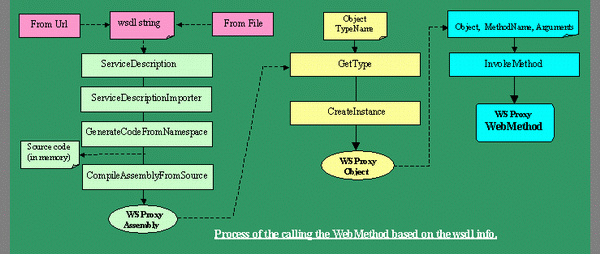
The source code of the Web Service is stored in the class for test purpose only. Its image is exactly the same like the file generated by wsdl.exe utility. For this part of the implementation I have been inspired by article [1] and [2], thanks. Having the source code of the proxy, then it is easy to compile it and generate its assembly. Once we have a proxy assembly we can use the Reflection magic to initiate a proxy class and then invoking its method members.
The following code snippet is shown its implementation:
  // Virtual Web Service Accessor

  public class WebServiceAccessor

  {

    private Assembly _ass = null;

        // assembly of the web service proxy

    private string _protocolName = "Soap";

        // communication protocol

    private string _srcWSProxy = string.Empty;

       // source text (.cs)

    //

    public Assembly Assembly { get{ return _ass; } }

    public string ProtocolName

      { get{ return _protocolName; } set {_protocolName = value; } }

    public string SrcWSProxy { get{ return _srcWSProxy; } }

    public WebServiceAccessor()

    {

    }

    public WebServiceAccessor(string wsdlSourceName)

    {

      AssemblyFromWsdl(GetWsdl(wsdlSourceName));

    }

    // Get the wsdl text from specified source

    public string WsdlFromUrl(string url)

    {

      WebRequest req = WebRequest.Create(url);

      WebResponse result = req.GetResponse();

      Stream ReceiveStream = result.GetResponseStream();

      Encoding encode = System.Text.Encoding.GetEncoding("utf-8");

      StreamReader sr = new StreamReader( ReceiveStream, encode );

      string strWsdl = sr.ReadToEnd();

      return strWsdl;

    }

    public string GetWsdl(string source)

    {

      if(source.StartsWith("<?xml version") == true)

      {

        return source;                // this can be a wsdl string

      }

      else

      if(source.StartsWith("http://") == true)

      {

      return WsdlFromUrl(source);     // this is a url address

      }

      return WsdlFromFile(source);    // try to get from the file system

    }

    public string WsdlFromFile(string fileFullPathName)

    {

      FileInfo fi = new FileInfo(fileFullPathName);

      if(fi.Extension == "wsdl")

      {

        FileStream fs = new FileStream(fileFullPathName, FileMode.Open,

            FileAccess.Read);

        StreamReader sr = new StreamReader(fs);

        char[] buffer = new char[(int)fs.Length];

        sr.ReadBlock(buffer, 0, (int)fs.Length);

        return new string(buffer);

      }

      throw new Exception("This is no a wsdl file");

    }

    // make assembly for specified wsdl text

    public Assembly AssemblyFromWsdl(string strWsdl)

    {

      // Xml text reader

      StringReader  wsdlStringReader = new StringReader(strWsdl);

      XmlTextReader tr = new XmlTextReader(wsdlStringReader);

      ServiceDescription sd = ServiceDescription.Read(tr);

      tr.Close();

      // WSDL service description importer

      CodeNamespace cns = new CodeNamespace("RKiss.WebServiceAccessor");

      ServiceDescriptionImporter sdi = new ServiceDescriptionImporter();

      sdi.AddServiceDescription(sd, null, null);

      sdi.ProtocolName = _protocolName;

      sdi.Import(cns, null);

      // source code generation

      CSharpCodeProvider cscp = new CSharpCodeProvider();

      ICodeGenerator icg = cscp.CreateGenerator();

      StringBuilder srcStringBuilder = new StringBuilder();

      StringWriter sw = new StringWriter(srcStringBuilder);

      icg.GenerateCodeFromNamespace(cns, sw, null);

      _srcWSProxy = srcStringBuilder.ToString();

      sw.Close();

      // assembly compilation.

      CompilerParameters cp = new CompilerParameters();

      cp.ReferencedAssemblies.Add("System.dll");

      cp.ReferencedAssemblies.Add("System.Xml.dll");

      cp.ReferencedAssemblies.Add("System.Web.Services.dll");

      cp.GenerateExecutable = false;

      cp.GenerateInMemory = true;

      cp.IncludeDebugInformation = false;

      ICodeCompiler icc = cscp.CreateCompiler();

      CompilerResults cr = icc.CompileAssemblyFromSource(cp, _srcWSProxy);

      if(cr.Errors.Count > 0)

        throw new Exception(string.Format("Build failed: {0} errors",

            cr.Errors.Count));

      return _ass = cr.CompiledAssembly;

    }

    // Create instance of the web service proxy

    public object CreateInstance(string objTypeName)

    {

      Type t = _ass.GetType("RKiss.WebServiceAccessor" + "." + objTypeName);

      return Activator.CreateInstance(t);

    }

    // invoke method on the obj

    public object Invoke(object obj, string methodName, params object[] args)

    {

      MethodInfo mi = obj.GetType().GetMethod(methodName);

      return mi.Invoke(obj, args);

    }

  }
WebServiceEventArgs class
The WebServiceEventArgs class is used to pass a callback state. This is an example for the concept validation. The class state is depended from the application, but less one field should be declared - _state. This field is a callback cookie. The other thing, there are two methods to serialize/de-serialize class in the XML fashion format. I used implicit and explicit operators to make an easy casting to/from string.
// The callback state class

  [Serializable]

  public class WebServiceEventArgs : EventArgs

  {

    private string    _name;

    private string    _state;

    private int     _param;

    //

    public string name

    {

      get{ return _name; }

      set{ _name = value; }

    }

    public string state

    {

      get{ return _state; }

      set{ _state = value; }

    }

    public int param

    {

      get{ return _param; }

      set{ _param = value; }

    }

    public static implicit operator string(WebServiceEventArgs obj)

    {

      StringBuilder xmlStringBuilder = new StringBuilder();

      XmlTextWriter tw = new XmlTextWriter(new StringWriter(

          xmlStringBuilder));

      XmlSerializer serializer = new XmlSerializer(

         typeof(WebServiceEventArgs));

      serializer.Serialize(tw, obj);

      tw.Close();

      return xmlStringBuilder.ToString();

    }

    public static explicit operator WebServiceEventArgs(string xmlobj)

    {

      XmlSerializer serializer = new XmlSerializer(

          typeof(WebServiceEventArgs));

      XmlTextReader tr = new XmlTextReader(new StringReader(xmlobj));

      WebServiceEventArgs ea =

           serializer.Deserialize(tr) as WebServiceEventArgs;

      tr.Close();

      return ea;

    }

  }
Test
The concept and design of the Web Service Callbacks can be tested with the following three web subprojects located in the http://localhost virtual directory. The test schema is shown in the above section - The Web Service Callback. All projects has incorporated the Trace points to see the process flow on the DebugView screen (http://www.sysinternals.com/).
Here are their implementations:
1. Web Service A
namespace WebServiceA

{

  public class ServiceA : System.Web.Services.WebService

  {

    public ServiceA()

    {

      //CODEGEN: This call is required by the ASP.NET Web Services Designer

      InitializeComponent();

      Trace.WriteLine(string.Format("[{0}]ServiceA.ctor", GetHashCode()));

    }

    #region Component Designer generated code

    private void InitializeComponent()

    {

    }

    #endregion

    protected override void Dispose( bool disposing )

    {

      Trace.WriteLine(string.Format("[{0}]ServiceA.Dispose", GetHashCode()));

    }

    [WebMethod]

    public string DoSomeWorkA(int count, string ticket)

    {

      Trace.WriteLine(string.Format("[{0}]ServiceA.DoSomeWorkA start...",

        GetHashCode()));

      int startTC = Environment.TickCount;

      // current state

      Global.state[ticket] = "The job has been started";

      string state = ticket;

      // location of the source/target web services -

      // (hard coded for test purpose only!)

      string myWsdlUrl = "http://localhost/WebServiceA/ServiceA.asmx?wsdl";

      string targetWsdlUrl = "http://localhost/WebServiceB/ServiceB.asmx?wsdl";

      // call the WebService B

      WebServiceAccessor wsa = new WebServiceAccessor(targetWsdlUrl);

      object esObj = wsa.CreateInstance("ServiceB");

      object retval = wsa.Invoke(esObj, "BeginDoSomeWorkB", count,

         myWsdlUrl, state, null, null);

      // Wait for the call to complete

      WebClientAsyncResult ar = retval as WebClientAsyncResult;

      ar.AsyncWaitHandle.WaitOne();

      // retrieve a result

      object result = wsa.Invoke(esObj, "EndDoSomeWorkB", ar);

      int durationTC = Environment.TickCount - startTC;

      Trace.WriteLine(string.Format("[{0}]ServiceA.DoSomeWorkA done in {1}ms",

         GetHashCode(), durationTC));

      //

      Global.state.Remove(ticket);

      return result.ToString();

    }

    [WebMethod]

    public bool CallbackServiceA(string sender, string xmlEventArg)

    {

      WebServiceEventArgs ea = (WebServiceEventArgs)xmlEventArg;

      string msg = string.Format(

             "[{0}]ServiceA.CallbackServiceA({1}, [{2},{3},{4}])",

             GetHashCode(), sender, ea.name, ea.state, ea.param);

      if(Global.state.ContainsKey(ea.state))

      {

        Global.state[ea.state] = string.Format("{0}, [{1},{2},{3}]",

             sender, ea.name, ea.state, ea.param);

        Trace.WriteLine(msg);

        return true;

      }

      return false;

    }

    [WebMethod]

    public string AbortWorkA(string ticket)

    {

      Trace.WriteLine(string.Format("[{0}]ServiceA.AbortWorkA",

           GetHashCode()));

      if(Global.state.ContainsKey(ticket))

      {

        Global.state.Remove(ticket);

        return string.Format("#{0} aborted.", ticket);

      }

      return string.Format("#{0} doesn't exist.", ticket);

    }

    [WebMethod]

    public string GetStatusWorkA(string ticket)

    {

      if(Global.state.ContainsKey(ticket))

      {

        return string.Format("#{0} status: {1}", ticket, Global.state[ticket]);

      }

      return string.Format("#{0} doesn't exist.", ticket);

    }

  }

}
The Global class:
namespace WebServiceA

{

  public class Global : System.Web.HttpApplication

  {

    static public Hashtable state = null;

    protected void Application_Start(Object sender, EventArgs e)

    {

      state = Hashtable.Synchronized(new Hashtable());

      Trace.WriteLine(string.Format("[{0}]ServiceA.Application_Start",

         GetHashCode()));

    }

    // ...

    protected void Application_End(Object sender, EventArgs e)

    {

      state.Clear();

      Trace.WriteLine(string.Format("[{0}]ServiceA.Application_End",

         GetHashCode()));

    }

  }

}
The request and callback Web Methods run in the different sessions, that's why the state has to be saved in the Global class in the shareable resource (for instance; Hashtable). Each client's request has a unique ticket Id, which it is a key information (cookie) between the Web Services and global State.
2. Web Service B
This Web Service is very simple. There is only one Web Method to simulate some work. During this process, the service is invoking the callback Web Method. The job runs in the required number of loops in the sync manner. Each loop is invoking the Callback Web Method to the Web Service "A" and based on its return value the process can be aborted. The service can hold the State in the Session.
namespace WebServiceB

{

  public class ServiceB : System.Web.Services.WebService

  {

    public ServiceB()

    {

      //CODEGEN: This call is required by the ASP.NET Web Services Designer

      InitializeComponent();

      Trace.WriteLine(string.Format("[{0}]ServiceB.ctor", GetHashCode()));

    }

    #region Component Designer generated code

    private void InitializeComponent()

    {

    }

    #endregion

    protected override void Dispose( bool disposing )

    {

    Trace.WriteLine(string.Format("[{0}]ServiceB.Dispose", GetHashCode()));

    }

    [WebMethod(EnableSession=true)]

    public string DoSomeWorkB(int count, string callbackWS, string stateWS)

    {

    Trace.WriteLine(string.Format("[{0}]ServiceB.DoSomeWorkB start...",

            GetHashCode()));

      int startTC = Environment.TickCount;

      // async call to the ServiceA.CallbackServiceA method

      WebServiceAccessor wsa = new WebServiceAccessor(callbackWS);

      object esObj = wsa.CreateInstance("ServiceA");

      // prepare the callback arguments: sender, EventArgs

      string sender = GetType().FullName;

      WebServiceEventArgs ea = new WebServiceEventArgs();

      ea.name = "This is a callback";

      ea.state = stateWS;

      for(int ii = 0; ii < (count & 0xff); ii++) // max. count = 255

      {

        ea.param = ii;

        string xmlEventArgs = ea;

        object retval = wsa.Invoke(esObj, "BeginCallbackServiceA",

             sender, xmlEventArgs, null, null);

        // simulate some task

        Thread.Sleep(250);

        // Wait for the call to complete

        WebClientAsyncResult ar = retval as WebClientAsyncResult;

        ar.AsyncWaitHandle.WaitOne();

        // result

        object result = wsa.Invoke(esObj, "EndCallbackServiceA", ar);

        if((bool)result == false)

        {

          Trace.WriteLine(string.Format(

             "[{0}]ServiceB.DoSomeWorkB has been aborted", GetHashCode()));

          return string.Format("#{0} aborted during the progress of {1}.",

             stateWS, ii);

        }

      }

      //

      int durationTC = Environment.TickCount - startTC;

      Trace.WriteLine(string.Format("[{0}]ServiceB.DoSomeWorkB done in {1}ms",

                GetHashCode(), durationTC));

      return string.Format("#{0} done in {1}ms", stateWS, durationTC);

    }

  }

}
3. Web Form
This is a simple browser-based client to the Web Service "A". Each Web Method has own button event handler. The State is holding on the Session class in the Stack object. The page updating is based on the mechanism, where event handlers pushing data to the Session Stack and then during the Page_Load time they are pulling and inserting into the ListBox control. The other interesting issue for this client is asynchronously invoking theDoSomeWorkA Method, where process is yielded and handled by its callback, that's why we can send the other requests to the Web Service "A". Note that each job is identified by its ticket ID which it represents the key of the State.
namespace WebFormCallbackWS

{

  public class WebForm1 : System.Web.UI.Page

  {

    // ...

    protected ServiceA sa = new ServiceA();

    public WebForm1()

    {

      Page.Init += new System.EventHandler(Page_Init);

    }

    private void Page_Load(object sender, System.EventArgs e)

    {

      if(IsPostBack == false)

      {

        //initialize controls, one time!

        if(Session["Status"] == null)

          Session["Status"] = Stack.Synchronized(new Stack());

      }

      else

      {

        Stack stack = Session["Status"] as Stack;

        while(stack.Count > 0)

          ListBoxCallbackStatus.Items.Add(stack.Pop().ToString());

        int numberOfItems = ListBoxCallbackStatus.Items.Count;

        if(numberOfItems > 13)

          ListBoxCallbackStatus.SelectedIndex = numberOfItems - 13;

      }

    }

    private void Page_Init(object sender, EventArgs e)

    {

      // ...

    }

    #region Web Form Designer generated code

    private void InitializeComponent()

    {

      // ...

    }

    #endregion

    // Call the web service asynchronously

    private void ButtonDoSomeWorkA_Click(object sender, System.EventArgs e)

    {

      int count = Convert.ToInt32(TextBoxCount.Text);

      string ticket = TextBoxTicketId.Text;

      //

      AsyncCallback callback = new AsyncCallback(callbackDoSomeWorkA);

      IAsyncResult ar = sa.BeginDoSomeWorkA(count, ticket, callback, null);

      ListBoxCallbackStatus.Items.Add(string.Format("#{0} start ...",

           ticket));

    }

    // the call callback from the WebService

    private void callbackDoSomeWorkA(IAsyncResult ar)

    {

      string retval = sa.EndDoSomeWorkA(ar);

      Stack stack = Session["Status"] as Stack;

      stack.Push(retval);

    }

    // call the web service

    private void ButtonAbort_Click(object sender, System.EventArgs e)

    {

      Stack stack = Session["Status"] as Stack;

      stack.Push(sa.AbortWorkA(TextBoxTicketId.Text));

    }

    // Get the status from the web service

    private void ButtonRefresh_Click(object sender, System.EventArgs e)

    {

      Stack stack = Session["Status"] as Stack;

      stack.Push(sa.GetStatusWorkA(TextBoxTicketId.Text));

    }

    // clean-up the listbox

    private void ButtonClear_Click(object sender, System.EventArgs e)

    {

      ListBoxCallbackStatus.Items.Clear();

    }

  }

}
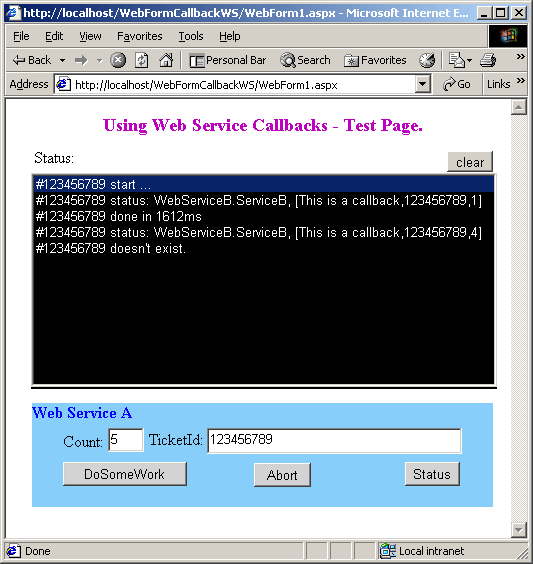
Now it is the time to make a test. The above picture shows the Web Form user interface. Be sure you are running on-line and Local intranet. Click on the DoSomeWork button and then ask for Status. The Status or Abort buttons can be clicked any time. The ListBox control will display the current State of the specified job (by the ticket Id).
Conclusion
Using the Web Services in the Application model opening a new dimension of the distributed architectures. Dynamically calling the Web Methods in the business model hierarchy is straightforward and simply using the features of the .NET Framework. This article shown how it can be implemented using the C# language. The solution has been created to show a concept and design issues. The real production version needs to address issues such as security, full url addressing, password, server proxy, etc.
Useful Links
License
This article, along with any associated source code and files, is licensed under The Code Project Open License (CPOL)
【转载】Using the Web Service Callbacks in the .NET Application的更多相关文章
- [转载] 学会使用Web Service上(服务器端访问)~~~
http://www.360doc.com/content/10/0712/12/541242_38461863.shtml# 关于什么是Web Service,相信在很多地方都会有介绍.简单的讲,W ...
- 【转载】使用SoapUI 测试Web Service
转载地址:使用SoapUI 测试Web Service 如何测试写好的Webservice?你当然可以写代码来测试,但还是太麻烦,你得花时间去学习各语言的关于Webservice调用的相关API. ...
- 转载——Java与WCF交互(二):WCF客户端调用Java Web Service
在上篇< Java与WCF交互(一):Java客户端调用WCF服务>中,我介绍了自己如何使用axis2生成java客户端的悲惨经历.有同学问起使用什么协议,经初步验证,发现只有wsHttp ...
- 转载——Step by Step 创建一个 Web Service
原创地址:http://www.cnblogs.com/jfzhu/p/4022139.html 转载请注明出处 (一)创建Web Service 创建第一个项目,类型选择ASP.NET Empty ...
- Web Service简介 内部资料 请勿转载 谢谢合作
1.1.Web Service基本概念 Web Service也叫XML Web Service WebService是一种可以接收从Internet或者Intranet上的其它系统中传递过来的请求, ...
- 【转载】在 Visual Studio 2012 中创建 ASP.Net Web Service
在 Visual Studio 2012 中创建 ASP.Net Web Service,步骤非常简单.如下: 第一步:创建一个“ASP.Net Empty Web Application”项目 创建 ...
- [转载]常用Web Service汇总(天气预报、时刻表等)
下面总结了一些常用的Web Service,是平时乱逛时收集的,希望对大家有用. ============================================ 天气预报Web Servic ...
- [转载]Web Service到底是什么
转自:http://blog.csdn.net/wooshn/article/details/8069087/ 武僧的专栏 一.序言 大家或多或少都听过WebService(Web服务),有一段时间 ...
- [转载] Web Service工作原理及实例
一.Web Service基本概念 Web Service也叫XML Web Service WebService是一种可以接收从Internet或者Intranet上的其它系统中传递过来的请求, ...
随机推荐
- 加速Android Studio/Gradle构建
已经使用Android Studio进行开发超过一年,随着项目的增大,依赖库的增多,构建速度越来越慢,现在最慢要6分钟才能build一个release的安装包,在网上查找资料,发现可以通过一些配置可以 ...
- 转:ORACLEERP开发基础之EBS开发基础
转自:http://blog.itpub.net/8781091/viewspace-1012244/ [内容导航] 第1页:开发工具安装 第2页:增加数据块 第3页:注册表单FORM 第4页:注册请 ...
- 一种协程的 C/C++ 实现
一种协程的 C/C++ 实现 介绍 在前几天接触到了协程的概念,觉得很有趣.因为我可以使用一个线程来实现一个类似多线程的程序,如果使用协程来替代线程,就可以省去很多原子操作和内存栅栏的麻烦,大大减少与 ...
- 发布GeoServer后预览提示下载wms文件
这是因为发布的图层有中文所导致的,只需修改tomcat的server.xml文件 <Connector port="8080" protocol="HTTP/1.1 ...
- 介绍SmartUpload很好的网站
附带链接:http://www.cnblogs.com/elleniou/archive/2012/09/24/2700583.html
- A swift Tour(2) Control Flow
Control Flow 用 if 和 switch 来做条件语句,并且用for-in,for,while,和do-while做循环,条件和循环的括号是可以不写的,但是body外面的括号是必须写的 l ...
- jquery的事件绑定
暂时有 bind(),live(),delegate(),on() 这四个事件监听函数 对应的4个事件解除函数分别是: unbind(),die(),undelegate(),off() bind:向 ...
- 【JAVA错误笔记】 - c3p0问题java.lang.NoClassDefFoundError:com.mchange.v2.ser.Indirector
错误描述:java.lang.NoClassDefFoundError:com.mchange.v2.ser.Indirector 原因分析: 这是c3p0的一个错误信息,我们在下载 c3p0时候,z ...
- 网易游戏QA工程师笔试回忆-2012.9【个人题解】
========================转帖======================== 网易游戏QA工程师笔试回忆-2012.9 刚刚从武大回来,趁热回忆下题目,给以后的XDJMs参考. ...
- memcache的分布式算法(转)
memcached的分布式 正如第1次中介绍的那样, memcached虽然称为“分布式”缓存服务器,但服务器端并没有“分布式”功能. 服务器端仅包括 第2次. 第3次 前坂介绍的内存存储功能,其实现 ...