
(三)elasticsearch 源码之启动流程分析
1.前面我们在《(一)elasticsearch 编译和启动》和 《(二)elasticsearch 源码目录 》简单了解下es(elasticsearch,下同),现在我们来看下启动代码
下面是启动流程图,我们按照流程图的顺序依次描述
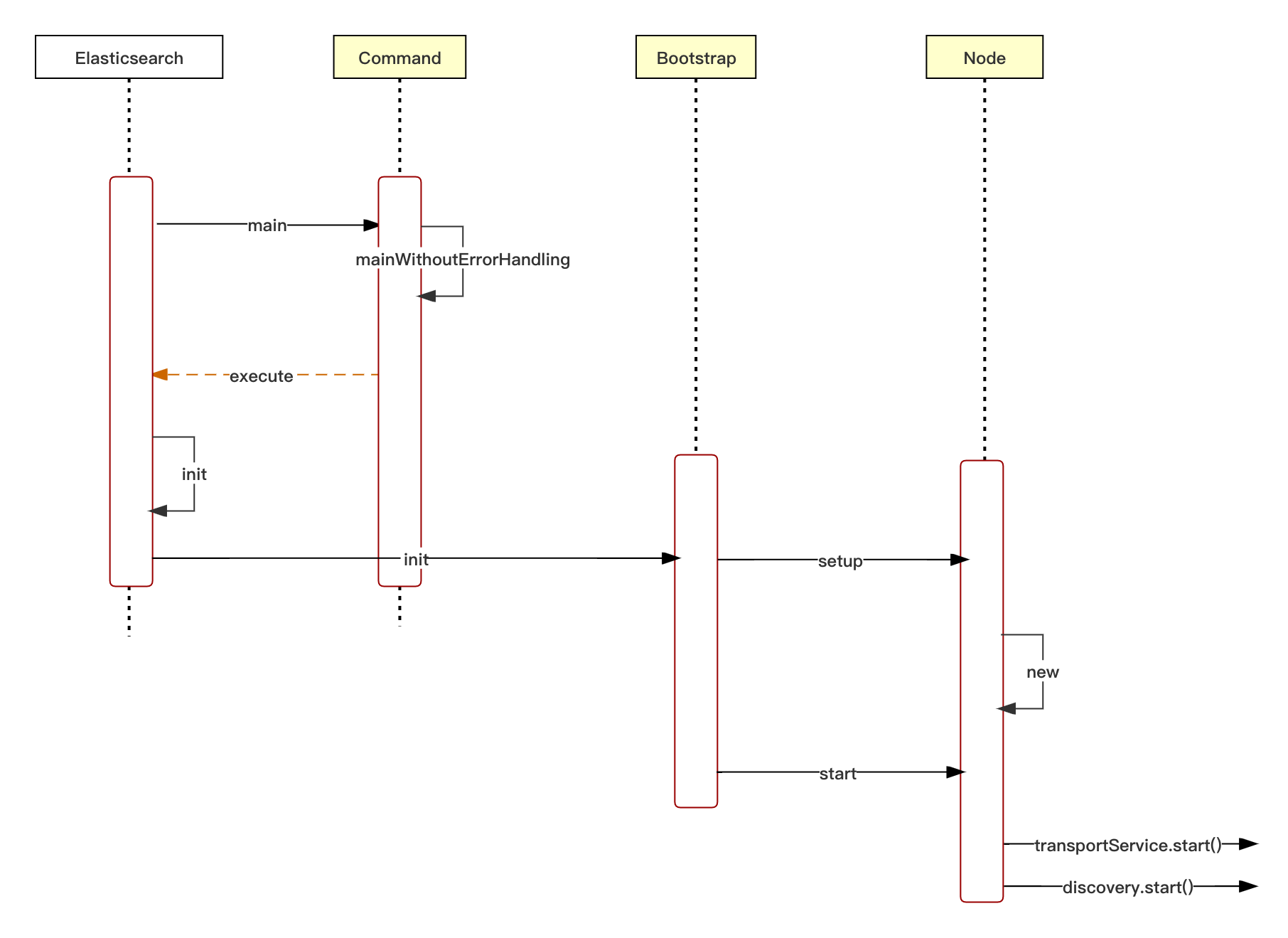
2.启动流程
org.elasticsearch.bootstrap.Elasticsearch

public static void main(final String[] args) throws Exception {

        overrideDnsCachePolicyProperties();

        /*

         * We want the JVM to think there is a security manager installed so that if internal policy decisions that would be based on the

         * presence of a security manager or lack thereof act as if there is a security manager present (e.g., DNS cache policy). This

         * forces such policies to take effect immediately.

         */

        System.setSecurityManager(new SecurityManager() {

            @Override

            public void checkPermission(Permission perm) {

                // grant all permissions so that we can later set the security manager to the one that we want

            }

        });

        LogConfigurator.registerErrorListener();

        final Elasticsearch elasticsearch = new Elasticsearch();

        int status = main(args, elasticsearch, Terminal.DEFAULT);

        if (status != ExitCodes.OK) {

            exit(status);

        }

    }
后续执行 Elasticsearch.execute -> Elasticsearch.init -> Bootstrap.init
org.elasticsearch.bootstrap.Bootstrap

static void init(

            final boolean foreground,

            final Path pidFile,

            final boolean quiet,

            final Environment initialEnv) throws BootstrapException, NodeValidationException, UserException {

        // force the class initializer for BootstrapInfo to run before

        // the security manager is installed

        BootstrapInfo.init();

        INSTANCE = new Bootstrap();

        // 安全配置文件

        final SecureSettings keystore = loadSecureSettings(initialEnv);

        final Environment environment = createEnvironment(pidFile, keystore, initialEnv.settings(), initialEnv.configFile());

        LogConfigurator.setNodeName(Node.NODE_NAME_SETTING.get(environment.settings()));

        try {

            LogConfigurator.configure(environment);

        } catch (IOException e) {

            throw new BootstrapException(e);

        }

        if (JavaVersion.current().compareTo(JavaVersion.parse("11")) < 0) {

            final String message = String.format(

                            Locale.ROOT,

                            "future versions of Elasticsearch will require Java 11; " +

                                    "your Java version from [%s] does not meet this requirement",

                            System.getProperty("java.home"));

            new DeprecationLogger(LogManager.getLogger(Bootstrap.class)).deprecated(message);

        }

        // 处理pidFile

        if (environment.pidFile() != null) {

            try {

                PidFile.create(environment.pidFile(), true);

            } catch (IOException e) {

                throw new BootstrapException(e);

            }

        }

        // 如果是后台启动,则不打印日志

        final boolean closeStandardStreams = (foreground == false) || quiet;

        try {

            if (closeStandardStreams) {

                final Logger rootLogger = LogManager.getRootLogger();

                final Appender maybeConsoleAppender = Loggers.findAppender(rootLogger, ConsoleAppender.class);

                if (maybeConsoleAppender != null) {

                    Loggers.removeAppender(rootLogger, maybeConsoleAppender);

                }

                closeSystOut();

            }

            // fail if somebody replaced the lucene jars

            checkLucene();

            // 通用异常捕获

            // install the default uncaught exception handler; must be done before security is

            // initialized as we do not want to grant the runtime permission

            // setDefaultUncaughtExceptionHandler

            Thread.setDefaultUncaughtExceptionHandler(new ElasticsearchUncaughtExceptionHandler());

            INSTANCE.setup(true, environment);

            try {

                // any secure settings must be read during node construction

                IOUtils.close(keystore);

            } catch (IOException e) {

                throw new BootstrapException(e);

            }

            INSTANCE.start();

            if (closeStandardStreams) {

                closeSysError();

            }

        }
这里我们可以关注下 INSTANCE.setup(true, environment);
org.elasticsearch.bootstrap.Bootstrap

private void setup(boolean addShutdownHook, Environment environment) throws BootstrapException {

        Settings settings = environment.settings();

        try {

            spawner.spawnNativeControllers(environment);

        } catch (IOException e) {

            throw new BootstrapException(e);

        }

        // 检查一些mlock设定

        initializeNatives(

                environment.tmpFile(),

                BootstrapSettings.MEMORY_LOCK_SETTING.get(settings),

                BootstrapSettings.SYSTEM_CALL_FILTER_SETTING.get(settings),

                BootstrapSettings.CTRLHANDLER_SETTING.get(settings));

        // 探针

        // initialize probes before the security manager is installed

        initializeProbes();

        if (addShutdownHook) {

            Runtime.getRuntime().addShutdownHook(new Thread() {

                @Override

                public void run() {

                    try {

                        IOUtils.close(node, spawner);

                        LoggerContext context = (LoggerContext) LogManager.getContext(false);

                        Configurator.shutdown(context);

                        if (node != null && node.awaitClose(10, TimeUnit.SECONDS) == false) {

                            throw new IllegalStateException("Node didn't stop within 10 seconds. " +

                                    "Any outstanding requests or tasks might get killed.");

                        }

                    } catch (IOException ex) {

                        throw new ElasticsearchException("failed to stop node", ex);

                    } catch (InterruptedException e) {

                        LogManager.getLogger(Bootstrap.class).warn("Thread got interrupted while waiting for the node to shutdown.");

                        Thread.currentThread().interrupt();

                    }

                }

            });

        }

        try {

            // 检查类加载的一些问题

            // look for jar hell

            final Logger logger = LogManager.getLogger(JarHell.class);

            JarHell.checkJarHell(logger::debug);

        } catch (IOException | URISyntaxException e) {

            throw new BootstrapException(e);

        }

        // Log ifconfig output before SecurityManager is installed

        IfConfig.logIfNecessary();

        // 安全处理

        // install SM after natives, shutdown hooks, etc.

        try {

            Security.configure(environment, BootstrapSettings.SECURITY_FILTER_BAD_DEFAULTS_SETTING.get(settings));

        } catch (IOException | NoSuchAlgorithmException e) {

            throw new BootstrapException(e);

        }

        node = new Node(environment) {

            @Override

            protected void validateNodeBeforeAcceptingRequests(

                final BootstrapContext context,

                final BoundTransportAddress boundTransportAddress, List<BootstrapCheck> checks) throws NodeValidationException {

                BootstrapChecks.check(context, boundTransportAddress, checks);

            }

        };

    }
最后一句 node = new Node(environment) 初始化了节点,里面做了许多工作
org.elasticsearch.node.Node

protected Node(

            final Environment environment, Collection<Class<? extends Plugin>> classpathPlugins, boolean forbidPrivateIndexSettings) {

    ...

            // 打印jvm信息

            final JvmInfo jvmInfo = JvmInfo.jvmInfo();

            logger.info(

                "version[{}], pid[{}], build[{}/{}/{}/{}], OS[{}/{}/{}], JVM[{}/{}/{}/{}]",

                Build.CURRENT.getQualifiedVersion(),

                jvmInfo.pid(),

                Build.CURRENT.flavor().displayName(),

                Build.CURRENT.type().displayName(),

                Build.CURRENT.hash(),

                Build.CURRENT.date(),

                Constants.OS_NAME,

                Constants.OS_VERSION,

                Constants.OS_ARCH,

                Constants.JVM_VENDOR,

                Constants.JVM_NAME,

                Constants.JAVA_VERSION,

                Constants.JVM_VERSION);

...

            // 初始化各类服务,以及他们相关的依赖

            this.pluginsService = new PluginsService(tmpSettings, environment.configFile(), environment.modulesFile(),

                environment.pluginsFile(), classpathPlugins);

            final Settings settings = pluginsService.updatedSettings();

            final Set<DiscoveryNodeRole> possibleRoles = Stream.concat(

                    DiscoveryNodeRole.BUILT_IN_ROLES.stream(),

                    pluginsService.filterPlugins(Plugin.class)

                            .stream()

                            .map(Plugin::getRoles)

                            .flatMap(Set::stream))

                    .collect(Collectors.toSet());

            DiscoveryNode.setPossibleRoles(possibleRoles);

            localNodeFactory = new LocalNodeFactory(settings, nodeEnvironment.nodeId());

...

            // guice注入

            modules.add(b -> {

                    b.bind(Node.class).toInstance(this);

                    b.bind(NodeService.class).toInstance(nodeService);

                    b.bind(NamedXContentRegistry.class).toInstance(xContentRegistry);

                    b.bind(PluginsService.class).toInstance(pluginsService);

                    b.bind(Client.class).toInstance(client);

                    b.bind(NodeClient.class).toInstance(client);

                    b.bind(Environment.class).toInstance(this.environment);

                    b.bind(ThreadPool.class).toInstance(threadPool);
es 使用 guice注入框架,guice是个非常轻量级的依赖注入框架,既然各个组件都已经注入好了,我们现在可以启动了。
INSTANCE.start -> Bootstrap.start
org.elasticsearch.bootstrap.Bootstrap

private void start() throws NodeValidationException {

        node.start();

        keepAliveThread.start();

    }
node.start中启动各个组件。es中的各个组件继承了 AbstractLifecycleComponent。start方法会调用组件的doStart方法。
org.elasticsearch.node.Node

public Node start() throws NodeValidationException {

        if (!lifecycle.moveToStarted()) {

            return this;

        }

        logger.info("starting ...");

        pluginLifecycleComponents.forEach(LifecycleComponent::start);

        injector.getInstance(MappingUpdatedAction.class).setClient(client);

        injector.getInstance(IndicesService.class).start();

        injector.getInstance(IndicesClusterStateService.class).start();

        injector.getInstance(SnapshotsService.class).start();

        injector.getInstance(SnapshotShardsService.class).start();

        injector.getInstance(SearchService.class).start();

        nodeService.getMonitorService().start();

        final ClusterService clusterService = injector.getInstance(ClusterService.class);

        final NodeConnectionsService nodeConnectionsService = injector.getInstance(NodeConnectionsService.class);

        nodeConnectionsService.start();

        clusterService.setNodeConnectionsService(nodeConnectionsService);

    ...
具体的我们看两个比较重要的服务 transportService.start();
org.elasticsearch.transport.TransportService

@Override

    protected void doStart() {

        transport.setMessageListener(this);

        connectionManager.addListener(this);

        // 建立网络连接

        transport.start();

        if (transport.boundAddress() != null && logger.isInfoEnabled()) {

            logger.info("{}", transport.boundAddress());

            for (Map.Entry<String, BoundTransportAddress> entry : transport.profileBoundAddresses().entrySet()) {

                logger.info("profile [{}]: {}", entry.getKey(), entry.getValue());

            }

        }

        localNode = localNodeFactory.apply(transport.boundAddress());

        if (connectToRemoteCluster) {

            // here we start to connect to the remote clusters

            remoteClusterService.initializeRemoteClusters();

        }

    }
启动transport的实现类是 SecurityNetty4HttpServerTransport
另一个比较重要的服务,discovery.start(),具体实现类是 Coordinator
org.elasticsearch.cluster.coordination.Coordinator

@Override

    protected void doStart() {

        synchronized (mutex) {

            CoordinationState.PersistedState persistedState = persistedStateSupplier.get();

            coordinationState.set(new CoordinationState(getLocalNode(), persistedState, electionStrategy));

            peerFinder.setCurrentTerm(getCurrentTerm());

            configuredHostsResolver.start();

            final ClusterState lastAcceptedState = coordinationState.get().getLastAcceptedState();

            if (lastAcceptedState.metaData().clusterUUIDCommitted()) {

                logger.info("cluster UUID [{}]", lastAcceptedState.metaData().clusterUUID());

            }

            final VotingConfiguration votingConfiguration = lastAcceptedState.getLastCommittedConfiguration();

            if (singleNodeDiscovery &&

                votingConfiguration.isEmpty() == false &&

                votingConfiguration.hasQuorum(Collections.singleton(getLocalNode().getId())) == false) {

                throw new IllegalStateException("cannot start with [" + DiscoveryModule.DISCOVERY_TYPE_SETTING.getKey() + "] set to [" +

                    DiscoveryModule.SINGLE_NODE_DISCOVERY_TYPE + "] when local node " + getLocalNode() +

                    " does not have quorum in voting configuration " + votingConfiguration);

            }

            ...
(三)elasticsearch 源码之启动流程分析的更多相关文章
- 渣渣菜鸡的 ElasticSearch 源码解析 —— 启动流程(下)
关注我 转载请务必注明原创地址为:http://www.54tianzhisheng.cn/2018/08/12/es-code03/ 前提 上篇文章写完了 ES 流程启动的一部分,main 方法都入 ...
- 渣渣菜鸡的 ElasticSearch 源码解析 —— 启动流程(上)
关注我 转载请务必注明原创地址为:http://www.54tianzhisheng.cn/2018/08/11/es-code02/ 前提 上篇文章写了 ElasticSearch 源码解析 -- ...
- Android4.0源码Launcher启动流程分析【android源码Launcher系列一】
最近研究ICS4.0的Launcher,发现4.0和2.3有稍微点区别,但是区别不是特别大,所以我就先整理一下Launcher启动的大致流程. Launcher其实是贯彻于手机的整个系统的,时时刻刻都 ...
- Netty 源码学习——客户端流程分析
Netty 源码学习--客户端流程分析 友情提醒: 需要观看者具备一些 NIO 的知识,否则看起来有的地方可能会不明白. 使用版本依赖 <dependency> <groupId&g ...
- hadoop源码_hdfs启动流程_3_心跳机制
hadoop在启动namenode和datanode之后,两者之间是如何联动了?datanode如何向namenode注册?如何汇报数据?namenode又如何向datanode发送命令? 心跳机制基 ...
- vue2源码框架和流程分析
vue整体框架和主要流程分析 之前对看过比较多关于vue源码的文章,但是对于整体框架和流程还是有些模糊,最后用chrome debug对vue的源码进行查看整理出这篇文章.... 本文对vue的整体框 ...
- Chromium源码--网络请求流程分析
转载请注明出处:http://www.cnblogs.com/fangkm/p/3784660.html 本文探讨一下chromium中加载URL的流程,具体来说是从地址栏输入URL地址到通过URLR ...
- hadoop源码_hdfs启动流程_2_DataNode
执行start-dfs.sh脚本后,集群是如何启动的? 本文阅读并注释了start-dfs脚本,以及datanode的启动主要流程流程源码. DataNode 启动流程 脚本代码分析 start-df ...
- Spring源码解析02:Spring IOC容器之XmlBeanFactory启动流程分析和源码解析
一. 前言 Spring容器主要分为两类BeanFactory和ApplicationContext,后者是基于前者的功能扩展,也就是一个基础容器和一个高级容器的区别.本篇就以BeanFactory基 ...
- Spring源码解析 | 第二篇:Spring IOC容器之XmlBeanFactory启动流程分析和源码解析
一. 前言 Spring容器主要分为两类BeanFactory和ApplicationContext,后者是基于前者的功能扩展,也就是一个基础容器和一个高级容器的区别.本篇就以BeanFactory基 ...
随机推荐
- Linux 下指定端口开放访问权限
Linux 下指定端口开放访问权限 作者:Grey 原文地址: 博客园:Linux 下指定端口开放访问权限 CSDN:Linux 下指定端口开放访问权限 环境 CentOS 系和 Debian 系的防 ...
- .NET Core C#系列之XiaoFeng.Threading.JobScheduler作业调度
作业调度其实就是一个定时器,定时完成某件事, 比如:每分钟执行一次,每小时执行一次,每天执行一次,第二周几执行,每月几号几点执行,间隔多少个小时执行一次等. 作业类:XiaoFeng.Threadin ...
- 怎样在vue中隐藏el-form-item中的值、设置输入框的值是只读
1.如何在前端vue中隐藏某一个元素(el-form-item怎样隐藏) 给每项表单项添加一个自己的id名,并用v-model绑定相对应的数据,利用v-if根据上一个表单项的数据值来进行显示或隐藏 & ...
- 动词时态=>2.动作的时间状态结合
动作和时间结合 现在的四种时态 现在进行时态 对于 现在这个时间点,这个 动作 还在进行当中 例如:我现在正在喝水 现在完成时态 对于 现在这个时间点,这个 动作 已然完成 例子:我现在已经喝完了水 ...
- 第2-1-1章 FastDFS分布式文件服务背景及系统架构介绍
目录 1 背景 1.1 为什么需要分布式文件服务 1.1.1 单机时代 1.1.2 独立文件服务器 1.1.3 分布式文件系统 1.2 什么是FastDFS 2 系统架构 2.1 Tracker集群 ...
- 成熟企业级开源监控解决方案Zabbix6.2关键功能实战-上
@ 目录 概述 定义 监控作用 使用理解 监控对象和指标 架构组成 常用监控软件分析 版本选型 俗语 安装 部署方式 部署 zabbix-agent 概述 定义 Zabbix 官网地址 https:/ ...
- STF的DOCKER搭建
OPENSTF OpenSTF(Smartphone Test Farm)是一个web端移动设备管理平台,可以从浏览器端远程调试.远程管理设备.其实有点类似于我们现在很火热的云测平台,如:testin ...
- perl使用print输入数据到文件
#!usr/bin/perl use utf8; #引入utf8模块 脚本内的字符串使用utf8作为编码格式 binmode(STDOUT,":encoding(gbk)"); # ...
- 我的Python基础(二)
python包含6种内奸的序列:列表.元组.字符串.Unicode字符串.buffer对象和xrange对象 列表和元组的主要区别在于,列表可以修改,元组则不能. 索引: 使用负数索引时,最后一个元素 ...
- HTTPS - 揭秘 TLS 1.2 协议完整握手过程--此文为转发文,一定要结合wirshark工具看,很清楚
winshark 筛选条件为:tls and ip.src==xxx 本文通过对一次 TLS 握手过程的数据抓包分析做为切入点,希望能进一步的帮助大家理解 HTTPS 原理. HTTPS 是建立在 S ...