
记录NLTK安装使用全过程--python
前言
之前做实验用到了情感分析,就下载了一下,这篇博客记录使用过程。
下载安装到实战详细步骤
NLTK下载安装
先使用pip install nltk 安装包
然后运行下面两行代码会弹出如图得GUI界面,注意下载位置,然后点击下载全部下载了大概3.5G。
import nltk

nltk.download()!
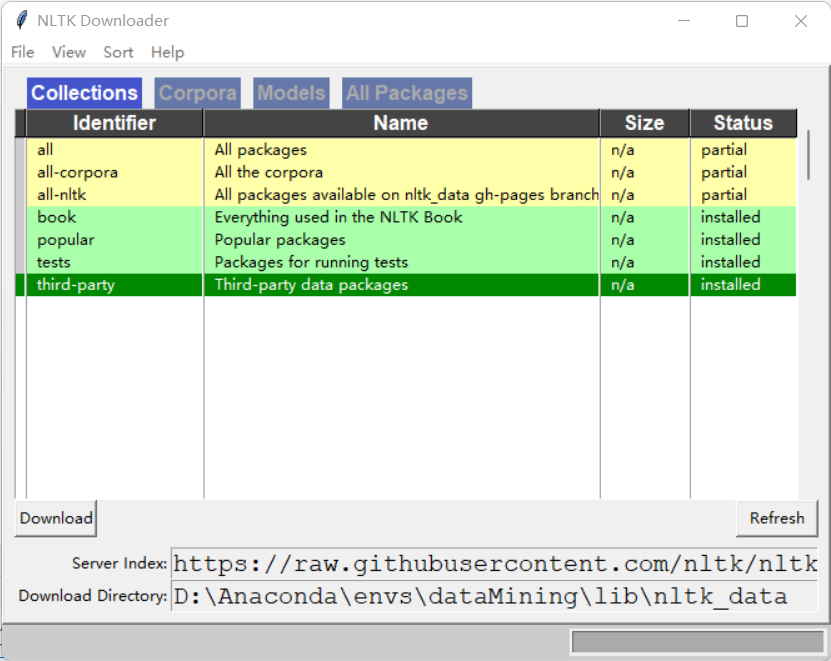
- 注意点:可能由于网络原因访问github卡顿导致,不能正常弹出GUI进行下载,可以自己去github下载
网址:https://github.com/nltk/nltk_data/tree/gh-pages/packages
下载成功后查看是否可以使用,运行下面代码看看是否可以调用brown中的词库
from nltk.corpus import brown

print(brown.categories())  # 输出brown语料库的类别

print(len(brown.sents()))  # 输出brown语料库的句子数量

print(len(brown.words()))  # 输出brown语料库的词数量

'''

结果为:

['adventure', 'belles_lettres', 'editorial', 'fiction', 'government', 'hobbies',

'humor', 'learned', 'lore', 'mystery', 'news', 'religion', 'reviews', 'romance',

'science_fiction']

57340

1161192

'''
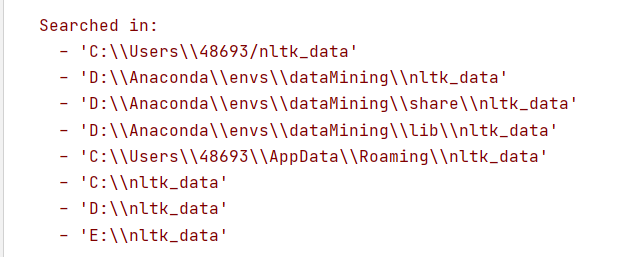
这时候有可能报错,说在下面文件夹中没有找到nltk_data
把下载好的文件解压在复制到其中一个文件夹位置即可,注意文件名,让后就能正常使用!
实战:运用自己的数据进行操作
一、使用自己的训练集训练和分析
可以看到我的训练集和代码的结构是这样的: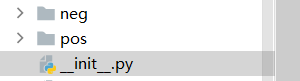 pos和neg里面是txt文本
链接:https://pan.baidu.com/s/1GrNg3ziWJGhcQIWBCr2PMg
提取码:1fb8
import nltk.classify.util

from nltk.classify import NaiveBayesClassifier

import os

from nltk.corpus import stopwords

import pandas as pd

def extract_features(word_list):

    return dict([(word, True) for word in word_list])

#停用词

stop = stopwords.words('english')

stop1 = ['!', ',' ,'.' ,'?' ,'-s' ,'-ly' ,' ', 's','...']

stop = stop1+stop

print(stop)

#读取txt文本

def readtxt(f,path):

    data1 = ['microwave']

    # 以 utf-8 的编码格式打开指定文件

    f = open(path+f, encoding="utf-8")

    # 输出读取到的数据

    #data = f.read().split()

    data = f.read().split()

    for i in range(len(data)):

        if data[i] not in stop:

            data[i] = [data[i]]

            data1 = data1+data[i]

    # 关闭文件

    f.close()

    del data1[0]

    return data1

if __name__ == '__main__':

    # 加载积极与消极评论  这些评论去掉了一些停用词,是在readtxt韩硕里处理的,

    #停用词如 i am you a this 等等在评论中是非常常见的,有可能对结果有影响,应该事先去除

    positive_fileids = os.listdir('pos')  # 积极 list类型 42条数据 每一条是一个txt文件

    print(type(positive_fileids), len(positive_fileids)) # list类型 42条数据 每一条是一个txt文件

    negative_fileids = os.listdir('neg')#消极 list类型 22条数据 每一条是一个txt文件自己找的一些数据

    print(type(negative_fileids),len(negative_fileids))

    # 将这些评论数据分成积极评论和消极评论

    # movie_reviews.words(fileids=[f])表示每一个txt文本里面的内容,结果是单词的列表:['films', 'adapted', 'from', 'comic', 'books', 'have', ...]

    # features_positive 结果为一个list

    # 结果形如:[({'shakesp: True, 'limit': True, 'mouth': True, ..., 'such': True, 'prophetic': True}, 'Positive'), ..., ({...}, 'Positive'), ...]

    path = 'pos/'

    features_positive = [(extract_features(readtxt(f,path=path)), 'Positive') for f in positive_fileids]

    path = 'neg/'

    features_negative = [(extract_features(readtxt(f,path=path)), 'Negative') for f in negative_fileids]

    # 分成训练数据集(80%)和测试数据集(20%)

    threshold_factor = 0.8

    threshold_positive = int(threshold_factor * len(features_positive))  # 800

    threshold_negative = int(threshold_factor * len(features_negative))  # 800

    # 提取特征 800个积极文本800个消极文本构成训练集  200+200构成测试文本

    features_train = features_positive[:threshold_positive] + features_negative[:threshold_negative]

    features_test = features_positive[threshold_positive:] + features_negative[threshold_negative:]

    print("\n训练数据点的数量:", len(features_train))

    print("测试数据点的数量:", len(features_test))

    # 训练朴素贝叶斯分类器

    classifier = NaiveBayesClassifier.train(features_train)

    print("\n分类器的准确性:", nltk.classify.util.accuracy(classifier, features_test))

    print("\n五大信息最丰富的单词:")

    for item in classifier.most_informative_features()[:5]:

        print(item[0])

    # 输入一些简单的评论

    input_reviews = [

        "works well with proper preparation.",

        ]

    #运行分类器,获得预测结果

    print("\n预测:")

    for review in input_reviews:

        print("\n评论:", review)

        probdist = classifier.prob_classify(extract_features(review.split()))

        pred_sentiment = probdist.max()

        # 打印输出

        print("预测情绪:", pred_sentiment)

        print("可能性:", round(probdist.prob(pred_sentiment), 2))

print("结束")
运行结果:这里的准确性有点高,这是因为我选取的一些数据是非常明显的表达积极和消极的所以处理结果比较难以相信
<class 'list'> 42

<class 'list'> 22

训练数据点的数量: 50

测试数据点的数量: 14

分类器的准确性: 1.0

五大信息最丰富的单词:

microwave

product

works

ever

service

预测:

评论: works well with proper preparation.

预测情绪: Positive

可能性: 0.77

结束
二、使用自带库分析
import pandas as pd

from nltk.sentiment.vader import SentimentIntensityAnalyzer

# 分析句子的情感:情感分析是NLP最受欢迎的应用之一。情感分析是指确定一段给定的文本是积极还是消极的过程。

# 有一些场景中,我们还会将“中性“作为第三个选项。情感分析常用于发现人们对于一个特定主题的看法。

# 定义一个用于提取特征的函数

# 输入一段文本返回形如:{'It': True, 'movie': True, 'amazing': True, 'is': True, 'an': True}

# 返回类型是一个dict

if __name__ == '__main__':

    # 输入一些简单的评论

    #data = pd.read_excel('data3/microwave1.xlsx')

    name = 'hair_dryer1'

    data = pd.read_excel('../data3/'+name+'.xlsx')

    input_reviews = data[u'review_body']

    input_reviews = input_reviews.tolist()

    input_reviews = [

        "works well with proper preparation.",

        "i hate that opening the door moves the microwave towards you and out of its place. thats my only complaint.",

        "piece of junk. got two years of use and it died. customer service says too bad. whirlpool dishwasher died a few months ago. whirlpool is dead to me.",

        "am very happy with  this"

        ]

    #运行分类器,获得预测结果

    for sentence in input_reviews:

        sid = SentimentIntensityAnalyzer()

        ss = sid.polarity_scores(sentence)

        print("句子:"+sentence)

        for k in sorted(ss):

            print('{0}: {1}, '.format(k, ss[k]), end='')

        print()

print("结束")
结果:
句子:works well with proper preparation.

compound: 0.2732, neg: 0.0, neu: 0.656, pos: 0.344,

句子:i hate that opening the door moves the microwave towards you and out of its place. thats my only complaint.

compound: -0.7096, neg: 0.258, neu: 0.742, pos: 0.0,

句子:piece of junk. got two years of use and it died. customer service says too bad. whirlpool dishwasher died a few months ago. whirlpool is dead to me.

compound: -0.9432, neg: 0.395, neu: 0.605, pos: 0.0,

句子:am very happy with  this

compound: 0.6115, neg: 0.0, neu: 0.5, pos: 0.5,

结束
结果解释:
compound就相当于一个综合评价,主要和消极和积极的可能性有关
neg:消极可能性
pos:积极可能性
neu:中性可能性
记录NLTK安装使用全过程--python的更多相关文章
- Ubuntu14.04 Django Mysql安装部署全过程
Ubuntu14.04 Django Mysql安装部署全过程 一.简要步骤.(阿里云Ubuntu14.04) Python安装 Django Mysql的安装与配置 记录一下我的部署过程,也方便 ...
- Ubuntu 14.04下Django+MySQL安装部署全过程
一.简要步骤.(Ubuntu14.04) Python安装 Django Mysql的安装与配置 记录一下我的部署过程,也方便一些有需要的童鞋,大神勿喷~ 二.Python的安装 由于博主使用的环境是 ...
- 基础知识:编程语言介绍、Python介绍、Python解释器安装、运行Python解释器的两种方式、变量、数据类型基本使用
2018年3月19日 今日学习内容: 1.编程语言的介绍 2.Python介绍 3.安装Python解释器(多版本共存) 4.运行Python解释器程序两种方式.(交互式与命令行式)(♥♥♥♥♥) 5 ...
- LinuxMint上安装redis和python遇到的一些问题
今天在安装Redis和Python上遇到了些问题,解决后记录下来. 环境:LinuxMint 18.3 安装redis sudo wget http://download.redis.io/relea ...
- window 安装gdal和python
进入 http://www.gisinternals.com/release.php 中下载下图(也可以不是这个版本但是下载的python和gdal一定要版本对应) 1.点击下图中release-17 ...
- 【转】Ubuntu 14.04下Django+MySQL安装部署全过程
一.简要步骤.(阿里云Ubuntu14.04) Python安装 Django Mysql的安装与配置 记录一下我的部署过程,也方便一些有需要的童鞋,大神勿喷~ 二.Python的安装 由于博主使用的 ...
- 编程语言、Python介绍及其解释器安装、运行Python解释器的两种方式、变量、内存管理
一.编程语言介绍 1.1 机器语言:直接用计算机能理解的二进制指令来编写程序,直接控制硬件. 1.2 汇编语言:在机器语言的基础上,用英文标签取代二进制指令来编写程序,本质上也是直接控制硬件. 以上2 ...
- 【python】pyenv与virtualenv安装,实现python多版本多项目管理
踩了很多坑,记录一下这次试验,本次测试环境:Linux centos7 64位. pyenv是一个python版本管理工具,它能够进行全局的python版本切换,也可以为单个项目提供对应的python ...
- Windows安装多个python解释器
Windows安装多个python解释器 在windows10系统下安装两个不同版本的的python解释器,在通常情况下编译执行文件都是没问题的,但是加载或下载包的时候pip的使用就会出现问题,无 ...
随机推荐
- CentOS7下Jumpserver V3.0 部署
环境准备 # 准备一台 2核4G (最低)且可以访问互联网的 64 位 Centos 7 主机 [root@localhost ~]# hostnamectl --static set-hostnam ...
- Linux 内存分析工具的命令大全介绍
在Linux系统经常被用作服务器系统.当服务器内存吃紧的时候,free命令是我们最常使用的内存分析工具. free使用介绍# free命令可以显示Linux系统中空闲的.已用的物理内存及swap内存, ...
- [LeetCode]771. 宝石与石头
给定字符串J 代表石头中宝石的类型,和字符串 S代表你拥有的石头. S 中每个字符代表了一种你拥有的石头的类型,你想知道你拥有的石头中有多少是宝石. J 中的字母不重复,J 和 S中的所有字符都是字母 ...
- 使用burpsuite对APP数据包进行安全测试
如之前的文章将手机抓包监听环境设置好后(之前学习burpsuite的时候写的,保存到草稿箱,忘记发了...),主要用到的功能如下: 1-1.数据包篡改 截获包后,可以对数据包中的内容在Raw标签框中直 ...
- MPEG2网马实验
实验目的 了解MPEG2网马的工作原理. 能分析简单的网马. 实验原理 通常被挂马的目标网站是会插入一段代码.比如: <iframe src="/muma.htm"; width="0" hei ...
- 国内外主流5款doshboard软件比较和对比
大数据行业随着互联网的蓬勃发展中也越来越被人们看好,但是从事大数据行业的数据分析师经常会谈到dashboard,很多人就会疑惑什么是dashboard,下面就来了解一下Doshboard的发展. da ...
- 深度测评,商业智能BI、报表工具谁更好用?
在很多人入门数据分析师或者投身大数据行业的时候,必然会听到的两个词就是"报表工具"和"BI商业智能"."BI"一词已被更广泛地知晓,但提起B ...
- Java处理.tif或.tiff图片
前言 Java将图片读取到内存用的是ImageIO,默认可以处理的图片格式如下: ImageIO.getWriterFileSuffixes() //此方法返回可以处理的图片格式数组 jpg bmp ...
- Python字典的创建与复制
Python 字典练习题 1.字典的创建 1.1 普通创建 d={'name':'Allen','age':21,'gender':'male'} print(d) # {'name': 'Allen ...
- JZ-023-二叉搜索树的后序遍历序列
二叉搜索树的后序遍历序列 题目描述 输入一个整数数组,判断该数组是不是某二叉搜索树的后序遍历的结果.如果是则返回true,否则返回false.假设输入的数组的任意两个数字都互不相同. 题目链接: 二叉 ...