
【spring Boot】1.创建第一个springBoot项目
入手springBoot,搭建第一个springBoot项目。
看官方文档还是有点别扭。
https://docs.spring.io/spring-boot/docs/current-SNAPSHOT/reference/htmlsingle/#getting-started
================================================================================================================
1.创建一个新的maven项目
maven项目的创建:http://www.cnblogs.com/sxdcgaq8080/p/5586644.html

2.配置pom.xml文件
<project xmlns="http://maven.apache.org/POM/4.0.0" xmlns:xsi="http://www.w3.org/2001/XMLSchema-instance" xsi:schemaLocation="http://maven.apache.org/POM/4.0.0 http://maven.apache.org/xsd/maven-4.0.0.xsd">

  <modelVersion>4.0.0</modelVersion>

  <groupId>com.sxd.springBootExample</groupId>

  <artifactId>firstSpringBootExample</artifactId>

  <version>0.0.1-SNAPSHOT</version>

  <packaging>war</packaging>

  <build>

      <plugins>

          <plugin>

              <artifactId>maven-war-plugin</artifactId>

              <configuration>

                  <version>3.0</version>

              </configuration>

          </plugin>

      </plugins>

  </build>

    <!-- 引入parent项目,其实就是一个项目jar,版本自己在http://mvnrepository.com/search?q=spring-boot-starter-parent 选择即可 -->

    <parent>

        <groupId>org.springframework.boot</groupId>

        <artifactId>spring-boot-starter-parent</artifactId>

        <version>1.5.7.RELEASE</version>

    </parent>

      <!-- 要跑起来一个web项目,就引入这一个jar即可,版本不用写,parent中已经声明了的 -->

    <dependencies>

        <dependency>

            <groupId>org.springframework.boot</groupId>

            <artifactId>spring-boot-starter-web</artifactId>

        </dependency>

    </dependencies>

</project>
3.创建一个java文件,一个Controller,一个springBoot的主入口
@RequestMapping("/")
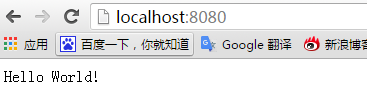
访问的地址:localhost:8080/  即可。
如果想带上项目名,请在这里自行配置上即可。
package com.sxd.main;

import org.springframework.boot.*;

import org.springframework.boot.autoconfigure.*;

import org.springframework.web.bind.annotation.*;

@RestController

@EnableAutoConfiguration

public class Example {

    @RequestMapping("/")

    String home() {

        return "Hello World!";

    }

    public static void main(String[] args) throws Exception {

        SpringApplication.run(Example.class, args);

    }

}
4.启动就好
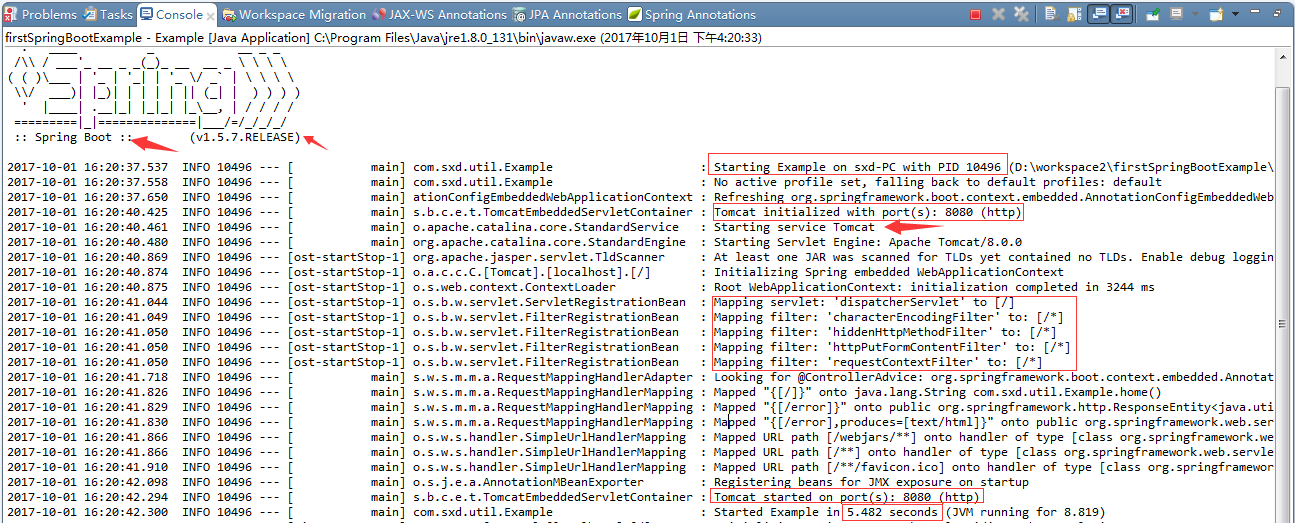
现在不用把项目放入tomcat中,springBoot中嵌入了tomcat
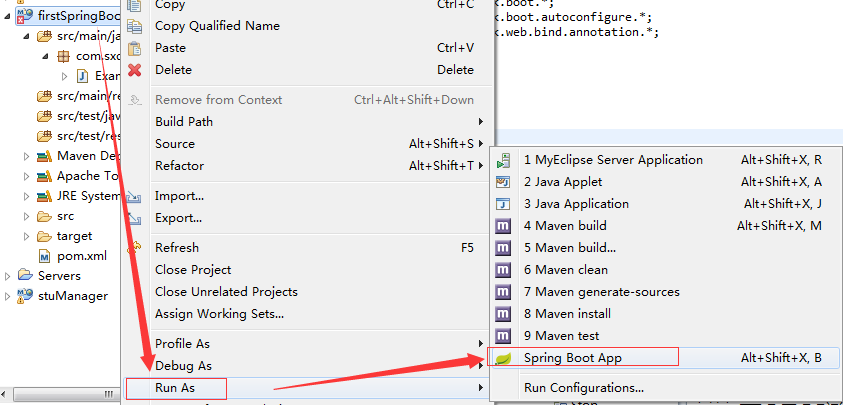
5.查看效果
浏览器上访问:
【spring Boot】1.创建第一个springBoot项目的更多相关文章
- 使用idea创建第一个springboot项目
版权声明:版权归作者所有,转载请注明出处. https://blog.csdn.net/qq_34205356/article/details/81098354 前言:如今springboot越来越火 ...
- 创建第一个springboot项目、用springboot实现页面跳转、@Controller和@RestController的区别
文章目录 一.第一个spring boot项目 二.spring boot跳转到指定页面 三.怎样将后台的信息传递到前台 四. @Controller和@RestController的区别? 一.第一 ...
- Spring Boot 学习(一) 快速搭建SpringBoot 项目
快速搭建一个 Spring Boot 项目 部分参考于<深入实践Spring Boot>.<Spring实战 第四版>与程序猿DD的有关博客. 参考(嘟嘟独立博客):http: ...
- SpringBoot学习1:创建第一个SpringBoot项目
一.新建项目 二.打开项目的pom文件,在里面添加maven依赖 <!--springboot项目依赖的父项目--> <parent> <groupId>org.s ...
- SpringBoot: 1.创建第一个SpringBoot项目(转)
一.新建项目 二.打开项目的pom文件,在里面添加maven依赖 1 <!--springboot项目依赖的父项目--> 2 <parent> 3 <groupId& ...
- 使用eclipse创建第一个SpringBoot项目
1.new->maven->maven project, 勾选 Create a simple project, 下一个页面中填入group id(项目组织唯一标识, 如org.ap ...
- 到spring官网创建第一个springboot工程
登录到spring的官网,直接生成一个,然后倒入本地工程就可以了. https://start.spring.io/ 点击创建的时候. 就等于下载了这个工程. 下载后,倒入到我们的maven工程可以直 ...
- 创建第一个springboot项目,maven project
- 快速构建一个springboot项目(一)
前言: springcloud是新一代的微服务框架而springboot作为springcloud的基础,很有必要对springboot深入学习一下. springboot能做什么? (1)spri ...
随机推荐
- springmvc项目搭建三-添加前端框架
这几年前端框架发展可以说非常迅猛了...实际项目中也用到了几个,easyui相对来讲,算是我第一个接触的前端框架了,用的时候感觉很方便,省了很多代码量,一个好的前端框架可以为你省去很多精力在前端布局上 ...
- Ajax---概念介绍
Ajax不是某种编程语言,是一种在无需重新加载整个网页的情况下能够更新部分网页的技术. 运用HTML和CSS来实现页面,表达信息: 运用XMLHttpRequest和Web服务器进行数据的异步交换: ...
- 【bzoj1044】[HAOI2008]木棍分割 二分+dp
题目描述 有n根木棍, 第i根木棍的长度为Li,n根木棍依次连结了一起, 总共有n-1个连接处. 现在允许你最多砍断m个连接处, 砍完后n根木棍被分成了很多段,要求满足总长度最大的一段长度最小, 并且 ...
- [洛谷P1903][国家集训队]数颜色
题目大意:有$n$支画笔,有两个操作 $Q\;l\;r:$询问$[l,r]$中有几种颜色 $R\;p\;Col:$把第$p$支画笔的颜色改成$Col$ 题解:带修莫队,分为$n^{\frac{1}{3 ...
- BZOJ 3223 Tyvj 1729 文艺平衡树 | Splay 维护序列关系
题解: 每次reverse(l,r) 把l-1转到根,r+1变成他的右儿子,给r+1的左儿子打个标记就是一次反转操作了 每次find和dfs输出的时候下放标记,把左儿子和右儿子换一下 记得建树的时候建 ...
- 雅礼集训 Day6 T2 Equation 解题报告
Equation 题目描述 有一棵\(n\)个点的以\(1\)为根的树,以及\(n\)个整数变量\(x_i\).树上\(i\)的父亲是\(f_i\),每条边\((i,f_i)\)有一个权值\(w_i\ ...
- bzoj 3379 - [USACO2004] 交作业
Description 一个数轴上有 \(n \le 1000\) 个位置, 每个位置有一个时间 \(t_i\) 要求在 时刻 \(t_i\) 后, 至少经过该位置一次. (去交作业) 求从 \(0\ ...
- ARM嵌入式开发中的GCC内联汇编__asm__
在针对ARM体系结构的编程中,一般很难直接使用C语言产生操作协处理器的相关代码,因此使用汇编语言来实现就成为了唯一的选择.但如果完全通过汇编代码实现,又会过于复杂.难以调试.因此,C语言内嵌汇编的方式 ...
- md5 加解密
using JGDJWeb.Model; using System; using System.Collections.Generic; using System.IO; using System.L ...
- NuGet Package Manager 实用命令
Creating Help Pages for ASP.NET Web API Install-Package Microsoft.AspNet.WebApi.HelpPage Install-Pac ...