
easyUI 展开DataGrid里面的行显示详细信息
http://blog.csdn.net/yanghongchang_/article/details/7854156原著
datagrid 可以改变它的view(视图)去显示不同的效果.使用详细视图,datagrid可以显示展开按钮("+" 或者 "-")在数据行的左边,用户可以展开一个行去显示一个附加的详细信息.
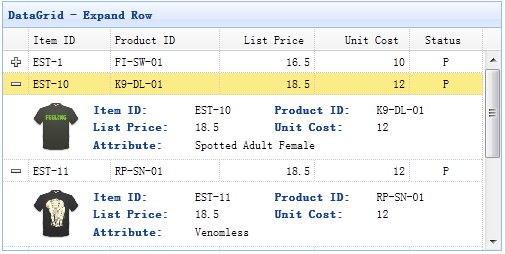
步骤 1: 创建 DataGrid
- <table id="dg" style="width:500px;height:250px" url="data/datagrid_data.json" title="DataGrid - Expand Row" singleselect="true" fitcolumns="true">
- <thead>
- <tr>
- <th field="itemid" width="60">Item ID</th>
- <th field="productid" width="80">Product ID</th>
- <th field="listprice" align="right" width="70">List Price</th>
- <th field="unitcost" align="right" width="70">Unit Cost</th>
- <th field="status" width="50" align="center">Status</th>
- </tr>
- </thead>
- </table>
步骤 2: 为DataGrid设置详细视图
使用详细视图,切记:引入视图script文件在你的页面的头部.
- <script type="text/javascript" src="http://www.jeasyui.com/easyui/datagrid-detailview.js"></script>
- $('#dg').datagrid({
- view: detailview,
- detailFormatter:function(index,row){
- return '<div id="ddv-' + index + '" style="padding:5px 0"></div>';
- },
- onExpandRow: function(index,row){
- $('#ddv-'+index).panel({
- border:false,
- cache:false,
- href:'datagrid21_getdetail.php?itemid='+row.itemid,
- onLoad:function(){
- $('#dg').datagrid('fixDetailRowHeight',index);
- }
- });
- $('#dg').datagrid('fixDetailRowHeight',index);
- }
- });
我们定义detailFormatter函数告诉datagrid 如何渲染详细视图,在这种情况下,我们返回一个简单的 '<div>'元素,它将充当最为一个详细内容的容器,
注意:详细信息为空,当用户点击展开按钮('+'),onExpandRow事件将被触发,所以我们可以写一些代码去加载ajax详细内容,最后我们调用fixDetailRowHeight方法去固定行高度,当详细内容加载之后.
步骤 3: 服务器端代码
datagrid21_getdetail.php
- <?php
- $itemid = $_REQUEST['itemid'];
- $content = file_get_contents('data/datagrid_data.json');
- $data = json_decode($content,true);
- foreach($data['rows'] as $item){
- if ($item['itemid'] == $itemid){
- break;
- }
- }
- ?>
- <table class="dv-table" border="0" style="width:100%;">
- <tr>
- <td rowspan="3" style="width:60px">
- <?php
- echo "<img src=\"images/$itemid.gif\" style=\"height:50px\"/>";
- ?>
- </td>
- <td class="dv-label">Item ID: </td>
- <td><?php echo $item['itemid'];?></td>
- <td class="dv-label">Product ID:</td>
- <td><?php echo $item['productid'];?></td>
- </tr>
- <tr>
- <td class="dv-label">List Price: </td>
- <td><?php echo $item['listprice'];?></td>
- <td class="dv-label">Unit Cost:</td>
- <td><?php echo $item['unitcost'];?></td>
- </tr>
- <tr>
- <td class="dv-label">Attribute: </td>
- <td colspan="3"><?php echo $item['attr1'];?></td>
- </tr>
- </table>
easyUI 展开DataGrid里面的行显示详细信息的更多相关文章
- win10 显示详细信息窗格
win10 显示详细信息窗格 CreateTime--2018年5月26日09点13分 Author:Marydon 1.说明: win10无法像win7那样将详细信息窗格显示在窗口的底部,只能显 ...
- easyui的datagrid改变整行颜色
easyui的datagrid改变单元格颜色方法1:https://www.cnblogs.com/raitorei/p/10395233.html easyui的datagrid改变单元格颜色方法2 ...
- Easyui的datagrid的editor(行编辑器)如何扩展datetimebox类型
在easyui的datagrid扩展方法中添加这样的时间日期(datetimebox)代码块 放在 $.extend($.fn.datagrid.defaults.editors,{datetim ...
- 单击HighCharts柱形体弹框显示详细信息
上篇博客介绍了如何在HighCharts统计图表下生成表格,二者相互结合,可以对数据进行更好的统计分析.在统计的同时,如果需要想要及时查看详细信息的话,就得再加一个功能,就是单击柱形体,显示该项下的详 ...
- html5,单击显示详细信息
<details open=""> <summary>点击率</summary> <p>详细信息</p&g ...
- datagrid 列鼠标悬浮显示全部信息
首次发表随笔,且是java新手,求不黑,可能在高手眼里好笑,嘿嘿1,样式设置超过字数限制显示省略号:<style type="text/css"> .datagrid- ...
- easyui,datagrid表格,行内可编辑
最近用到easyui,需要表格内编辑,但是我同一个页面有多个表格,把官方的代码修改了一下,如下: HTML代码 <table id="dg" class="easy ...
- EasyUI的datagrid有值但是显示不出来
$("#goodsList").datagrid({ url: "../Ajax/GoodsAjax.ashx", queryParams: { cmd ...
- easyui 中datagrid 点击行的事件
$('#datagrid 的ID').datagrid({ onClickRow:function(index,data) { ...
随机推荐
- Mxgraph使用总结一
一.Mxgraph介绍: mxGraph 是一个 JS 绘图组件适用于需要在网页中设计/编辑 Workflow/BPM流程图.图表.网络图和普通图形的 Web 应用程序.mxgraph 下载包中包括j ...
- windows10环境下运行Debug
1. 什么是Debug? Debug是DOS.Windows都提供的实模式(8086方式)程序的调试工具. 使用它,可以查看CPU各种寄存器中的内容.内存的情况和在机器码级别跟踪程序的运行. 2. 常 ...
- mysql 异常宕机 ..InnoDB: Database page corruption on disk or a failed,,InnoDB: file read of page 8.
mysql 测试环境异常宕机 系统:\nKylin 3.3 mysql版本:5.6.15--yum安装,麒麟提供的yum源数据库版本 error日志 181218 09:38:52 mysqld_sa ...
- java中的死锁现象
死锁是这样一种情形:多个线程同时被阻塞,它们中的一个或者全部都在等待某个资源被释放.由于线程被无限期地阻塞,因此程序不可能正常终止. java 死锁产生的四个必要条件: 1.互斥使用,即当资源被一个线 ...
- web 应用 及 补充
Highcharts 绘图配置 的函数及参数 web页面文本框修饰器 --- KindEditor web页面 之 超人性的点赞与狂踩 web页面 之 图片上传 web页面 之 评论盖楼 jQuery ...
- 数据库学习笔记 (三) python操作数据库
python 操作MYSQL数据库主要有两种方式: 使用原生模块:pymysql ORM框架:SQLAchemy 一.pymysql 1.1下载安装模块 第一种:cmd下:执行命令下载安装:pip3 ...
- Celery-4.1 用户指南: Optimizing (优化)
简介 默认的配置做了很多折中考虑.它不是针对某个情况优化的,但是大多数情况下都工作的非常好. 基于一个特殊的使用场景,有很多优化可以做. 优化可以应用到运行环境的不同属性,可以是任务执行的时间,使用的 ...
- 12-01Js对象##正则表达式##
正则表达式:是一个字符一个字符的验证,通过量词验证字符串: 1.什么是RegExp?RegExp是正则表达式的缩写.RegExp 对象用于规定在文本中检索的内容. 2.定义RegExp:var +变量 ...
- leetcode398
public class Solution { int[] nums; Random rnd; public Solution(int[] nums) { this.nums = nums; this ...
- Tomcat 不能正常启动
启动过程提示: Stopping ProtocolHandler ["http-bio-8080"] the JRE_HOME environment variable is no ...