
Express全系列教程之(十):jade模板引擎
一、前言
随着前端业务的不断发展,页面交互逻辑的不断提高,让数据和界面实现分离渐渐被提了出来。JavaScript的MVC思想也流行了起来,在这种背景下,基于node.js的模板引擎也随之出现。
什么是模板引擎?
它用于解析动态数据和静态页面所生成的视图文件,将原本静态的数据变为动态,快速地实现页面交互;
目前使用较广的模板引擎有以下几种:Jade / Pug、EJS、Handlebars。
jade模板引擎
jade模板引擎相较于原来的html会显得更加简洁,它将标签原本的"<>"符号去掉,用括号代替,层级使用tab缩进来分,并且也支持js语法;
二、jade的基本使用
安装jade:
cnpm install jade --save
在程序中引入jade:
app.set('views',"public");	//设置视图的对应目录

app.set("view engine","jade");		//设置默认的模板引擎

app.engine('jade', require('jade').__express);		//定义模板引擎
特定路由渲染:
app.use("/",function(req,res){

	res.render("index.jade");

});
完整实例:
const express=require("express");

const jade=require("jade");

const fs=require('fs');

var app=express();

//引用jade

app.set('views',"public");	//设置视图的对应目录

app.set("view engine","jade");		//设置默认的模板引擎

app.engine('jade', jade.__express);		//定义模板引擎

//获取jade文件

var str=jade.renderFile("./public/index.jade",{pretty:true});

console.log(str);

app.use("/",function(req,res){

	res.render("index.jade");

});

app.listen(8080);
由上面的app.set('views',"public");可知,这里将jade文件放在了public文件夹下:
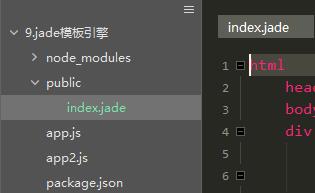
在执行res.render时,会自动渲染public中的index.jade文件,之后转换为HTML5进行dom渲染显示。
三、jade基础语法
1、jade对很多html操作进行了简化,如下:
html

	head

		style

	body

		div(class="content")

			h1 正文
了解过html语句的,从结构上一定会发现,它将原本的双标签省略了,尖括号也不见了,而层级的划分则由缩进实现,默认的,jade会把几乎所有缩进后的字母变为标签(行内元素)。以下代码会变为:
<html>

  <head>

    <style></style>

  </head>

  <body>

    <div class="content">

      <h1>正文</h1>

    </div>

  </body>

</html>
<div class="content"></div>也将用div(class="content")代表,简化了代码的书写;
2、“|”符号的作用
有时我们想让我们的标签成为文字,那么“|”成为了绝好的工具:
div(class="content",id="content")

  | center
我们可以看到,他将center作为文字原封不动的写入了html中,而不是作为一个标签渲染。
当然我们用它来转换js语句:
script

	| var cli = document.getElementById("content");

	| cli.onclick=function(){

	|	alert("aaa");

	| }
他将会变为:
<script>

    var cli = document.getElementById("content");

    cli.onclick=function(){

        alert("aaa");

    }

</script>
3、识别js语句:
可以通过 script. 来识别js语法:
script.

	var cli = document.getElementById("content");

	cli.onclick=function(){

		alert("aaa");

	}
他也会变为:
<script>

    var cli = document.getElementById("content");

    cli.onclick=function(){

        alert("aaa");

    }

</script>
我们可以看到,相比于用 | 使用script. 更加方便快捷。
4、引入其他js文件:
想在jade的js标签中引入其他js文件?没错,它也支持。前提请确保他们在同一文件夹下:
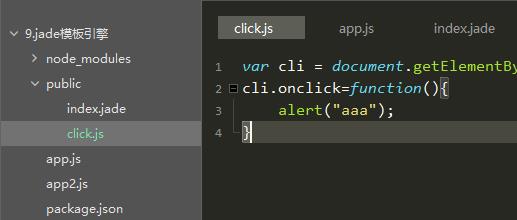
script

  include click.js
得到:
<script>var cli = document.getElementById("content");

	cli.onclick=function(){

       		alert("aaa");

	}

</script>
5、表达式
“-”允许我们直接写js语法,在变量调用时,通过 #{a+b} 或 div=a+b 进行:
html

	head

	body

		-var a=10

		-var b=20

		div a+b为:#{a+b}

		div=a+b
会得到:
<html>

  <head></head>

  <body>

    <div>a+b为:30</div>

    <div>30</div>

  </body>

</html>
6、for循环:
"-"也可以用于循环语句的使用
html

	head

	body

		-var arr=0;

		-for(var i=5;i>arr;i--)

			div=i

		div the number = #{i}
得到:
<html>

  <head></head>

  <body>

    <div>5</div>

    <div>4</div>

    <div>3</div>

    <div>2</div>

    <div>1</div>

    <div>the number = 0</div>

  </body>

</html>
7、case ,when
类似于switch case语句:
html

	head

	body

		- var test = "汉子"

		-var none = "无"

		div The word is #{test}

		case test

			when "a": div the when is a

			when "b": div the second is b

			when "汉子": div the Third is 汉子

			default: The words is #{none}
得到:
<html>

  <head></head>

  <body>

    <div>The word is 汉子。</div>

    <div>the Third is 汉子</div>

  </body>

</html>
类似于switch case,只执行when中与case对应的代码块,在匹配后面用 : 来作为要执行的代码,后面跟上标签和对应语句
8、if else条件判断
html

	head

	body

		-for(var i=12;i>0;i--)

			-if(i%2==0)

				div(style={background:'#eee',width:'100%',height:'20px',color: '#333'})	偶数

			-else

				div(style={background:'#333',width:'100%',height:'20px',color: '#eee'})	奇数
得到:
<html>

  <head></head>

  <body>

    <div style="background:#eee;width:100%;height:20px;color:#333">     偶数</div>

    <div style="background:#333;width:100%;height:20px;color:#eee">     奇数</div>

    <div style="background:#eee;width:100%;height:20px;color:#333">     偶数</div>

    <div style="background:#333;width:100%;height:20px;color:#eee">     奇数</div>

    <div style="background:#eee;width:100%;height:20px;color:#333">     偶数</div>

    <div style="background:#333;width:100%;height:20px;color:#eee">     奇数</div>

    <div style="background:#eee;width:100%;height:20px;color:#333">     偶数</div>

    <div style="background:#333;width:100%;height:20px;color:#eee">     奇数</div>

    <div style="background:#eee;width:100%;height:20px;color:#333">     偶数</div>

    <div style="background:#333;width:100%;height:20px;color:#eee">     奇数</div>

    <div style="background:#eee;width:100%;height:20px;color:#333">     偶数</div>

    <div style="background:#333;width:100%;height:20px;color:#eee">     奇数</div>

  </body>

</html>
9、style的写法:
在对style样式进行修改时,与script相同,也可使用 . 对其进行编辑,之后对不同的标签在其后面加{},大括号里写css语句1,并使用 ; 隔开
html

	head

		meta(charset="utf-8")

		title jade测试页面

		style.

			body{margin:0;padding:0}

			div

			{width: 100px;height: 100px;background: #ccc;text-align: center;line-height: 100px;margin: 10px auto}

			div.last{clear:left}

	body

		-var a=0;

		while a<12

			if a%2==0 && a!=0

				div.last=a++

			else

				div=a++
得到:
<html>

  <head>

    <meta charset="utf-8"/>

    <title>jade测试页面</title>

    <style>

      body{margin:0;padding:0}

      div

      {width: 100px;height: 100px;background: #ccc;text-align: center;line-height: 100px;margin: 10px auto}

      div.last{clear:left}

    </style>

  </head>

  <body>

    <div>0</div>

    <div>1</div>

    <div class="last">2</div>

    <div>3</div>

    <div class="last">4</div>

    <div>5</div>

    <div class="last">6</div>

    <div>7</div>

    <div class="last">8</div>

    <div>9</div>

    <div class="last">10</div>

    <div>11</div>

  </body>

</html>
10、Mixin
Mixin的作用是对模块的复用,当重复代码有不同内容时,起作用就来了:
- var num = 0;

mixin node

    div The number in mixin node is #{num++}

+node()

+node()

+node()

div At last, the number in mixin node is #{num++}
得到:
<div>The number in mixin node is 0</div>

<div>The number in mixin node is 1</div>

<div>The number in mixin node is 2</div>

<div>At last, the number in mixin node is 3</div>
以上则是jade的一些常用语法,如果平常使用jade作为开发,那么这些是非常基础的,也希望大家有所体会
Express全系列教程之(十):jade模板引擎的更多相关文章
- Express全系列教程之(十一):渲染ejs模板引擎
一.简介 相比于jade模板引擎,ejs对原HTML语言就未作出结构上的改变,只不过在其交互数据方面做出了些许修改,相比于jade更加简单易用.因此其学习成本是很低的.您也可参考ejs官网:https ...
- Express全系列教程之(一):Express的安装 和第一个程序
前言 ndoe.js,一个基于javsscript运行环境的服务器语言,它的出现使得javascript有能力去实现服务器操作.在gitHub上ndoe.js的star数已接近6万,可见其受欢迎程度: ...
- Express全系列教程之(九):将session上传至mysql数据库
一.简介 实际引用中,有些公司在不同地区会设置不同服务器,因此就需要用到nginx以实现负载均衡,这时,将session数据保存至数据库就成为了需要面对的问题,我们以MySQL数据库为例,看看他是如何 ...
- Express全系列教程之(八):session的基本使用
一.关于session session是另一种记录客户状态的机制,与cookie保存在客户端浏览器不同,session保存在服务器当中:当客户端访问服务器时,服务器会生成一个session对象,对象中 ...
- Express全系列教程之(七):cookie的加密
一.关于cookie加密 cookie加密是让客户端用户无法的值cookie明文信息,是数据安全的重要部分:一般的我们可以在保存cookie时对cookie信息进行加密,或者在res.cookie中对 ...
- Express全系列教程之(六):cookie的使用
一.关于Cookie 在我们关闭一个登录过的网址并重新打开它后,我们的登录信息依然没有丢失:当我们浏览了商品后历史记录里出现了我们点击过的商品:当我们推回到首页后,推荐商品也为我们选出了相似物品:事实 ...
- Express全系列教程之(五):Express的中间件
一.中间件 从字面意思,我们可以了解到它大概就是做中间代理操作,事实也是如此:大多数情况下,中间件就是在做接收到请求和发送响应中间的一系列操作.事实上,express是一个路由和中间件的web框架,E ...
- Express全系列教程之(四):获取Post参数的两种方式
一.关于POST请求 post方法作为http请求很重要的一部分,几乎所有的网站都有用到它,与get不同,post请求更像是在服务器上做修改操作,它一般用于数据资源的更新.相比于get请求,post所 ...
- Express全系列教程之(三):get传参
一.关于get请求 一般在网站开发中,get都用作数据获取和查询,类似于数据库中的查询操作,当服务器解析前台资源后即传输相应内容:而查询字符串是在URL上进行的,形如: http://localhos ...
随机推荐
- Microsoft Office Visio 2010如何创建UML 用例图
转自:https://blog.csdn.net/mmoooodd/article/details/10513059 1..在Microsoft Office2010中打开Microsoft Visi ...
- Struts2 全局结果集-全局result节点设置,package设置abstract=true的实现
转自:https://blog.csdn.net/u013161278/article/details/41855273 如果我们所有的action均有可能跳到相同的页面,则不妨使用全局result. ...
- ks8基础(1) etcd安装
下载安装 https://github.com/coreos/etcd/releases 在这网页,可以看到有多个版本共选择. 下载3.25 解压后, cd etcd-v3.2.5-linux-amd ...
- LAMP 3.3 mysql常用操作-1
有一个图形化管理 mysql 的工具叫做 phpmyadmin,如何在命令行下面来管理和操作 mysql. 首先进入mysql mysql -uroot -pwangshaojun 查看有那些库 &g ...
- 向linux内核增加一个系统调用-1
验证编辑编译内核的流程,并增加新的系统调用 注意:需要/目录至少10GB空间,/boot目录500MB空间 下载内核并解压 kernel下载 百度云搬运 密码: qc8b 进入 /usr/src目录 ...
- struts2学习笔记(3)struts.xml的一些常用设置
在开发中通常需要用到多个配置文件,可以通过在web.xml中添加以下代码: <include file="login.xml"></include> 将sr ...
- 2018多校第九场1010 (HDU6424) 数学
题目链接:http://acm.hdu.edu.cn/showproblem.php?pid=6424 解法:找规律.因为最多三项,a1^a2^a3可以拆成(a1+2)+(a2+1)*a3,然后建成数 ...
- JavaPersistenceWithHibernate第二版笔记-第七章-004Mapping a map(@MapKeyEnumerated 、 @MapKeyTemporal、@MapKeyColumn)
一.结构 二.代码 1. package org.jpwh.model.collections.mapofstrings; import org.jpwh.model.Constants; impor ...
- java中的全局变量与静态变量的区别与联系?有时候为什么专门定义静态变量。(标题党~~)
static代表“每个类一个”而不是“每个对象一个”.即静态变量是类的所有对象共有的. 1 static JFrame f; static MyDrawPanel ml; 整个应用程序如下: 定义在p ...
- Posters TopCoder - 1684
传送门 分析 首先我们不难想到1e4^5的暴力枚举,但显然这是不行的,于是我们考虑对于每一张海报肯定有一种最优情况使得它至少有一条边要么靠着板子的边要么靠着之前的某一张海报的边,这样我们便可以将复杂度 ...