
Express全系列教程之(十):jade模板引擎
一、前言
随着前端业务的不断发展,页面交互逻辑的不断提高,让数据和界面实现分离渐渐被提了出来。JavaScript的MVC思想也流行了起来,在这种背景下,基于node.js的模板引擎也随之出现。
什么是模板引擎?
它用于解析动态数据和静态页面所生成的视图文件,将原本静态的数据变为动态,快速地实现页面交互;
目前使用较广的模板引擎有以下几种:Jade / Pug、EJS、Handlebars。
jade模板引擎
jade模板引擎相较于原来的html会显得更加简洁,它将标签原本的"<>"符号去掉,用括号代替,层级使用tab缩进来分,并且也支持js语法;
二、jade的基本使用
安装jade:
cnpm install jade --save
在程序中引入jade:
app.set('views',"public");	//设置视图的对应目录

app.set("view engine","jade");		//设置默认的模板引擎

app.engine('jade', require('jade').__express);		//定义模板引擎
特定路由渲染:
app.use("/",function(req,res){

	res.render("index.jade");

});
完整实例:
const express=require("express");

const jade=require("jade");

const fs=require('fs');

var app=express();

//引用jade

app.set('views',"public");	//设置视图的对应目录

app.set("view engine","jade");		//设置默认的模板引擎

app.engine('jade', jade.__express);		//定义模板引擎

//获取jade文件

var str=jade.renderFile("./public/index.jade",{pretty:true});

console.log(str);

app.use("/",function(req,res){

	res.render("index.jade");

});

app.listen(8080);
由上面的app.set('views',"public");可知,这里将jade文件放在了public文件夹下:
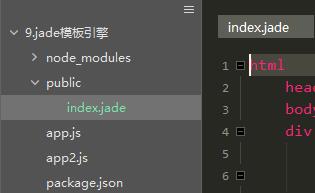
在执行res.render时,会自动渲染public中的index.jade文件,之后转换为HTML5进行dom渲染显示。
三、jade基础语法
1、jade对很多html操作进行了简化,如下:
html

	head

		style

	body

		div(class="content")

			h1 正文
了解过html语句的,从结构上一定会发现,它将原本的双标签省略了,尖括号也不见了,而层级的划分则由缩进实现,默认的,jade会把几乎所有缩进后的字母变为标签(行内元素)。以下代码会变为:
<html>

  <head>

    <style></style>

  </head>

  <body>

    <div class="content">

      <h1>正文</h1>

    </div>

  </body>

</html>
<div class="content"></div>也将用div(class="content")代表,简化了代码的书写;
2、“|”符号的作用
有时我们想让我们的标签成为文字,那么“|”成为了绝好的工具:
div(class="content",id="content")

  | center
我们可以看到,他将center作为文字原封不动的写入了html中,而不是作为一个标签渲染。
当然我们用它来转换js语句:
script

	| var cli = document.getElementById("content");

	| cli.onclick=function(){

	|	alert("aaa");

	| }
他将会变为:
<script>

    var cli = document.getElementById("content");

    cli.onclick=function(){

        alert("aaa");

    }

</script>
3、识别js语句:
可以通过 script. 来识别js语法:
script.

	var cli = document.getElementById("content");

	cli.onclick=function(){

		alert("aaa");

	}
他也会变为:
<script>

    var cli = document.getElementById("content");

    cli.onclick=function(){

        alert("aaa");

    }

</script>
我们可以看到,相比于用 | 使用script. 更加方便快捷。
4、引入其他js文件:
想在jade的js标签中引入其他js文件?没错,它也支持。前提请确保他们在同一文件夹下:
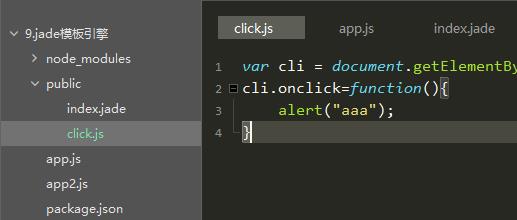
script

  include click.js
得到:
<script>var cli = document.getElementById("content");

	cli.onclick=function(){

       		alert("aaa");

	}

</script>
5、表达式
“-”允许我们直接写js语法,在变量调用时,通过 #{a+b} 或 div=a+b 进行:
html

	head

	body

		-var a=10

		-var b=20

		div a+b为:#{a+b}

		div=a+b
会得到:
<html>

  <head></head>

  <body>

    <div>a+b为:30</div>

    <div>30</div>

  </body>

</html>
6、for循环:
"-"也可以用于循环语句的使用
html

	head

	body

		-var arr=0;

		-for(var i=5;i>arr;i--)

			div=i

		div the number = #{i}
得到:
<html>

  <head></head>

  <body>

    <div>5</div>

    <div>4</div>

    <div>3</div>

    <div>2</div>

    <div>1</div>

    <div>the number = 0</div>

  </body>

</html>
7、case ,when
类似于switch case语句:
html

	head

	body

		- var test = "汉子"

		-var none = "无"

		div The word is #{test}

		case test

			when "a": div the when is a

			when "b": div the second is b

			when "汉子": div the Third is 汉子

			default: The words is #{none}
得到:
<html>

  <head></head>

  <body>

    <div>The word is 汉子。</div>

    <div>the Third is 汉子</div>

  </body>

</html>
类似于switch case,只执行when中与case对应的代码块,在匹配后面用 : 来作为要执行的代码,后面跟上标签和对应语句
8、if else条件判断
html

	head

	body

		-for(var i=12;i>0;i--)

			-if(i%2==0)

				div(style={background:'#eee',width:'100%',height:'20px',color: '#333'})	偶数

			-else

				div(style={background:'#333',width:'100%',height:'20px',color: '#eee'})	奇数
得到:
<html>

  <head></head>

  <body>

    <div style="background:#eee;width:100%;height:20px;color:#333">     偶数</div>

    <div style="background:#333;width:100%;height:20px;color:#eee">     奇数</div>

    <div style="background:#eee;width:100%;height:20px;color:#333">     偶数</div>

    <div style="background:#333;width:100%;height:20px;color:#eee">     奇数</div>

    <div style="background:#eee;width:100%;height:20px;color:#333">     偶数</div>

    <div style="background:#333;width:100%;height:20px;color:#eee">     奇数</div>

    <div style="background:#eee;width:100%;height:20px;color:#333">     偶数</div>

    <div style="background:#333;width:100%;height:20px;color:#eee">     奇数</div>

    <div style="background:#eee;width:100%;height:20px;color:#333">     偶数</div>

    <div style="background:#333;width:100%;height:20px;color:#eee">     奇数</div>

    <div style="background:#eee;width:100%;height:20px;color:#333">     偶数</div>

    <div style="background:#333;width:100%;height:20px;color:#eee">     奇数</div>

  </body>

</html>
9、style的写法:
在对style样式进行修改时,与script相同,也可使用 . 对其进行编辑,之后对不同的标签在其后面加{},大括号里写css语句1,并使用 ; 隔开
html

	head

		meta(charset="utf-8")

		title jade测试页面

		style.

			body{margin:0;padding:0}

			div

			{width: 100px;height: 100px;background: #ccc;text-align: center;line-height: 100px;margin: 10px auto}

			div.last{clear:left}

	body

		-var a=0;

		while a<12

			if a%2==0 && a!=0

				div.last=a++

			else

				div=a++
得到:
<html>

  <head>

    <meta charset="utf-8"/>

    <title>jade测试页面</title>

    <style>

      body{margin:0;padding:0}

      div

      {width: 100px;height: 100px;background: #ccc;text-align: center;line-height: 100px;margin: 10px auto}

      div.last{clear:left}

    </style>

  </head>

  <body>

    <div>0</div>

    <div>1</div>

    <div class="last">2</div>

    <div>3</div>

    <div class="last">4</div>

    <div>5</div>

    <div class="last">6</div>

    <div>7</div>

    <div class="last">8</div>

    <div>9</div>

    <div class="last">10</div>

    <div>11</div>

  </body>

</html>
10、Mixin
Mixin的作用是对模块的复用,当重复代码有不同内容时,起作用就来了:
- var num = 0;

mixin node

    div The number in mixin node is #{num++}

+node()

+node()

+node()

div At last, the number in mixin node is #{num++}
得到:
<div>The number in mixin node is 0</div>

<div>The number in mixin node is 1</div>

<div>The number in mixin node is 2</div>

<div>At last, the number in mixin node is 3</div>
以上则是jade的一些常用语法,如果平常使用jade作为开发,那么这些是非常基础的,也希望大家有所体会
Express全系列教程之(十):jade模板引擎的更多相关文章
- Express全系列教程之(十一):渲染ejs模板引擎
一.简介 相比于jade模板引擎,ejs对原HTML语言就未作出结构上的改变,只不过在其交互数据方面做出了些许修改,相比于jade更加简单易用.因此其学习成本是很低的.您也可参考ejs官网:https ...
- Express全系列教程之(一):Express的安装 和第一个程序
前言 ndoe.js,一个基于javsscript运行环境的服务器语言,它的出现使得javascript有能力去实现服务器操作.在gitHub上ndoe.js的star数已接近6万,可见其受欢迎程度: ...
- Express全系列教程之(九):将session上传至mysql数据库
一.简介 实际引用中,有些公司在不同地区会设置不同服务器,因此就需要用到nginx以实现负载均衡,这时,将session数据保存至数据库就成为了需要面对的问题,我们以MySQL数据库为例,看看他是如何 ...
- Express全系列教程之(八):session的基本使用
一.关于session session是另一种记录客户状态的机制,与cookie保存在客户端浏览器不同,session保存在服务器当中:当客户端访问服务器时,服务器会生成一个session对象,对象中 ...
- Express全系列教程之(七):cookie的加密
一.关于cookie加密 cookie加密是让客户端用户无法的值cookie明文信息,是数据安全的重要部分:一般的我们可以在保存cookie时对cookie信息进行加密,或者在res.cookie中对 ...
- Express全系列教程之(六):cookie的使用
一.关于Cookie 在我们关闭一个登录过的网址并重新打开它后,我们的登录信息依然没有丢失:当我们浏览了商品后历史记录里出现了我们点击过的商品:当我们推回到首页后,推荐商品也为我们选出了相似物品:事实 ...
- Express全系列教程之(五):Express的中间件
一.中间件 从字面意思,我们可以了解到它大概就是做中间代理操作,事实也是如此:大多数情况下,中间件就是在做接收到请求和发送响应中间的一系列操作.事实上,express是一个路由和中间件的web框架,E ...
- Express全系列教程之(四):获取Post参数的两种方式
一.关于POST请求 post方法作为http请求很重要的一部分,几乎所有的网站都有用到它,与get不同,post请求更像是在服务器上做修改操作,它一般用于数据资源的更新.相比于get请求,post所 ...
- Express全系列教程之(三):get传参
一.关于get请求 一般在网站开发中,get都用作数据获取和查询,类似于数据库中的查询操作,当服务器解析前台资源后即传输相应内容:而查询字符串是在URL上进行的,形如: http://localhos ...
随机推荐
- myeclipse实用快捷键
笔者这里总结的是个人在使用myeclipse时常用的快捷操作,总结如下: 1.Ctrl + / :为选中的一段代码加上或去掉注释符 Ctrl + Shift + / :( ...
- 人工智能一之TensorFlow环境配置
1.安装pip:sudo apt-get install python-pip python-dev 2.定义仅支持CPU的python2.7环境下TensorFlow安装包地址:export TF_ ...
- python中not的用法
python中的not具体表示是什么: 在python中not是逻辑判断词,用于布尔型True和False,not True为False,not False为True,以下是几个常用的not的用法: ...
- ImageView 的 ScaleType
/** * Options for scaling the bounds of an image to the bounds of this view. 将一个图片的边界缩放到这个view边界的几种选 ...
- import time
时间相关的操作,时间有三种表示方式: 时间戳 1970年1月1日之后的秒,即:time.time() 格式化的字符串 2014-11-11 11:11, 即:t ...
- JVM实用参数(二)参数分类和即时(JIT)编译器诊断
JVM实用参数(二)参数分类和即时(JIT)编译器诊断 作者: PATRICK PESCHLOW 原文地址 译者:赵峰 校对:许巧辉 在这个系列的第二部分,我来介绍一下HotSpot J ...
- C++面向对象类的实例题目五
题目描述: 编写一个程序,采用一个类求n!,并输出5!的值. 程序代码: #include<iostream> using namespace std; class CFactorial ...
- MySql 5.7中添加用户,新建数据库,用户授权,删除用户,修改密码
转自http://blog.csdn.net/w690333243/article/details/76576952 1.新建用户 创建test用户,密码是1234. MySQL -u root -p ...
- WOJ 46 完全背包
高级的暴力,神仙优化…… 首先$O(n^{3})$的$dp$很好想,然后这样可以$O(1)$地回答询问. 考虑到所有物品的体积是一个连续的区间,所以说我们可以合并一些物品来达到预处理时间均摊的效果. ...
- Python中list常用的10个基本方法----list的灰魔法
########################list 的常用的10个基本方法################################## list 类 列表# 1 列表的基本格式#2 可以 ...