
iOS应用上架报错解决
ERROR ITMS-90087: "Unsupported Architectures. The executable for LiveStorage.app/Frameworks/SpeechSDK.framework contains unsupported architectures '[x86_64, i386]'."
ERROR ITMS-90209: "Invalid Segment Alignment. The app binary at 'LiveStorage.app/Frameworks/SpeechSDK.framework/SpeechSDK' does not have proper segment alignment. Try rebuilding the app with the latest Xcode version."
ERROR ITMS-90125: "The binary is invalid. The encryption info in the LC_ENCRYPTION_INFO load command is either missing or invalid, or the binary is already encrypted. This binary does not seem to have been built with Apple's linker."
WARNING ITMS-90080: "The executable 'Payload/LiveStorage.app/Frameworks/SpeechSDK.framework' is not a Position Independent Executable. Please ensure that your build settings are configured to create PIE executables. For more information refer to Technical Q&A QA1788 - Building a Position Independent Executable in the iOS Developer Library."
解决办法:TARGETS->Build Phases->点击加号选择New Run Script Phase->然后复制粘贴下面代码 搞掂上架
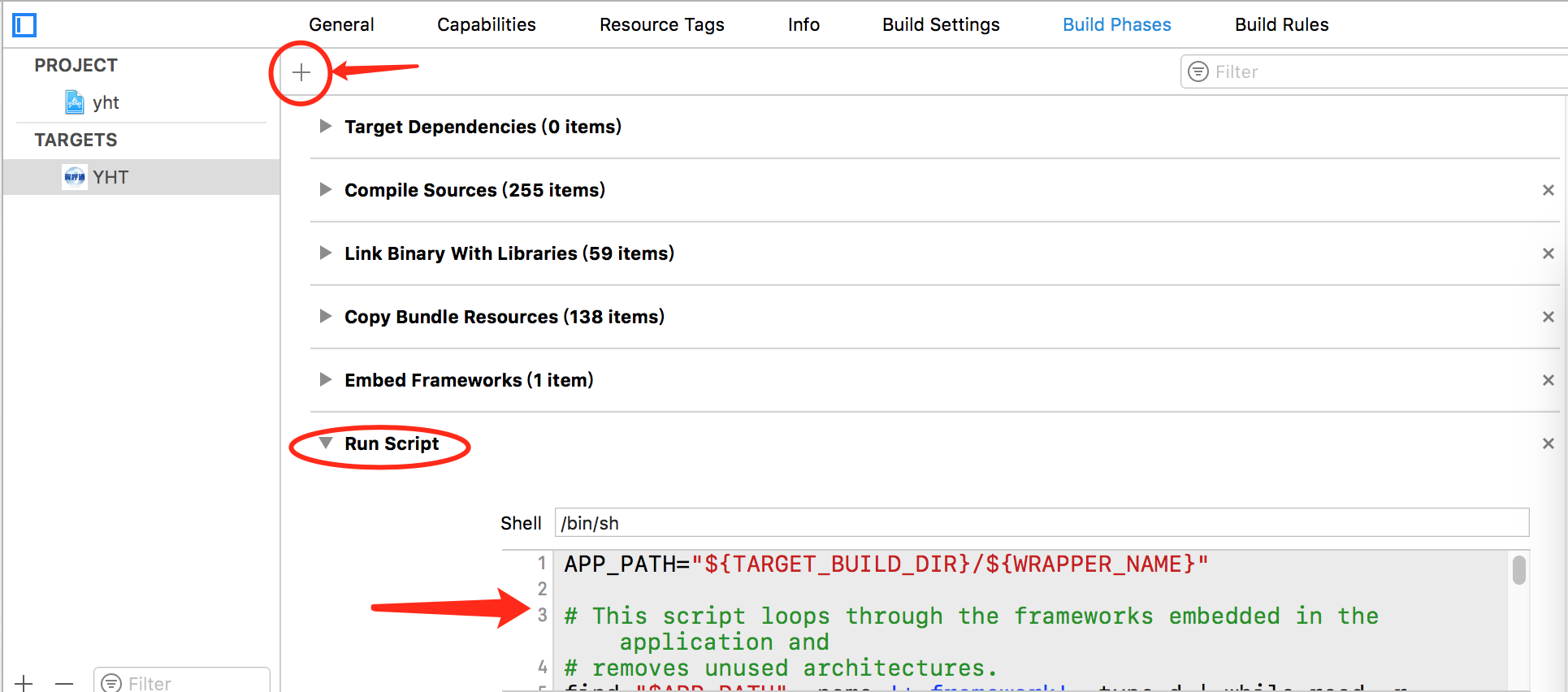

APP_PATH="${TARGET_BUILD_DIR}/${WRAPPER_NAME}"

# This script loops through the frameworks embedded in the application and

# removes unused architectures.

find "$APP_PATH" -name '*.framework' -type d | while read -r FRAMEWORK

do

FRAMEWORK_EXECUTABLE_NAME=$(defaults read "$FRAMEWORK/Info.plist" CFBundleExecutable)

FRAMEWORK_EXECUTABLE_PATH="$FRAMEWORK/$FRAMEWORK_EXECUTABLE_NAME"

echo "Executable is $FRAMEWORK_EXECUTABLE_PATH"

EXTRACTED_ARCHS=()

for ARCH in $ARCHS

do

echo "Extracting $ARCH from $FRAMEWORK_EXECUTABLE_NAME"

lipo -extract "$ARCH" "$FRAMEWORK_EXECUTABLE_PATH" -o "$FRAMEWORK_EXECUTABLE_PATH-$ARCH"

EXTRACTED_ARCHS+=("$FRAMEWORK_EXECUTABLE_PATH-$ARCH")

done

echo "Merging extracted architectures: ${ARCHS}"

lipo -o "$FRAMEWORK_EXECUTABLE_PATH-merged" -create "${EXTRACTED_ARCHS[@]}"

rm "${EXTRACTED_ARCHS[@]}"

echo "Replacing original executable with thinned version"

rm "$FRAMEWORK_EXECUTABLE_PATH"

mv "$FRAMEWORK_EXECUTABLE_PATH-merged" "$FRAMEWORK_EXECUTABLE_PATH"

done
iOS应用上架报错解决的更多相关文章
- iOS微信支付demo运行报错解决如下
要接入微信支付的小伙伴,首先要下载一份官方demo(APP微信支付官方Demo下载),然后打开工程,准备大干一场. 1.编译报错 编译的时候居然直接报错了(orz) 错误提示: APP微信支付官方De ...
- iOS url带中文下载时 报错解决方法
问题描述:下载文件时, 请求带中文的URL的资源时,比如:http://s237.sznews.com/pic/2010/11/23/e4fa5794926548ac953a8a525a23b6f2/ ...
- 【转】 IOS开发xcode报错之has been modified since the precompiled header was built
本文转载自 IOS开发xcode报错之has been modified since the precompiled header was built 其实我是升级xcode到4.6.3的时候遇到的 ...
- IOS开发 xcode报错之has been modified since the precompiled header was built
转载的文章 很实用 IOS开发xcode报错之has been modified since the precompiled header was built 今天做百度地图的时候第一次发现下面错误 ...
- javascript的倒计时功能中newData().getTime()在iOS下会报错问题解决
javascript的倒计时功能中newData().getTime()在iOS下会报错问题解决 在做移动端时间转化为时间戳时,遇到了一个问题,安卓手机上访问时,能拿到时间戳,从而正确转换时间,而在i ...
- sphinx :undefined reference to `libiconv' 报错解决办法
sphinx :undefined reference to `libiconv' 报错解决办法 2013-11-30 21:45:39 安装sphinx时不停报错...郁闷在make时报错,错误 ...
- redis运用连接池报错解决
redis使用连接池报错解决redis使用十几小时就一直报异常 redis.clients.jedis.exceptions.JedisConnectionException: Could not g ...
- linux下启动dbca或netmgr类的图形界面报错解决
linux下启动dbca或netmgr类的图形界面报错解决 Xlib: connection to ":0.0" refused by server Xlib: No pro ...
- CentOS 6.5 Maven 编译 Apache Tez 0.8.3 踩坑/报错解决记录
最近准备学习使用Tez,因此从官网下载了最新的Tez 0.8.3源码,按照安装教程编译使用.平时使用的集群环境是离线的,本打算这一次也进行离线编译,无奈一编译就开始报缺少jar包的错,即使手动下载ja ...
随机推荐
- luogu P1651 塔
题目描述 小明很喜欢摆积木,现在他正在玩的积木是由N个木块组成的,他想用这些木块搭出两座高度相同的塔,一座塔的高度是搭建它的所有木块的高度和,并且一座塔至少要用一个木块.每个木块只能用一次,也可以不用 ...
- ural 1519 fomular 1 既插头DP学习笔记
直接看CDQ在2008年的论文吧. 个人认为她的论文有两个不明确的地方, 这里补充一下: 首先是轮廓的概念. 我们在进行插头DP时, 是从上往下, 从左往右逐个格子进行的, 已经处理的格子与未经处理的 ...
- C++ 11中几个我比较喜欢的语法(二)
之前在文章C++ 11中几个我比较喜欢的语法中介绍了几个我比较喜欢的C++语法,其中有些语法由于VC 11还不支持,无法跨平台,所以没有介绍.前几天VS 2013 Preview发布后,对C++ 11 ...
- 受检查异常要求try catch或者throws,但是要记住只要catch异常了,就不会向下继续抛了
所以在框架中,要想异常被统一的异常拦截器处理,就要将受检查异常转换为运行异常,在受检查异常的catch时候,手动throw new runtime exception
- dedecms图片列表效果调用
效果如图 代码如下: <div class="listbox"> <ul class="e1"> {dede:list pagesize ...
- Web支持可暂停的超大文件上传
代码镇顶:https://github.com/dna2github/petalJS/blob/master/upload 前些天遇到用户须要上传10GB大小以上的文件的需求,查查网上的库.都不好用. ...
- 2016.8.22 Axure两级下拉框联动的实现
刚学Axure,有些很简单的东西都要弄很久,但是弄出来的总归是很开心的. 参考来自:实现省市县下拉框的三级联动 http://www.woshipm.com/rp/348795.html/commen ...
- day06_方法_20150806
day06_方法_20150806 -------------------------回想:--------------------------------- 1.更佳适用情况 当---w ...
- Oracle中group by 的扩展函数rollup、cube、grouping sets
Oracle的group by除了基本使用方法以外,还有3种扩展使用方法,各自是rollup.cube.grouping sets.分别介绍例如以下: 1.rollup 对数据库表emp.如果当中两个 ...
- MSComm串口类的使用 (程序设计)
参考文档:http://wenku.baidu.com/link?url=MLGQojaxyHnEgngEAXG8oPnISuM9SVaDzNTvg0oTSrrJkMXIR_6MR3cO_Vnh-gr ...