
springboot 2.0.8 跳转jsp页面
springboot项目创建教程 https://blog.csdn.net/q18771811872/article/details/88126835
springboot 2.0跳转 html教程 https://blog.csdn.net/q18771811872/article/details/88312862
jsp+html跳转整合 https://blog.csdn.net/q18771811872/article/details/88343672
这是一篇单独跳转jsp页面的教程 ,后续会介绍html和jsp同时存在的 我暂时注释了thymeleaf模版以及配置
1创建目录结果和jsp文件
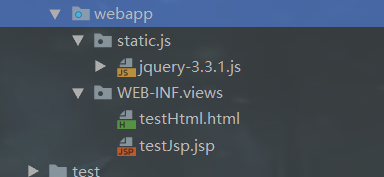

2配置return 返回模版 及代码
@RequestMapping(value = "/testJsp", produces = "application/json;charset=UTF-8", method = {RequestMethod.POST, RequestMethod.GET})

    public String testJsp(Model m, HttpServletRequest request, HttpServletResponse response){

        List<Map<String,Object>> list=userService.userQueryAll();

        request.setAttribute("list",list);

        log.info("进入了testJsp方法!");

        return "views/testJsp";

    }
3.application.yml 文件 配置 thymeleaf 模版参数
spring:

  dataSource:

    type: com.alibaba.druid.pool.DruidDataSource

    url: jdbc:mysql://localhost:3306/db-test?useUnicode=true&characterEncoding=utf8&tinyInt1isBit=false&usessl=false

    username: root

    password: 123456

    driverClassName: com.mysql.jdbc.Driver

  mvc:

    view: #新版本 1.3后可以使用

      suffix: .jsp

      prefix: /WEB-INF/

  view: #老版本 1.4后被抛弃

    suffix: .jsp

    prefix: /WEB-INF/
4. pom.xml 文件加入tomcat和jsp支持 ,如果是有thymeleaf架包的暂时注释掉,这里只写jsp跳转( 有thymeleaf架包的时候return模版会优先跳转html页面)
<!--tomcat支持-->

        <dependency>

            <groupId>org.springframework.boot</groupId>

            <artifactId>spring-boot-starter-tomcat</artifactId>

            <scope>provided</scope>

        </dependency>

        <dependency>

            <groupId>org.apache.tomcat.embed</groupId>

            <artifactId>tomcat-embed-jasper</artifactId>

            <scope>provided</scope>

        </dependency>

        <!--servlet依赖.-->

        <dependency>

            <groupId>javax.servlet</groupId>

            <artifactId>javax.servlet-api</artifactId>

            <version>4.0.1</version>

            <scope>provided</scope>

        </dependency>

        <!--jsp标签库-->

        <dependency>

            <groupId>javax.servlet</groupId>

            <artifactId>jstl</artifactId>

        </dependency>
5. jsp页面这里直接用了EL表达式
<%@ page contentType="text/html;charset=UTF-8" isELIgnored="false" pageEncoding="UTF-8" %>

<%@ taglib uri="http://java.sun.com/jstl/core_rt" prefix="c" %>

<%

    String path = request.getContextPath();

    String basePath = request.getScheme() + "://" + request.getServerName() + ":" + request.getServerPort() + path + "/";

%>

<!DOCTYPE html >

<html lang="zh-CN">

<head>

    <title>Title</title>

    <meta http-equiv="Content-Type" content="text/html; charset=utf-8"/>

    <script src="<%=basePath%>static/js/jquery-3.3.1.js" charset="utf-8"></script>

</head>

<body>

<table border="1">

    <thead>

    <tr>

        <th>序号</th>

        <th>名字</th>

        <th>号码</th>

        <th>创建时间</th>

    </tr>

    </thead>

    <tbody>

    <c:forEach items="${list}" var="listv" varStatus="status">

        <tr>

            <td>${listv.id}</td>

            <td>${listv.name}</td>

            <td>${listv.phone}</td>

            <td>${listv.create_time}</td>

        </tr>

    </c:forEach>

    </tbody>

</table>

</body>

<script type="text/javascript" charset="utf-8">

</script>

</html>
6. Project Structure里面 这个一般是默认配置好了的,如果没有就要加上哦

就这样启动就行了 效果图如下

原文地址 https://blog.csdn.net/q18771811872/article/details/88342298
springboot 2.0跳转 html教程 https://blog.csdn.net/q18771811872/article/details/88312862
jsp+html跳转整合 https://blog.csdn.net/q18771811872/article/details/88343672
springboot项目创建教程 https://blog.csdn.net/q18771811872/article/details/88126835
springboot 2.0.8 跳转jsp页面的更多相关文章
- springboot 2.0.8 跳转html页面
springboot项目创建链接 https://blog.csdn.net/q18771811872/article/details/88126835 springboot2.0 跳转jsp教程 h ...
- 多模块springboot项目启动访问不了jsp页面
被springboot项目maven打包.启动.访问折腾的头都大了,一步一个坑,在解决了所有的问题之后,那种欣喜若狂的心情只有自己能体会,决定要好好记录一下了,废话不多说了,直接进入正题. 问题和排查 ...
- 分享url带中文参数,打开html操作完毕跳转jsp页面中文乱码解决
1.在app端分享参数组合时不对传递的url进行任何编码. 2.打开html页面时使用 escape函数对有中文的参数进行编码 escape(GetQueryString("paramete ...
- springboot跳转jsp页面
springboot支持jsp页面跳转 官方不推荐jsp的支持(jar包不支持jsp,jsp需要运行在servletContext中,war包需要运行在server服务器中如tomcat)官方推荐使用 ...
- springboot 2.0 整合 同时支持jsp+html跳转
springboot项目创建教程 https://blog.csdn.net/q18771811872/article/details/88126835 springboot2.0 跳转html教程 ...
- springboot 运行jar 跳转jsp页面
pom.xml 添加 <!-- tomcat支持 --> <dependency> <groupId>org.springframework.boot</gr ...
- springboot+jsp+mybatis项目实例(后台成功,但是无法跳转jsp页面,没有实体类的注解,看springboot+jsp第二弹相关配置,即可成功配置jsp)
SpringBoot是用来简化SpringMvc开发的项目,这里自然要整合mybatis等持久化框架! 先看看项目目录: 一.在pom.xml中配置依赖jar包:<project xmlns=& ...
- request.getRequestDispatcher跳转jsp页面失败
我在JS里面写了个Ajax,传值给控制器,然后利用request.getRequestDispatcher(),打算跳转至另外一个页面.但是没有跳转成功,运行之后没反应. 在网上搜了资料发现,利用aj ...
- 18. 进livebos对象直接跳转jsp页面的做法
在网格脚本定义添加: window.onload=function(){ window.location.href='/plug-in/sinopec/contractManagement/h ...
随机推荐
- D3DXCreateTextureFromFile
HRESULT D3DXCreateTextureFromFile( __in LPDIRECT3DDEVICE9 pDevice, __in LPCTSTR pSrcFile, __out LPDI ...
- BZOJ 1222: [HNOI2001]产品加工
F[i]表示第一个机器用了i的时间,第二个机器的最小时间 转移即可 #include<cstdio> #include<algorithm> using namespace s ...
- 移动Web应用程序开发HTML5篇
https://software.intel.com/zh-cn/blogs/2012/03/09/webhtml5-offline-web-applications
- Python框架之Django学习笔记(四)
第一个基于Django的页面:Hello World 正如我们的第一个目标,创建一个网页,用来输出这个著名的示例信息:Hello world. 第一个视图 Hello world视图非常简单. 这些是 ...
- Oracle 学习笔记(Windows 环境下安装 + PL/SQL)
Oracle 安装.PL/SQL 配置使用 前言:因更换机械硬盘为 SSD 固态硬盘装了新 Windows 7 系统,需要重新搭建开发环境,把 Oracle 安装过程和 PL/SQL 配置使用做下笔 ...
- C++ STL map容器的说明测试1
// maptest.cpp : 定义控制台应用程序的入口点.// #include "stdafx.h" /*********************************** ...
- Your branch is ahead of 'origin/master' by 21 commits.
当切换到主分支后,准备 git pull 拉取远程 master 分支时,提示本地主分支显示有 21 个commits 问题原因: 因为你修改了 local master 本地的主分支,可以选择以下方 ...
- ubuntu16.04中docker安装curl拒绝连接问题
在Ubuntu16.04中安装docker ce,安装步骤按照官网说明https://docs.docker.com/engine/installation/linux/docker-ce/ubunt ...
- 【bzoj2179】FFT快速傅立叶 FFT
题目描述 给出两个n位10进制整数x和y,你需要计算x*y. 输入 第一行一个正整数n. 第二行描述一个位数为n的正整数x. 第三行描述一个位数为n的正整数y. 输出 输出一行,即x*y的结果. 样例 ...
- socket实例C语言:一个简单的聊天程序
我们老师让写一个简单的聊天软件,并且实现不同机子之间的通信,我用的是SOCKET编程.不废话多说了,先附上代码: 服务器端server.c #include <stdio.h> #incl ...