
flashcache 介绍
rpm:
flashcache-utils-0.0-4.1.el6.x86_64
kmod-flashcache-0.0-3.el6.x86_64
基本介绍:
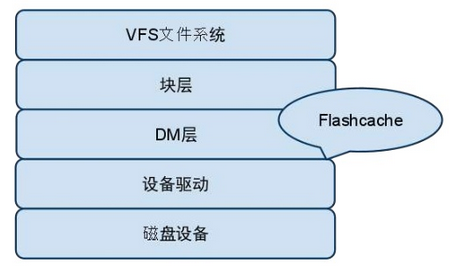
Flashcache是Facebook技术团队开发的一个内核模块,通过在文件系统(VFS)和设备驱动之间新增一次缓存层,可以用SSD作为介质的缓存,通过将传统硬盘上的热门数据缓存到SSD上,加速服务器磁盘读写性能。最初是为加速MySQL设计
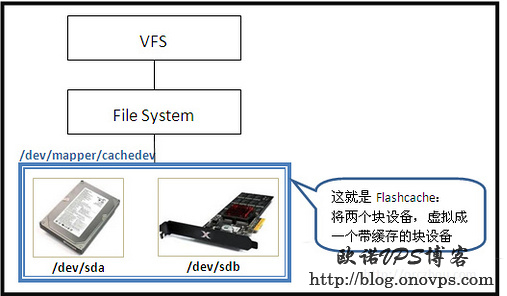
Flashcache是基于dm框架实现的,很自然的,是把一个SSD盘和一个机械硬盘聚合成一个虚拟设备供用户使用。
基本原理图:
Flashcache在内核的层次:
基本命令行:
/sbin/flashcache_create
/sbin/flashcache_destroy
/sbin/flashcache_load
/sbin/flashcache_scan
/sbin/flashcache_setioctl
/sbin/flashstat
/sbin/get_agsize
/usr/lib/ocf/resource.d/flashcache
/usr/share/doc/flashcache-utils-0.0/GPL-v2.0.txt
root@vClass-tekKw queue]# rpm -ql kmod-flashcache-0.0-.el6.x86_64

/etc/depmod.d/kmod-flashcache.conf

/lib/modules/2.6.-220.17..el6.x86_64

/lib/modules/2.6.-220.17..el6.x86_64/extra

/lib/modules/2.6.-220.17..el6.x86_64/extra/flashcache

/lib/modules/2.6.-220.17..el6.x86_64/extra/flashcache/flashcache.ko

/usr/share/doc/kmod-flashcache-0.0

/usr/share/doc/kmod-flashcache-0.0/GPL-v2..txt

/usr/share/doc/kmod-flashcache-0.0/README

/usr/share/doc/kmod-flashcache-0.0/flashcache-doc.txt

/usr/share/doc/kmod-flashcache-0.0/flashcache-sa-guide.txt
flashcache_create 命令
[root@vClass-tekKw rc.d]# flashcache_create

Usage: flashcache_create [-v] [-p back|thru|around] [-b block size] [-m md block size] [-s cache size] [-a associativity] cachedev ssd_devname disk_devname

Usage : flashcache_create Cache Mode back|thru|around is required argument

Usage : flashcache_create Default units for -b, -m, -s are sectors, or specify in k/M/G. Default associativity is .

git commit:
flashcache_create相关参数说明:
-p:缓存模式 writeback(数据先写到SSD,随后写到普通硬盘),
writethrough(数据同时写到SSD和普通硬盘),
writearound(数据绕过SSD,直接写到普通硬盘)三种,三种模式的所有读都会被缓存到flashcache可以通过dev.flashcache.<cachedev>.cache_all参数调整
-s:缓存大小,可选项,如果未指定则整个SSD设备被用于缓存,默认的计数单位是扇区(sectors),但是可以接受k/m/g单位。
-b:指定块大小,可选项,默认为4KB,必须为2的指数。默认单位为扇区。也可以用K作为单位,一般选4KB。
-f:强制创建,不进行检查
-m:设备元数据块大小,只有writeback需要存储metadata块,默认4K
创建Flashcache
flashcache_create -p back -b 4k cachedev /dev/sdc /dev/sdb2
生成/dev/mapper/cachedev设备
指定flashcache的block大小与Percona的page大小相同,一般默认
加载缓存设备
flashcache_load /dev/sdc cachedev (系统重启时使用来加载已经创建过的缓存设备cachedev)
加载已存在的flashcache操作仅用于writeback模式,writethrough和writearound模式重启机器后需要重新使用flashcache_create创建
使用Flashcache
创建好的flashcache设备是块设备,可格式文件系统后挂在使用,也可以继续对其分区等
mount /dev/mapper/cachedev /data
销毁Flashcache
flashcache_destroy /dev/sdc
这种方式删除writeback模式的flashcache时会将SSD上的所有数据删除包括脏数据
建议使用dmsetup命令(device-mapper软件包)删除,会自动将脏数据写入磁盘
dmsetup remove cachedev
Flashcache参数优化
 [root@localhost ]#sysctl dev.flashcache

 dev.flashcache.sdc+sdb2.io_latency_hist =

 dev.flashcache.sdc+sdb2.do_sync =

 dev.flashcache.sdc+sdb2.stop_sync =

 dev.flashcache.sdc+sdb2.dirty_thresh_pct =

 dev.flashcache.sdc+sdb2.max_clean_ios_total =

 dev.flashcache.sdc+sdb2.max_clean_ios_set =

 dev.flashcache.sdc+sdb2.do_pid_expiry =

 dev.flashcache.sdc+sdb2.max_pids =

 dev.flashcache.sdc+sdb2.pid_expiry_secs =

 dev.flashcache.sdc+sdb2.reclaim_policy =

 dev.flashcache.sdc+sdb2.zero_stats =

 dev.flashcache.sdc+sdb2.fast_remove =

 dev.flashcache.sdc+sdb2.cache_all =

 dev.flashcache.sdc+sdb2.fallow_clean_speed =

 dev.flashcache.sdc+sdb2.fallow_delay =

 dev.flashcache.sdc+sdb2.skip_seq_thresh_kb =

 dev.flashcache.sdc+sdb2.clean_on_read_miss =

 dev.flashcache.sdc+sdb2.clean_on_write_miss =

 dev.flashcache.sdc+sdb2.lru_promote_thresh =

 dev.flashcache.sdc+sdb2.lru_hot_pct =

 dev.flashcache.sdc+sdb2.new_style_write_merge =
 dev.flashcache.fast_remove:      删除flashcache卷时不同步脏缓存块。这个选项用来快速删除。

 dev.flashcache.zero_stats:       统计信息归零。

 dev.flashcache.reclaim_policy:    缓存回收规则。有两种算法:先进先出FIFO(),最近最少用LRU().默认是FIFO。

 dev.flashcache.write_merge:      启用写入合并,默认是开启的。

 dev.flashcache.dirty_thresh_pct:flachcache    尝试保持每个单元的脏块在这个n%以下。设置低增加磁盘写入和降低块重写,但是增加了块读取缓存的可用性。

 dev.flashcache.do_sync:               调度清除缓存中的所有脏块。

 dev.flashcache.stop_sync:              停止同步操作。

 dev.flashcache.cache_all:              全局缓存模式:缓存所有和全部不缓存。默认是缓存所有。

 dev.flashcache.fallow_delay:            清除脏块的间隔。默认60s。设置为0禁止空闲,彻底清除。

 dev.flashcache.io_latency_hist:          计算IO等待时间,并绘制直方图。

 dev.flashcache.max_clean_ios_set:          在清除块时,每单元最大写入出错。

 dev.flashcache.max_clean_ios_total:        在同步所有块时,最大写入问题。

 dev.flashcache.debug:                开启debug。

 dev.flashcache.do_pid_expiry:            在白/黑名单上启用逾期的pid列表。

 dev.flashcache.pid_expiry_secs:          设置pid白/黑名单的逾期。

 dev.flashcache.max_pids:              最大数量的pid白/黑名单。
参数介绍参考:https://github.com/facebook/flashcache/blob/master/doc/flashcache-sa-guide.txt
针对MySQL作此优化:
 dev.flashcache.sdc+sdb2.cache_all =          默认值1表示缓存所有,0都不缓存,另外通过进程黑白名单控制

 dev.flashcache.sdc+sdb2.reclaim_policy =        缓存回收策略,:FIFO,:LRU,可动态调整

 dev.flashcache.sdbc+sdb2.fast_remove =        0  表示不同步脏块到磁盘,1表示同步脏块到磁盘

 dev.flashcache.sdc+sdb2.dirty_thresh_pct =      每组脏块占有的百分比,过低会减少块覆盖,增加磁盘写操作和读缓存

 dev.flashcache.sdc+sdb2.new_style_write_merge =   打开写入合并,提升写磁盘的性能(旧版本dev.flashcache.sdc+sdb2.write_merge)

 dev.flashcache.sdb1+sda6.skip_seq_thresh_kb =   表示不缓存超过256kb的顺序IO(由于SSD的随机读写比SAS好,但顺序读写相差不大,故作此优化)
Flashcache开机启动
flashcache模块自动加载–flashcache设备自动加载flashcache_load /dev/sdc cachedev
A.模块自动加载请参考安装部分
B.开机自动加载已创建的缓存设备及挂载
 cd /usr/src/flashcache-3.1./utils

 cp flashcache /etc/init.d/

 chmod +x /etc/init.d/flashcache

 修改/etc/init.d/flashcache

 SSD_DISK= /dev/sdc

 BACKEND_DISK= /dev/sdb2

 CACHEDEV_NAME= cachedev

 MOUNTPOINT= /data

 FLASHCACHE_NAME=sdc+sdb2

 chkconfig flashcache on
Flashcache状态监控
 dmsetup status cachedev

 dmsetup table  cachedev

 错误日志报告

 /proc/flashcache/sdc+sdb2/flashcache_errors

 状态报告

 /proc/flashcache/sdc+sdb2/flashcache_stats

 亦可使用flashstat命令实时查看
注意事项:
1.100G SSD + 2T SATA是一个具有现实参考意义的案例。
2.把Mysql的随机读写与顺序读写分离(即把log直接放在后端的磁盘上,而不能放在mapper盘上),这样性能会提高很多。
3.用来跳过顺序IO的一个参数。
dev.flashcache..skip_seq_thresh_kb
4.带有flashcache的机器,在关机时需要耗费大量时间整理脏块。
5.服务器掉电有导致分区损坏的可能,且通过fsck无法修复。
6.flashcache_create创建了缓存设备之后挂载即可使用,如创建之后使用flashcache_load /dev/sdc cachedev会提示Invalid Flashcache superblock的错误
参考:
SSD+Flashcache 的理解 RAID了解 http://blog.csdn.net/caoshuming_500/article/details/7495323
Flashcache基本使用及注意事项 http://blog.csdn.net/werm520/article/details/42638897
命中率80%,磁盘I/O减半,Flashcache的发展史 http://www.csdn.net/article/2013-10-31/2817357-facebook-flashcache-2010-2013
flashcache的实现与分析 http://blog.csdn.net/kidd_3/article/details/6984822
flashcache原理 http://www.udpwork.com/item/8437.html
Flashcache基本使用及注意事项 http://www.simlinux.com/archives/398.html
Flashcache初探 http://blog.chinaunix.net/uid-26950862-id-3948198.html
如何使用FlashCache技术加速 https://zhidao.baidu.com/question/1768060642827049340.html
FlashCache初探(二) http://www.cnblogs.com/remimin/archive/2012/04/16/2451002.html
Centos安装Flashcache使用SSD缓存 http://www.haiyun.me/archives/centos-flashcache.html
linux内核源码阅读之facebook硬盘加速利器flashcache之初 http://blog.csdn.net/liumangxiong/article/details/11643473
flashcache 介绍的更多相关文章
- linux内核源码阅读之facebook硬盘加速flashcache之六
其实到目前为止,如果对读流程已经能轻松地看懂了,那么写流程不需要太多脑细胞.我觉得再写下去没有太大的必要了,后面想想为了保持flashcache完整性,还是写出来吧.接着到写流程: 1530stati ...
- linux内核源码阅读之facebook硬盘加速flashcache之五
正常流程到flashcache_map的1623行或1625行,按顺序先看读流程: 1221static void 1222flashcache_read(struct cache_c *dmc, s ...
- linux内核源码阅读之facebook硬盘加速flashcache之四
这一小节介绍一下flashcache读写入口和读写的基础实现. 首先,不管是模块还是程序,必须先找到入口,用户态代码会经常去先看main函数,内核看module_init,同样看IO流时候也要找到入口 ...
- linux内核源码阅读之facebook硬盘加速利器flashcache
从来没有写过源码阅读,这种感觉越来越强烈,虽然劣于文笔,但还是下定决心认真写一回. 源代码下载请参见上一篇flashcache之我见 http://blog.csdn.net/liumangxiong ...
- linux内核源码阅读之facebook硬盘加速flashcache之三
上一节讲到在刷缓存的时候会调用new_kcahed_job创建kcached_job,由此我们也可以看到cache数据块与磁盘数据的对应关系.上一篇:http://blog.csdn.net/lium ...
- Flashcache基本使用及注意事项
Flashcache基本使用及注意事项 发表回复 环境:Centos6.5 x64 minal 安装方法 Contents [hide] 1 安装方法 2 自动加载模块 3 创建Flashcache ...
- Facebook数据库工具Flashcache初探
Flashcache是Facebook技术团队的又一力作,最初是为加速MySQL设计的.Flashcache是在Linux层面的,所以任何受磁盘IO困绕的软件或应用都可以方便的使用之. 1. Why ...
- flashcache中内存与磁盘,磁盘与磁盘的io
flashcache中跟磁盘相关的读写分为以下两类: 1)磁盘跟内存的交互 2)磁盘跟磁盘之前的交互 比如说读不命中时就是直接从磁盘读,属于第1种情况,那读命中呢?也是属于第1种情况,不过这时候是从S ...
- HBase(一)——HBase介绍
HBase介绍 1.关系型数据库与非关系型数据库 (1)关系型数据库 关系型数据库最典型的数据机构是表,由二维表及其之间的联系所组成的一个数据组织 优点: 1.易于维护:都是使用表结构,格 ...
随机推荐
- Python中字符串String的基本内置函数与过滤字符模块函数的基本用法
Python中字符串String的基本内置函数与用法 首先我们要明白在python中当字符编码为:UTF-8时,中文在字符串中的占位为3个字节,其余字符为一个字节 下面就直接介绍几种python中字符 ...
- Python学习笔记:装饰器
Python 装饰器的基本概念和应用 代码编写要遵循开放封闭原则,虽然在这个原则是用的面向对象开发,但是也适用于函数式编程,简单来说,它规定已经实现的功能代码不允许被修改,但可以被扩展,即: 封闭:已 ...
- Codeforces Round #271 (Div. 2) D Flowers【计数dp】
D. Flowers time limit per test 1.5 seconds memory limit per test 256 megabytes input standard input ...
- poj 3273 分期问题 最大化最小值
题意:将N个账款分给城M个财务期,使得每个分期账款和的值最大? 思路: 每次mid为分期账款 如果分期次数小于m说明mid太大,减上限 反正 增下限 开始下限设为 最大值 上限设为和 解决问题的代码 ...
- 12、python中的函数(高阶函数)
一.高阶函数 函数实际上也是一个对象,所以也能由变量指向一个函数对象,实际上函数名就是一个变量名.那么函数是传入变量作为参数的,如果传入的变量指向的是函数对象,这种函数就叫高阶函数. 高阶函数就是传入 ...
- Kali 安装VMtools(最新)
老方法安装的VMtools不能进行主宿切换,下面是kali最新版安装VMtools的方法 一.换国内源&更新源 参考 Kali 2017更新源 二.安装VMtools apt-get inst ...
- Python协程详解(二)
上一章,我们介绍了Python的协程,并讲到用yield达到协程的效果,这一章,我们来介绍yield from的结构和作用 我们先来对比下yield和yield from的用法 def first_g ...
- dotnet core 2.2 安装后在vs2017中无法选择 dotnet core 2.2 为目标框架
可能有效的解决方案: 无法完全保证有效,因为我本地装上没问题,只帮同事解决过一次,貌似有效 方案就是多装几个 .net core 2.2.xxx 版本,然后可能就正常识别了. 在安装之前,先把 vs ...
- Python框架之Django学习笔记(十)
又是一周周末,如约学习Django框架.在上一次,介绍了MVC开发模式以及Django自己的MVT开发模式,此次,就从数据处理层Model谈起. 数据库配置 首先,我们需要做些初始配置:我们需要告诉D ...
- Delphi字符串处理函数
1.Copy 功能说明:该函数用于从字符串中复制指定范围中的字符.该函数有3个参数.第一个参数是数据源(即被复制的字符串),第二个参数是从字符串某一处开始复制,第三个参数是要复制字符串的长度(即个数) ...