
五 Vue学习 首页学习 (上)
首页: http://localhost:8002/#/, 登录页面如下:
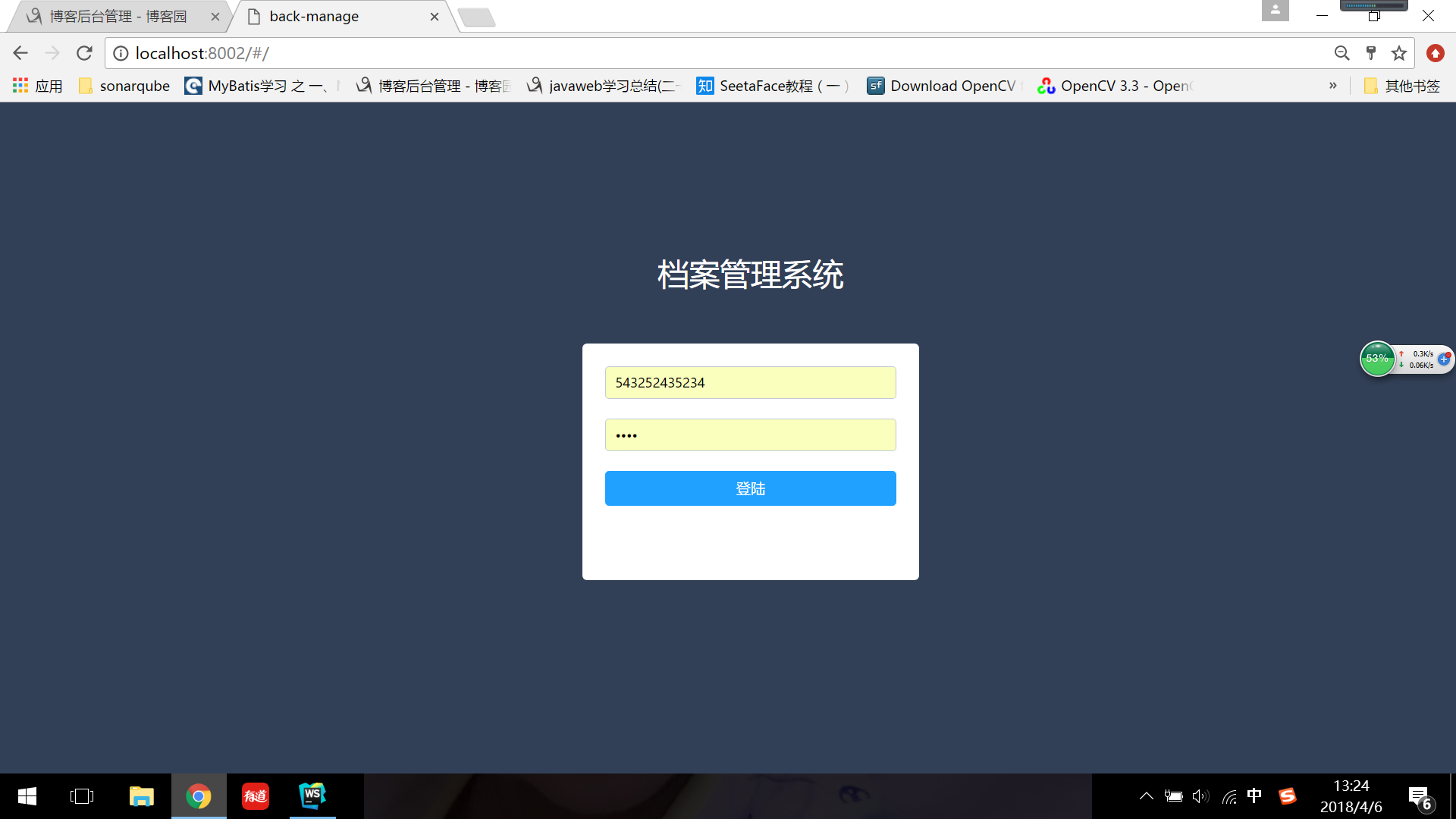
index.js文件中如下的路由配置,转过去看login.vue是如何实现的。
const routes = [
   {
      path: '/',
      component: login
   },

(这里一个问题:  login.vue是如何与index.xml整到一起的呢:
   login作为路由在Router中定义,而在App.vue中Router是参数,这样login就是App.vue的路由了;  App.vue和index.html已经绑定了,并且在App.vue的模板中又又有<Router-View>标签,
所以就可以在index.html中看到login的内容了。)
login.vue代码如下:
  <section>: HTML5中的新标签,定义了文档的某个区域。比如章节、头部、底部或者文档的其他区域。
v-show="true/false: VUE元素的隐藏和显示;
el-form: element的表单
rules: element-UI组件定义的规则,对规则进行校验,如果不满足,会有相应的提示信息等,其规则定义在下面:
                     rules: {

                      username: [

                        { required: true, message: '请输入用户名', trigger: 'blur' },   // 定义了username必填,提示的信息,以及触发条件

              ], password: [ { required: true, message: '请输入密码', trigger: 'blur' } ], },
     ref:  表示是el-form的别名,或者叫引用,供其他地方使用:
           如下的代码,在提交表单的时候,用的就是ref指定的名字。
             <el-form-item>

                        <el-button type="primary" @click="submitForm('loginForm')" class="submit_btn">登陆</el-button>

                      </el-form-item>
    el-form-item:pro:  控件的名字。
      placeholder: input用户名控件中当不输入信息时的提示文本。
      v-if: 指令是条件渲染指令,它根据表达式的真假来删除和插入.
      v-for: v-for指令基于一个数组渲染一个列表;
      v-bind: 和某个值绑定
      v-on : v-on指令用于给监听DOM事件;
@click=: v-on:click的缩写
        <!-- 完整语法 -->
          <a v-on:click="doSomething">...</a>
        <!-- 缩写 -->
          <a @click="doSomething">...</a>
<template>

      <div class="login_page fillcontain">

          <!--<transition name="form-fade" mode="in-out">-->

              <section class="form_contianer" v-show="showLogin">

                  <div class="manage_tip">

                      <p>档案管理系统</p>

                  </div>

                <el-form :model="loginForm" :rules="rules" ref="loginForm">

                    <el-form-item prop="username">

                        <el-input v-model="loginForm.username" placeholder="用户名"><span>dsfsf</span></el-input>

                    </el-form-item>

                    <el-form-item prop="password">

                        <el-input type="password" placeholder="密码" v-model="loginForm.password"></el-input>

                    </el-form-item>

                    <el-form-item>

                        <el-button type="primary" @click="submitForm('loginForm')" class="submit_btn">登陆</el-button>

                      </el-form-item>

                </el-form>

                <!--<p class="tip">温馨提示:</p>-->

                <!--<p class="tip">未登录过的新用户,自动注册</p>-->

                <!--<p class="tip">注册过的用户可凭账号密码登录</p>-->

              </section>

          <!--</transition>-->

      </div>

</template>

<script>

    import {login, getAdminInfo} from '@/api/getData'

    import {mapActions, mapState} from 'vuex'

    export default {

        data(){

            return {

                loginForm: {

                    username: '',

                    password: '',

                },

                rules: {

                    username: [

                        { required: true, message: '请输入用户名', trigger: 'blur' },

                    ],

                    password: [

                        { required: true, message: '请输入密码', trigger: 'blur' }

                    ],

                },

                showLogin: false,

            }

        },

        mounted(){

            this.showLogin = true;

            if (!this.adminInfo.id) {

                this.getAdminData()

            }

        },

        computed: {

            ...mapState(['adminInfo']),

        },

        methods: {

            ...mapActions(['getAdminData']),

            async submitForm(formName) {

                this.$refs[formName].validate(async (valid) => {

                    if (valid) {

                        const res = await login({user_name: this.loginForm.username, password: this.loginForm.password})

                        if (res.status == 1) {

                            this.$message({

                                type: 'success',

                                message: '登录成功'

                            });

                            this.$router.push('manage')

                        }else{

                            this.$message({

                                type: 'error',

                                message: res.message

                            });

                        }

                    } else {

                        this.$notify.error({

                            title: '错误',

                            message: '请输入正确的用户名密码',

                            offset: 100

                        });

                        return false;

                    }

                });

            },

        }

        // watch: {

        //     adminInfo: function (newValue){

        //         if (newValue.id) {

        //             this.$message({

         //                type: 'success',

         //                message: '检测到您之前登录过,将自动登录'

         //            });

        //             this.$router.push('manage')

        //         }

        //     }

        // }

    }

</script>

<style lang="less" scoped>

    @import '../style/mixin';

    .login_page{

        background-color: #324057;

    }

    .manage_tip{

        position: absolute;

        width: 100%;

        top: -100px;

        left: 0;

        p{

            font-size: 34px;

            color: #fff;

        }

    }

    .form_contianer{

        .wh(320px, 210px);

        .ctp(320px, 210px);

        padding: 25px;

        border-radius: 5px;

        text-align: center;

        background-color: #fff;

        .submit_btn{

            width: 100%;

            font-size: 16px;

        }

    }

    .tip{

        font-size: 12px;

        color: red;

    }

    .form-fade-enter-active, .form-fade-leave-active {

          transition: all 1s;

    }

    .form-fade-enter, .form-fade-leave-active {

          transform: translate3d(0, -50px, 0);

          opacity: 0;

    }

</style>
export default {} : ES6的语法,表示导出。es6中,实现了模块功能,你要import 引入东西,导出了才能引用。因为这个login会被其他的组件使用(App.vue),所以一定要导出的。
return data(): 注意, 上面的data()是个函数(有return),而不是对象,每次调用都会返回其中数据的拷贝。这个很重要,因为login模块被很多地方用到,如果返回data对象的
话(不用return),多个地方方公用相同的数据,这是错误的; 而如果data() 是一个函数,return的是全新的对象,这样就不会共享数据了。
data 是数据,主要是这些数据和template中的元素绑定。
mounted VS created:
computed:计算属性,是 Vue 中常用的一个功能
         模板内的表达式是非常便利的,但是它们实际上只用于简单的运算。在模板中放入太多的逻辑会让模板过重且难以维护。
         computed相当于属性的一个实时计算,如果实时计算里关联了对象,那么当对象的某个值改变的时候,同事会出发实时计算
五 Vue学习 首页学习 (上)的更多相关文章
- Vue学习笔记-Vue.js-2.X 学习(五)===>脚手架Vue-CLI(PyCharm)
Vue项目在pycharm中配置 退出运行: ctrl+c Vue学习笔记-Vue.js-2.X 学习(六)===>脚手架Vue-CLI(项目说明)
- Vue源码学习二 ———— Vue原型对象包装
Vue原型对象的包装 在Vue官网直接通过 script 标签导入的 Vue包是 umd模块的形式.在使用前都通过 new Vue({}).记录一下 Vue构造函数的包装. 在 src/core/in ...
- vue - blog开发学习1
1.安装vue-cli vue intall -g vue-cli 2.创建项目 vue init webpack nblog 3.按提示要求配置项目 ? Project name nblog ? P ...
- Vue学习笔记-Vue.js-2.X 学习(四)===>脚手架Vue-CLI(基本工作和创建)
(五) 脚手架Vue-CLI 一 Vue-CLI前提(nodejs和webpack) 二 Vue学习-nodejs按装配置,Node.js 就是运行在服务端的 JavaScript. 1. 去nod ...
- Vue学习笔记-Vue.js-2.X 学习(一)===>基本知识学习
一 使用环境: windows 7 64位操作系统 二 IDE:VSCode/PyCharm 三 Vue.js官网: https://cn.vuejs.org/ 四 下载安装引用 方式1:直接 ...
- 20145330第五周《Java学习笔记》
20145330第五周<Java学习笔记> 这一周又是紧张的一周. 语法与继承架构 Java中所有错误都会打包为对象可以尝试try.catch代表错误的对象后做一些处理. 使用try.ca ...
- MVC&WebForm对照学习:文件上传(以图片为例)
原文 http://www.tuicool.com/articles/myM7fe 主题 HTMLMVC模式Asp.net 博客园::首页:: :: :: ::管理 5 Posts :: 0 ...
- Deep Learning(深度学习)学习笔记整理系列之(五)
Deep Learning(深度学习)学习笔记整理系列 zouxy09@qq.com http://blog.csdn.net/zouxy09 作者:Zouxy version 1.0 2013-04 ...
- Vue 超快速学习
Vue 超快速学习 基础知识: 1.vue的生命周期: beforeCreate/created. beforeMount/mounted. beforeUpdate/updated. beforeD ...
随机推荐
- DataGrid绑定Dictionary问题
问题] 在最近的项目中使用DataGrid的DataGridCheckBoxColumn绑定了后台TagModel类的IsSelected字段,数据源是TagModel类型的Dictionary,运行 ...
- [转]Unity3D Editor 编辑器简易教程
Star 自定义编辑器简易教程 an introduction to custom editors 原文地址 http://catlikecoding.com/unity/tutorials/star ...
- Epplus 使用案例
//拷贝 sheet.Cells["6:12"].Copy(sheet.Cells["1:2"]); //边框无 sheet.Cells[(i * 6 + i ...
- 【BZOJ4861】[Beijing2017]魔法咒语 矩阵乘法+AC自动机+DP
[BZOJ4861][Beijing2017]魔法咒语 题意:别看BZ的题面了,去看LOJ的题面吧~ 题解:显然,数据范围明显的分成了两部分:一个是L很小,每个基本词汇长度未知:一个是L很大,每个基本 ...
- Runnable 和 Callable的区别
Runnable 与 Callable的区别: (1)Callable规定的方法是call(),Runnable规定的方法是run(). (2)Callable的任务执行后可返回值,而Runnable ...
- 【题解】T54037 最开始
传送门 题目大意: 对于\(a+ \frac 1{a^{}}=n\)求$a^{m}+ \frac 1{a^{m}} $,对\(10^9+7\)取模. 题目做法: 乍看此题,没有思路,但是如果用数学办法 ...
- CrystalReport runtime的下载地址
SAP网站的东西实在太多了,找个CrytalReport都费劲.13.*版的可以通过下面的地址下载: SAP Crystal Reports, developer version for Micros ...
- python中的编码转换
今天遇到了一个问题,将字符串“\uxxxx\uxxxx”转换成汉字.网上查了很多资料都不行. 后来看到,发现一个函数就OK了. str = str.decode('unicode_escape') 等 ...
- Java里的阻塞队列
JDK7提供了7个阻塞队列,如下: ArrayBlockingQueue : 一个数组结构组成的有界阻塞队列. LinkedBlockingQueue : 一个由链表结构组成的有界阻塞队列 . Pr ...
- VIM命令总结【转】
命令历史 以:和/开头的命令都有历史纪录,可以首先键入:或/然后按上下箭头来选择某个历史命令. 启动vim 在命令行窗口中输入以下命令即可 vim 直接启动vim vim filename 打开vim ...