
wepy原理研究
像VUE一样写微信小程序-深入研究wepy框架 https://zhuanlan.zhihu.com/p/28700207
wepy原理研究
虽然wepy提升了小程序开发体验,但毕竟最终要运行在小程序环境中,归根结底wepy还是需要编译成小程序 需要的格式,因此wepy的核心在于代码解析与编译。
wepy项目文件主要有两个: wepy-cli:用于把.wpy文件提取分析并编译成小程序所要求的wxml、wxss、js、json格式 wepy:编译后js文件中的js框架
wepy编译过程
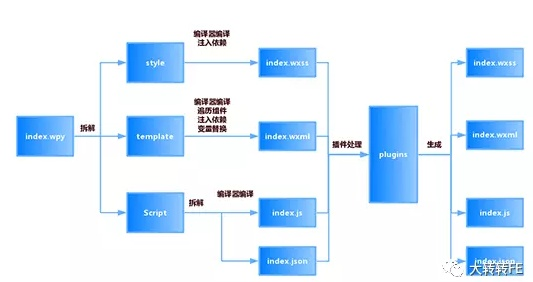
拆解过程核心代码
//wepy自定义属性替换成小程序标准属性过程

return content.replace(/<([\w-]+)\s*[\s\S]*?(\/|<\/[\w-]+)>/ig, (tag, tagName) => {

   tagName = tagName.toLowerCase();

return tag.replace(/\s+:([\w-_]*)([\.\w]*)\s*=/ig, (attr, name, type) => { // replace :param.sync => v-bind:param.sync

if (type === '.once' || type === '.sync') {

}

else

           type = '.once';

return ` v-bind:${name}${type}=`;

}).replace(/\s+\@([\w-_]*)([\.\w]*)\s*=/ig, (attr, name, type) => { // replace @change => v-on:change

const prefix = type !== '.user' ? (type === '.stop' ? 'catch' : 'bind') : 'v-on:';

return ` ${prefix}${name}=`;

});

});

...

//按xml格式解析wepy文件

xml = this.createParser().parseFromString(content);

const moduleId = util.genId(filepath);

//提取后的格式

let rst = {

   moduleId: moduleId,

   style: [],

template: {

       code: '',

       src: '',

       type: ''

},

   script: {

       code: '',

       src: '',

       type: ''

}

};

//循环拆解提取过程

[].slice.call(xml.childNodes || []).forEach((child) => {

const nodeName = child.nodeName;

if (nodeName === 'style' || nodeName === 'template' || nodeName === 'script') {

let rstTypeObj;

if (nodeName === 'style') {

           rstTypeObj = {code: ''};

           rst[nodeName].push(rstTypeObj);

} else {

           rstTypeObj = rst[nodeName];

}

       rstTypeObj.src = child.getAttribute('src');

       rstTypeObj.type = child.getAttribute('lang') || child.getAttribute('type');

if (nodeName === 'style') {

// 针对于 style 增加是否包含 scoped 属性

           rstTypeObj.scoped = child.getAttribute('scoped') ? true : false;

}

if (rstTypeObj.src) {

           rstTypeObj.src = path.resolve(opath.dir, rstTypeObj.src);

}

if (rstTypeObj.src && util.isFile(rstTypeObj.src)) {

const fileCode = util.readFile(rstTypeObj.src, 'utf-8');

if (fileCode === null) {

throw '打开文件失败: ' + rstTypeObj.src;

} else {

               rstTypeObj.code += fileCode;

}

} else {

[].slice.call(child.childNodes || []).forEach((c) => {

               rstTypeObj.code += util.decode(c.toString());

});

}

if (!rstTypeObj.src)

           rstTypeObj.src = path.join(opath.dir, opath.name + opath.ext);

}

});

...

// 拆解提取wxml过程

(() => {

if (rst.template.type !== 'wxml' && rst.template.type !== 'xml') {

let compiler = loader.loadCompiler(rst.template.type);

if (compiler && compiler.sync) {

if (rst.template.type === 'pug') { // fix indent for pug, https://github.com/wepyjs/wepy/issues/211

let indent = util.getIndent(rst.template.code);

if (indent.firstLineIndent) {

                   rst.template.code = util.fixIndent(rst.template.code, indent.firstLineIndent * -1, indent.char);

}

}

//调用wxml解析模块

let compilerConfig = config.compilers[rst.template.type];

// xmldom replaceNode have some issues when parsing pug minify html, so if it's not set, then default to un-minify html.

if (compilerConfig.pretty === undefined) {

               compilerConfig.pretty = true;

}

           rst.template.code = compiler.sync(rst.template.code, config.compilers[rst.template.type] || {});

           rst.template.type = 'wxml';

}

}

if (rst.template.code)

       rst.template.node = this.createParser().parseFromString(util.attrReplace(rst.template.code));

})();

// 提取import资源文件过程

(() => {

let coms = {};

   rst.script.code.replace(/import\s*([\w\-\_]*)\s*from\s*['"]([\w\-\_\.\/]*)['"]/ig, (match, com, path) => {

       coms[com] = path;

});

let match = rst.script.code.match(/[\s\r\n]components\s*=[\s\r\n]*/);

   match = match ? match[0] : undefined;

let components = match ? this.grabConfigFromScript(rst.script.code, rst.script.code.indexOf(match) + match.length) : false;

let vars = Object.keys(coms).map((com, i) => `var ${com} = "${coms[com]}";`).join('\r\n');

try {

if (components) {

           rst.template.components = new Function(`${vars}\r\nreturn ${components}`)();

} else {

           rst.template.components = {};

}

} catch (e) {

       util.output('错误', path.join(opath.dir, opath.base));

       util.error(`解析components出错,报错信息:${e}\r\n${vars}\r\nreturn ${components}`);

}

})();

...
wepy中有专门的script、style、template、config解析模块 以template模块举例:
//compile-template.js

...

//将拆解处理好的wxml结构写入文件

getTemplate (content) {

   content = `<template>${content}</template>`;

let doc = new DOMImplementation().createDocument();

let node = new DOMParser().parseFromString(content);

let template = [].slice.call(node.childNodes || []).filter((n) => n.nodeName === 'template');

[].slice.call(template[0].childNodes || []).forEach((n) => {

       doc.appendChild(n);

});

...

return doc;

},

//处理成微信小程序所需的wxml格式

compileXML (node, template, prefix, childNodes, comAppendAttribute = {}, propsMapping = {}) {

//处理slot

this.updateSlot(node, childNodes);

//处理数据绑定bind方法

this.updateBind(node, prefix, {}, propsMapping);

//处理className

if (node && node.documentElement) {

Object.keys(comAppendAttribute).forEach((key) => {

if (key === 'class') {

let classNames = node.documentElement.getAttribute('class').split(' ').concat(comAppendAttribute[key].split(' ')).join(' ');

               node.documentElement.setAttribute('class', classNames);

} else {

               node.documentElement.setAttribute(key, comAppendAttribute[key]);

}

});

}

//处理repeat标签

let repeats = util.elemToArray(node.getElementsByTagName('repeat'));

...

//处理组件

let componentElements = util.elemToArray(node.getElementsByTagName('component'));

...

return node;

},

//template文件编译模块

compile (wpy){

...

//将编译好的内容写入到文件

let plg = new loader.PluginHelper(config.plugins, {

       type: 'wxml',

       code: util.decode(node.toString()),

       file: target,

       output (p) {

           util.output(p.action, p.file);

},

done (rst) {

//写入操作

           util.output('写入', rst.file);

           rst.code = self.replaceBooleanAttr(rst.code);

           util.writeFile(target, rst.code);

}

});

}
编译前后文件对比
wepy编译前的文件:
<scroll-view scroll-y="true" class="list-page" scroll-top="{{scrollTop}}" bindscrolltolower="loadMore">

<!-- 商品列表组件 -->

<view class="goods-list">

<GoodsList :goodsList.sync="goodsList" :clickItemHandler="clickHandler" :redirect="redirect" :pageUrl="pageUrl"></GoodsList>

</view>

</scroll-view>
wepy编译后的文件:
<scroll-view scroll-y="true" class="list-page" scroll-top="{{scrollTop}}" bindscrolltolower="loadMore">

<view class="goods-list">

<view wx:for="{{$GoodsList$goodsList}}" wx:for-item="item" wx:for-index="index" wx:key="{{item.infoId}}" bindtap="$GoodsList$clickHandler" data-index="{{index}}" class="item-list-container{{index%2==0 ? ' left-item' : ''}}">

<view class="item-img-list"><image src="{{item.pic}}" class="item-img" mode="aspectFill"/></view>

<view class="item-desc">

<view class="item-list-title">

<text class="item-title">{{item.title}}</text>

</view>

<view class="item-list-price">

<view wx:if="{{item.price && item.price>0}}" class="item-nowPrice"><i>¥</i>{{item.price}}</view>

<view wx:if="{{item.originalPrice && item.originalPrice>0}}" class="item-oriPrice">¥{{item.originalPrice}}</view>

</view>

<view class="item-list-local"><view>{{item.cityName}}{{item.cityName&&item.businessName?' | ':''}}{{item.businessName}}    </view>

</view>

</view>

<form class="form" bindsubmit="$GoodsList$sendFromId" report-submit="true" data-index="{{index}}">

<button class="submit-button" form-type="submit"/>

</form>

</view>

</view>

</view>

</scroll-view>
可以看到wepy将页面中所有引入的组件都直接写入页面当中,并且按照微信小程序的格式来输出 当然也从一个侧面看出,使用wepy框架后,代码风格要比原生的更加简洁优雅
以上是wepy实现原理的简要分析,有兴趣的朋友可以去阅读源码(https://github.com/wepyjs/wepy)。 综合来讲,wepy的核心在于编译环节,能够将优雅简洁的类似VUE风格的代码,编译成微信小程序所需要的繁杂代码。
wepy作为一款优秀的微信小程序框架,可以帮我们大幅提高开发效率,在为数不多的小程序框架中一枝独秀,希望有更多的团队选择wepy。
PS:wepy也在实现小程序和VUE代码同构,但目前还处在开发阶段,如果未来能实现一次开发,同时产出小程序和M页,将是一件非常爽的事情。
wepy原理研究的更多相关文章
- AX中四种库存ABC分析法原理研究
库存ABC分类,简单的说就是抓大放小,是为了让我们抓住重点,用最大精力来管理最重要的物料,而对于不太重要的物料则可以用较少的精力进行管理.它和我们平常说的八二法则有异曲同工之妙. 既然要应用库存ABC ...
- SpringMVC关于json、xml自动转换的原理研究[附带源码分析 --转
SpringMVC关于json.xml自动转换的原理研究[附带源码分析] 原文地址:http://www.cnblogs.com/fangjian0423/p/springMVC-xml-json-c ...
- SpringMVC关于json、xml自动转换的原理研究[附带源码分析]
目录 前言 现象 源码分析 实例讲解 关于配置 总结 参考资料 前言 SpringMVC是目前主流的Web MVC框架之一. 如果有同学对它不熟悉,那么请参考它的入门blog:http://www.c ...
- SpringMVC关于json、xml自动转换的原理研究
SpringMVC是目前主流的Web MVC框架之一. 如果有同学对它不熟悉,那么请参考它的入门blog:http://www.cnblogs.com/fangjian0423/p/springMVC ...
- NNs(Neural Networks,神经网络)和Polynomial Regression(多项式回归)等价性之思考,以及深度模型可解释性原理研究与案例
1. Main Point 0x1:行文框架 第二章:我们会分别介绍NNs神经网络和PR多项式回归各自的定义和应用场景. 第三章:讨论NNs和PR在数学公式上的等价性,NNs和PR是两个等价的理论方法 ...
- [日常] MySQL的哈希索引和原理研究测试
1.哈希索引 :(hash index)基于哈希表实现,只有精确匹配到索引列的查询,才会起到效果.对于每一行数据,存储引擎都会对所有的索引列计算出一个哈希码(hash code),哈希码是一个较小的整 ...
- Java运行原理研究(未完待续)
java的介绍和定性 java的优缺点分析 jdk的组成结构 jvm的工作原理 java的跨平台原理 java的编译和运行过程
- Oracle中读取数据一些原理研究
文章很多摘录了 http://blog.163.com/liaoxiangui@126/blog/static/7956964020131069843572/ 同时基于这篇文章的基础上,补充一些学习要 ...
- boneCP原理研究
** 转载请注明源链接:http://www.cnblogs.com/wingsless/p/6188659.html boneCP是一款关注高性能的数据库连接池产品 github主页 . 不过最近作 ...
随机推荐
- 【Visual Studio】Error: forget to add '#include "stdafx.h"' to your source (转)
原文转自 http://www.cnblogs.com/qunews/articles/2200313.html [问题原因]在编译时使用了预编译头文件, [解决方法]Project-->Pro ...
- 标准C程序设计七---34
Linux应用 编程深入 语言编程 标准C程序设计七---经典C11程序设计 以下内容为阅读: <标准C程序设计>(第7版) 作者 ...
- andriod多线程
用ThreadHandle可以实现多线程,然后再主线程更新UI 第二种就是用 AsyncTask 具体看代码 public void onClick(View v) { new DownloadIma ...
- CSS-@media媒体查询(输出设备中的页面可见区域宽度)
早上好,仙女刘,首先恭喜你在2019.06.13号也就是昨天生日快乐!希望你在今后的每一天都是开开心心的,爱你哟,早上起床后的在激动心情下的美美哒! 好了,现在进入正题: 在做响应式页面的时候,我经常 ...
- 牛客网 牛客小白月赛1 B.简单题2-控制输出格式
B.简单题2 链接:https://www.nowcoder.com/acm/contest/85/B来源:牛客网 和A题一样,控制输出格式就可以. 代码: 1 #include<iostr ...
- 2017 [六省联考] T6 寿司餐厅
4873: [Shoi2017]寿司餐厅 Time Limit: 20 Sec Memory Limit: 512 MBSubmit: 450 Solved: 316[Submit][Status ...
- Linux BPF/bcc for Oracle Tracing
Luca Canali on 26 May 2016 Topic: In this post you will find a short discussion and pointers to the ...
- sqlserverinternals.com
http://sqlblog.com/blogs/kalen_delaney/default.aspx https://sqlserverinternals.com/
- Android -- AsyncTask 使用和缺陷
一.AsyncTask的基本用法 由于AsyncTask是一个抽象类,所以如果我们想使用它,就必须要创建一个子类去继承它.在继承时我们可以为AsyncTask类指定三个泛型参数,这三个参数的用途如下: ...
- windows10 安装 mysql 5.6 教程
首先是下载 mysql-installer-community-5.6.14.0.msi ,大家可以到 mysql 官方网去下载. win10的安全机制比较严格,安装前最好到<设置>--& ...