
Android笔记之DrawerLayout的基本使用
效果图

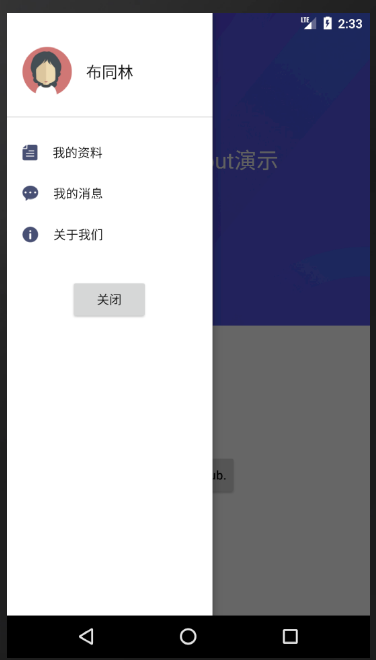
activity_main.xml
<?xml version="1.0" encoding="utf-8"?>

<LinearLayout xmlns:android="http://schemas.android.com/apk/res/android"

    android:layout_width="match_parent"

    android:layout_height="match_parent">

    <android.support.v4.widget.DrawerLayout

        android:id="@+id/drawerLayout"

        android:layout_width="match_parent"

        android:layout_height="match_parent">

        <RelativeLayout

            android:layout_width="match_parent"

            android:layout_height="match_parent"

            android:background="#ffffffff">

            <ImageView

                android:layout_width="match_parent"

                android:layout_height="355dp"

                android:background="@mipmap/ic_main_background" />

            <RelativeLayout

                android:id="@+id/titleRelativeLayout"

                android:layout_width="match_parent"

                android:layout_height="45dp"

                android:layout_marginTop="18dp">

                <FrameLayout

                    android:id="@+id/userFrameLayout"

                    android:layout_width="45dp"

                    android:layout_height="match_parent">

                    <ImageView

                        android:layout_width="20dp"

                        android:layout_height="20dp"

                        android:layout_gravity="center_vertical"

                        android:layout_marginLeft="15dp"

                        android:src="@mipmap/ic_user" />

                </FrameLayout>

                <TextView

                    android:layout_width="wrap_content"

                    android:layout_height="wrap_content"

                    android:layout_centerInParent="true"

                    android:text="标题"

                    android:textColor="#fff0f0f0"

                    android:textSize="18sp" />

            </RelativeLayout>

            <TextView

                android:layout_width="wrap_content"

                android:layout_height="wrap_content"

                android:layout_centerHorizontal="true"

                android:layout_marginTop="150dp"

                android:text="DrawerLayout演示"

                android:textColor="#fff0f0f0"

                android:textSize="25sp" />

            <Button

                android:layout_width="wrap_content"

                android:layout_height="wrap_content"

                android:layout_centerHorizontal="true"

                android:layout_marginTop="500dp"

                android:text="This is a stub."

                android:textAllCaps="false" />

        </RelativeLayout>

        <LinearLayout

            android:id="@+id/leftLinearLayout"

            android:layout_width="233dp"

            android:layout_height="match_parent"

            android:layout_gravity="left"

            android:background="#ffffffff"

            android:orientation="vertical">

            <LinearLayout

                android:layout_width="match_parent"

                android:layout_height="wrap_content"

                android:layout_marginTop="39dp"

                android:layout_marginBottom="23dp">

                <ImageView

                    android:layout_width="56dp"

                    android:layout_height="56dp"

                    android:layout_marginLeft="18dp"

                    android:layout_marginRight="16dp"

                    android:src="@mipmap/ic_portrait" />

                <TextView

                    android:layout_width="wrap_content"

                    android:layout_height="wrap_content"

                    android:layout_gravity="center_vertical"

                    android:text="布同林"

                    android:textColor="#ff1b1b1b"

                    android:textSize="18sp" />

            </LinearLayout>

            <View

                android:layout_width="match_parent"

                android:layout_height="1dp"

                android:background="#ffdfdfdf" />

            <TextView

                android:layout_width="match_parent"

                android:layout_height="wrap_content"

                android:layout_marginLeft="18dp"

                android:drawableLeft="@mipmap/ic_profile"

                android:drawablePadding="17dp"

                android:paddingTop="30dp"

                android:text="我的资料"

                android:textColor="#ff1b1b1b"

                android:textSize="14sp" />

            <TextView

                android:layout_width="match_parent"

                android:layout_height="wrap_content"

                android:layout_marginLeft="18dp"

                android:drawableLeft="@mipmap/ic_message"

                android:drawablePadding="17dp"

                android:paddingTop="27dp"

                android:text="我的消息"

                android:textColor="#ff1b1b1b"

                android:textSize="14sp" />

            <TextView

                android:id="@+id/aboutUsTextView"

                android:layout_width="match_parent"

                android:layout_height="wrap_content"

                android:layout_marginLeft="18dp"

                android:drawableLeft="@mipmap/ic_information"

                android:drawablePadding="17dp"

                android:paddingTop="27dp"

                android:text="关于我们"

                android:textColor="#ff1b1b1b"

                android:textSize="14sp" />

            <Button

                android:id="@+id/closeDrawerButton"

                android:layout_width="wrap_content"

                android:layout_height="wrap_content"

                android:layout_gravity="center"

                android:layout_marginTop="40dp"

                android:text="关闭" />

        </LinearLayout>

    </android.support.v4.widget.DrawerLayout>

</LinearLayout>
MainActivity.java
package com.bu_ish.empty;

import android.graphics.Color;

import android.os.Build;

import android.support.v4.widget.DrawerLayout;

import android.support.v7.app.AlertDialog;

import android.support.v7.app.AppCompatActivity;

import android.os.Bundle;

import android.view.Gravity;

import android.view.View;

import android.view.Window;

public class MainActivity extends AppCompatActivity {

    private DrawerLayout drawerLayout;

    @Override

    protected void onCreate(Bundle savedInstanceState) {

        super.onCreate(savedInstanceState);

        setContentView(R.layout.activity_main);

        Window window = getWindow();

        window.getDecorView().setSystemUiVisibility(View.SYSTEM_UI_FLAG_LAYOUT_FULLSCREEN | View.SYSTEM_UI_FLAG_LAYOUT_STABLE);

        if (Build.VERSION.SDK_INT >= Build.VERSION_CODES.LOLLIPOP) {

            window.setStatusBarColor(Color.TRANSPARENT);

        }

        drawerLayout = findViewById(R.id.drawerLayout);

        findViewById(R.id.userFrameLayout).setOnClickListener(new View.OnClickListener() {

            @Override

            public void onClick(View v) {

                drawerLayout.openDrawer(Gravity.LEFT);

            }

        });

        findViewById(R.id.aboutUsTextView).setOnClickListener(new View.OnClickListener() {

            @Override

            public void onClick(View v) {

                new AlertDialog.Builder(MainActivity.this).setMessage("布同林").show();

            }

        });

        findViewById(R.id.closeDrawerButton).setOnClickListener(new View.OnClickListener() {

            @Override

            public void onClick(View v) {

                drawerLayout.closeDrawer(Gravity.LEFT);

            }

        });

    }

}
P.S.
从左侧划出菜单,则android:layout_gravity="left"
DrawerLayout.openDrawer(int gravity):打开菜单
DrawerLayout.closeDrawer(int gravity):关闭菜单
完整Demo
链接:https://pan.baidu.com/s/16tsE4jiQWbTdGSNKBHK-4g
提取码:cd25
Android笔记之DrawerLayout的基本使用的更多相关文章
- Android笔记:DrawerLayout抽屉布局的使用
DrawerLayout(抽屉布局),在各种app中经常出现,比如csdn.. 如下示,只要从屏幕侧边滑一下,或者点击左上角的图标,抽屉就会出来. DrawerLayout要点: 1.使用Drawer ...
- Android笔记——Android中数据的存储方式(二)
我们在实际开发中,有的时候需要储存或者备份比较复杂的数据.这些数据的特点是,内容多.结构大,比如短信备份等.我们知道SharedPreferences和Files(文本文件)储存这种数据会非常的没有效 ...
- Android笔记:触摸事件的分析与总结----TouchEvent处理机制
原创作品,允许转载,转载时请务必以超链接形式标明文章 原始出处 .作者信息和本声明.否则将追究法律责任.http://glblong.blog.51cto.com/3058613/1559320 ...
- Android抽屉效果 DrawerLayout 入门经验总结
今天试了试这个抽屉布局的效果,结果很崩溃无语 网上很多资料都千篇一律,感觉都有问题,下面总结下几点经验: 先上个效果图: 1. layout 布局文件中怎么写: <android.suppor ...
- Android 笔记之 R 文件
Android笔记之R文件 h2{ color: #4abcde; } a{ color: blue; text-decoration: none; } a:hover{ color: red; te ...
- Android 笔记之 Android 系统架构
Android笔记之Android系统架构 h2{ color: #4abcde; } a{ color: blue; text-decoration: none; } a:hover{ color: ...
- Android笔记之使用Glide加载网络图片、下载图片
Glide简介 不想说太多,真的很方便:P)可以节省我不少时间 GitHub地址:https://github.com/bumptech/glide 加载网络图片到ImageView Glide.wi ...
- Android笔记--View绘制流程源码分析(二)
Android笔记--View绘制流程源码分析二 通过上一篇View绘制流程源码分析一可以知晓整个绘制流程之前,在activity启动过程中: Window的建立(activit.attach生成), ...
- Android笔记--View绘制流程源码分析(一)
Android笔记--View绘制流程源码分析 View绘制之前框架流程分析 View绘制的分析始终是离不开Activity及其内部的Window的.在Activity的源码启动流程中,一并包含 着A ...
随机推荐
- WebRTC VoiceEngine综合应用示例(一)——基本结构分析(转)
把自己这两天学习VoiceEngine的成果分享出来,供大家参考,有什么问题也欢迎大家指出,一起学习一起进步. 本文将对VoiceEngine的基本结构做一个分析,分析的方法是自底向上的:看一个音频编 ...
- Python远程视频监控程序
老板由于事务繁忙无法经常亲临教研室,于是让我搞个监控系统,让他在办公室就能看到教研室来了多少人.o(>﹏<)o||| 最初我的想法是直接去网上下个软件,可是找来找去不是有毒就是收费,无奈技 ...
- p标签注意事项
<p> 哈哈,我是一个段落哦! <div id="box">我是一个萌萌的div</div> </p> 这样写的后果: 注意: p标 ...
- Oracle单个datafile大小的限制
http://blog.itpub.net/30776559/viewspace-2146790/
- 洛谷——P2853 [USACO06DEC]牛的野餐Cow Picnic
P2853 [USACO06DEC]牛的野餐Cow Picnic 题目描述 The cows are having a picnic! Each of Farmer John's K (1 ≤ K ≤ ...
- luogu P1879 [USACO06NOV]玉米田Corn Fields
题目描述 Farmer John has purchased a lush new rectangular pasture composed of M by N (1 ≤ M ≤ 12; 1 ≤ N ...
- EventBus3.0使用笔记.md
事件总线这个其实没什么好说的,除了已经ondestroy的fragment或者activity不能接受外,只要定义了的都能接收消息 代码如下,需要注意的一点就是接收的监听事件必须用public修饰并且 ...
- 【spring cloud】spring cloud子module的pom文件添加依赖,出现unknown问题【maven】
spring cloud项目,一般都是父项目中有多个子服务,也就是子module模块. 如下图: 问题描述:在父项目中引用了常用的jar包,例如,引入了spring boot的依赖,那么在子项目中引入 ...
- Error building Player: Win32Exception: ApplicationName='E:/adt-20140702/sdk\tools\zipalign.exe', Com
1.原因 更新sdk后报错..由于版本号不同,zipalign.exe所处路径不同 2.解决的方法 在sdk路径下搜索zipalign.exe .然后拷贝到报错内容中制定的路径即可了.
- CString和string头文件
在使用了MFC库的工程中CString可以直接使用,在没有使用MFC库的工程中加入#include <atlstr.h> 要使用STL里的string,要加入#include <st ...