
Spring Cloud 之分布式配置基础应用
分布式配置基础应用
配置中心服务
spring-config-server
pom.xml
<?xml version="1.0" encoding="UTF-8"?>

<project xmlns="http://maven.apache.org/POM/4.0.0" xmlns:xsi="http://www.w3.org/2001/XMLSchema-instance"

         xsi:schemaLocation="http://maven.apache.org/POM/4.0.0 http://maven.apache.org/xsd/maven-4.0.0.xsd">

    <modelVersion>4.0.0</modelVersion>

    <groupId>org.galsang.cloud</groupId>

    <artifactId>spring-config-server</artifactId>

    <version>0.0.1-SNAPSHOT</version>

    <packaging>jar</packaging>

    <name>spring-config-server</name>

    <description>配置中心服务</description>

    <parent>

        <groupId>org.springframework.boot</groupId>

        <artifactId>spring-boot-starter-parent</artifactId>

        <version>1.5.9.RELEASE</version>

        <relativePath/> <!-- lookup parent from repository -->

    </parent>

    <properties>

        <project.build.sourceEncoding>UTF-8</project.build.sourceEncoding>

        <project.reporting.outputEncoding>UTF-8</project.reporting.outputEncoding>

        <java.version>1.8</java.version>

        <spring-cloud.version>Edgware.RELEASE</spring-cloud.version>

    </properties>

    <dependencies>

        <dependency>

            <groupId>org.springframework.cloud</groupId>

            <artifactId>spring-cloud-config-server</artifactId>

        </dependency>

        <dependency>

            <groupId>org.springframework.cloud</groupId>

            <artifactId>spring-cloud-starter-eureka</artifactId>

        </dependency>

        <dependency>

            <groupId>org.springframework.boot</groupId>

            <artifactId>spring-boot-starter-test</artifactId>

            <scope>test</scope>

        </dependency>

    </dependencies>

    <dependencyManagement>

        <dependencies>

            <dependency>

                <groupId>org.springframework.cloud</groupId>

                <artifactId>spring-cloud-dependencies</artifactId>

                <version>${spring-cloud.version}</version>

                <type>pom</type>

                <scope>import</scope>

            </dependency>

        </dependencies>

    </dependencyManagement>

    <build>

        <plugins>

            <plugin>

                <groupId>org.springframework.boot</groupId>

                <artifactId>spring-boot-maven-plugin</artifactId>

            </plugin>

        </plugins>

    </build>

</project>
application-dev.yml
spring:

  profiles: dev

  cloud:

    inetutils:

      preferred-networks:

        - 192.168

    config:

      server:

        git:

          uri: https://gitee.com/vimx86/SpringCloud-Learning/ # git 配置仓库地址

          search-paths: galsang-z-docs/config-repo

          # 由于是公开git 仓库,故不使用账号密码

#          username:

#          password:

  # git管理配置

  # /{application}/{profile}[/{label}]

  # /{application}-{profile}.yml

  # /{label}/{application}-{profile}.yml

  # /{application}-{profile}.properties

  # /{label}/{application}-{profile}.properties

  # http://www.galsang.org:9001/application-dev/dev/master

  # http://www.galsang.org:9001/application/dev/master

  # http://www.galsang.org:9001/application-dev.properties   默认使用master分支中的配置文件

  # http://www.galsang.org:9001/dev/application-beta.properties 使用指定分支中的配置文件

server:

  port: 9001

  context-path: /

  display-name: www.galsang.org

# 服务注册配置

eureka:

# 作为服务进行注册

  client:

    register-with-eureka: true

    fetch-registry: true

    enabled: true

    service-url:

      defaultZone: http://www.galsang.org:9000/eureka/

  instance:

    prefer-ip-address: true

    instance-id: ${spring.application.name}:${server.display-name}:${server.port}

    leaseRenewalIntervalInSeconds: 1

    leaseExpirationDurationInSeconds: 2
SpringConfigServerApplication.java
package org.galsang.cloud;

import org.springframework.boot.SpringApplication;

import org.springframework.boot.autoconfigure.SpringBootApplication;

import org.springframework.cloud.client.discovery.EnableDiscoveryClient;

import org.springframework.cloud.config.server.EnableConfigServer;

@SpringBootApplication

@EnableConfigServer // 激活配置中心服务

@EnableDiscoveryClient // 激活Eureka中的DiscoveryClient 服务发现

public class SpringConfigServerApplication {

    public static void main(String[] args) {

        SpringApplication.run(SpringConfigServerApplication.class, args);

    }

}
配置客户服务
spring-config-client
pom.xml
<?xml version="1.0" encoding="UTF-8"?>

 <project xmlns="http://maven.apache.org/POM/4.0.0" xmlns:xsi="http://www.w3.org/2001/XMLSchema-instance"

    xsi:schemaLocation="http://maven.apache.org/POM/4.0.0 http://maven.apache.org/xsd/maven-4.0.0.xsd">

    <modelVersion>4.0.0</modelVersion>

    <groupId>org.galsang.cloud</groupId>

    <artifactId>spring-config-client</artifactId>

    <version>0.0.1-SNAPSHOT</version>

    <packaging>jar</packaging>

    <name>spring-config-client</name>

    <description>配置客户服务</description>

    <parent>

        <groupId>org.springframework.boot</groupId>

        <artifactId>spring-boot-starter-parent</artifactId>

        <version>1.5.9.RELEASE</version>

        <relativePath/> <!-- lookup parent from repository -->

    </parent>

    <properties>

        <project.build.sourceEncoding>UTF-8</project.build.sourceEncoding>

        <project.reporting.outputEncoding>UTF-8</project.reporting.outputEncoding>

        <java.version>1.8</java.version>

        <spring-cloud.version>Edgware.RELEASE</spring-cloud.version>

    </properties>

    <dependencies>

        <dependency>

            <groupId>org.springframework.cloud</groupId>

            <artifactId>spring-cloud-starter-config</artifactId>

        </dependency>

        <dependency>

            <groupId>org.springframework.cloud</groupId>

            <artifactId>spring-cloud-starter-eureka</artifactId>

        </dependency>

        <dependency>

            <groupId>org.springframework.boot</groupId>

            <artifactId>spring-boot-starter-web</artifactId>

        </dependency>

        <dependency>

            <groupId>org.springframework.boot</groupId>

            <artifactId>spring-boot-starter-test</artifactId>

            <scope>test</scope>

        </dependency>

    </dependencies>

    <dependencyManagement>

        <dependencies>

            <dependency>

                <groupId>org.springframework.cloud</groupId>

                <artifactId>spring-cloud-dependencies</artifactId>

                <version>${spring-cloud.version}</version>

                <type>pom</type>

                <scope>import</scope>

            </dependency>

        </dependencies>

    </dependencyManagement>

    <build>

        <plugins>

            <plugin>

                <groupId>org.springframework.boot</groupId>

                <artifactId>spring-boot-maven-plugin</artifactId>

            </plugin>

        </plugins>

    </build>

 </project>
bootstrap.yml
spring:

  application:

    name: spring-config-client

  cloud:

    config:

      profile: dev # 环境

      label: master # git 仓库分支

      uri: http://www.galsang.org:9001/  # 配置中心地址

server:

  port: 9002

  context-path: /

  display-name: www.galsang.org

eureka:

  client:

    register-with-eureka: true

    fetch-registry: true

    enabled: true

    service-url:

      defaultZone: http://www.galsang.org:9000/eureka/

  instance:

      prefer-ip-address: true

      instance-id: ${spring.application.name}:${server.display-name}:${server.port}

      leaseRenewalIntervalInSeconds: 1

      leaseExpirationDurationInSeconds: 2
SpringConfigServerApplication.java
package org.galsang.cloud;

import org.springframework.boot.SpringApplication;

import org.springframework.boot.autoconfigure.SpringBootApplication;

import org.springframework.cloud.client.discovery.EnableDiscoveryClient;

@SpringBootApplication

@EnableDiscoveryClient

public class SpringConfigClientApplication {

    public static void main(String[] args) {

        SpringApplication.run(SpringConfigClientApplication.class, args);

    }

}
TestConfigController.java
package org.galsang.cloud.controller;

import org.springframework.beans.factory.annotation.Value;

import org.springframework.web.bind.annotation.RequestMapping;

import org.springframework.web.bind.annotation.RestController;

/**

 * Description:测试 使用 配置中心 配置文件的 接口

 * <br /> Author: vimx86

 */

@RestController

public class TestConfigController {

    @Value("${from}")

    private String from;

    @RequestMapping("/from")

    public String from() {

        return from;

    }

}
效果预览
浏览器打开 http://www.galsang.org:9002/from
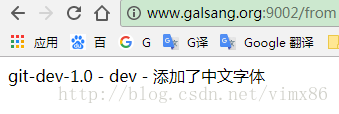
说明访问git仓库中的配置成功。
源码请移步: https://gitee.com/vimx86/SpringCloud-Learning
参考资料
Spring Cloud 之分布式配置基础应用的更多相关文章
- Spring Cloud Config 分布式配置中心使用教程
一.简介 在分布式系统中,由于服务数量巨多,为了方便服务配置文件统一管理,实时更新,所以需要分布式配置中心组件.在Spring Cloud中,有分布式配置中心组件spring cloud config ...
- Spring Cloud 2-Config 分布式配置中心(七)
Spring Cloud Config 1.github配置 2.服务端配置 pom.xml application.xml Application.java 3.配置和命名 1. 配置加载顺序 ...
- Spring Cloud Config 分布式配置中心【Finchley 版】
一. 介绍 1,为什么需要配置中心? 当服务部署的越来越多,规模越来越大,对应的机器数量也越来越庞大,靠人工来管理和维护服务的配置信息,变得困难,容易出错. 因此,需要一个能够动态注册和获取服务信息的 ...
- Spring Cloud (5) 分布式配置中心
Spring Cloud Config 在分布式系统中,由于服务数量很多,为了方便服务配置文件统一管理,实时更新,所以需要分布式配置中心组件.在Spring Cloud中,使用Spring Cloud ...
- spring cloud 集成分布式配置中心 apollo(单机部署apollo)
一.什么是apollo? Apollo(阿波罗)是携程框架部门研发的分布式配置中心,能够集中化管理应用不同环境.不同集群的配置,配置修改后能够实时推送到应用端,并且具备规范的权限.流程治理等特性,适用 ...
- Spring Cloud之分布式配置中心
用服务的方式来实现 ConfigAppApplication.java package com.packtpub.ConfigApp; import org.springframework.boot. ...
- Spring Cloud (6) 分布式配置中心-高可用
高可用 现在已经可以从配置中心读取配置文件了,当微服务很多时都从配置中心读取配置文件,这时可以将配置中心做成一个微服务,将其集群化,从而达到高可用. 改造config-server 加入eureka ...
- Spring Cloud Config 实现配置中心,看这一篇就够了
Spring Cloud Config 是 Spring Cloud 家族中最早的配置中心,虽然后来又发布了 Consul 可以代替配置中心功能,但是 Config 依然适用于 Spring Clou ...
- 跟我学SpringCloud | 第六篇:Spring Cloud Config Github配置中心
SpringCloud系列教程 | 第六篇:Spring Cloud Config Github配置中心 Springboot: 2.1.6.RELEASE SpringCloud: Greenwic ...
随机推荐
- web前端 javascript 兼容低版本 IE 6 7 8复合写法
1. 返回检测屏幕宽度(可视区域) function client() { if(window.innerWidth != null) // ie9 + 最新浏览器 { return { width: ...
- Angular 懒加载找不到模块问题解决方法
问题: 懒加载无法找到模块 解决办法: 在app-routing.module.ts中引入该模块
- 009.Nginx缓存及配置
一 浏览器缓存 1.1 缓存概述 缓存对于Web至关重要,尤其对于大型高负载Web站点.Nginx缓存可作为性能优化的一个重要手段,可以极大减轻后端服务器的负载.通常对于静态资源,即较少经常更新的资源 ...
- DirectX11 With Windows SDK--35 粒子系统
前言 在这一章中,我们主要关注的是如何模拟一系列粒子,并控制它们运动.这些粒子的行为都是类似的,但它们也带有一定的随机性.这一堆粒子的几何我们叫它为粒子系统,它可以被用于模拟一些比较现象,如:火焰.雨 ...
- 题解 CF917D 【Stranger Trees】
生成树计数问题用矩阵树定理来考虑. 矩阵树定理求得的为\(\sum\limits_T\prod\limits_{e\in T}v_e\),也就是所有生成树的边权积的和. 这题边是不带权的,应用矩阵树定 ...
- Monster Audio 使用教程(三)多音轨录音、播放
在工作站音轨上,把需要进行录音的音轨的录音按钮点亮,然后点击液晶屏旁边的[录音]按钮,开始录音 导出干声 如果希望录音后,导出干声(干声为录下的原始声音,不受效果器的作用),用其他宿主软件进行处理, ...
- python为什么这么火?里面肯定是有原因的
因为人生苦短要用python啊! 看完本文,你将在结尾得到本文的一个福利彩蛋 你瞧瞧其他语言之父... Java之父——James Gosling PHP之父 ——Rasmus Lerdorf Obj ...
- javascript 中 this
参考http://www.ruanyifeng.com/blog/2018/06/javascript-this.html this的原理 JavaScript 语言之所以有this的设计,跟内存 ...
- 【laravel】用户认证之----手动认证用户
模型 如果某个模型类需要用于认证,必须继承自 Illuminate\Foundation\Auth\User 基类,否则会报错.然后在这个模型类中使用 Notifiable Trait,里面提供了用户 ...
- Usvn迁移
近期由于公司需要整理所有的服务器资源进行统一管理,因此需要迁移原usvn到新环境,但是在网上查找有关usvn的迁移信息没有结果,故整理自己的通过测试的迁移方案共享给大家 迁移列表 原服务器 软件 目标 ...