
MyBatis-Plus Generator自定义模板
相信大家在开发过程中,应该都用过Mybatis-Plus的Generator,但是可能没有自定义过模板并使用。
每个项目都应该有一个从Controller层到Mapper层的通用模板,来去掉哪些简单的重复开发工作。
至于如何自定义模板并开发,大家可以先看看这篇博文,以及其附带的三篇博文,相信您一定有收获。
Ⅰ、奋斗青年LOVE
Ⅱ、Github链接
Ⅲ、呵呵彡
如果您看完的话,应该也能手动制作一个自己风格的开发模板。
MyBatis-Plus的默认模板引擎是Velocity,但是这个引擎似乎多年没有人维护了,所以推荐使用FreeMarker。
官网的例子:
public class CodeGenerator {

    /**

     * <p>

     * 读取控制台内容

     * </p>

     */

    public static String scanner(String tip) {

        Scanner scanner = new Scanner(System.in);

        StringBuilder help = new StringBuilder();

        help.append("请输入" + tip + ":");

        System.out.println(help.toString());

        if (scanner.hasNext()) {

            String ipt = scanner.next();

            if (StringUtils.isNotBlank(ipt)) {

                return ipt;

            }

        }

        throw new MybatisPlusException("请输入正确的" + tip + "!");

    }

    public static void main(String[] args) {

        // 代码生成器

        AutoGenerator mpg = new AutoGenerator();

        // 全局配置

        GlobalConfig gc = new GlobalConfig();

        String projectPath = System.getProperty("user.dir");

        gc.setOutputDir(projectPath + "/src/main/java"); // 文件输出位置,不要把文件输出位置写在那个System.getProperty方法那里,会输出null,看清楚哈!!!

        gc.setAuthor("jobob");

        gc.setOpen(false); // 是否打开文件位置

        // gc.setSwagger2(true); 实体属性 Swagger2 注解

        mpg.setGlobalConfig(gc);

        // 数据源配置

        DataSourceConfig dsc = new DataSourceConfig();

        dsc.setUrl("jdbc:mysql://localhost:3306/ant?useUnicode=true&useSSL=false&characterEncoding=utf8");

        // dsc.setSchemaName("public");

        dsc.setDriverName("com.mysql.jdbc.Driver");

        dsc.setUsername("root");

        dsc.setPassword("密码");

        mpg.setDataSource(dsc);

        // 包配置

        PackageConfig pc = new PackageConfig();

        pc.setModuleName(scanner("模块名"));

        pc.setParent("com.baomidou.ant"); // pc.getParent方法会输出 包名+模块名

        mpg.setPackageInfo(pc);

        // 自定义配置

        InjectionConfig cfg = new InjectionConfig() {

            @Override

            public void initMap() {

                // to do nothing

            }

        };

        // 如果模板引擎是 freemarker

        String templatePath = "/templates/mapper.xml.ftl";

        // 如果模板引擎是 velocity

        // String templatePath = "/templates/mapper.xml.vm";

        // 自定义输出配置

        List<FileOutConfig> focList = new ArrayList<>();

        // 自定义配置会被优先输出

        focList.add(new FileOutConfig(templatePath) {

            @Override

            public String outputFile(TableInfo tableInfo) {

                // 自定义输出文件名 , 如果你 Entity 设置了前后缀、此处注意 xml 的名称会跟着发生变化!!

                return projectPath + "/src/main/resources/mapper/" + pc.getModuleName()

                        + "/" + tableInfo.getEntityName() + "Mapper" + StringPool.DOT_XML;

            }

        });

        /*

        cfg.setFileCreate(new IFileCreate() {

            @Override

            public boolean isCreate(ConfigBuilder configBuilder, FileType fileType, String filePath) {

                // 判断自定义文件夹是否需要创建

                checkDir("调用默认方法创建的目录,自定义目录用");

                if (fileType == FileType.MAPPER) {

                    // 已经生成 mapper 文件判断存在,不想重新生成返回 false

                    return !new File(filePath).exists();

                }

                // 允许生成模板文件

                return true;

            }

        });

        */

        cfg.setFileOutConfigList(focList);

        mpg.setCfg(cfg);

        // 配置模板

        TemplateConfig templateConfig = new TemplateConfig();

        // 配置自定义输出模板

        //指定自定义模板路径,注意不要带上.ftl/.vm, 会根据使用的模板引擎自动识别

        // templateConfig.setEntity("templates/entity2.java");

        // templateConfig.setService();

        // templateConfig.setController();

        templateConfig.setXml(null);

        mpg.setTemplate(templateConfig);

        // 策略配置

        StrategyConfig strategy = new StrategyConfig();

        strategy.setNaming(NamingStrategy.underline_to_camel);

        strategy.setColumnNaming(NamingStrategy.underline_to_camel);

        strategy.setSuperEntityClass("你自己的父类实体,没有就不用设置!");

        strategy.setEntityLombokModel(true);

        strategy.setRestControllerStyle(true);

        // 公共父类

        strategy.setSuperControllerClass("你自己的父类控制器,没有就不用设置!");

        // 写于父类中的公共字段

        strategy.setSuperEntityColumns("id");

        strategy.setInclude(scanner("表名,多个英文逗号分割").split(","));

        strategy.setControllerMappingHyphenStyle(true);

        strategy.setTablePrefix(pc.getModuleName() + "_");

        mpg.setStrategy(strategy);

        mpg.setTemplateEngine(new FreemarkerTemplateEngine());

        mpg.execute();

    }

}
上面的例子,全局配置,数据源配置,包配置,主要看的应该是自定义配置和策略配置。
 // 自定义配置

        InjectionConfig cfg = new InjectionConfig() {

            @Override

            public void initMap() {

                // to do nothing

            }

        };
比如这个,就是给自定义模板提供参数用的,官方示例:
InjectionConfig injectionConfig = new InjectionConfig() {

    //自定义属性注入:abc

    //在.ftl(或者是.vm)模板中,通过${cfg.abc}获取属性

    @Override

    public void initMap() {

        Map<String, Object> map = new HashMap<>();

        map.put("abc", this.getConfig().getGlobalConfig().getAuthor() + "-mp");

        this.setMap(map);

    }

};
我们先看下官方的一个controller模板:
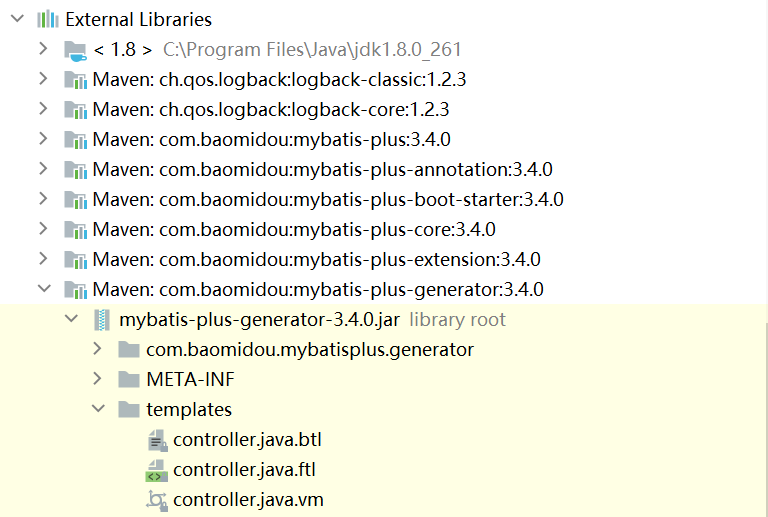
这个是模板的位置,我们就以controller.java.ftl为例:
package ${package.Controller};

import org.springframework.web.bind.annotation.RequestMapping;

<#if restControllerStyle>

import org.springframework.web.bind.annotation.RestController;

<#else>

import org.springframework.stereotype.Controller;

</#if>

<#if superControllerClassPackage??>

import ${superControllerClassPackage};

</#if>

/**

 * <p>

 * ${table.comment!} 前端控制器

 * </p>

 *

 * @author ${author}

 * @since ${date}

 */

<#if restControllerStyle>

@RestController

<#else>

@Controller

</#if>

@RequestMapping("<#if package.ModuleName?? && package.ModuleName != "">/${package.ModuleName}</#if>/<#if controllerMappingHyphenStyle??>${controllerMappingHyphen}<#else>${table.entityPath}</#if>")

<#if kotlin>

class ${table.controllerName}<#if superControllerClass??> : ${superControllerClass}()</#if>

<#else>

<#if superControllerClass??>

public class ${table.controllerName} extends ${superControllerClass} {

<#else>

public class ${table.controllerName} {

</#if>

}

</#if>
这个FreeMarker模板上面是不是有很多参数呢,你肯定会疑惑他们从哪儿来的,官网给其实给出了介绍:

我们可以Debug官方的CodeGenerator,在AbstractTemplateEngine的getObjectMap方法的末尾打上断点,
然后再看看objectMap的值有哪些可用。
public Map<String, Object> getObjectMap(TableInfo tableInfo) {

        ConfigBuilder config = this.getConfigBuilder();

        HashMap objectMap;

        if (config.getStrategyConfig().isControllerMappingHyphenStyle()) {

            objectMap = CollectionUtils.newHashMapWithExpectedSize(33);

            objectMap.put("controllerMappingHyphenStyle", config.getStrategyConfig().isControllerMappingHyphenStyle());

            objectMap.put("controllerMappingHyphen", StringUtils.camelToHyphen(tableInfo.getEntityPath()));

        } else {

            objectMap = CollectionUtils.newHashMapWithExpectedSize(31);

        }

        objectMap.put("restControllerStyle", config.getStrategyConfig().isRestControllerStyle());

        objectMap.put("config", config);

        objectMap.put("package", config.getPackageInfo());

        GlobalConfig globalConfig = config.getGlobalConfig();

        objectMap.put("author", globalConfig.getAuthor());

        objectMap.put("idType", globalConfig.getIdType() == null ? null : globalConfig.getIdType().toString());

        objectMap.put("logicDeleteFieldName", config.getStrategyConfig().getLogicDeleteFieldName());

        objectMap.put("versionFieldName", config.getStrategyConfig().getVersionFieldName());

        objectMap.put("activeRecord", globalConfig.isActiveRecord());

        objectMap.put("kotlin", globalConfig.isKotlin());

        objectMap.put("swagger2", globalConfig.isSwagger2());

        objectMap.put("date", (new SimpleDateFormat("yyyy-MM-dd")).format(new Date()));

        objectMap.put("table", tableInfo);

        objectMap.put("enableCache", globalConfig.isEnableCache());

        objectMap.put("baseResultMap", globalConfig.isBaseResultMap());

        objectMap.put("baseColumnList", globalConfig.isBaseColumnList());

        objectMap.put("entity", tableInfo.getEntityName());

        objectMap.put("entitySerialVersionUID", config.getStrategyConfig().isEntitySerialVersionUID());

        objectMap.put("entityColumnConstant", config.getStrategyConfig().isEntityColumnConstant());

        objectMap.put("entityBuilderModel", config.getStrategyConfig().isEntityBuilderModel());

        objectMap.put("chainModel", config.getStrategyConfig().isChainModel());

        objectMap.put("entityLombokModel", config.getStrategyConfig().isEntityLombokModel());

        objectMap.put("entityBooleanColumnRemoveIsPrefix", config.getStrategyConfig().isEntityBooleanColumnRemoveIsPrefix());

        objectMap.put("superEntityClass", this.getSuperClassName(config.getSuperEntityClass()));

        objectMap.put("superMapperClassPackage", config.getSuperMapperClass());

        objectMap.put("superMapperClass", this.getSuperClassName(config.getSuperMapperClass()));

        objectMap.put("superServiceClassPackage", config.getSuperServiceClass());

        objectMap.put("superServiceClass", this.getSuperClassName(config.getSuperServiceClass()));

        objectMap.put("superServiceImplClassPackage", config.getSuperServiceImplClass());

        objectMap.put("superServiceImplClass", this.getSuperClassName(config.getSuperServiceImplClass()));

        objectMap.put("superControllerClassPackage", this.verifyClassPacket(config.getSuperControllerClass()));

        objectMap.put("superControllerClass", this.getSuperClassName(config.getSuperControllerClass()));

        return (Map)(Objects.isNull(config.getInjectionConfig()) ? objectMap : config.getInjectionConfig().prepareObjectMap(objectMap));//这里上断点。

    }
那么加入这些参数不够用怎么办呢,上面提到了可以通过自定义模板参数,不知你们记得吗,那么如何引用呢?
我们首先定位到官方的自定义属性注入:
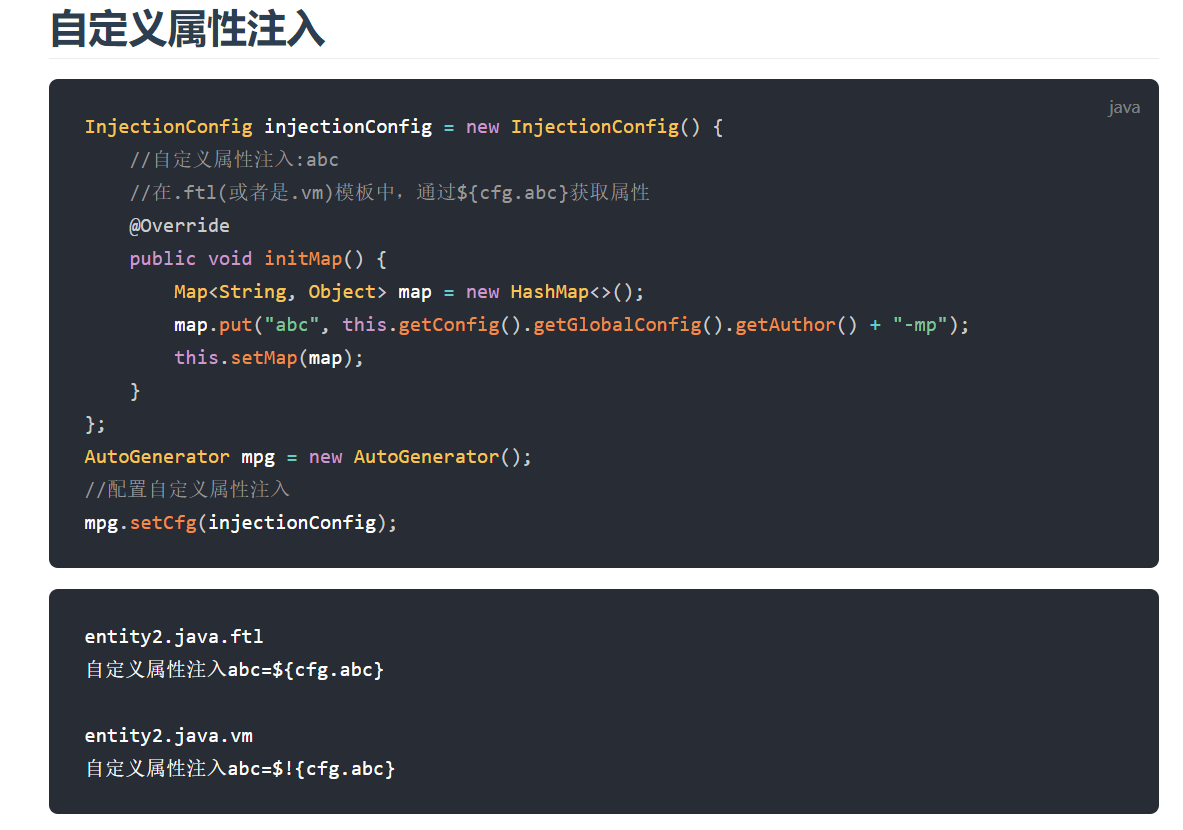
现在就不会出现了属性不够用的情况了,自定义的模板参数通过${cfg.param}来引用。
现在我们来看到官方这段代码:
// 如果模板引擎是 freemarker

        String templatePath = "/templates/mapper.xml.ftl";

        // 如果模板引擎是 velocity

        // String templatePath = "/templates/mapper.xml.vm";

        // 自定义输出配置

        List<FileOutConfig> focList = new ArrayList<>();

        // 自定义配置会被优先输出

        focList.add(new FileOutConfig(templatePath) {

            @Override

            public String outputFile(TableInfo tableInfo) {

                // 自定义输出文件名 , 如果你 Entity 设置了前后缀、此处注意 xml 的名称会跟着发生变化!!

                return projectPath + "/src/main/resources/mapper/" + pc.getModuleName()

                        + "/" + tableInfo.getEntityName() + "Mapper" + StringPool.DOT_XML;

            }

        });
templatePath是你自定义的模板的位置,return的是你用模板生成的文件的位置。
// 配置模板

        TemplateConfig templateConfig = new TemplateConfig();

        // 配置自定义输出模板

        //指定自定义模板路径,注意不要带上.ftl/.vm, 会根据使用的模板引擎自动识别

        // templateConfig.setEntity("templates/entity2.java");

        // templateConfig.setService();

        // templateConfig.setController();

        templateConfig.setXml(null);

        mpg.setTemplate(templateConfig);
这个templateConfig是官方提供的Controller层到Mapper层的基本示例,如果你想自定义的话,就提供自定义模板的位置。
现在我想你已经知道如何自己开发一套模板了吧,我们现在来看看策略配置(上文提到的奋斗的青年的代码)。
// 策略配置

        StrategyConfig strategy = new StrategyConfig();

        // strategy.setCapitalMode(true);// 全局大写命名 ORACLE 注意

        //strategy.setTablePrefix(new String[] { "tlog_", "tsys_" });// 此处可以修改为您的表前缀

        strategy.setNaming(NamingStrategy.underline_to_camel);// 表名生成策略

        strategy.setInclude(new String[] { "app_certificate" }); // 需要生成的表

        // strategy.setExclude(new String[]{"test"}); // 排除生成的表

        // 自定义实体父类

        // strategy.setSuperEntityClass("com.baomidou.demo.TestEntity");

        // 自定义实体,公共字段

        // strategy.setSuperEntityColumns(new String[] { "test_id", "age" });

        // 自定义 mapper 父类

        // strategy.setSuperMapperClass("com.baomidou.demo.TestMapper");

        // 自定义 service 父类

        // strategy.setSuperServiceClass("com.baomidou.demo.TestService");

        // 自定义 service 实现类父类

        // strategy.setSuperServiceImplClass("com.baomidou.demo.TestServiceImpl");

        // 自定义 controller 父类

        // strategy.setSuperControllerClass("com.baomidou.demo.TestController");

        // 【实体】是否生成字段常量(默认 false)

        // public static final String ID = "test_id";

         strategy.setEntityColumnConstant(true);

        // 【实体】是否为构建者模型(默认 false)

        // public User setName(String name) {this.name = name; return this;}

        //strategy.setEntityBuilderModel(true);

        mpg.setStrategy(strategy);
可以仿照上面的例子,然后再结合官方文档,再比对生成的代码,我相信你一定更清楚了。
最后提示一下自己,看文档一定要细心奥。
MyBatis-Plus Generator自定义模板的更多相关文章
- MyBatis Generator 自定义生成注释
注释生成器 为了生成db里面的注释,必须自定义注释生成器 EmptyCommentGenerator: import org.mybatis.generator.api.CommentGenerato ...
- 修改mybatis plus Generator模板生成字段注释枚举常量
修改mybatis plus Generator模板生成字段注释枚举常量 本文基于最新的mybatis-plus 3.0.1版本源码修改,如果使用其它版本,处理方式也类似,主要是生成Entity的Fr ...
- 谈谈yii2-gii如何自定义模板
作者:白狼 出处:http://www.manks.top/article/yii2_gii_custom_template本文版权归作者,欢迎转载,但未经作者同意必须保留此段声明,且在文章页面明显位 ...
- 【Mybatis】简单的mybatis增删改查模板
简单的mybatis增删改查模板: <?xml version="1.0" encoding="UTF-8" ?> <!DOCTYPE map ...
- Django自定义模板
定义simple_tag步骤 一.创建templatetags文件 首先在app下创建templatetags文件:名字不许叫这个,不能改变. 二.在文件中创建一个py文件 文件名自定义 三.在创建的 ...
- 学习CodeIgniter框架之旅(一)自定义模板目录
在常用的框架本身都已经做好了分层和目录结构,但这在很多时候不满足项目的需求甚至在某些情况下变得不合理,因此很多时候需要自定义目录结构,在此就看看如果在CodeIgniter框架中自定义模板目录: 在C ...
- .NET/ASP.NETMVC 深入剖析 Model元数据、HtmlHelper、自定义模板、模板的装饰者模式(三)
阅读目录: 7.HtmlHelper.HtmlHelper<T>中的ViewModel的类型推断 8.控制ViewModel中的某个属性的呈现(使用PartialView部分视图细粒度控制 ...
- 使用requireJS,backboneJS,和underscoreJS完成自定义模板封装
使用requireJS,backboneJS,和underscoreJS完成自定义模板封装 原来的代码 当我们进行一个列表的数据填充的时候,是这样做的: //获取美食列表 function getFo ...
- DISCUZ 自定义模板
DISCUZ 自定义模板 模板安装和维护 安装新模板 将模板template打包放在对应目录:template/ 后台 -> 界面 -> 风格管理 , 安装模板 后台 -> 界面 - ...
随机推荐
- TypedArray & ArrayBuffer
TypedArray & ArrayBuffer Type Each element size in bytes Int8Array 1 Uint8Array 1 Uint8ClampedAr ...
- React & Didact
React & Didact A DIY guide to build your own React https://github.com/pomber/didact https://gith ...
- taro 滚动事件
taro 滚动事件 taro scroll bug ScrollView https://nervjs.github.io/taro/docs/components/viewContainer/scr ...
- ffmpeg concat设置绝对路径
https://superuser.com/questions/718027/ffmpeg-concat-doesnt-work-with-absolute-path/1551017#1551017 ...
- 为什么说NGK引领全球数字资产财富革命
进入2020年,区块链万业迸发出巨大的能量,事实上区块链和数字经济正是未来全球财富的新方向.区块链和数字货币的增值空间巨大,是数字时代新的经济增长点.目前,全球衍生品市场价值532万亿美元,全球债务市 ...
- 为什么NGK推出的DEFI项目这么火热?
进入到2020年的下半年,DeFi的锁仓量基本上是以日破新高的态势,不断的成为一个独角兽.DeFi逐渐形成一个独角兽的同时,也在不断的给区块链生态赋能,源源不断进行金融价值输送.所以加密货币体量的不断 ...
- JavaScript高级-类的使用
1.面向过程与面向对象 1.1面向过程 面向过程就是分析出解决问题所需要的步骤,然后用函数把这些步骤一步一步实现,使用的时候再一个一个的依次调用就可以了. 1.2面向对象 面向对象是把事务分解成为一个 ...
- 08_MySQL数据库的字段约束
数据库的字段约束 实战: CREATE TABLE t_teacher ( id INT UNSIGNED PRIMARY KEY AUTO_INCREMENT, name VARCHAR(20) N ...
- 手把手教你Centos7 部署 gitlab社区版
一.前置说明: 操作系统:Centos 7 物理内存:>=2G 本人亲测,如果安装低版本的gitlab,比如我这里所使用的v8.17.0,物理内存1G,swap 2G虚拟内存即可部署.高版本的所 ...
- 第一篇文章 vim的使用
这么长时间以来,一直没有在博客园上写过博文.那第一篇博文就以vim的使用为开端吧. 不知道有多少人还在用着ctrl+c,ctrl+v这种方式,不过,就我个人而言,还是很倾向于vim的.不管是在服务器上 ...