
Android 之 SimpleAdapter 学习笔记
•SimpleAdapter简介
simpleAdapter 的扩展性最好,可以定义各种各样的布局出来;
可以放上ImageView(图片),还可以放上Button(按钮),CheckBox(复选框)等等。
准备工作
新建一个项目,选择 Empty Activity 选项;
Android Studio 会自动为我们生成两个文件 MainActivity.java 和 activity_main.xml;
activity_main.xml
<?xml version="1.0" encoding="utf-8"?>

<LinearLayout xmlns:android="http://schemas.android.com/apk/res/android"

    xmlns:app="http://schemas.android.com/apk/res-auto"

    xmlns:tools="http://schemas.android.com/tools"

    android:layout_width="match_parent"

    android:layout_height="match_parent"

    android:orientation="vertical"

    android:padding="10dp">

    <TextView

        android:layout_width="wrap_content"

        android:layout_height="wrap_content"

        android:text="Test Simple Adapter"

        android:textSize="20sp"

        />

    <!--    为 ListView 设置红色的分割线

            并将分割线宽度设置为 2dp      -->

    <ListView

        android:id="@+id/lv_simple_adapter"

        android:layout_width="wrap_content"

        android:layout_height="wrap_content"

        android:layout_marginTop="10dp"

        android:divider="@color/red"

        android:dividerHeight="2dp"

        />

</LinearLayout>
在 res/layout 新建一个 simple_adapter_item.xml 文件;
simple_adapter_item.xml
<?xml version="1.0" encoding="utf-8"?>

<LinearLayout xmlns:android="http://schemas.android.com/apk/res/android"

    android:layout_width="match_parent"

    android:layout_height="match_parent"

    android:padding="10dp"

    android:orientation="horizontal">

    <ImageView

        android:id="@+id/header"

        android:layout_width="100dp"

        android:layout_height="160dp"

        android:scaleType="centerCrop"

        />

    <LinearLayout

        android:layout_width="match_parent"

        android:layout_height="160dp"

        android:orientation="vertical"

        android:layout_marginLeft="10dp">

        <TextView

            android:id="@+id/name"

            android:layout_width="match_parent"

            android:layout_height="wrap_content"

            android:textSize="20sp"

            android:gravity="left"/>

        <TextView

            android:id="@+id/desc"

            android:layout_width="match_parent"

            android:layout_height="wrap_content"

            android:textSize="13sp"

            android:textColor="@color/gray"

            android:gravity="left"/>

    </LinearLayout>

</LinearLayout>
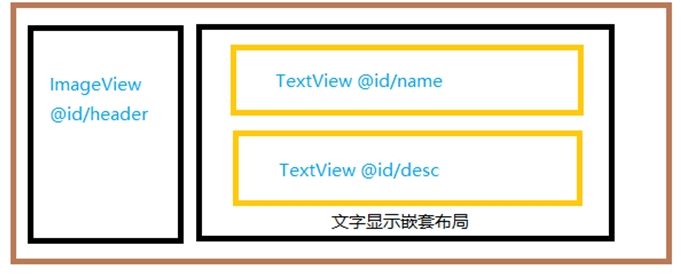
页面布局说明
- 整体采用线性布局,并以水平排列。
- 左边第一项定义一个ImageView组件,用来显示图片。
- 右边嵌套一个线性布局,并以垂直排列。
- 嵌套的线性布局里面定义了两个TextView,一个显示名字,一个显示介绍。
simple_adapter_item布局示意图如下:
最后,修改 MainActivity.java 中的代码;
MainActivity.java
public class SimpleAdapterActivity extends AppCompatActivity {

    private ListView listview;

    private String[] name = new String[]{"关羽","孙尚香","娜可露露"};

    private String[] desc = new String[]{

            "暴风雪的远征者,冰凌北地的灾厄之王!\n"+"为我们的永生而战,为我们的不朽而战!\n"+"奉上领地,或者化为冻腐的尘埃!",

            "大小姐驾到,通通闪开!\n"+"来发子弹吗?满足你!\n"+"你,也是本小姐的粉丝吗?",

            "啊里噶多,玛玛哈哈\n"+"萨,特几那赛\n"+"一待!玛玛哈哈"

    };

    private int[] head = new int[]{

            R.drawable.guan_yu,

            R.drawable.sun_shang_xiang,

            R.drawable.na_ke_lu_lu

    };

    @Override

    protected void onCreate(Bundle savedInstanceState) {

        super.onCreate(savedInstanceState);

        setContentView(R.layout.activity_simple_adapter_main);

        SimpleAdapter adapter = new SimpleAdapter(this,getData(),R.layout.simple_adapter_item,new String[]{"name","desc","header"},new int[]{

                R.id.name,R.id.desc,R.id.header

        });

        listview = findViewById(R.id.lv_simple_adapter);

        listview.setAdapter(adapter);

    }

    private List<Map<String,Object>> getData(){

        List<Map<String,Object>> list = new ArrayList<>();

        for(int i = 0;i < name.length;i++){

            Map<String,Object> map = new HashMap<>();

            map.put("name",name[i]);

            map.put("desc",desc[i]);

            map.put("header",head[i]);

            list.add(map);

        }

        return list;

    }

}
说明
- 定义了一个 String 数组 name,用来定义名称。
- 定义了一个 String 数组 desc,用来定义介绍。
- 准备几张图片,拷贝到 drawable 文件夹(网上随便找几张就行),然后定义一个 int 数组,把图片 ID 加进来。
- 定义一个 List<Map<String,Object>>getData() 方法,用来获取列表项。
- 创建一个 SimpleAdapter 对象。
- 设置 ListView 的 Adapter 为刚创建的 simpleAdapter。
使用 simpleAdapter 的数据项一般都是 HashMap 构成的 List,List 的每一节对应 ListView 的每一行。
HashMap 的每个键值数据映射到布局文件中对应id的组件上。
因为系统没有对应的布局文件可用,所以需要我们自己定义一个布局 simple_adapter_item.xml。
SimpleAdapter中参数所表达的意思
new SimpleAdapter(Context context, List<? extends Map<String,?>>data,int resource,String[] from,int[] to);
- Context context : 表示上下文对象,就是要展示 ListView 的 Activity,或者是通过 getApplicationContext() 得到的上下文对象
- List<? extends Map<String,?>>data : 用于在列表中显示的数据,传入的数据必须是 List<? extends Map<String,?>> 的实现类
- 比如 List<Map<String,Object>>
- int resource : ListView 中显示的每行子 View 的资源文件,就是位于 layout 文件夹中的 .xml 布局文件
- String[] from : 表示 Map<String,Object> 中存放的 Key 键值,因为它要通过键值才能找到对应的 Value,也就是布局要显示的内容
- int[] to : 表示要显示出来的 resource 布局文件的 R.id.xx 值,它和 from 中的数据源选项要一一对应
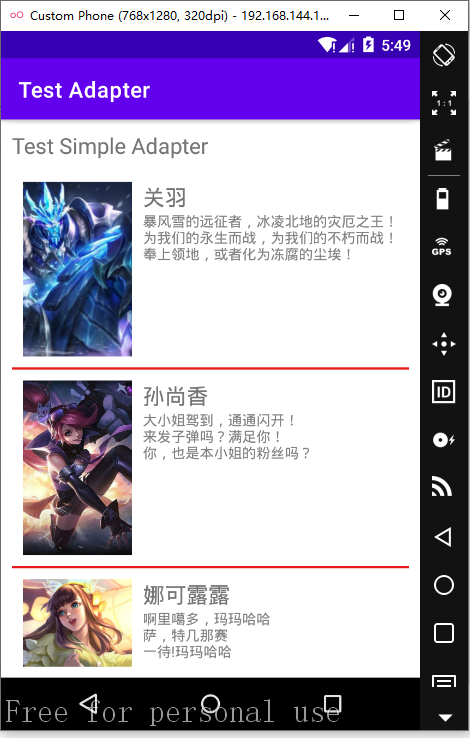
•运行效果
Android 之 SimpleAdapter 学习笔记的更多相关文章
- Android安装器学习笔记(一)
Android安装器学习笔记(一) 一.Android应用的四种安装方式: 1.通过系统应用PackageInstaller.apk进行安装,安装过程中会让用户确认 2.系统程序安装:在开机的时候自动 ...
- android cocos2d-x for Android安装和学习笔记(请用adt-bundle21.1或以上导入)
引用:http://weimingtom.iteye.com/blog/1483566 (20121108)注意:这篇文章用cdt编译ndk工程的内容已过时(现在可以用adt-bundle,避免配置繁 ...
- Android API Guides 学习笔记---Application Fundamentals(一)
今天开始学习google官网上的API guides ,主要读了Application Fundamentals这一章节,此章节介绍了一个App的基本组成,共包括四大部分内容. 1. App ...
- Android应用开发学习笔记之事件处理
作者:刘昊昱 博客:http://blog.csdn.net/liuhaoyutz Android提供的事件处理机制分为两类:一是基于监听的事件处理:二是基于回调的事件处理.对于基于监听的事件处理,主 ...
- Android Socket编程学习笔记
http://blog.csdn.net/eyu8874521/article/details/8847173 度娘给出的描述:通常也称作"套接字",用于描述IP地址和端口,是一个 ...
- Android应用开发学习笔记之AsyncTask
作者:刘昊昱 博客:http://blog.csdn.net/liuhaoyutz 在上一篇文章中我们学习了多线程和Handler消息处理机制,如果有计算量比较大的任务,可以创建一个新线程执行计算工作 ...
- Android应用开发学习笔记之播放音频
作者:刘昊昱 博客:http://blog.csdn.net/liuhaoyutz Android支持常用音视频格式文件的播放,本文我们来学习怎样开发Android应用程序对音视频进行操作. Andr ...
- android移动开发学习笔记(二)神奇的Web API
本次分两个大方向去讲解Web Api,1.如何实现Web Api?2.如何Android端如何调用Web Api?对于Web Api是什么?有什么优缺点?为什么用WebApi而不用Webservice ...
- [Android游戏开发学习笔记]View和SurfaceView
本文为阅读http://blog.csdn.net/xiaominghimi/article/details/6089594的笔记. 在Android游戏中充当主要角色的,除了控制类就是显示类.而在A ...
随机推荐
- 使用 js 实现一个简易版的 drag & drop 库
使用 js 实现一个简易版的 drag & drop 库 具有挑战性的前端面试题 H5 DnD js refs https://www.infoq.cn/article/0NUjpxGrqRX ...
- Jamstack Conf 2020
Jamstack Conf 2020 Jamstack Conf Virtual https://jamstackconf.com/virtual/ Conf Schedule https://jam ...
- Mapbox 地图实验室
Mapbox 地图实验室 Learn with Mapbox https://www.mapbox.com/community/education/ https://labs.mapbox.com/e ...
- js var & let & const All In One
js var & let & const All In One js var & let & const 区别对比 var let const 区别 是否存在 hois ...
- NGK DeFi Baccarat或将推动BGV成为下一个千倍币!
目前,已经接近2020年年末,但是DeFi的热潮还在持续.近日,DeFi市场传出一道重磅利好消息,便是NGK DeFi去中心化交易系统Baccarat即将上线.届时,将会引起整个区块链市场的又一次震动 ...
- Codeforces 1485F Copy or Prefix Sum
题目链接 点我跳转 题目大意 给定一个长度为 \(N\) 的序列 \(bi\) 问有多少个长度为 \(N\) 的序列 \(a\) 使得 \(b[i] = a[i]\) 或 \(b[i] = ∑a[j] ...
- vue学习遇到的问题
1.vue脚手架的安装,解决链接:https://www.cnblogs.com/qcq0703/p/14439467.html2.2.2.0+ 的版本里,当在组件上使用 v-for 时,key 现在 ...
- lombok插件@Slf4j注解不生效问题解决办法
最近在尝试使用日志工具Sfl4j,当时使用log时报错,找了好久才解决这个问题. 1.首先需要下载Lombok插件 File->settings->Plugins 搜索Lombok,点击安 ...
- (三)MySQL锁机制 + 事务
转: (三)MySQL锁机制 + 事务 表锁(偏读) 偏向MyISAM存储引擎.开销小,加锁快,无死锁,锁定粒度大,发生锁冲突的概率最高,并发最低. 查看当前数据库中表的上锁情况,0表示未上锁. sh ...
- Java实现贪吃蛇
游戏界面基本布局 贪吃蛇是基于JFrame的一款小游戏.它主要有两部分组成,一个是显示区域,一个是按钮区域.这两个区域都用JPanel来实现. 首先需要创建一个基于JFrame的类,例如创建一个MyF ...