
【Azure Developer】VS Code运行Java 版Azure Storage SDK操作Blob (新建Container, 上传Blob文件,下载及清理)
问题描述
是否可以用Java代码来管理Azure blob? 可以。在代码中加入azure-storage-blob依赖。即可使用以下类操作Azure Storage Blob。
- BlobServiceClient:BlobServiceClient 类可用于操纵 Azure 存储资源和 blob 容器。 存储帐户为 Blob 服务提供顶级命名空间。
- BlobServiceClientBuilder:BlobServiceClientBuilder 类提供流畅的生成器 API,以帮助对 BlobServiceClient 对象的配置和实例化。
- BlobContainerClient:BlobContainerClient 类可用于操纵 Azure 存储容器及其 blob。
- BlobClient:BlobClient 类可用于操纵 Azure 存储 blob。
- BlobItem:BlobItem 类表示从对 listBlobs 的调用返回的单个 blob。
执行步骤
首先,设置VS Code上执行Java 代码的环境,这里需要的步骤比较多。完全参考VS Code for Java文档即可:https://code.visualstudio.com/docs/java/java-tutorial.
以下是创建项目步骤:
1)创建blob-quickstart-v12项目
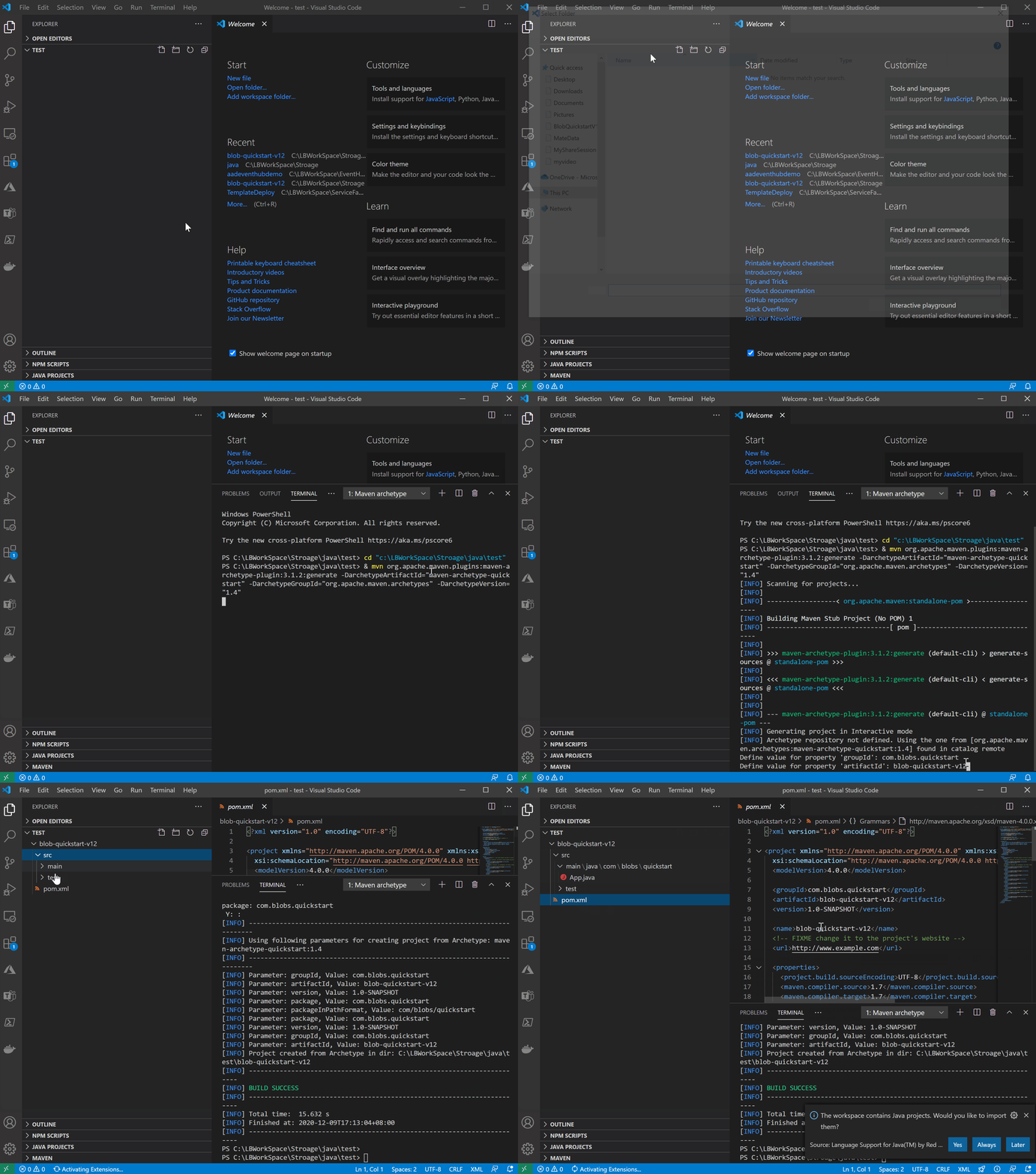
跳转到blob-quickstart-v12目录,并在目录中创建一个data目录,用于在接下来的代码中创建本地文件及下载bolb中的文件
cd blob-quickstart-v12

mkdir data
2) 修改pom.xml,添加对Java azure-storage-blob SDK的依赖
  <dependencies>

    <dependency>

      <groupId>junit</groupId>

      <artifactId>junit</artifactId>

      <version>4.11</version>

      <scope>test</scope>

    </dependency>

    <dependency>

      <groupId>com.azure</groupId>

      <artifactId>azure-storage-blob</artifactId>

      <version>12.6.0</version>

  </dependency>

  </dependencies>
3)在App.java代码文件中添加引用
package com.blobs.quickstart;

/**

 * Azure blob storage v12 SDK quickstart

 */

import com.azure.storage.blob.*;

import com.azure.storage.blob.models.*;

import java.io.*;

public class App

{

    public static void main( String[] args ) throws IOException

    {

        System.out.println("Azure Blob storage v12 - Java quickstart sample\n");
4)添加Stroage Account的连接字符串
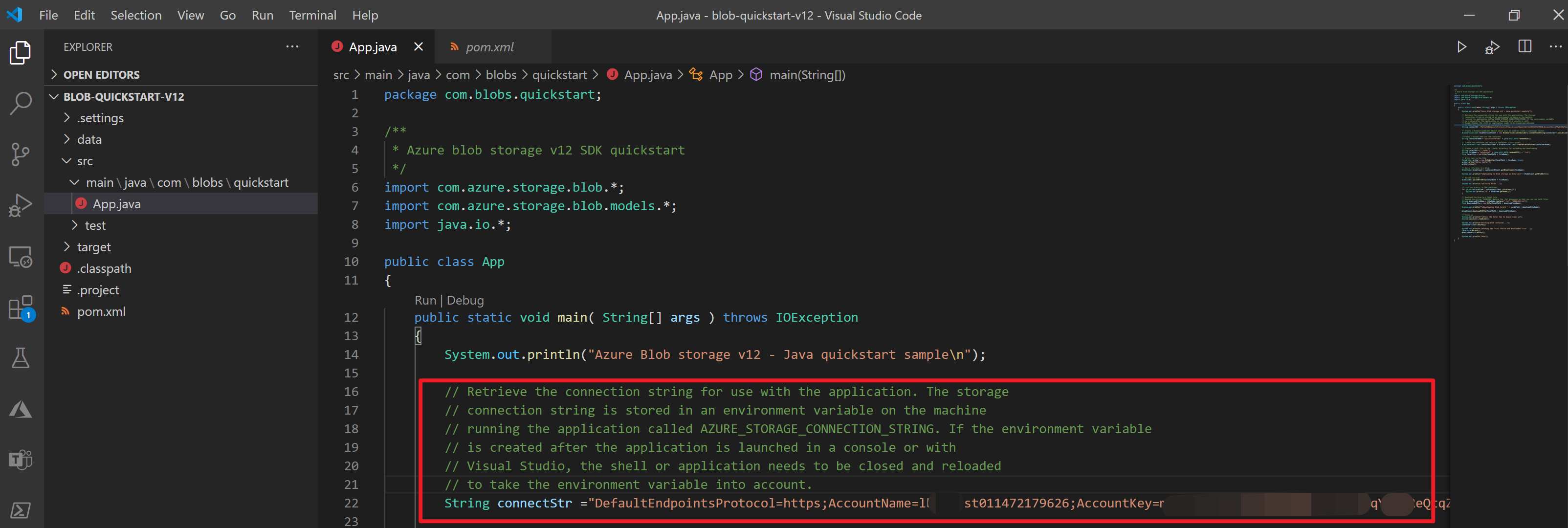
5)创建blobServiceClient对象,同时调用createBlobContainer方法创建容器
        // Create a BlobServiceClient object which will be used to create a container client

        BlobServiceClient blobServiceClient = new BlobServiceClientBuilder().connectionString(connectStr).buildClient();

        //Create a unique name for the container

        String containerName = "quickstartblobs" + java.util.UUID.randomUUID();

        // Create the container and return a container client object

        BlobContainerClient containerClient = blobServiceClient.createBlobContainer(containerName);
6)创建BlobClient对象,同时调用uploadFromFile方法上传文件(.tx)
        // Create a local file in the ./data/ directory for uploading and downloading

        String localPath = "./data/";

        String fileName = "quickstart" + java.util.UUID.randomUUID() + ".txt";

        File localFile = new File(localPath + fileName);

        // Write text to the file

        FileWriter writer = new FileWriter(localPath + fileName, true);

        writer.write("Hello, World!");

        writer.close();

        // Get a reference to a blob

        BlobClient blobClient = containerClient.getBlobClient(fileName);

        System.out.println("\nUploading to Blob storage as blob:\n\t" + blobClient.getBlobUrl());

        // Upload the blob

        blobClient.uploadFromFile(localPath + fileName);
7)使用containerClient对象的listBlobs方法列出容器中的BlobItem
        System.out.println("\nListing blobs...");

        // List the blob(s) in the container.

        for (BlobItem blobItem : containerClient.listBlobs()) {

            System.out.println("\t" + blobItem.getName());

        }
8)使用blobClient对象的downloadToFile方法下载文件到本地
        // Download the blob to a local file

        // Append the string "DOWNLOAD" before the .txt extension so that you can see both files.

        String downloadFileName = fileName.replace(".txt", "DOWNLOAD.txt");

        File downloadedFile = new File(localPath + downloadFileName);

        System.out.println("\nDownloading blob to\n\t " + localPath + downloadFileName);

        blobClient.downloadToFile(localPath + downloadFileName);
9)使用containerClient对象的delete方法删除容器
        // Clean up

        System.out.println("\nPress the Enter key to begin clean up");

        System.console().readLine();

        System.out.println("Deleting blob container...");

        containerClient.delete();

        System.out.println("Deleting the local source and downloaded files...");

        localFile.delete();

        downloadedFile.delete();

        System.out.println("Done");
10) 在VS Code中调试或执行,右键选择Run/Debug

全部代码
App.java文件
package com.blobs.quickstart;

/**

 * Azure blob storage v12 SDK quickstart

 */

import com.azure.storage.blob.*;

import com.azure.storage.blob.models.*;

import java.io.*;

public class App

{

    public static void main( String[] args ) throws IOException

    {

        System.out.println("Azure Blob storage v12 - Java quickstart sample\n");

        // Retrieve the connection string for use with the application. The storage

        // connection string is stored in an environment variable on the machine

        // running the application called AZURE_STORAGE_CONNECTION_STRING. If the environment variable

        // is created after the application is launched in a console or with

        // Visual Studio, the shell or application needs to be closed and reloaded

        // to take the environment variable into account.

        String connectStr ="DefaultEndpointsProtocol=https;AccountName=xxxxxxxx;AccountKey=xxxxxxxxxxxxxxx;EndpointSuffix=core.chinacloudapi.cn";// System.getenv("AZURE_STORAGE_CONNECTION_STRING");

        // Create a BlobServiceClient object which will be used to create a container client

        BlobServiceClient blobServiceClient = new BlobServiceClientBuilder().connectionString(connectStr).buildClient();

        //Create a unique name for the container

        String containerName = "quickstartblobs" + java.util.UUID.randomUUID();

        // Create the container and return a container client object

        BlobContainerClient containerClient = blobServiceClient.createBlobContainer(containerName);

        // Create a local file in the ./data/ directory for uploading and downloading

        String localPath = "./data/";

        String fileName = "quickstart" + java.util.UUID.randomUUID() + ".txt";

        File localFile = new File(localPath + fileName);

        // Write text to the file

        FileWriter writer = new FileWriter(localPath + fileName, true);

        writer.write("Hello, World!");

        writer.close();

        // Get a reference to a blob

        BlobClient blobClient = containerClient.getBlobClient(fileName);

        System.out.println("\nUploading to Blob storage as blob:\n\t" + blobClient.getBlobUrl());

        // Upload the blob

        blobClient.uploadFromFile(localPath + fileName);

        System.out.println("\nListing blobs...");

        // List the blob(s) in the container.

        for (BlobItem blobItem : containerClient.listBlobs()) {

            System.out.println("\t" + blobItem.getName());

        }

        // Download the blob to a local file

        // Append the string "DOWNLOAD" before the .txt extension so that you can see both files.

        String downloadFileName = fileName.replace(".txt", "DOWNLOAD.txt");

        File downloadedFile = new File(localPath + downloadFileName);

        System.out.println("\nDownloading blob to\n\t " + localPath + downloadFileName);

        blobClient.downloadToFile(localPath + downloadFileName);

        // Clean up

        System.out.println("\nPress the Enter key to begin clean up");

        System.console().readLine();

        System.out.println("Deleting blob container...");

        containerClient.delete();

        System.out.println("Deleting the local source and downloaded files...");

        localFile.delete();

        downloadedFile.delete();

        System.out.println("Done");

    }

}
pom.xml文件
<?xml version="1.0" encoding="UTF-8"?>

<project xmlns="http://maven.apache.org/POM/4.0.0" xmlns:xsi="http://www.w3.org/2001/XMLSchema-instance"

  xsi:schemaLocation="http://maven.apache.org/POM/4.0.0 http://maven.apache.org/xsd/maven-4.0.0.xsd">

  <modelVersion>4.0.0</modelVersion>

  <groupId>com.blobs.quickstart</groupId>

  <artifactId>blob-quickstart-v12</artifactId>

  <version>1.0-SNAPSHOT</version>

  <name>blob-quickstart-v12</name>

  <!-- FIXME change it to the project's website -->

  <url>http://www.example.com</url>

  <properties>

    <project.build.sourceEncoding>UTF-8</project.build.sourceEncoding>

    <maven.compiler.source>1.7</maven.compiler.source>

    <maven.compiler.target>1.7</maven.compiler.target>

  </properties>

  <dependencies>

    <dependency>

      <groupId>junit</groupId>

      <artifactId>junit</artifactId>

      <version>4.11</version>

      <scope>test</scope>

    </dependency>

    <dependency>

      <groupId>com.azure</groupId>

      <artifactId>azure-storage-blob</artifactId>

      <version>12.6.0</version>

  </dependency>

  </dependencies>

  <build>

    <pluginManagement><!-- lock down plugins versions to avoid using Maven defaults (may be moved to parent pom) -->

      <plugins>

        <!-- clean lifecycle, see https://maven.apache.org/ref/current/maven-core/lifecycles.html#clean_Lifecycle -->

        <plugin>

          <artifactId>maven-clean-plugin</artifactId>

          <version>3.1.0</version>

        </plugin>

        <!-- default lifecycle, jar packaging: see https://maven.apache.org/ref/current/maven-core/default-bindings.html#Plugin_bindings_for_jar_packaging -->

        <plugin>

          <artifactId>maven-resources-plugin</artifactId>

          <version>3.0.2</version>

        </plugin>

        <plugin>

          <artifactId>maven-compiler-plugin</artifactId>

          <version>3.8.0</version>

        </plugin>

        <plugin>

          <artifactId>maven-surefire-plugin</artifactId>

          <version>2.22.1</version>

        </plugin>

        <plugin>

          <artifactId>maven-jar-plugin</artifactId>

          <version>3.0.2</version>

        </plugin>

        <plugin>

          <artifactId>maven-install-plugin</artifactId>

          <version>2.5.2</version>

        </plugin>

        <plugin>

          <artifactId>maven-deploy-plugin</artifactId>

          <version>2.8.2</version>

        </plugin>

        <!-- site lifecycle, see https://maven.apache.org/ref/current/maven-core/lifecycles.html#site_Lifecycle -->

        <plugin>

          <artifactId>maven-site-plugin</artifactId>

          <version>3.7.1</version>

        </plugin>

        <plugin>

          <artifactId>maven-project-info-reports-plugin</artifactId>

          <version>3.0.0</version>

        </plugin>

      </plugins>

    </pluginManagement>

  </build>

</project>
参考资料
Getting Started with Java in VS Code:https://code.visualstudio.com/docs/java/java-tutorial
快速入门:使用 Java v12 SDK 管理 blob: https://docs.azure.cn/zh-cn/storage/blobs/storage-quickstart-blobs-java#code-examples
【Azure Developer】VS Code运行Java 版Azure Storage SDK操作Blob (新建Container, 上传Blob文件,下载及清理)的更多相关文章
- Java版 人脸识别SDK demo
虹软人脸识别SDK之Java版,支持SDK 1.1+,以及当前最新版本2.0,滴滴,抓紧上车! 前言 由于业务需求,最近跟人脸识别杠上了,本以为虹软提供的SDK是那种面向开发语言的,结果是一堆dll· ...
- Java版 人脸识别SDK dem
虹软人脸识别SDK之Java版,支持SDK 1.1+,以及2.0版本,滴滴,抓紧上车! 前言由于业务需求,最近跟人脸识别杠上了,本以为虹软提供的SDK是那种面向开发语言的,结果是一堆dll······ ...
- azure 上传blob到ams(CreateFromBlob)
遇到的错误:The destination storage credentials must contain the account key credentials,参数名: destinationS ...
- Azure IoT Hub 十分钟入门系列 (4)- 实现从设备上传日志文件/图片到 Azure Storage
本文主要分享一个案例: 10分钟内通过Device SDK上传文件到IoTHub B站视频:https://www.bilibili.com/video/av90224073/ 本文主要有如下内容: ...
- 【Web应用】JAVA网络上传大文件报500错误
问题描述 当通过 JAVA 网站上传大文件,会报 500 错误. 问题分析 因为 Azure 的 Java 网站都是基于 IIS 转发的,所以我们需要关注 IIS 的文件上传限制以及 requestT ...
- 用java 代码下载Samba服务器上的文件到本地目录以及上传本地文件到Samba服务器
引入: 在我们昨天架设好了Samba服务器上并且创建了一个 Samba 账户后,我们就迫不及待的想用JAVA去操作Samba服务器了,我们找到了一个框架叫 jcifs,可以高效的完成我们工作. 实践: ...
- java+上传大文件
在Web应用系统开发中,文件上传和下载功能是非常常用的功能,今天来讲一下JavaWeb中的文件上传和下载功能的实现. 先说下要求: PC端全平台支持,要求支持Windows,Mac,Linux 支持所 ...
- java上传超大文件解决方案
用JAVA实现大文件上传及显示进度信息 ---解析HTTP MultiPart协议 (本文提供全部源码下载,请访问 https://github.com/1269085759/up6-jsp-mysq ...
- java 上传大文件以及文件夹
我们平时经常做的是上传文件,上传文件夹与上传文件类似,但也有一些不同之处,这次做了上传文件夹就记录下以备后用. 这次项目的需求: 支持大文件的上传和续传,要求续传支持所有浏览器,包括ie6,ie7,i ...
随机推荐
- spring 2.5 基础知识和与其他框架的集成
spring环境搭建: 一:导入spring2.5所需的包,在classpath目录下建一个名为"beans.xml"模板文件: <?xml version="1. ...
- win10安装MySQL5.7.31 zip版
因为我之前卸载了安装的(msi,exe)格式的MySQL,现在重新安装zip版的MySQL. 1,下载MySQL MySQL下载地址 : https://dev.mysql.com/downloads ...
- Git-commit与回滚
# 提交-信息 git commit -m "message" git commit -a -m "message" // 等同于 git add . & ...
- com.aliyun.oss.ClientException: Connection error due to: Connection pool shut down
com.aliyun.oss.ClientException: Connection error due to: Connection pool shut down[ErrorCode]: Unkno ...
- txt文件覆盖恢复
1.txt文件恢复到之前保存的版本 2.电脑未重启 方式:如果你使用系统还原可以用"还原以前的版本"功能来轻松找回. 右击.txt文件-还原以前的版本-选择时间点-还原
- empty
等效于false的都是true
- 3dmax利用静止静态对象功能,制作精准击碎效果
一般情况下,当我们在3D建模中使用RayFire破碎插件来制作一些精准击碎效果时,需要将物体的击中部分定义为休眠对象,将其他未击中的部分定义为静态对象,以实现击中部分出现碎片的效果.但这种方式必须精准 ...
- 攻克弹唱第八课(吉他演奏的律动与funk音乐)
在本期文章中,笔者将为通过Guitar Pro 7吉他打谱软件与大家分享一下吉他律动与funk音乐的经验. 想必正在看这篇文章的进阶者和高手,都会考虑这样一个问题.我辛辛苦苦练习的大段solo和指弹曲 ...
- mq中nio
MappedFile#appendMessagesInner
- 没有wget Loading mirror speeds from cached hostfile
问题描述 新装的系统,没有一些常用命令的rpm包.使用ifconfig,报错 Loading mirror speeds from cached hostfile解决 网上解决方案是换数据下载源,但是 ...