
spring boot:给接口增加签名验证(spring boot 2.3.1)
一,为什么要给接口做签名验证?
说明:刘宏缔的架构森林是一个专注架构的博客,地址:https://www.cnblogs.com/architectforest
对应的源码可以访问这里获取: https://github.com/liuhongdi/
说明:作者:刘宏缔 邮箱: 371125307@qq.com
二,演示项目的相关信息
https://github.com/liuhongdi/apisign
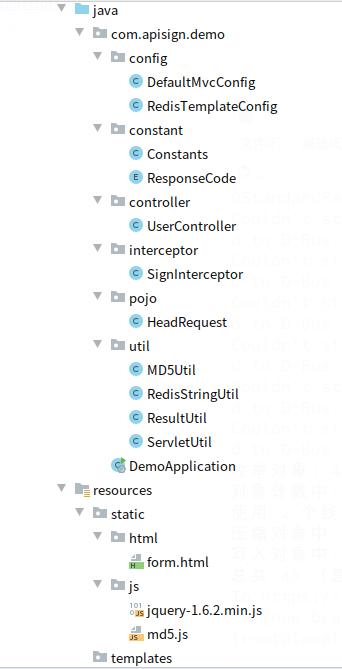
三, java代码说明:
@Component

public class SignInterceptor implements HandlerInterceptor {

    private static final String SIGN_KEY = "apisign_";

    private static final Logger logger = LogManager.getLogger("bussniesslog");

    @Resource

    private RedisStringUtil redisStringUtil;

    /*

    *@author:liuhongdi

    *@date:2020/7/1 下午4:00

    *@description:

     * @param request:请求对象

     * @param response:响应对象

     * @param handler:处理对象:controller中的信息   *

     * *@return:true表示正常,false表示被拦截

    */

    @Override

    public boolean preHandle(HttpServletRequest request, HttpServletResponse response, Object handler) throws Exception {

        //依次检查各变量是否存在?

        String appId = request.getHeader("appId");

        if (StringUtils.isBlank(appId)) {

            ServletUtil.renderString(response, JSON.toJSONString(ResultUtil.error(ResponseCode.SIGN_NO_APPID)));

            return false;

        }

        String timestampStr = request.getHeader("timestamp");

        if (StringUtils.isBlank(timestampStr)) {

            ServletUtil.renderString(response, JSON.toJSONString(ResultUtil.error(ResponseCode.SIGN_NO_TIMESTAMP)));

            return false;

        }

        String sign = request.getHeader("sign");

        if (StringUtils.isBlank(sign)) {

            ServletUtil.renderString(response, JSON.toJSONString(ResultUtil.error(ResponseCode.SIGN_NO_SIGN)));

            return false;

        }

        String nonce = request.getHeader("nonce");

        if (StringUtils.isBlank(nonce)) {

            ServletUtil.renderString(response, JSON.toJSONString(ResultUtil.error(ResponseCode.SIGN_NO_NONCE)));

            return false;

        }

        //得到正确的sign供检验用

        String origin = appId + Constants.APP_SECRET + timestampStr + nonce + Constants.APP_API_VERSION;

        String signEcrypt = MD5Util.md5(origin);

        long timestamp = 0;

        try {

            timestamp = Long.parseLong(timestampStr);

        } catch (Exception e) {

            logger.error("发生异常",e);

        }

        //前端的时间戳与服务器当前时间戳相差如果大于180,判定当前请求的timestamp无效

        if (Math.abs(timestamp - System.currentTimeMillis() / 1000) > 180) {

            ServletUtil.renderString(response, JSON.toJSONString(ResultUtil.error(ResponseCode.SIGN_TIMESTAMP_INVALID)));

            return false;

        }

        //nonce是否存在于redis中,检查当前请求是否是重复请求

        boolean nonceExists = redisStringUtil.hasStringkey(SIGN_KEY+timestampStr+nonce);

        if (nonceExists) {

            ServletUtil.renderString(response, JSON.toJSONString(ResultUtil.error(ResponseCode.SIGN_DUPLICATION)));

            return false;

        }

        //后端MD5签名校验与前端签名sign值比对

        if (!(sign.equalsIgnoreCase(signEcrypt))) {

            ServletUtil.renderString(response, JSON.toJSONString(ResultUtil.error(ResponseCode.SIGN_VERIFY_FAIL)));

            return false;

        }

        //将timestampstr+nonce存进redis

        redisStringUtil.setStringValue(SIGN_KEY+timestampStr+nonce, nonce, 180L);

        //sign校验无问题,放行

        return true;

    }

    @Override

    public void postHandle(HttpServletRequest request, HttpServletResponse response, Object handler, ModelAndView modelAndView) throws Exception {

    }

    @Override

    public void afterCompletion(HttpServletRequest request, HttpServletResponse response, Object handler, Exception ex) throws Exception {

    }

}
说明:如果客户端请求的数据缺少会被拦截
与服务端的appSecret等参数md5生成的sign不一致也会被拦截
时间超时/重复请求也会被拦截
2,DefaultMvcConfig.java
@Configuration

@ConditionalOnWebApplication(type = ConditionalOnWebApplication.Type.SERVLET)

public class DefaultMvcConfig implements WebMvcConfigurer {

    @Resource

    private SignInterceptor signInterceptor;

    /**

     * 添加Interceptor
     * liuhongdi

     */

    @Override

    public void addInterceptors(InterceptorRegistry registry) {

        registry.addInterceptor(signInterceptor)

                .addPathPatterns("/**")                    //所有请求都需要进行报文签名sign

                .excludePathPatterns("/html/*","/js/*");   //排除html/js目录

    }

}
说明:用来添加interceptor
四,效果验证:
<body>

<a href="javascript:login('right')">login(right)</a><br/>

<a href="javascript:login('error')">login(error)</a><br/>

<script>

    //vars

    var appId="wap";

    var version="1.0";

    //得到sign

    function getsign(appSecret,timestamp,nonce) {

        var origin = appId + appSecret + timestamp +  nonce + version;

        console.log("origin:"+origin);

        var sign = hex_md5(origin);

        return sign;

    }

    //访问login这个api

    //说明:这里仅仅是举例子,在ios/android开发中,appSecret要以二进制的形式编译保存

    function login(isright) {

        //right secret

        var appSecret_right="30c722c6acc64306a88dd93a814c9f0a";

        //error secret

        var appSecret_error="aabbccdd";

        var timestamp = parseInt((new Date()).getTime()/1000);

        var nonce = Math.floor(Math.random()*8999)+1000;

        var sign = "";

        if (isright == 'right') {

             sign = getsign(appSecret_right,timestamp,nonce);

        } else {

             sign = getsign(appSecret_error,timestamp,nonce);

        }


        var postdata = {

            username:"a",

            password:"b"

        }

        $.ajax({

            type:"POST",

            url:"/user/login",

            data:postdata,

            //返回数据的格式

            datatype: "json",

            //在请求之前调用的函数

            beforeSend: function(request) {

                request.setRequestHeader("appId", appId);

                request.setRequestHeader("timestamp", timestamp);

                request.setRequestHeader("sign", sign);

                request.setRequestHeader("nonce", nonce);

            },

            //成功返回之后调用的函数

            success:function(data){

                if (data.status == 0) {

                    alert('success:'+data.msg);

                } else {

                    alert("failed:"+data.msg);

                }

            },

            //调用执行后调用的函数

            complete: function(XMLHttpRequest, textStatus){

                //complete

            },

            //调用出错执行的函数

            error: function(){

                //请求出错处理

            }

        });

    }

</script>

</body>
如图:

说明:
login(right):使用正确的appSecret访问login这个接口
login(error):使用错误的appSecret访问login这个接口
{"status":0,"msg":"操作成功","data":null}
{"msg":"sign签名校验失败","status":10007}
五,查看spring boot的版本:
  .   ____          _            __ _ _

 /\\ / ___'_ __ _ _(_)_ __  __ _ \ \ \ \

( ( )\___ | '_ | '_| | '_ \/ _` | \ \ \ \

 \\/  ___)| |_)| | | | | || (_| |  ) ) ) )

  '  |____| .__|_| |_|_| |_\__, | / / / /

 =========|_|==============|___/=/_/_/_/

 :: Spring Boot ::        (v2.3.1.RELEASE)
spring boot:给接口增加签名验证(spring boot 2.3.1)的更多相关文章
- spring boot: 设计接口站api的版本号,支持次版本号(spring boot 2.3.2)
一,为什么接口站的api要使用版本号? 1,当服务端接口的功能发生改进后, 客户端如果不更新版本, 则服务端返回的功能可能不能使用, 所以在服务端功能升级后, 客户端也要相应的使用 ...
- spring boot rest 接口集成 spring security(2) - JWT配置
Spring Boot 集成教程 Spring Boot 介绍 Spring Boot 开发环境搭建(Eclipse) Spring Boot Hello World (restful接口)例子 sp ...
- spring boot rest 接口集成 spring security(1) - 最简配置
Spring Boot 集成教程 Spring Boot 介绍 Spring Boot 开发环境搭建(Eclipse) Spring Boot Hello World (restful接口)例子 sp ...
- Spring Boot初识(3)- Spring Boot整合Swagger
一.本文介绍 如果Web项目是完全前后端分离的话(我认为现在完全前后端分离已经是趋势了)一般前端和后端交互都是通过接口的,对接口入参和出参描述的文档就是Mock文档.随着接口数量的增多和参数的个数增加 ...
- 47. Spring Boot发送邮件【从零开始学Spring Boot】
(提供源代码) Spring提供了非常好用的JavaMailSender接口实现邮件发送.在Spring Boot的Starter模块中也为此提供了自动化配置.下面通过实例看看如何在Spring Bo ...
- Spring Boot (十): Spring Boot Admin 监控 Spring Boot 应用
Spring Boot (十): Spring Boot Admin 监控 Spring Boot 应用 1. 引言 在上一篇文章<Spring Boot (九): 微服务应用监控 Spring ...
- Spring Boot 2.X(七):Spring Cache 使用
Spring Cache 简介 在 Spring 3.1 中引入了多 Cache 的支持,在 spring-context 包中定义了org.springframework.cache.Cache 和 ...
- spring boot系列(七)spring boot 使用mongodb
1 pom.xml配置 增加包依赖:spring-boot-starter-data-mongodb <dependency> <groupId>org.springframe ...
- Spring Boot 2.0(二):Spring Boot 2.0尝鲜-动态 Banner
Spring Boot 2.0 提供了很多新特性,其中就有一个小彩蛋:动态 Banner,今天我们就先拿这个来尝尝鲜. 配置依赖 使用 Spring Boot 2.0 首先需要将项目依赖包替换为刚刚发 ...
随机推荐
- Coneology(POJ 2932)
原题如下: Coneology Time Limit: 5000MS Memory Limit: 65536K Total Submissions: 4937 Accepted: 1086 D ...
- Linux 获取屏幕分辨率与窗口行列数(c/c++)
获取当前分辨率 #include<stdio.h> #include<sys/types.h> #include<sys/stat.h> #include<s ...
- Cobalt Strike后渗透安装和初步使用
Cobalt Strike安装 系统要求 Cobalt Strike要求Java 1.8,Oracle Java ,或OpenJDK . 如果你的系统上装有防病毒产品,请确保在安装 Cobalt St ...
- 移动端 取消0.3ms的延迟 两种方案解决
在index.html中添加一下代码 <script src="https://as.alipayobjects.com/g/component/fastclick/1.0.6/fas ...
- python的学习准备工作
python是开放的的语言,可以从官方网站下载www.python.org 下载下来后直接运行安装就行了 ctrl+n新建一个文件 ctrl+s保存,以.py为扩展名 点run module 或者F5 ...
- golang slice学习
关于获取slice相关内存地址操作 s := make([]int, 1) t.Log(unsafe.Pointer(&s))// 获取当前slice 结构体实例的内存地址 t.Log(uns ...
- 利用new Object方式创建对象
var obj = new Object(); //创建了一个空的对象obj.uname = 'zhangsanfeng';obj.name = 18; //字面量方式创建对象不 ...
- Salesforce LWC学习(二十七) File Upload
本篇参考: https://developer.salesforce.com/docs/component-library/bundle/lightning-file-upload/documenta ...
- 如何自动填充SQL语句中的公共字段
1. 前言 我们在设计数据库的时候一定会带上新增.更新的时间.操作者等审计信息. 之所以带这些信息是因为假如有一天公司的数据库被人为删了,尽管可能有数据库备份可以恢复数据.但是我们仍然需要追踪到这个事 ...
- 088 01 Android 零基础入门 02 Java面向对象 02 Java封装 01 封装的实现 02 封装的代码实现
088 01 Android 零基础入门 02 Java面向对象 02 Java封装 01 封装的实现 02 封装的代码实现 本文知识点:Java封装的代码实现 说明:因为时间紧张,本人写博客过程中只 ...