
【应用服务 App Service】App Service For Linux 中如何挂载一个共享文件夹呢? Mount Azure Storage Account File Share
问题描述
使用Linux作为服务器运行Web App时,如何将 Storage Account 作为本地共享装载到 App Service for Linux / Container 中的应用呢?
问题解答
根据官网介绍, App Service For Linux / Container 是可以通过配置完成Mount Azure Storage Account的blob或者是File Share 到Linux环境中的。 它主要的优势有以下四点:
- 为App Service 应用配置永久性存储,并单独管理存储。
- 使静态内容(如视频和图像)可随时用于App Service 应用。
- 将应用程序日志文件写入 Azure 文件共享,或将较旧的应用程序日志存档到 Azure 文件共享。
- 跨多个应用或与其他 Azure 服务共享内容。
操作步骤可以详细参考:以本地共享(容器)形式装载 Azure 存储 - Azure App Service | Microsoft Docs
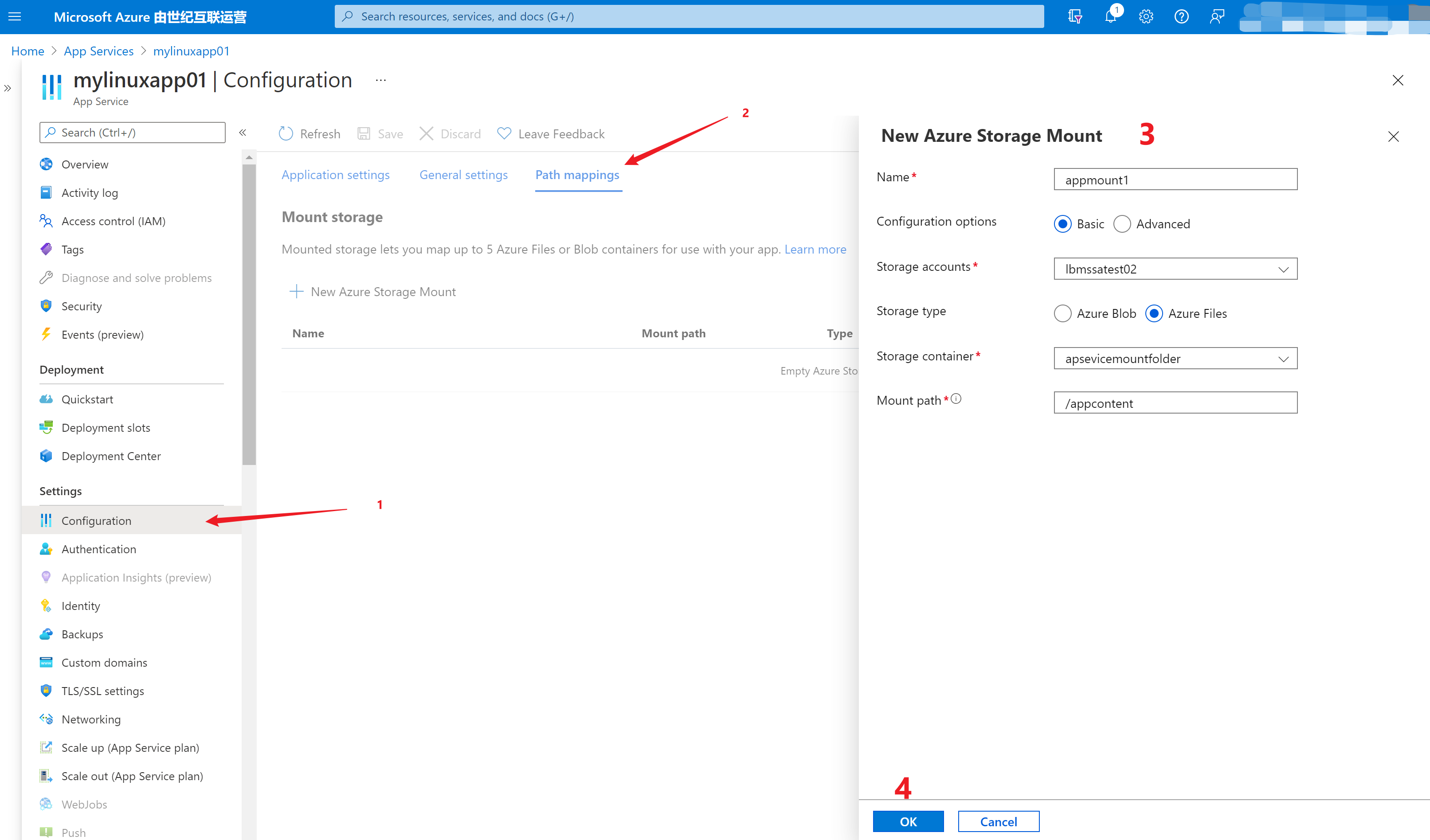
添加 Azure Storage Mount 的内容说明如下:
名称(Name) :装载配置的名称。 不允许空格。
配置选项 (Configuration options): 如果存储帐户未使用服务终结点或专用终结点,则选择“基本”。 否则,选择“高级”。
存储帐户 (Storage accounts):Azure 存储帐户。
存储类型 (Storage type):根据要装载的存储选择类型。 Azure Blob 仅支持只读访问。
存储容器 / 共享名(Storage container / Share name) :要装载的文件共享或 Blob 容器。
访问密钥(仅高级)(Access Key) :存储帐户的访问密钥。
装载路径(Mount path) :要装载到 Azure 存储的 Linux 容器中的目录。 不要使用 / 或 /home。
问题验证
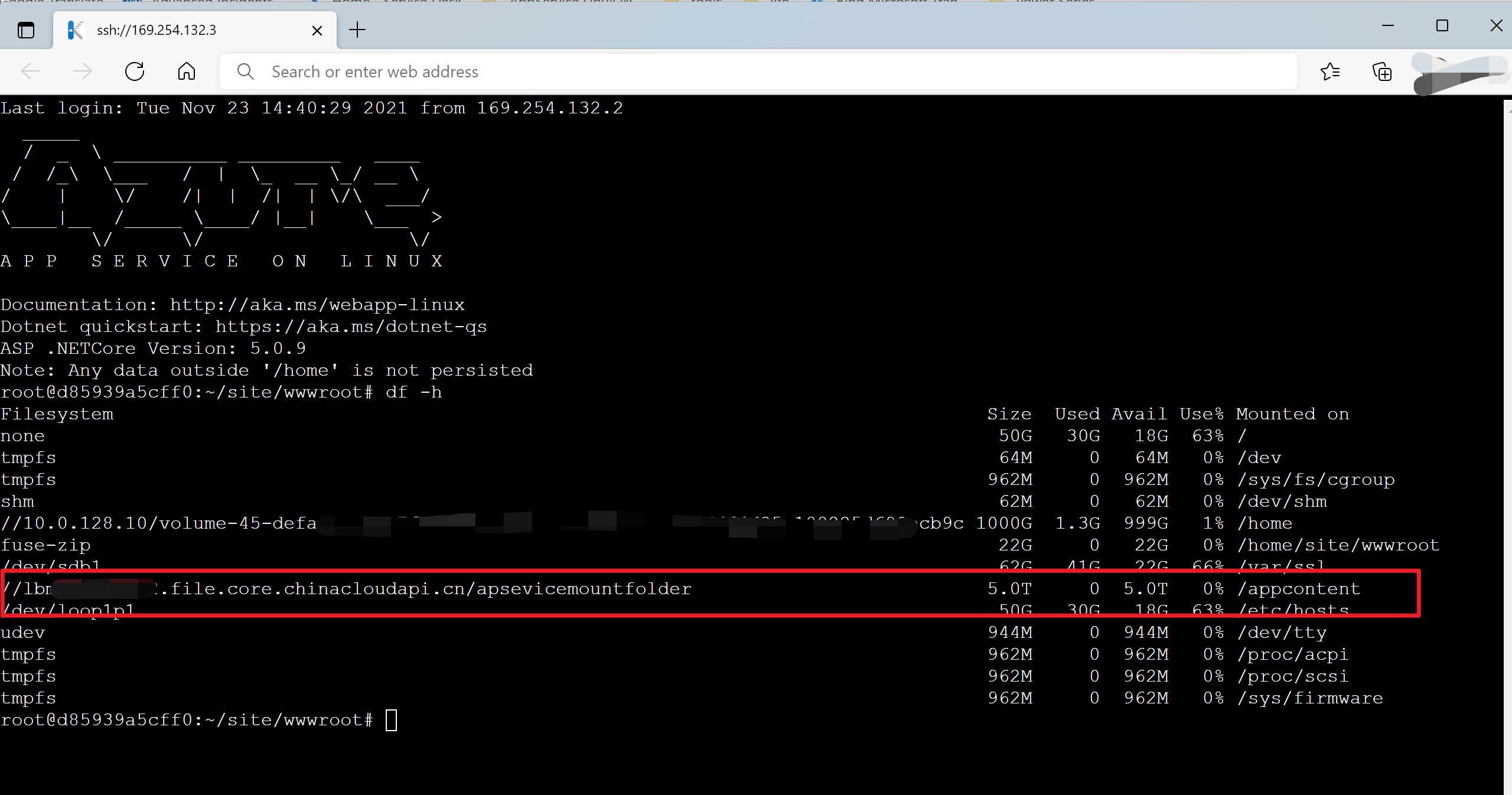
在App Service门户中,进入SSH页面( https://<yourappservicename>.scm.chinacloudsites.cn/webssh/host ),执行 df –h 显示查看File Share是否Mount成功。
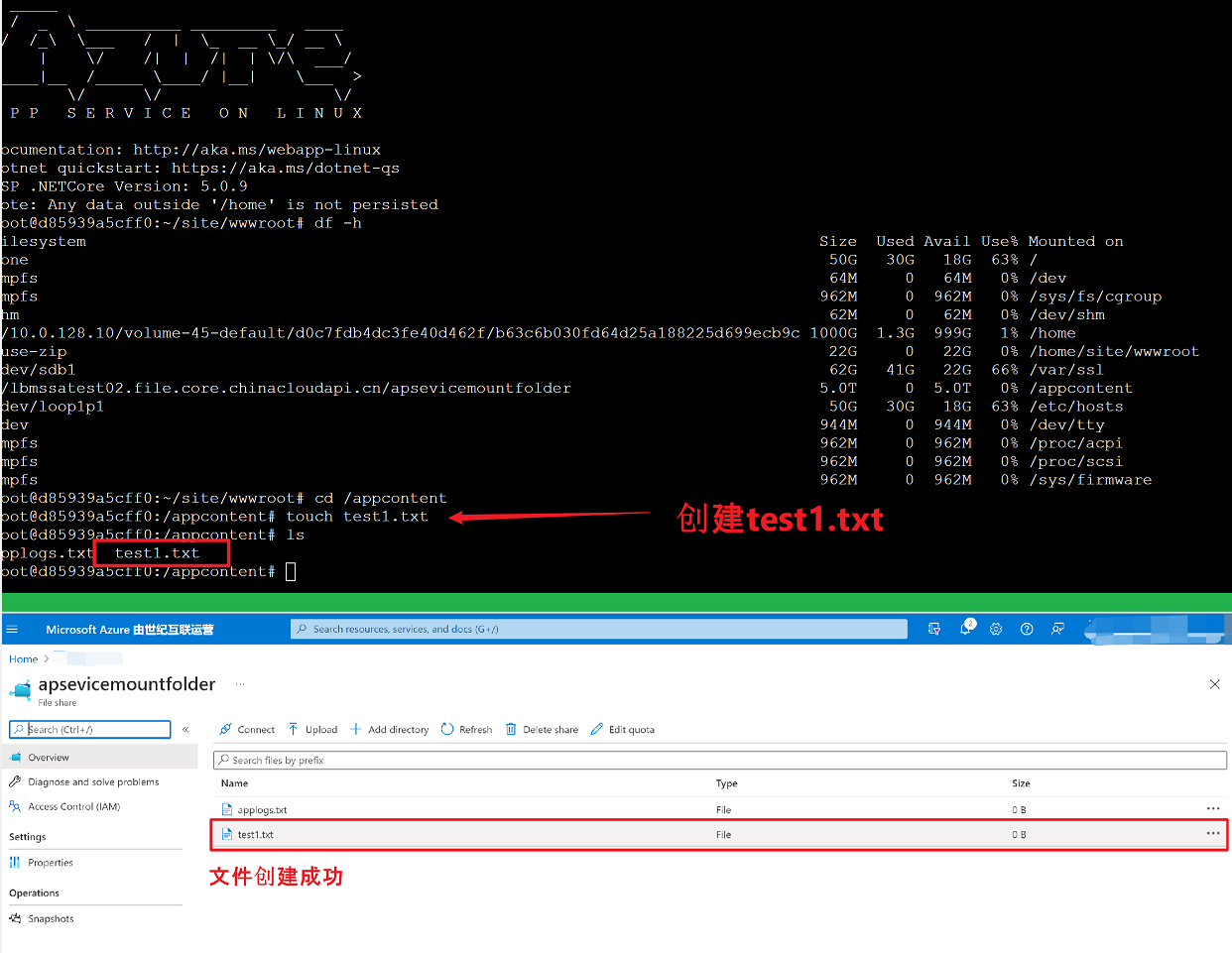
在/appcontent目录中新建文件test1.txt,然后在Storage Account中查看文件是否存在
也可以在SSH中通过 tcpping 来查看App Service Storage Account之间的网络连通性
tcpping <Storageaccount>.file.core.chinacloudapi.cn
附录一:容器app service 如何添加启动参数 --privileged
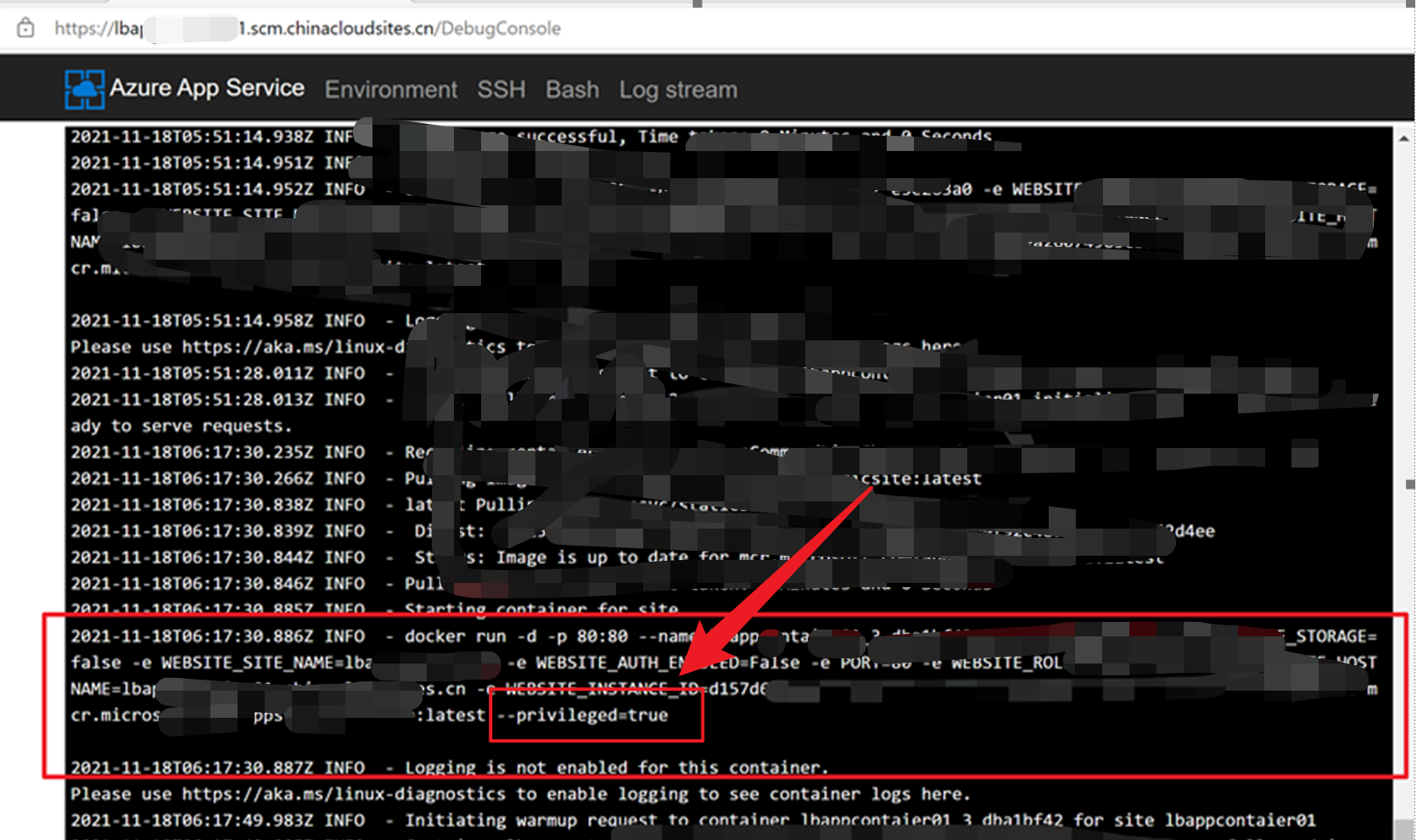
可以在App Service的Configuration 配置页面中对启动命令一项中根据需求进行设置。如设置 –privileged = true
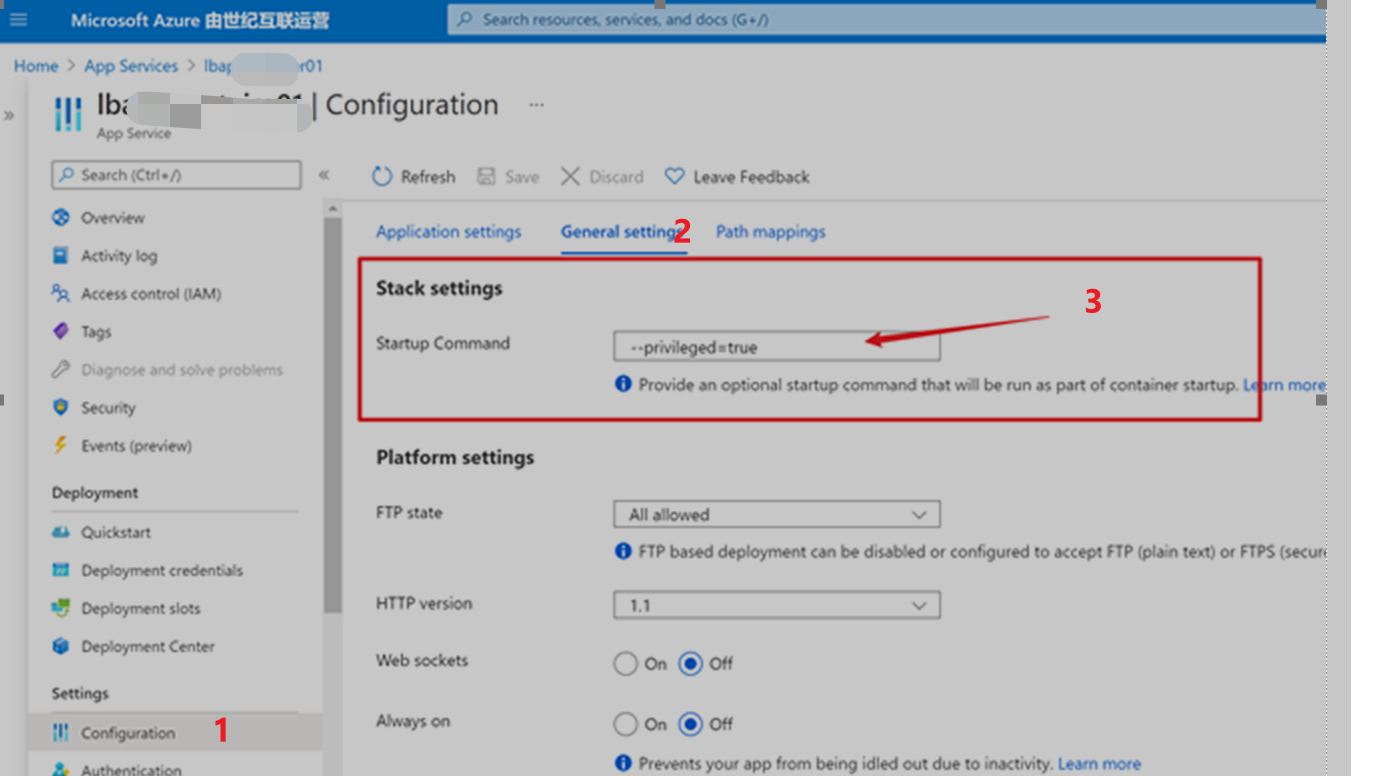
设置保存后,通过kudu( https://<your app service name>.scm.chinacloudsites.cn/ )站点进入bash页面,查看Logfiles中的日志文件。可以查看到docker run指令中已经包含了 –privileged=ture 参数。
参考文档
将 Azure 存储作为本地共享装载到应用服务中的容器应用 :https://docs.microsoft.com/zh-cn/azure/app-service/configure-connect-to-azure-storage?tabs=portal&pivots=container-linux#mount-storage-to-linux-container
Linux df command - displays number of free disk blocks and free files : https://docs.oracle.com/cd/E23823_01/html/816-5166/df-1m.html#REFMAN1Mdf-1m
-h
Like -k, except that sizes are in a more human readable format. The output consists of one line of information for each specified file system. This information includes the file system name, the total space allocated in the file system, the amount of space allocated to existing files, the total amount of space available for the creation of new files by unprivileged users, and the percentage of normally available space that is currently allocated to all files on the file system. All sizes are scaled to a human readable format, for example, 14K, 234M, 2.7G, or 3.0T. Scaling is done by repetitively dividing by 1024.This option overrides the -b, -e, -g, -k, -n, -t, and -V options. This option only works on mounted filesystems and can not be used together with -o option.
-k
Prints the allocation in kbytes. The output consists of one line of information for each specified file system. This information includes the file system name, the total space allocated in the file system, the amount of space allocated to existing files, the total amount of space available for the creation of new files by unprivileged users, and the percentage of normally available space that is currently allocated to all files on the file system. This option overrides the -b, -e, -n, and -t options.-l
Reports on local file systems only. This option is used only for mounted file systems. It can not be used with the -o option.
【应用服务 App Service】App Service For Linux 中如何挂载一个共享文件夹呢? Mount Azure Storage Account File Share的更多相关文章
- 在Linux中要修改一个文件夹或文件的权限
在Linux中要修改一个文件夹或文件的权限我们需要用到linux chmod命令来做,下面我写了几个简单的实例大家可参考一下. 语法如下: chmod [who] [+ | - | =] [mode] ...
- 在linux中访问virtualbox的共享文件夹
1.在客户机里需要安装Virtualbox的增强功能. 2.使用virtualbox的图形界面设置好共享文件夹. 3.假设你设置的共享文件夹的名称是 share,使用如下命令在客户机的linux系统中 ...
- VMware中 CentOS7挂载windows共享文件夹
在编译自己的hadoop时,不想再次在虚拟机中下载jar包,就想到了挂载自己本地的maven仓库,使用本地仓库来进行编译,这里就需要使用VMware的VMware Tools了,直接复制官方文档如下 ...
- linux 客户机挂载vitualbox共享文件夹
1. 安装增强功能包(Guest Additions) 安装好Ubuntu 9.10后,运行Ubuntu并登录.然后在VirtualBox的菜单里选择"设备(Devices)" - ...
- linux上挂载windows共享文件夹
linux上挂载windows共享文件夹 1.共享windows目录 挂载之前得创建一个有password的用户(当前用户也能够),并将你要挂载的目录进行共享,并赋予读写权限 如图. watermar ...
- linux中内核的一个不错的参数somaxconn
导读:在linux中,/proc/sys/net/core/somaxconn这个参数,linux中内核的一个不错的参数somaxconn 看下其解析: 对于一个TCP连接,Server与Client ...
- virtualbox中linux系统与windows实现共享文件夹
最近有一次,需要在linux获取在我windows系统里的安装包,但是呢不论如何也拿不过去. virtualbox虽然提供了双向拖放,但是实在是太不健壮了,感觉基本就没好使过. 于是我想到了用共享文件 ...
- 在 Linux 中,最直观、最可见的部分就是 文件系统(file system)
在 Linux 中,最直观.最可见的部分就是 文件系统(file system).下面我们就来一起探讨一下关于 Linux 中国的文件系统,系统调用以及文件系统实现背后的原理和思想.这些思想中有一些来 ...
- VMware中Linux虚拟机与Windows主机共享文件夹
VMware下Linux虚拟机与Windows主机共享文件夹 1. 安装vm-tool 2. 开启共享文件夹 虚拟机->设置->选项->共享文件夹"右边选择"总是 ...
- VMware,win7与linux centos6.4文件互传,linux下挂载windows共享文件夹,vmware tools安装方法
本方法是以win7,VMware9.0.1 ,centos6.4为基础实验的. 对于linux的初级使用阶段,都会Windows中使用linux虚拟机VMWare或者其它的.在Windows与linu ...
随机推荐
- js赋值的两种方式
第一种 let obj=[ { value:undefined } ] obj[0].value.value='zahngsan' obj[0].value.label='张三' 机智的小伙伴,可能已 ...
- PHP伪协议与文件包含漏洞
https://www.cnblogs.com/weak-chicken/p/12275806.html 1 file:// - 访问本地文件系统 2 http:// - 访问 HTTP(s) 网址 ...
- consul系列文章01---docker安装consul
1.下载镜像 2.运行容器 docker run --name consul -d -p 8500:8500 --restart=always consul agent -server -boots ...
- 离线下载和安装UWP(windows应用商店)软件
离线下载uwp安装包 打开商店,然后搜索您要的应用程序名称,进入应用界面 点击 分享按钮,在弹出窗口中选择[复制链接] 把链接粘贴到:https://store.rg-adguard.net/ 默认选 ...
- 大语言模型的预训练[1]:基本概念原理、神经网络的语言模型、Transformer模型原理详解、Bert模型原理介绍
大语言模型的预训练[1]:基本概念原理.神经网络的语言模型.Transformer模型原理详解.Bert模型原理介绍 1.大语言模型的预训练 1.LLM预训练的基本概念 预训练属于迁移学习的范畴.现有 ...
- 找工作、备考、面试刷题网站推荐(牛客网、力扣、计蒜客、hihocoder、七月在线)以及acm竞赛oj
不管是找工作笔试面试白板试进大厂,还是研究生参加初试复试,数据结构和算法都是都是重中之重,刷题就很必要,来拿走自己的offer 吧! 一.offer刷题推荐 1.牛客网 链接:牛客网 - 找工作神器| ...
- 【1】Anaconda安装超简洁教程,配置环境、创建虚拟环境、添加镜像源
相关文章: [1]Anaconda安装超简洁教程,瞬间学会! [2]Anaconda下:ipython文件的打开方式,Jupyter Notebook中运行.py文件,快速打开ipython文件的方法 ...
- NetCat 工具的常用使用技巧
netcat 黑客们的瑞士军刀,虽然小巧但是其功能一点也不弱,并且该工具天生免杀,值得你去尝试. NCwindows反弹 1:正向连接 服务器执行:nc -l -p 8888 -e cmd.exe 本 ...
- iOS安装包瘦身总结
前段时间APP要做资源压缩,需要把项目中使用的所有图片资源进行压缩,以减小APP安装包体积.想着既然压缩APP资源是为了缩小APP体积,那么来一遍APP整体瘦身流程并做一下总结吧. 整个过程分三步: ...
- Load-balanced-online-OJ-system 负载均衡的OJ系统项目
前言 那么这里博主先安利一些干货满满的专栏了! 首先是博主的高质量博客的汇总,这个专栏里面的博客,都是博主最最用心写的一部分,干货满满,希望对大家有帮助. 高质量博客汇总 本项目Github地址 - ...