
CPU信息查看的工具
CPU信息查看的工具
背景
信创国产化如火如荼.

CPU的型号其实越来越多

lscpu出来的结果其实太抽象, 对CPU的缓存架构显示不充分

今天在看大佬的文章是看到了一个工具:

hwloc

感觉非常优秀.

想学习一下

https://plantegg.github.io/2023/12/23/几款不同的CPU一些数据--备查5/
第一步安装
yum install hwloc* -y

注意于原文不太一样, 显示图片需要安装gui组件.

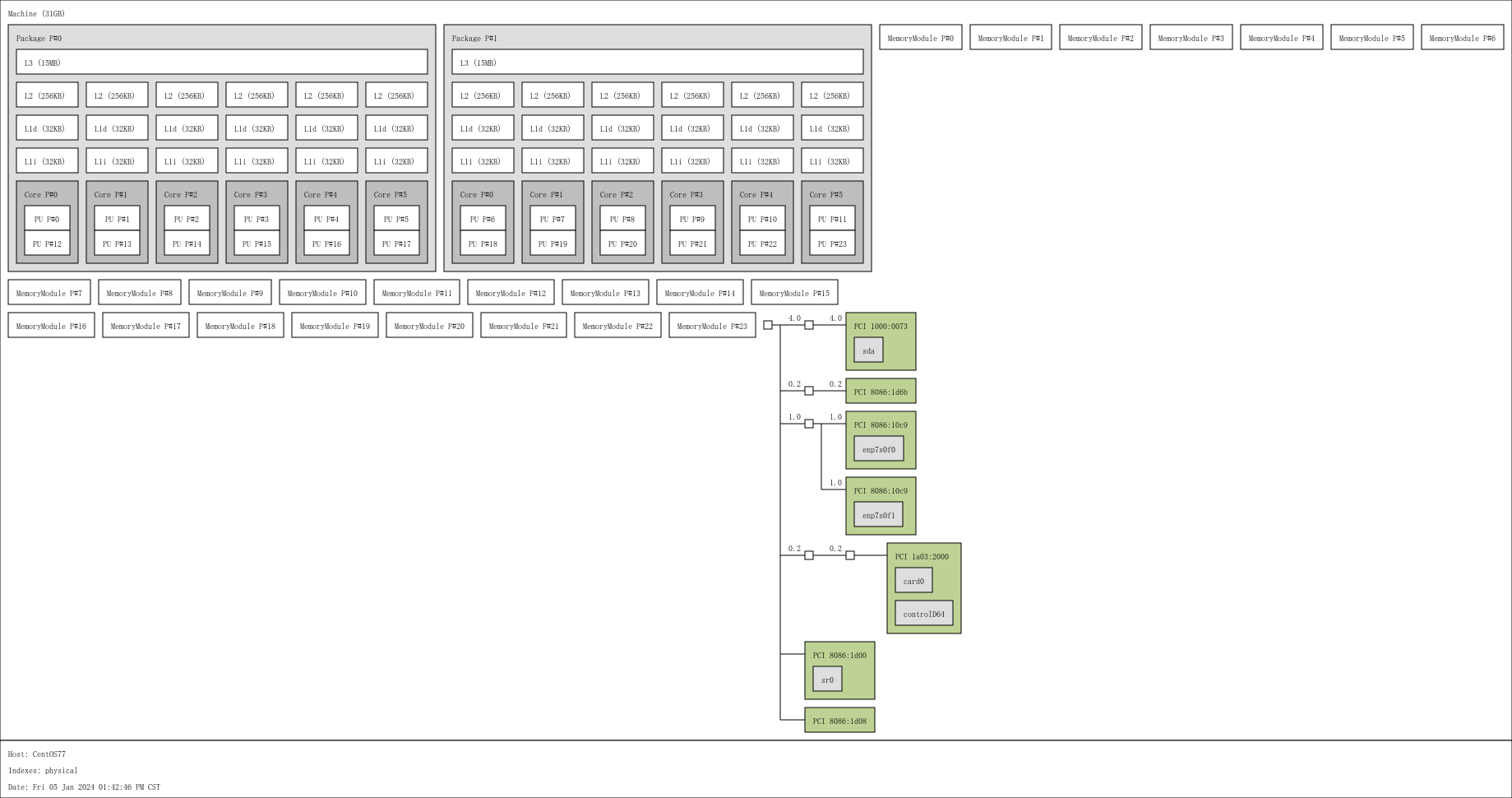
另外这个软件包 base 包里面就有 安装还是比较简单的.
简单使用
lstopo

部分参数介绍

*PU P#*是处理单元处理器# - 这些是CPU核心内的处理元素,从图片中我们可以看到4个核心,每个核心有2个处理元素(超线程),总共有8个,但实际是4个。

L#i代表指令高速缓存。

L#d代表数据高速缓存。

L1代表1级缓存。

L2代表第2级高速缓存。

L3代表三级缓存。

链接:https://juejin.cn/post/7117544110856077343

可以使用 lstopo zhaobsh.png 直接转储成图片.
查看内存信息
dmidecode -t memory

其实可以如下处理:

dmidecode -t

dmidecode: option requires an argument -- 't'

Type number or keyword expected

Valid type keywords are:

  bios

  system

  baseboard

  chassis

  processor

  memory

  cache

  connector

  slot

其实可以根据类型进行查看

比如dmidecode -t cache

查看缓存等信息
查看帮助
lstopo --help

Usage: lstopo [ options ] ... [ filename.format ]

See lstopo(1) for more details.

Default output is graphical (X11) if DISPLAY is set, console otherwise.

Supported output file formats: console, ascii, fig, pdf, ps, png, svg, xml, synthetic

Formatting options:

  -l --logical          Display hwloc logical object indexes

                        (default for console output)

  -p --physical         Display physical object indexes

                        (default for graphical output)

Output options:

  --output-format <format>

  --of <format>         Force the output to use the given format

  -f --force            Overwrite the output file if it exists

Textual output options:

  --only <type>         Only show objects of the given type in the textual output

  -v --verbose          Include additional details

  -s --silent           Reduce the amount of details to show

  -c --cpuset           Show the cpuset of each object

  -C --cpuset-only      Only show the cpuset of each object

  --taskset             Show taskset-specific cpuset strings

Object filtering options:

  --ignore <type>       Ignore objects of the given type

  --no-caches           Do not show caches

  --no-useless-caches   Do not show caches which do not have a hierarchical

                        impact

  --no-icaches          Do not show instruction caches

  --merge               Do not show levels that do not have a hierarchical

                        impact

  --no-collapse         Do not collapse identical PCI devices

  --restrict <cpuset>   Restrict the topology to processors listed in <cpuset>

  --restrict binding    Restrict the topology to the current process binding

  --restrict-flags <n>  Set the flags to be used during restrict

  --no-io               Do not show any I/O device or bridge

  --no-bridges          Do not any I/O bridge except hostbridges

  --whole-io            Show all I/O devices and bridges

Input options:

  --input <XML file>

  -i <XML file>         Read topology from XML file <path>

  --input <directory>

  -i <directory>        Read topology from chroot containing the /proc and /sys

                        of another system

  --input "node:2 2"

  -i "node:2 2"         Simulate a fake hierarchy, here with 2 NUMA nodes of 2

                        processors

  --input-format <format>

  --if <format>         Enforce input format among xml, fsroot, synthetic

  --thissystem          Assume that the input topology provides the topology

                        for the system on which we are running

  --pid <pid>           Detect topology as seen by process <pid>

  --whole-system        Do not consider administration limitations

Graphical output options:

  --fontsize 10         Set size of text font

  --gridsize 10         Set size of margin between elements

  --horiz[=<type,...>]  Horizontal graphical layout instead of nearly 4/3 ratio

  --vert[=<type,...>]   Vertical graphical layout instead of nearly 4/3 ratio

  --rect[=<type,...>]   Rectangular graphical layout with nearly 4/3 ratio

  --index=[<type,...>]  Display indexes for the given object types

  --no-index=[<type,.>] Do not display indexes for the given object types

  --attrs=[<type,...>]  Display attributes for the given object types

  --no-attrs=[<type,.>] Do not display attributes for the given object types

  --no-legend           Remove the text legend at the bottom

  --append-legend <s>   Append a new line of text at the bottom of the legend

Miscellaneous options:

  --export-synthetic-flags <n>

                        Set flags during the synthetic topology export

  --ps --top            Display processes within the hierarchy

  --version             Report version and exit
简单效果为:
CPU信息查看的工具的更多相关文章
- cpu信息查看
# 总核数 = 物理CPU个数 X 每颗物理CPU的核数 # 总逻辑CPU数 = 物理CPU个数 X 每颗物理CPU的核数 X 超线程数 # 查看物理CPU个数 cat /proc/cpuinfo| ...
- linux服务器cpu信息查看详解
在linux系统中,提供了/proc目录下文件,显示系统的软硬件信息.如果想了解系统中CPU的提供商和相关配置信息,则可以查/proc/cpuinfo.但是此文件输出项较多,不易理解.例如我们想获取, ...
- linux cpu信息查看
转自:https://www.cnblogs.com/emanlee/p/3587571.html # 总核数 = 物理CPU个数 X 每颗物理CPU的核数 # 总逻辑CPU数 = 物理CPU个数 X ...
- Linux CPU信息和使用情况查看(CentOS)
一.CPU信息查看 cat /proc/cpuinfo| grep "physical id"| sort -u | wc -l #查看是物理CPU个数,-u和uniq都是去重作用 ...
- Linux系统CPU核数等信息查看
版权声明:本文为原创文章,允许转载,转载时请务必以超链接形式标明文章 原始出处 .作者信息和本声明. https://blog.csdn.net/fgf00/article/details/52584 ...
- Linux下查看CPU信息[/proc/cpuinfo]
最近在研究linux系统负载的时候,接触到一些关于CPU信息查看的知识,和大家分享一下.通过对/proc/cpuinfo文件中的参数的分析,也学到了不少东西. 在linux操作系统中,CPU的信息在启 ...
- linux服务器硬件信息查看
1.linux 查看服务器序列号(S/N) [root@oss20hb106 ~]# dmidecode -t 1 # dmidecode 2.11 # SMBIOS entry point at 0 ...
- ubuntu下查看cpu信息
查看CPU信息cat /proc/cpuinfo 几个cpu more /proc/cpuinfo |grep "physical id"|uniq|wc -l 每个cpu是几核( ...
- Linux 查看CPU信息、机器型号等硬件信息
测试机器的硬件信息: 查看CPU信息(型号) # cat /proc/cpuinfo | grep name | cut -f2 -d: | uniq -c 8 Intel(R) Xeo ...
- Linux查看CPU信息
1. 查看物理CPU的个数 #cat /proc/cpuinfo |grep "physical id"|sort |uniq|wc –l 2. 查看逻辑CPU的个数 #ca ...
随机推荐
- 设计模式之设计模式概述-shejimoshigaishu
title: 设计模式之设计模式概述 date: 2022-12-04 00:21:18.469 updated: 2022-12-11 23:03:45.617 url: https://www.y ...
- 对比Spring Boot中的JdbcClient与JdbcTemplate
本文我们一起看看Spring Boot中 JdbcClient 和 JdbcTemplate 之间的差异. 以下内容使用的Java和Spring Boot版本为: Java 21 Spring Boo ...
- .Net人的自我修养-书目汇总
.Net人的自我修养-书目汇总 2019年来现在的公司开始从事.Net相关的工作.记录一下工作以来看过(或者翻过)和听过还不错打算看相关的技术书籍或资料. 为了方便给大家参考,看(翻)过书目以难度排序 ...
- 容器中域名解析流程以及不同dnsPolicy对域名解析影响
本文分享自华为云社区<容器中域名解析流程以及不同dnsPolicy对域名解析影响>,作者:可以交个朋友 . 一.coreDNS背景 部署在kubernetes集群中的容器业务通过coreD ...
- 从热爱到深耕,全国Top10开源软件出品人探索“开源云上行”
本文分享自华为云社区<[先锋开发者云上说]从热爱到深耕,全国Top10开源软件出品人探索"开源云上行">,作者:华为云社区精选. <2022-2023 中国开源开 ...
- CutMix&Mixup详解与代码实战
摘要:本文将通过实践案例带大家掌握CutMix&Mixup. 本文分享自华为云社区<CutMix&Mixup详解与代码实战>,作者:李长安. 引言 最近在回顾之前学到的知识 ...
- 可以一学的代码优化小技巧:减少if-else冗余
摘要:if-else 语句对于程序员来说,是非常非常熟悉的一个判断语句,我们在日常开发和学习中都经常看见它. 本文分享自华为云社区<JavaScript代码之美-代码优化,减少if-else冗余 ...
- 初学开发必看:何为Git,何为SVN
摘要:在和客户交流代码开发的过程中,时常会先入为主的交流起Git:但在和很多中小型企业交流的过程,发现SVN的模式也被使用得很频繁.那么两者的具体差异有哪些呢? 本文分享自华为云社区<Git V ...
- STM32+华为云IOT制作酒驾监控系统:上车就监控
摘要:设计一种安装在驾驶室内,能根据具体功能进行鉴别酒精浓度的系统,一起监督行车安全. 本文分享自华为云社区<基于STM32+华为云IOT设计的酒驾监控系统[玩转华为云]>,作者: DS小 ...
- iOS应用程序发布流程:从测试到上架的完整指南
目录 转载:iOS应用程序的签名.重签名和安装测试 前言 打开要处理的IPA文件 设置签名使用的证书和描述文件 开始ios ipa重签名 转载:iOS应用程序的签名.重签名和安装测试 前言 ipa ...