
【Vue】Re20 VueX 第一部分(共享数据,Getters)
一、概述
专门为VueJS应用程序开发的状态管理模式
集中式存储管理应用的所有组件的状态,按照相应的规则保证状态以一种可预测的方式发生变化
VueX也集成到了官方调试工具devtools extension中
状态共享问题:
类似JavaWeb中的Session,每一个资源共同需要的变量
二、案例演示
首先需要安装VueX,CLI2的安装是没有提供VueX的
npm install vuex --save
App.vue
<template>

  <div id="app">

    <h3>{{message}}</h3>

    <p>

      <button @click="$store.state.count --"> - </button>

      <span>{{$store.state.count}}</span>

      <button @click="$store.state.count ++"> + </button>

    </p>

    <vuex-comp></vuex-comp>

  </div>

</template>

<!-- Actions行为 + View视图 + State状态 -->

<script>

import VueXComp from "./components/VueX";

export default {

  name: 'App',

  data () {

    return {

      message : 'sss',

      // count : 0

    }

  },

  components : {

    vuexComp : VueXComp

  },

}

</script>

<style>

#app {

  font-family: 'Avenir', Helvetica, Arial, sans-serif;

  -webkit-font-smoothing: antialiased;

  -moz-osx-font-smoothing: grayscale;

  text-align: center;

  color: #2c3e50;

  margin-top: 60px;

}

</style>
VueX.vue
<template>

  <div>

    <h3>VueX Component</h3>

    <p>{{$store.state.count}}</p>

  </div>

</template>

<script>

export default {

  name: "VueX"

}

</script>

<style scoped>

</style>
store目录的Index.js
import Vue from 'vue';

import VueX from 'vuex';

/* 安装VueX */

Vue.use(VueX);

const store = new VueX.Store({

  state : { /* 状态保存,存放所有组件共享的对象 */

    count : 0

  },

  mutations : {

  },

  actions : {

  },

  modules : {

  }

});

export default store;
main.js引入VueX的初始化:
// The Vue build version to load with the `import` command

// (runtime-only or standalone) has been set in webpack.base.conf with an alias.

import Vue from 'vue'

import App from './App'

import router from './router'

import Store from './store';

Vue.config.productionTip = false

// Vue.use(VueX);

/* eslint-disable no-new */

new Vue({

  el: '#app',

  router,

  store : Store,

  components: { App },

  template: '<App/>'

})
两个组件是共用store中的state属性的count

变量引用依靠$store
$store.state.定义的属性
但是官方不推荐使用上面这样的直接引用获取
因为在devtools的调试插件中可以发现这样的问题:

在界面中的点击,共享的count数据更新了,但是在调试插件中的vuex属性状态栏中,
数据是没有发生变化的。
使用mutations实现,并且可以被devtools跟踪
至少使用先使用mutations调用,如果还有请求的操作,那还需要actions中调用
store/index.js
import Vue from 'vue';

import VueX from 'vuex';

/* 安装VueX */

Vue.use(VueX);

const store = new VueX.Store({

  state : { /* 状态保存,存放所有组件共享的对象 */

    count : 0

  },

  mutations : { /*  */

    increment (state) {

      state.count ++

    },

    decrement (state) {

      state.count --

    }

  },

  actions : {

  },

  modules : {

  }

});

export default store;
首页App.vue
<template>

  <div id="app">

    <h3>{{message}}</h3>

    <p>

<!--      <button @click="$store.state.count --"> - </button>-->

      <button @click="aaa"> - </button>

      <span>{{$store.state.count}}</span>

      <button @click="bbb"> + </button>

<!--      <button @click="$store.state.count ++"> + </button>-->

    </p>

    <vuex-comp></vuex-comp>

  </div>

</template>

<!-- Actions行为 + View视图 + State状态 -->

<script>

import VueXComp from "./components/VueX";

export default {

  name: 'App',

  data () {

    return {

      message : 'sss',

      // count : 0

    }

  },

  methods : {

    aaa () {

      this.$store.commit('decrement');

    },

    bbb () {

      this.$store.commit('increment');

    }

  },

  components : {

    vuexComp : VueXComp

  },

}

</script>

<style>

#app {

  font-family: 'Avenir', Helvetica, Arial, sans-serif;

  -webkit-font-smoothing: antialiased;

  -moz-osx-font-smoothing: grayscale;

  text-align: center;

  color: #2c3e50;

  margin-top: 60px;

}

</style>
修改预览的效果可以跟踪Mutations的方法执行
但是state变量不知道为什么对不上值: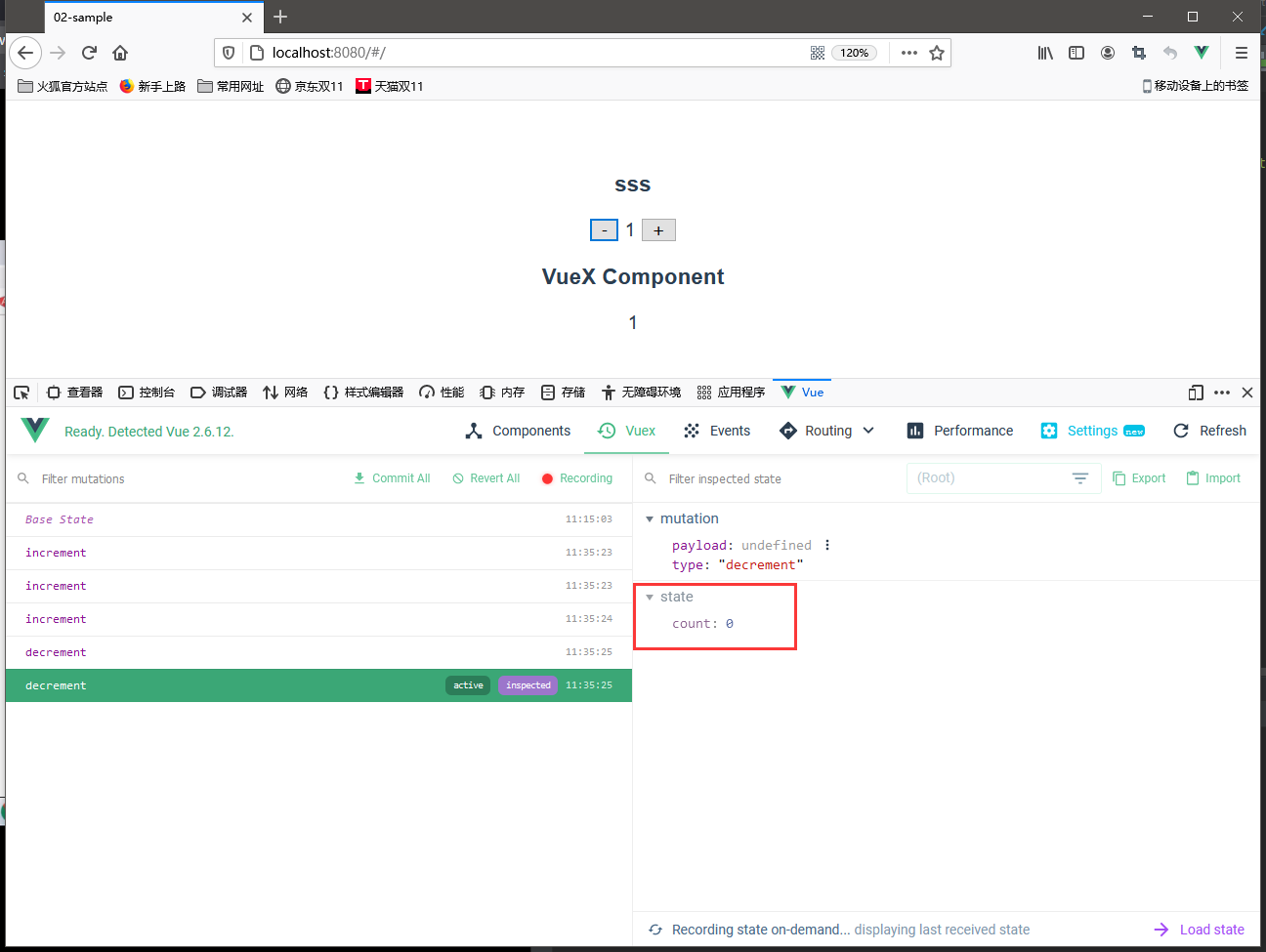
三、使用Getters计算复杂的需求
现在Store中多了一组学生信息,需求是获取某一属性的某一范围的所有学生信息
例如年龄大于20或者小于20
store/index.js
import Vue from 'vue';

import VueX from 'vuex';

/* 安装VueX */

Vue.use(VueX);

const store = new VueX.Store({

  state : { /* 状态保存,存放所有组件共享的对象 */

    count : 0,

    str : 'sss',

    students : [

      { id : 110, name : '学生110', age : 28, gender : true, },

      { id : 111, name : '学生111', age : 18, gender : true, },

      { id : 112, name : '学生112', age : 38, gender : false, },

      { id : 113, name : '学生113', age : 14, gender : true, },

      { id : 114, name : '学生114', age : 44, gender : false, },

      { id : 115, name : '学生115', age : 10, gender : true, },

    ]

  },

  mutations : { /*  */

    increment (state) {

      state.count ++

    },

    decrement (state) {

      state.count --

    },

  },

  actions : {

  },

  modules : {

  },

  getters : {

    getStringJoin (state) {

      return state.str + 'saa';

    },

    getCount (state) {

      return state.count;

    },

    large20Age (state) {

      return state.students.filter(student => student.age > 20);

    }

  }

});

export default store;
App.vue
<template>

  <div id="app">

    <h3>{{message}}</h3>

    <p>

<!--      <button @click="$store.state.count --"> - </button>-->

      <button @click="aaa"> - </button>

      <!--<span>{{$store.state.count}}</span>-->

      <strong>{{$store.getters.getCount}}</strong>

      <button @click="bbb"> + </button>

<!--      <button @click="$store.state.count ++"> + </button>-->

    </p>

    <ul> <!-- 使用store的getters属性调用 -->

      <li v-for="student in $store.getters.large20Age">

        {{student.id}} | {{student.name}} | {{student.age}} | {{student.gender}}

      </li>

    </ul>

    <ul> <!-- 使用当前组件computed属性调用 -->

      <li v-for="student in largeThan20Age">

        {{student.id}} | {{student.name}} | {{student.age}} | {{student.gender}}

      </li>

    </ul>

    <p>

      {{$store.getters.getStringJoin}}

    </p>

    <vuex-comp></vuex-comp>

  </div>

</template>

<!-- Actions行为 + View视图 + State状态 -->

<script>

import VueXComp from "./components/VueX";

export default {

  name: 'App',

  data () {

    return {

      message : 'sss',

      // count : 0

    }

  },

  methods : {

    aaa () {

      this.$store.commit('decrement');

    },

    bbb () {

      this.$store.commit('increment');

    }

  },

  computed : {

    // largeThan20Age () {

    //   return this.$store.state.students.filter(student => {

    //     return student.age >= 20;

    //   });

    // }


    largeThan20Age () {

      return this.$store.state.students.filter(student => student.age >= 20);

    }

  },

  components : {

    vuexComp : VueXComp

  },

}

</script>

<style>

#app {

  font-family: 'Avenir', Helvetica, Arial, sans-serif;

  -webkit-font-smoothing: antialiased;

  -moz-osx-font-smoothing: grayscale;

  text-align: center;

  color: #2c3e50;

  margin-top: 60px;

}

</style>
getters属性支持内嵌式调用,提高了其他getters方法的可重用性
  getters : {

    getStringJoin (state) {

      return state.str + 'saa';

    },

    getCount (state) {

      return state.count;

    },

    large20Age (state) {

      return state.students.filter(student => student.age > 20);

    },

    large20AgeLength (state, getters) {

      return getters.large20Age.length;

    }

  }
年龄限制条件交给参数决定,更灵活的需求:
getters方法无法自定义我们希望的参数【已经固定了参数格式,第一state、第二getters】
解决方案是先返回一个函数,在这个函数的形参就可以获取了,然后里面再写需求逻辑
    largeAgeBy (state) {

      return age => {

        return state.students.filter(student => student.age > age);

      }

    }
App.vue调用
<template>

  <div id="app">

    <h3>{{message}}</h3>

    <p>

<!--      <button @click="$store.state.count --"> - </button>-->

      <button @click="aaa"> - </button>

      <!--<span>{{$store.state.count}}</span>-->

      <strong>{{$store.getters.getCount}}</strong>

      <button @click="bbb"> + </button>

<!--      <button @click="$store.state.count ++"> + </button>-->

    </p>

    <ul> <!-- 使用store的getters属性调用 -->

      <li v-for="student in $store.getters.large20Age">

        {{student.id}} | {{student.name}} | {{student.age}} | {{student.gender}}

      </li>

    </ul>

    <ul> <!-- 使用当前组件computed属性调用 -->

      <li v-for="student in largeThan20Age">

        {{student.id}} | {{student.name}} | {{student.age}} | {{student.gender}}

      </li>

    </ul>

    <p>{{$store.getters.large20AgeLength}}</p>

    <p>

      {{$store.getters.getStringJoin}}

    </p>

    <ul>

      <li v-for="student in $store.getters.largeAgeBy(0)">

        {{student.id}} {{student.name}} {{student.age}} {{student.gender}}

      </li>

    </ul>

    <vuex-comp></vuex-comp>

  </div>

</template>

<!-- Actions行为 + View视图 + State状态 -->

<script>

import VueXComp from "./components/VueX";

export default {

  name: 'App',

  data () {

    return {

      message : 'sss',

      // count : 0

    }

  },

  methods : {

    aaa () {

      this.$store.commit('decrement');

    },

    bbb () {

      this.$store.commit('increment');

    }

  },

  computed : {

    // largeThan20Age () {

    //   return this.$store.state.students.filter(student => {

    //     return student.age >= 20;

    //   });

    // }

    largeThan20Age () {

      return this.$store.state.students.filter(student => student.age >= 20);

    }

  },

  components : {

    vuexComp : VueXComp

  },

}

</script>

<style>

#app {

  font-family: 'Avenir', Helvetica, Arial, sans-serif;

  -webkit-font-smoothing: antialiased;

  -moz-osx-font-smoothing: grayscale;

  text-align: center;

  color: #2c3e50;

  margin-top: 60px;

}

</style>
【Vue】Re20 VueX 第一部分(共享数据,Getters)的更多相关文章
- 十、Vue:Vuex实现data(){}内数据多个组件间共享
一.概述 官方文档:https://vuex.vuejs.org/zh/installation.html 1.1vuex有什么用 Vuex:实现data(){}内数据多个组件间共享一种解决方案(类似 ...
- vue 使用vuex 刷新时保存数据
created () { this.$store.replaceState(Object.assign(this.$store.state,JSON.parse(localStorage.getIte ...
- Vue总结第六天:Vuex (全局变量管理~多个页面共享数据)
Vue总结第六天:Vuex (全局变量管理~多个页面共享数据) 目录 一.Vuex (全局变量管理~~多个页面共享数据) ✿ 更详细的可以看官网:开始 | Vuex 1.什么是Vuex? 2.核心概念 ...
- vue+vuex+axios从后台获取数据存入vuex,组件之间共享数据
在vue项目中组件间相互传值或者后台获取的数据需要供多个组件使用的情况很多的话,有必要考虑引入vuex来管理这些凌乱的状态,今天这边博文用来记录这一整个的过程,后台api接口是使用webpack-se ...
- vuex 实现vue中多个组件之间数据同步以及数据共享。
http://pan.baidu.com/s/1hrJfpli demo下载地址 前言 在一些项目中有很多数据状态之间要实现数据共享状态共享,例如购物车的数据.用户的登录状态等等.vue父元素是可以 ...
- Vuex.js状态管理共享数据 - day8
VScode文件目录: amount.vue代码如下: <template> <div> <!-- <h3>{{ $store.state.count }}& ...
- vue学习记录:vue引入,validator验证,数据信息,vuex数据共享
最近在学习vue,关于学习过程中所遇到的问题进行记录,包含vue引入,validator验证,数据信息,vuex数据共享,传值问题记录 1.vue 引入vue vue的大致形式如下: <temp ...
- 用Vue来实现音乐播放器(二十):Vuex初始化及歌手数据的配置
state:所有组件的所有状态和数据 放入同一个内存空间去管理 我们把它称为state Vue Components:state里面的数据可以方便的映射到组件上 然后渲染组件 Actions:当组件 ...
- vue全家桶(Vue+Vue-router+Vuex+axios)(Vue+webpack项目实战系列之二)
Vue有多优秀搭配全家桶做项目有多好之类的咱就不谈了,直奔主题. 一.Vue 系列一已经用vue-cli搭建了Vue项目,此处就不赘述了. 二.Vue-router Vue的路由,先献上文档(http ...
- 深入浅出的webpack4构建工具--webpack4+vue+route+vuex项目构建(十七)
阅读目录 一:vue传值方式有哪些? 二:理解使用Vuex 三:webpack4+vue+route+vuex 项目架构 回到顶部 一:vue传值方式有哪些? 在vue项目开发过程中,经常会使用组件来 ...
随机推荐
- 内置对象Date
// 内置对象 Date 时间对象 // 可以通过 内置对象 data来获取和存储时间 // 使用方式步骤 // 1,创建时间对象 // ...
- LeetCode 72. Edit Distance 编辑距离 (C++/Java)
题目: Given two words word1 and word2, find the minimum number of operations required to convert word1 ...
- .net core .net5 asp.net core mvc 与quartz.net 3.3.3 新版本调用方式
参照了:https://www.cnblogs.com/LaoPaoEr/p/15129899.html 1.项目Nuget引用Quartz.AspNetCore和Quartz.Extensions. ...
- STM32 + RT-Thread + LVGL
一.基本信息 MCU:STM32F103ZET6 RT-Thread:5.0.2 LVGL:8.3.11 LCD:ST7735s 编译环境:RTThread studio 二.LVGL 移植要求 16 ...
- ELK收集主流应用日志
1.收集nginx日志 学习背景:access.log,error.log目前日志混杂在一个es索引下. 改进filebeat配置 https://www.elastic.co/guide/en/be ...
- 说一下 JSP 的 4 种作用域?
page:代表与一个页面相关的对象和属性. request:代表与客户端发出的一个请求相关的对象和属性.一个请求可能跨越多个页面,涉及多个 Web 组件:需要在页面显示的临时数据可以置于此作用域. s ...
- 记录一下tomcat报错日志分析(去重分类)
#!/usr/bin/env python # coding=utf-8 import os folder_path = 'E:\\Desktop' output_file = 'E:\\Deskto ...
- Android无障碍自动化结合opencv实现支付宝能量自动收集
Android无障碍服务可以操作元素,手势模拟,实现基本的控制.opencv可以进行图像识别.两者结合在一起即可实现支付宝能量自动收集.opencv用于识别能量,无障碍服务用于模拟手势,即点击能量. ...
- hadoop集群配置文件与功能对应解析
以三个节点的集群为例: 总括: nodemanager ,datanode --> slavesresourcemanager ----------> yarn namenode ...
- 如何在 Windows 使用 Podman Desktop 取代 Docker Desktop
Podman Desktop 是 Docker Desktop 的免费替代品,是本地开发使用的另一个绝佳选择.它提供了类似的功能集,同时保持完全开源,让您避免使用 Docker 产品的许可问题.在本文 ...