
【Mybatis-Plus】06 代码生成器 CodeGenerator
导入生成器需要的依赖坐标:
<dependency>

    <groupId>com.baomidou</groupId>

    <artifactId>mybatis-plus-generator</artifactId>

    <version>3.2.0</version>

</dependency>

<dependency>

    <groupId>org.apache.velocity</groupId>

    <artifactId>velocity-engine-core</artifactId>

    <version>2.1</version>

</dependency>

<dependency>

    <groupId>org.freemarker</groupId>

    <artifactId>freemarker</artifactId>

    <version>2.3.29</version>

</dependency>

<dependency>

    <groupId>com.ibeetl</groupId>

    <artifactId>beetl</artifactId>

    <version>3.0.11.RELEASE</version>

</dependency>
新建了一个普通Maven空项目:
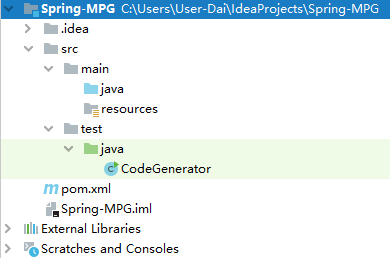
创建我们的代码生成器程序:
import com.baomidou.mybatisplus.core.exceptions.MybatisPlusException;

import com.baomidou.mybatisplus.generator.AutoGenerator;

import com.baomidou.mybatisplus.generator.config.DataSourceConfig;

import com.baomidou.mybatisplus.generator.config.GlobalConfig;

import com.baomidou.mybatisplus.generator.config.PackageConfig;

import com.baomidou.mybatisplus.generator.config.StrategyConfig;

import com.baomidou.mybatisplus.generator.config.rules.NamingStrategy;

import org.apache.commons.lang3.StringUtils;

import java.util.Scanner;

/**

 * @author DaiZhiZhou

 * @file MP-Spring

 * @create 2020-08-06 9:11

 */

public class CodeGenerator {

    /**

     * <p>

     * 读取控制台内容

     * </p>

     */

    public static String scanner(String tip) {

        Scanner scanner = new Scanner(System.in);

        StringBuilder help = new StringBuilder();

        help.append("请输入").append(tip).append(":");

        System.out.println(help.toString());

        if (scanner.hasNext()) {

            String ipt = scanner.next();

            if (StringUtils.isNotEmpty(ipt)) {

                return ipt;

            }

        }

        throw new MybatisPlusException("请输入正确的" + tip + "!");

    }

    public static void main(String[] args) {

        // 代码生成器

        AutoGenerator mybatisPlusCodeGenerator = new AutoGenerator();

        // 全局配置

        GlobalConfig gc = new GlobalConfig();

        // 先得到当前工程目录

        String projectPath = System.getProperty("user.dir");

        // 是maven项目的结构,就是工程目录 + /src/main/java

        gc.setOutputDir(projectPath + "/src/main/java");

        //gc.setOutputDir("D:\\workspace-sts\\0520adv\\02_mp_springboot/src/main/java");

        // 设置生成文件的作者信息

        gc.setAuthor("Echo42");

        //当代码生成完成之后是否打开代码所在的文件夹

        gc.setOpen(true);

        // gc.setSwagger2(true); 实体属性 Swagger2 注解

        //gc.setServiceName("%sService");

        // 将上述的全局配置注入

        mybatisPlusCodeGenerator.setGlobalConfig(gc);

        // 数据源配置

        DataSourceConfig dataSourceConfiguration = new DataSourceConfig();

        dataSourceConfiguration.setUrl("jdbc:mysql://localhost:3306/oa?useUnicode=true&useSSL=false&characterEncoding=utf8&serverTimezone=UTC");

        // dataSourceConfiguration.setSchemaName("public");

        dataSourceConfiguration.setDriverName("com.mysql.cj.jdbc.Driver");

        dataSourceConfiguration.setUsername("root");

        dataSourceConfiguration.setPassword("123456");

        mybatisPlusCodeGenerator.setDataSource(dataSourceConfiguration);

        // 包配置

        PackageConfig pc = new PackageConfig();

        // 设置父级包名

        pc.setParent("cn.echo42");//controller entity  service  service.impl

        pc.setModuleName(scanner("模块名"));

        //pc.setModuleName("sys");

        // 实体类名称

        pc.setEntity("domain");

        // mapper包名称

        pc.setMapper("mapper");

        // mapper对应的映射器xml

        pc.setXml("mapper.xml");

        // 业务包层名称

        pc.setService("service");

        // 业务接口的实现类包

        pc.setServiceImpl("service.impl");

        // 控制器包名称

        pc.setController("controller");

        // 装填包信息对象

        mybatisPlusCodeGenerator.setPackageInfo(pc);

        // 策略配置

        StrategyConfig strategy = new StrategyConfig();

        //设置字段和表名的是否把下划线完成驼峰命名规则

        strategy.setNaming(NamingStrategy.underline_to_camel);

        strategy.setColumnNaming(NamingStrategy.underline_to_camel);

        //设置生成的实体类继承的父类

        //strategy.setSuperEntityClass("com.sxt.BaseEntity");

        //是否启动lombok

        strategy.setEntityLombokModel(true);

        //是否生成resetController

        strategy.setRestControllerStyle(true);

        // 公共父类

        //strategy.setSuperControllerClass("com.sxt.BaseController");

        // 写于父类中的公共字段

        //strategy.setSuperEntityColumns("person_id","person_name");

        //要设置生成哪些表 如果不设置就是生成所有的表

        //strategy.setInclude(scanner("表名,多个英文逗号分割").split(","));

        strategy.setControllerMappingHyphenStyle(true);

        //strategy.setTablePrefix(pc.getModuleName() + "_");

        strategy.setTablePrefix("sys_");

        mybatisPlusCodeGenerator.setStrategy(strategy);

        mybatisPlusCodeGenerator.execute();

    }

}
点击运行:
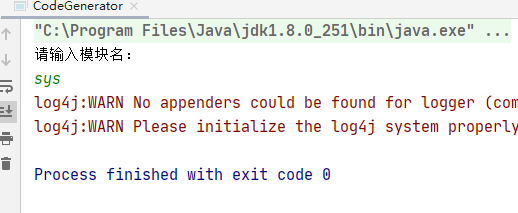
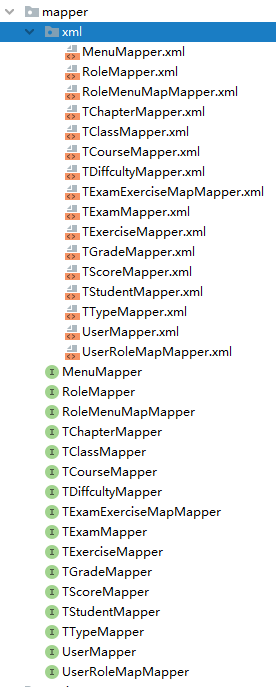
然后生成的这个目录结构:

基础四层就帮我们自动创建完成了:
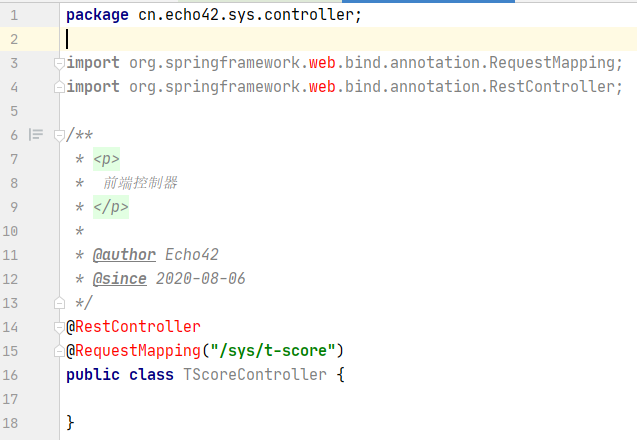
controller报错是因为没有加入SpringMVC:
如果是SSMP的开发模式,编写结构文件使用这个能省力很多,
但是对结构不清楚的情况还是多人肉手写熟悉熟悉
【Mybatis-Plus】06 代码生成器 CodeGenerator的更多相关文章
- 【MyBatis学习06】_parameter:解决There is no getter for property named in class java.lang.String
我们知道在mybatis的映射中传参数,只能传入一个.通过#{参数名} 即可获取传入的值. Mapper接口文件: public int delete(int id) throws Exception ...
- 【MyBatis学习06】输入映射和输出映射
在前面几篇博文的例子中也可以看到mybatis中输入映射和输出映射的身影,但是没有系统的总结一下,这篇博客主要对这两个东东做一个总结.我们知道mybatis中输入映射和输出映射可以是基本数据类型.ha ...
- MyBatis学习06(动态SQL和缓存)
10.动态SQL 10.1 什么是动态SQL 动态SQL指的是根据不同的查询条件 , 生成不同的Sql语句. 官网描述: MyBatis 的强大特性之一便是它的动态 SQL.如果你有使用 JDBC 或 ...
- MyBatis Generator 详解 专题
idea中有plugin可提高效率: http://www.henryxi.com/use-idea-mybatis-plugin-generate-mapper-files eg: <?xml ...
- MyBatis Generator 详解
MyBatis Generator中文文档 MyBatis Generator中文文档地址:http://mbg.cndocs.tk/ 该中文文档由于尽可能和原文内容一致,所以有些地方如果不熟悉,看中 ...
- MyBatis Generator 详解 【转来纯为备忘】
版权声明:版权归博主所有,转载请带上本文链接!联系方式:abel533@gmail.com 目录(?)[+] MyBatis Generator中文文档 运行MyBatis Generator X ...
- mybatis Generator配置文件详解
这里按照配置的顺序对配置逐个讲解,更细的内容可以配合中文文档参照. 1. 配置文件头 <?xml version="1.0" encoding="UTF-8&quo ...
- 转载:mybatis自动生成
MyBatis Generator中文文档 MyBatis Generator中文文档地址: http://generator.sturgeon.mopaas.com/ 该中文文档由于尽可能和原文内容 ...
- MyBatis Generator中文文档
MyBatis Generator中文文档 MyBatis Generator中文文档地址: http://mbg.cndocs.tk/ 该中文文档由于尽可能和原文内容一致,所以有些地方如果不熟悉,看 ...
- MyBatis Generator 详解(转)
MyBatis Generator中文文档 MyBatis Generator中文文档地址:http://mbg.cndocs.tk/ 该中文文档由于尽可能和原文内容一致,所以有些地方如果不熟悉,看中 ...
随机推荐
- 图形库使用 Direct3d
1 里面的数学 矩阵是三角函数组合出来的 旋转的时候 xy 两个变量距离变 第三轴被影响角度 2视锥 远近四棱锥双剪切平面 3 三维点 A点 B点 C点 确定三位坐标 ,初始坐标是坐标中中心值 x,y ...
- js jquery input radio点击事件
HTML: <input type="radio" name="myname" value="1" />1 <input ...
- 《Vue3.x +TpyeScript实践指南》勘误
图书出版已有一段时间,书中已发现错误如下: 书的第14页,倒数第3行,npm init -y命令中,init和-y之间应该有个空格: 书的第32页,代码的第1行,应该为模板字符串符号 `,我看印刷的是 ...
- 配置pod拉取harbor容器镜像仓库私有镜像:secret保存账号密码
目录 一.系统环境 二.前言 三.Docker-Registry类型的Secret简介 四.镜像仓库简介 五.搭建Harbor容器镜像仓库 5.1 安装Harbor 5.2 创建项目 5.3 推送镜像 ...
- 大模型重塑软件开发,华为云AI原生应用架构设计与实践分享
在ArchSummit全球架构师峰会2024上,华为云aPaaS平台首席架构师马会彬受邀出席,和技术爱好者分享AI原生应用引擎的架构与实践. AI大模型与AI重塑软件的大趋势下,软件会发生哪些本质的变 ...
- Hugging Face Accelerate 两个后端的故事:FSDP 与 DeepSpeed
社区中有两个流行的 零冗余优化器(Zero Redundancy Optimizer,ZeRO) 算法实现,一个来自 DeepSpeed,另一个来自 PyTorch.Hugging Face Acce ...
- 总结:软件开发的3个方向 与 嵌入式Linux学习路线(驱动方向)
--- title: 嵌入式Linux学习路线图(驱动方向) date: 2020-05-09 07:17:58 categories: tags: - embeded - summary - arm ...
- openfoam 修改 src 库经验记录
遇到一个问题,要把 sprayFoam 求解器的蒸发模型修改为自定义蒸发模型. sprayFoam 求解器本身没有实现蒸发模型,而是调用 $FOAM_SRC/lagrangian/intermedia ...
- 新品来袭,全国产ARM+FPGA--"RK3568J+Logos-2"工业核心板,让您的硬件设计“更简单”!
如需选购,请登录创龙科技天猫旗舰店: tronlong.tmall.com! 欢迎加入RK3568J技术交流群:567208221 欢迎加入Logos-2技术交流群:311416997 更多产品详情以 ...
- Simple WPF: WPF 自定义按钮外形
最新内容优先发布于个人博客:小虎技术分享站,随后逐步搬运到博客园. WPF的按钮提供了Template模板,可以通过修改Template模板中的内容对按钮的样式进行自定义,完整代码Github自取. ...