
c# HttpWebRequest https的一些处理
先看下请求方法
   public string Get_Request(

             string strUrl,

             CookieContainer _cookie = null,

             string strHost = "",

             string strRefer = "",

             string strOrigin = "",

             bool blnHttps = false,

             Dictionary<string, string> lstHeads = null,

             bool blnKeepAlive=false,

             string strEncoding = "utf-8",

             string strContentType = "",

             string strCertFile="",

             string strAccept = "text/html,application/xhtml+xml,application/xml;q=0.9,image/webp,*/*;q=0.8",

             string strUserAgent = "Mozilla/5.0 (Windows NT 6.1; WOW64) AppleWebKit/537.36 (KHTML, like Gecko) Chrome/45.0.2454.101 Safari/537.36",

             bool blnAllowAutoRedirect = true,

             int intTimeout =  * )

         {

             HttpWebRequest request;

             HttpWebResponse response;

             request = (HttpWebRequest)WebRequest.Create(strUrl);

             if (blnHttps)

             {

                 ServicePointManager.ServerCertificateValidationCallback = new RemoteCertificateValidationCallback(CheckValidationResult);

                 request.ProtocolVersion = HttpVersion.Version10;

                 ServicePointManager.SecurityProtocol = SecurityProtocolType.Tls12;

             }

             request.KeepAlive = blnKeepAlive;

             request.Accept = strAccept;

             request.Timeout = intTimeout;

             request.Method = "GET";

             request.Credentials = CredentialCache.DefaultCredentials;

             request.UserAgent = strUserAgent;

             request.AllowAutoRedirect = blnAllowAutoRedirect;

             request.Proxy = null;

             if (!string.IsNullOrEmpty(strContentType))

             {

                 request.ContentType = strContentType;

             }

             if (_cookie != null)

             {

                 request.CookieContainer = _cookie;

             }

             if (!string.IsNullOrEmpty(strHost))

             {

                 request.Host = strHost;

             }

             if (!string.IsNullOrEmpty(strRefer))

             {

                 request.Referer = strRefer;

             }

             if (!string.IsNullOrEmpty(strOrigin))

             {

                 request.Headers.Add("Origin", strOrigin);

             }

             if (lstHeads != null && lstHeads.Count > )

             {

                 foreach (var item in lstHeads)

                 {

                     request.Headers.Add(item.Key, item.Value);

                 }

             }

             response = (HttpWebResponse)request.GetResponse();

             var sr = new StreamReader(response.GetResponseStream(), Encoding.GetEncoding(strEncoding));

             string strResult = sr.ReadToEnd();

             sr.Close();

             request.Abort();

             response.Close();

             return strResult;

         }

         private static bool CheckValidationResult(object sender, X509Certificate certificate, X509Chain chain, SslPolicyErrors errors)

         {

             return true; //总是接受

         }
if (blnHttps)内的代码就是针对https所做的处理
需要注意的是
1、当使用https请求的时候需要确定加密协议是哪个,这个可以通过火狐查看到,如下图
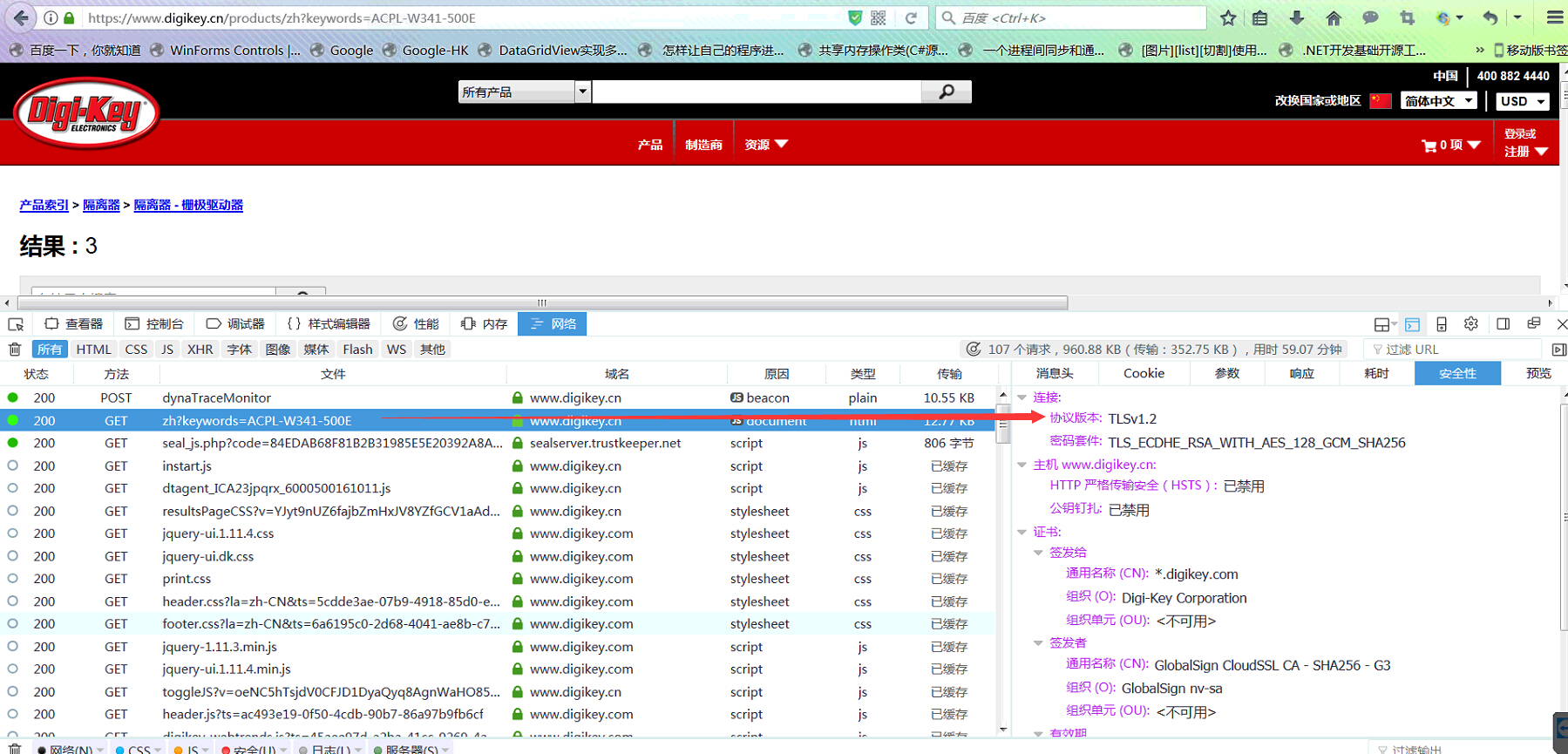
2、只有Framework4.5及以上才支持1.1和1.2协议
如果仍有什么不明白的地方请留言吧
c# HttpWebRequest https的一些处理的更多相关文章
- 《C# 爬虫 破境之道》:第一境 爬虫原理 — 第二节:WebRequest
本节主要来介绍一下,在C#中制造爬虫,最为常见.常用.实用的基础类 ------ WebRequest.WebResponse. 先来看一个示例 [1.2.1]: using System; usin ...
- 在 IIS 6 和 IIS 7中配置Https,设置WCF同时支持HTTP和HTPPS,以及使用HttpWebRequest和HttpClient调用HttpS
IIS 7 ,给IIS添加CA证书以支持https IIS 6 架设证书服务器 及 让IIS启用HTTPS服务 WCF IIS 7中配置HTTPS C#利用HttpWebRequest进行post请求 ...
- 在C#用HttpWebRequest中发送GET/HTTP/HTTPS请求
通用辅助类 下面是我编写的一个辅助类,在这个类中采用了HttpWebRequest中发送GET/HTTP/HTTPS请求,因为有的时候需 要获取认证信息(如Cookie),所以返回的是HttpWeb ...
- C# HttpWebRequest GET HTTP HTTPS 请求
下面是我编写的一个辅助类,在这个类中采用了HttpWebRequest中发送GET/HTTP/HTTPS请求,因为有的时候需要获取认证信息(如Cookie),所以返回的是HttpWebResponse ...
- C#利用HttpWebRequest进行post请求的示例(HTTPS)
using System; using System.Collections.Generic; using System.Linq; using System.Text; using System.N ...
- 通过HttpWebRequest请求https接口
一.为什么进行代理接口的开发: 有些项目需要访问被墙了哒网站,比如前不久公司开发项目需要使用google地图的接口,而google在中国被墙了,所有打算做一个代理接口服务,将代理放到国外服务器上,通过 ...
- (转) 在C#用HttpWebRequest中发送GET/HTTP/HTTPS请求
转自:http://blog.csdn.net/zhoufoxcn/article/details/6404236 通用辅助类 下面是我编写的一个辅助类,在这个类中采用了HttpWebRequest中 ...
- 【转】Problems with HTTPS, HttpWebRequest, and iOS?
We're using HttpWebRequest to hit HTTPS urls, on iOS. In Debug, local builds, etc. everything works ...
- 【转】在C#用HttpWebRequest中发送GET/HTTP/HTTPS请求
http://zhoufoxcn.blog.51cto.com/792419/561934 这个需求来自于我最近练手的一个项目,在项目中我需要将一些自己发表的和收藏整理的网文集中到一个地方存放,如果全 ...
随机推荐
- 【record】11.7..11.13
好少
- 【33.33%】【codeforces 608C】Chain Reaction
time limit per test2 seconds memory limit per test256 megabytes inputstandard input outputstandard o ...
- DAX的圈圈大坑:循环依赖关系错误circular dependency (单表篇)
使用DAX中的某些函数特别类似Calculate这种函数创建计算列时很容易出现一种错误,叫做检测到循环依赖关系,即:A circular dependency was detected.对于刚接触Da ...
- Python 编程规范 —— TODO 注释(结合 PyCharm)
编程是代码和注释的统一: TODO 自然表示需要做而未做的一些待完成的事项,有助于事后的检索,以及对整体项目做进一步的修改迭代. # TODO(kl@gmail.com): Use a "* ...
- 哪个项目管理工具好用到哭?JIRA VS 华为软件开发云
一.产品介绍 JIRA是Atlassian公司出品的项目与事务跟踪工具,被广泛应用于缺陷跟踪.客户服务.需求收集.流程审批.任务跟踪.项目跟踪和敏捷管理等工作领域. 华为软件开发云 (DevCloud ...
- 弄App Store提示和技巧推荐
众所周知上苹果的主页推荐是对产品最佳(高曝光率+零广告费)推广,然而苹果却对选择的方式和规则讳莫如深. 下面是搜集的一些获得推荐的开发人员的经验. 1. 产品要新颖.且质量上乘.这个质量包括非常多细节 ...
- Formview单文档或对话框项目接受不到按键消息的解决办法
当对话框或formview界面上有控件时,由于焦点在控件上,因此wm_char,wm_keydown等按键消息会被控件捕获,而导致对话框或formview无法接受该类按键消息.这时候通常的解决方法是在 ...
- js之美
http://fxck.it/post/72326363595 大部分脚本语言里字面量都要快一些,因为解析[]比解析new Array()步骤少的多 关于Object可以用constructor注入的 ...
- Android4.0图库Gallery2代码分析(一) 程序整体结构
Android4.0图库Gallery2代码分析(一) 程序整体结构 Gallery2的用例图分析:Gallery2主要功能是实现本地存储器.MTP存储器和网络存储器中媒体(图像和视频)的浏览.显示和 ...
- 从编译,执行过程理解c#
上节我们说过C#所开发的程序源代码并不是编译成能够直接在操作系统上执行的二进制代码.与Java类似,它被编译成为中间代码,然后通过.NET Framework的虚拟机——被称之为通用语言运行时(CLR ...