
ios开发网络学习五:MiMEType ,多线程下载文件思路,文件的压缩和解压缩
一:MiMEType:一般可以再百度上搜索到相应文件的MiMEType,或是利用c语言的api去获取文件的MiMEType
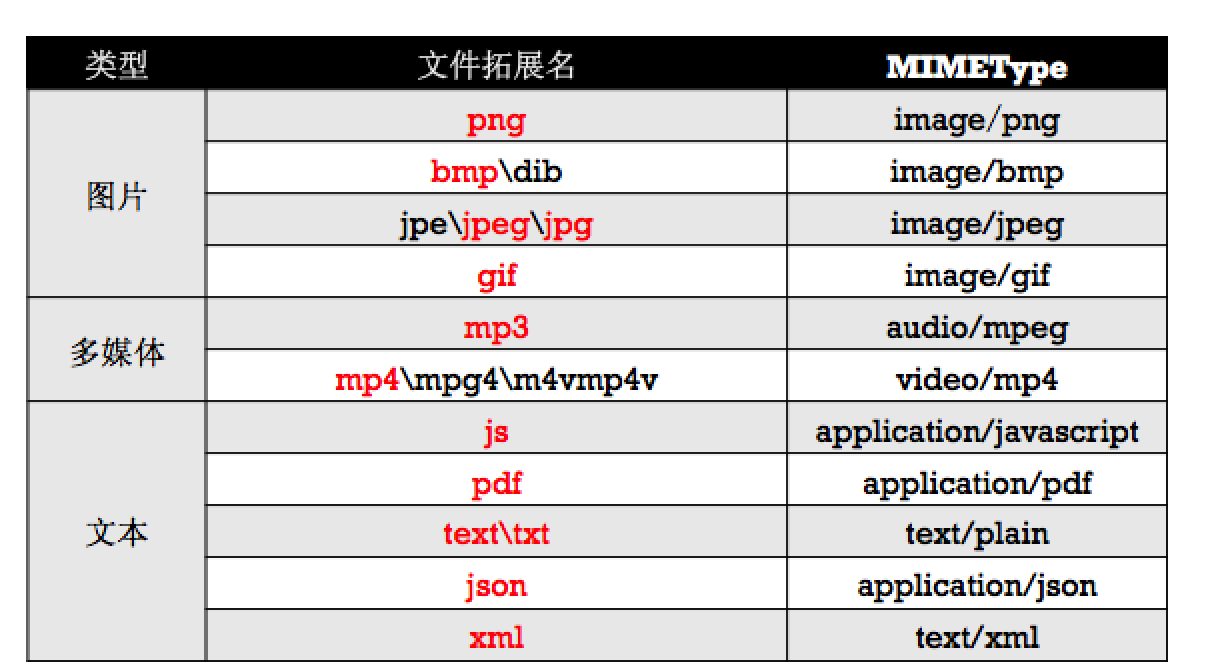

;
//对该文件发送一个异步请求,拿到文件的MIMEType
- (void)MIMEType
{
// NSString *file = @"file:///Users/文顶顶/Desktop/test.png";
[NSURLConnection sendAsynchronousRequest:[NSURLRequest requestWithURL:[NSURL fileURLWithPath:@"/Users/文顶顶/Desktop/test.png"]] queue:[NSOperationQueue mainQueue] completionHandler:^(NSURLResponse * __nullable response, NSData * __nullable data, NSError * __nullable connectionError) {
// response.MIMEType
NSLog(@"%@",response.MIMEType);
}];
}
```
(2)通过UTTypeCopyPreferredTagWithClass方法
```objc
//注意:需要依赖于框架MobileCoreServices
- (NSString *)mimeTypeForFileAtPath:(NSString *)path
{
if (![[[NSFileManager alloc] init] fileExistsAtPath:path]) {
return nil;
}
CFStringRef UTI = UTTypeCreatePreferredIdentifierForTag(kUTTagClassFilenameExtension, (__bridge CFStringRef)[path pathExtension], NULL);
CFStringRef MIMEType = UTTypeCopyPreferredTagWithClass (UTI, kUTTagClassMIMEType);
CFRelease(UTI);
if (!MIMEType) {
return @"application/octet-stream";
}
return (__bridge NSString *)(MIMEType);
}
```
二:多线程文件下载思路:将下载文件分成若干段,每段任务创建一条线程,多个任务并发执行下载文件的操作,不能利用输出流进行文件二进制数据data的拼接,否则会出现数据错乱。利用文件句柄,在代理方法中,接受到数据后,判断是哪条线程,再根据线程的不同,将文件句柄的位置偏移到seekoffset,偏移到相应线程的下载的地方
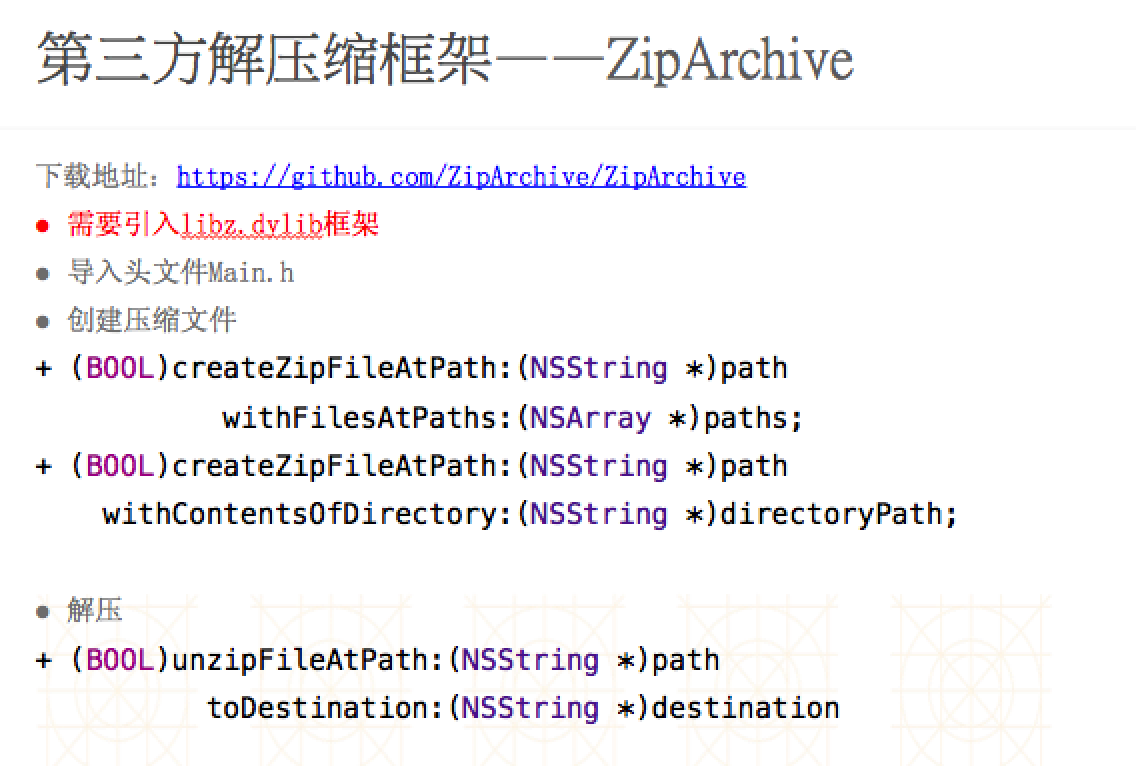
三:文件的压缩和解压缩

#import "ViewController.h"

#import "SSZipArchive.h"

@interface ViewController ()

@end

@implementation ViewController

-(void)touchesBegan:(NSSet<UITouch *> *)touches withEvent:(UIEvent *)event

{

    [self unzip];

}

-(void)zip

{

    NSArray *arrayM = @[

                        @"/Users/xiaomage/Desktop/Snip20160226_2.png",

                        @"/Users/xiaomage/Desktop/Snip20160226_6.png"

                        ];

    /*

     第一个参数:压缩文件的存放位置

     第二个参数:要压缩哪些文件(路径)

     */

    //[SSZipArchive createZipFileAtPath:@"/Users/xiaomage/Desktop/Test.zip" withFilesAtPaths:arrayM];

    [SSZipArchive createZipFileAtPath:@"/Users/xiaomage/Desktop/Test.zip" withFilesAtPaths:arrayM withPassword:@""];

}

-(void)zip2

{

    /*

     第一个参数:压缩文件存放位置

     第二个参数:要压缩的文件夹(目录)

     */

    [SSZipArchive createZipFileAtPath:@"/Users/xiaomage/Desktop/demo.zip" withContentsOfDirectory:@"/Users/xiaomage/Desktop/demo"];

}

-(void)unzip

{

    /*

     第一个参数:要解压的文件在哪里

     第二个参数:文件应该解压到什么地方

     */

    //[SSZipArchive unzipFileAtPath:@"/Users/xiaomage/Desktop/demo.zip" toDestination:@"/Users/xiaomage/Desktop/xx"];

    [SSZipArchive unzipFileAtPath:@"/Users/xiaomage/Desktop/demo.zip" toDestination:@"/Users/xiaomage/Desktop/xx" progressHandler:^(NSString *entry, unz_file_info zipInfo, long entryNumber, long total) {

        NSLog(@"%zd---%zd",entryNumber,total);

    } completionHandler:^(NSString *path, BOOL succeeded, NSError *error) {

        NSLog(@"%@",path);

    }];

}

@end
ios开发网络学习五:MiMEType ,多线程下载文件思路,文件的压缩和解压缩的更多相关文章
- ios开发网络学习五:输出流以及文件上传
一:输出流 #import "ViewController.h" @interface ViewController ()<NSURLConnectionDataDelega ...
- ios开发网络学习九:NSURLSessionDownloadTask实现大文件下载
一:NSURLSessionDownloadTask:实现文件下载:无法监听进度 #import "ViewController.h" @interface ViewControl ...
- ios开发网络学习十一:NSURLSessionDataTask离线断点下载(断点续传)
#import "ViewController.h" #define FileName @"121212.mp4" @interface ViewControl ...
- ios开发网络学习四:NSURLConnection大文件断点下载
#import "ViewController.h" @interface ViewController ()<NSURLConnectionDataDelegate> ...
- ios开发网络学习AFN框架的使用一:get和post请求
#import "ViewController.h" #import "AFNetworking.h" @interface ViewController () ...
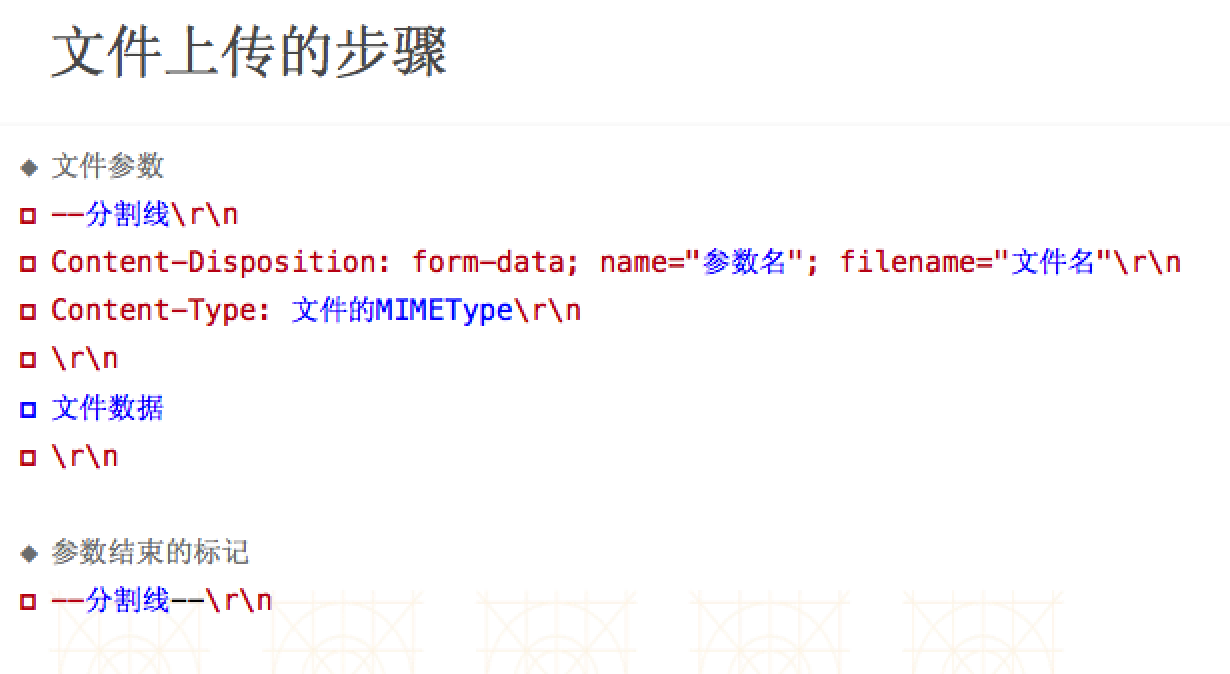
- ios开发网络学习十二:NSURLSession实现文件上传
#import "ViewController.h" // ----WebKitFormBoundaryvMI3CAV0sGUtL8tr #define Kboundary @&q ...
- ios开发runtime学习五:KVC以及KVO,利用runtime实现字典转模型
一:KVC和KVO的学习 #import "StatusItem.h" /* 1:总结:KVC赋值:1:setValuesForKeysWithDictionary实现原理:遍历字 ...
- ios开发网络学习三:NSURLConnection小文件大文件下载
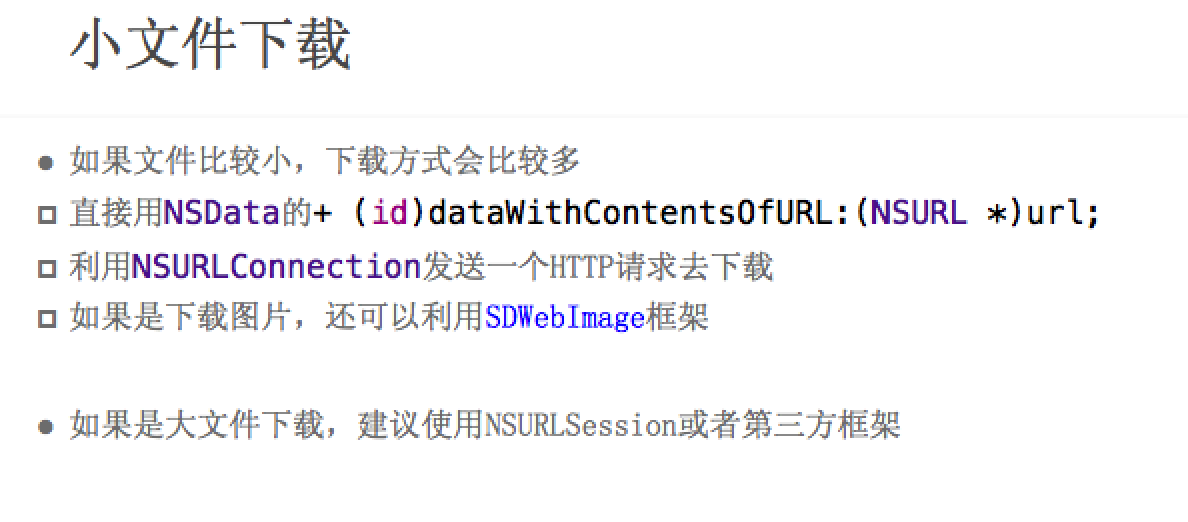
一:小文件下载 #import "ViewController.h" @interface ViewController ()<NSURLConnectionDataDele ...
- ios开发网络学习:一:NSURLConnection发送GET,POST请求
#import "ViewController.h" @interface ViewController ()<NSURLConnectionDataDelegate> ...
随机推荐
- Directx9.0 学习教程3 -图形学之创建点 线 三角形 等
1.首先 介绍点的表示方法 struct CUSTOMVERTEX { float x,y,z; }; CUSTOMVERTEX Vertices[] = { {-5.0, -5.0, 0.0}, { ...
- PA模块经常使用表
SELECT * FROM pa_projects_all; --项目 SELECT * FROM pa_project_types; --项目类型 SELECT * FROM pa_project_ ...
- mysql 不能启动的两种错误提示及解决方法
在linux系统中安装mysql服务器详细步骤并解决ERROR 1045 (28000): Access denied for user 'root'@'localhost' (using passw ...
- js18--继承方式
方式1:子类.prototype = 父类对象 Boy.prototype = new Person(); Sub.prototype = new Sup('张三'); //可以传参数也可以不传 ...
- Direct2D开发:MFC下从资源文件中加载位图
转载请注明出处:http://www.cnblogs.com/ye-ming 0X01 概述: 相对于GDI处理界面,Direct2D有得天独厚的优势,下图就是Direct2D与GDI的效果对比,wi ...
- 题目1205:N阶楼梯上楼问题(2008年华中科技大学计算机保研机试真题:递推求解)
题目1205:N阶楼梯上楼问题 时间限制:1 秒 内存限制:128 兆 特殊判题:否 提交:2447 解决:927 题目描写叙述: N阶楼梯上楼问题:一次能够走两阶或一阶,问有多少种上楼方式. (要求 ...
- js常用数据转换&判断
数组转字符串 var a, b; a = new Array(0,1,2,3,4); b = a.join("-"); //"0-1-2-3-4" 字符串转数组 ...
- input表单验证(全面)
1.英文字母 1 <script type="text/javascript"> 2 //验证只能是字母 3 function checkZm(zm){ 4 var z ...
- 学习 Perl(一) —— 安装及 hello world
所谓存在的即是合理的,尤其适用于琳琅满目的编程语言界.每种编程语言在设计之初均只为解决特定领域的特定问题而生,没有语言擅长所有的领域能够完美地解决所有的问题. 这里推荐一本经典的 perl 入门书:P ...
- (转)iptables详细教程:基础、架构、清空规则、追加规则、应用实例
转自:http://lesca.me/archives/iptables-tutorial-structures-configuratios-examples.html iptables防火墙可以用于 ...