
Walking on the path of Redis --- Introduction and Installation
废话开篇
以前从来没听说过有Redis这么个玩意,无意间看到一位仁兄的博客,才对其有所了解,所以决定对其深入了解下。有不对的地方还请各位指正。
Redis介绍
下面是官方的介绍,不喜欢english的直接绕到中文的介绍区域。
Redis is an open source, BSD licensed, advanced key-value store. It is often referred to as a data structure server since keys can contain strings, hashes, lists, sets and sorted sets.
You can run atomic operations on these types, like appending to a string; incrementing the value in a hash; pushing to a list; computing set intersection, union and difference; or getting the member with highest ranking in a sorted set.
In order to achieve its outstanding performance, Redis works with an in-memory dataset. Depending on your use case, you can persist it either by dumping the dataset to disk every once in a while, or by appending each command to a log.
Redis also supports trivial-to-setup master-slave replication, with very fast non-blocking first synchronization, auto-reconnection on net split and so forth.
Other features include Transactions, Pub/Sub, Lua scripting, Keys with a limited time-to-live, and configuration settings to make Redis behave like a cache.
You can use Redis from most programming languages out there.
Redis安装
由于本人平时开发都在Windows上,所以一下的介绍及后续的文章都是基于Windows 7 32bits的机子上,还请各位选择性的参考。目前Redis对Windows没有官方支持,但是开源的力量是无穷的,Microsoft 开发并维护 Win32-64 experimental version of Redis.当时觉得不可思议,像Microsoft这样“注重隐私“的公司也开始进行开源项目的开发了。下载结束之后将其解压,然后找到目录”bin/release/“下的redisbin文件(同时也包含64bits的文件,根据自己的环境进行选择),我的是32bits的,所以直接解压的redisbin。详细见下图 。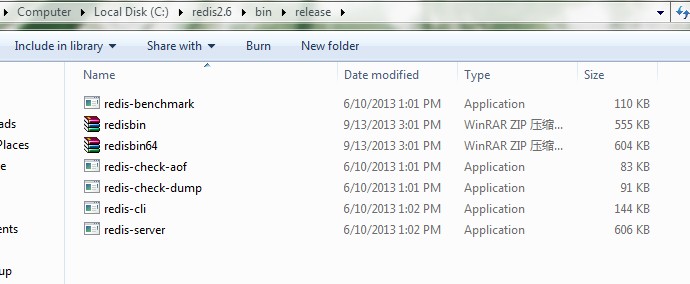
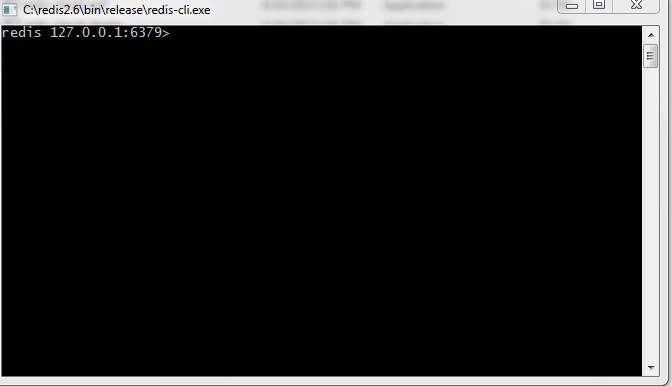
接下来就是启动redis-server和redis-cli了。doc命令进入到上面的目录下,直接双击redis-server.exe就会启动redis-server了,详细解下图。
然后直接双击redis-cli.exe就会启动redis-cli了,详细解下图。
废话收尾
以上安装过程比较简单,对入门可能会有所帮助,接下来会介绍redis的相关配置。
Walking on the path of Redis --- Introduction and Installation的更多相关文章
- Walking on the path of Redis --- Data structure
废话开篇 相比于其他内存数据库,Redis最大的特点就是拥有丰富的数据结构, 经常被称为Date Structure Server.Redis支持的数据结构包含strings, hashes, lis ...
- Walking on the path of Redis --- Redis configuration
废话开篇 Redis的安装是非常简单易操作的,但是配置就有点复杂了,要想得到高性能的Redis数据服务,深入了解下如何配置是很重要的. 配置详解 下面是主要的参数及说明,至于如何配置才能最优,目前还不 ...
- SpagoBI 教程 Lesson 1:Introduction and Installation
SapgoBI Lesson 1: Introduction and Installation Downloading and installing SpagoBI. Download SpagoBI ...
- [redis] redis
redis是什么? wiki redis官方介绍:introduction to redis 安装: install 拉到最下面的install小节 wget http://download.redi ...
- Linux实战教学笔记45:NoSQL数据库之redis持久化存储(一)
第1章 redis存储系统 1.1 redis概述 REmote DIctionary Server(Redis)是一个基于key-value键值对的持久化数据库存储系统.redis和大名鼎鼎的Mem ...
- Redis的README.md
This README is just a fast *quick start* document. You can find more detailed documentation at http: ...
- 缓存、队列(Memcached、redis、RabbitMQ)
本章内容: Memcached 简介.安装.使用 Python 操作 Memcached 天生支持集群 redis 简介.安装.使用.实例 Python 操作 Redis String.Hash.Li ...
- Redis 简单搭建
======== redis ======== 1. redis setup and test : 1. download the package from https://redis.io/down ...
- CentOS安装Redis
wget http://download.redis.io/redis-stable.tar.gz tar xvzf redis-stable.tar.gz cd redis-stable make ...
随机推荐
- TCP中的RST标志(Reset)详解
在谈RST攻击前,必须先了解TCP:如何通过三次握手建立TCP连接.四次握手怎样把全双工的连接关闭掉.滑动窗口是怎么传输数据的.TCP的flag标志位里RST在哪些情况下出现.下面我会画一些尽量简化的 ...
- 如何快速从数据库获取表属性编写JavaBean
以前自己对子设计好的数据库将数据库中的表转换为JavaBean,自己还一个一个慢慢打效率真是低,还是老师比较聪明学习学习. 我用的数据库可视化工具是Navicat Premium.UltraEdit( ...
- 学习Linux服务的方法
1.服务的概述:名字.功能.特点.原理.端口号 2.安装 3.配置文件的位置 4.服务器启动.关闭的脚本,查看端口 5.此服务的使用方法 6.修改配置文件,案例部署 7.排错调优
- Golang - 爬虫案例实践
目录 Golang - 爬虫案例实践 1. 爬虫步骤 2. 正则表达式 3. 并发爬取美图 Golang - 爬虫案例实践 1. 爬虫步骤 明确目标(确定在哪个网址搜索) 爬(爬下数据) 取(去掉没用 ...
- codevs——T3111 CYD啃骨头
http://codevs.cn/problem/3111/ 时间限制: 1 s 空间限制: 128000 KB 题目等级 : 黄金 Gold 题解 查看运行结果 题目描述 Desc ...
- 【翻译自mos文章】ABMR:在asm 环境中測试Automatic Block Recover 特性的方法
ABMR:在asm 环境中測试Automatic Block Recover 特性的方法 參考原文: ABMR: How to test Automatic Block Recover Feature ...
- Java高级程序猿技术积累
watermark/2/text/aHR0cDovL2Jsb2cuY3Nkbi5uZXQveDczNDQwMDE0Ng==/font/5a6L5L2T/fontsize/400/fill/I0JBQk ...
- 【j2ee spring】44、巴巴运动网前台产品显示
[j2ee spring]44.巴巴运动网前台产品显示 项目结构 项目代码 界面显示 <%@ page language="java" isELIgnored="f ...
- Linux命令(九)——系统监视和进程控制
与windows系统一样,linux系统中也有很多进程在同时运行,每个进程都有一个识别码PID,它是进程的唯一识别标志. 一.进程的类型 1.系统进程 在操作系统启动后,系统环境平台运行所加载的进程, ...
- bootstrap模态框通过传值解决重复提交问题
自己通过模态框确认是否提交的功能时,总是重复提价上次的请求. 原因:重复的原因是jquery通过id绑定了确定按钮的onclick事件,所以每次提交都会增加 一次绑定(没有清除上次的绑定),才造成了重 ...