
Walking on the path of Redis --- Introduction and Installation
废话开篇
以前从来没听说过有Redis这么个玩意,无意间看到一位仁兄的博客,才对其有所了解,所以决定对其深入了解下。有不对的地方还请各位指正。
Redis介绍
下面是官方的介绍,不喜欢english的直接绕到中文的介绍区域。
Redis is an open source, BSD licensed, advanced key-value store. It is often referred to as a data structure server since keys can contain strings, hashes, lists, sets and sorted sets.
You can run atomic operations on these types, like appending to a string; incrementing the value in a hash; pushing to a list; computing set intersection, union and difference; or getting the member with highest ranking in a sorted set.
In order to achieve its outstanding performance, Redis works with an in-memory dataset. Depending on your use case, you can persist it either by dumping the dataset to disk every once in a while, or by appending each command to a log.
Redis also supports trivial-to-setup master-slave replication, with very fast non-blocking first synchronization, auto-reconnection on net split and so forth.
Other features include Transactions, Pub/Sub, Lua scripting, Keys with a limited time-to-live, and configuration settings to make Redis behave like a cache.
You can use Redis from most programming languages out there.
Redis安装
由于本人平时开发都在Windows上,所以一下的介绍及后续的文章都是基于Windows 7 32bits的机子上,还请各位选择性的参考。目前Redis对Windows没有官方支持,但是开源的力量是无穷的,Microsoft 开发并维护 Win32-64 experimental version of Redis.当时觉得不可思议,像Microsoft这样“注重隐私“的公司也开始进行开源项目的开发了。下载结束之后将其解压,然后找到目录”bin/release/“下的redisbin文件(同时也包含64bits的文件,根据自己的环境进行选择),我的是32bits的,所以直接解压的redisbin。详细见下图 。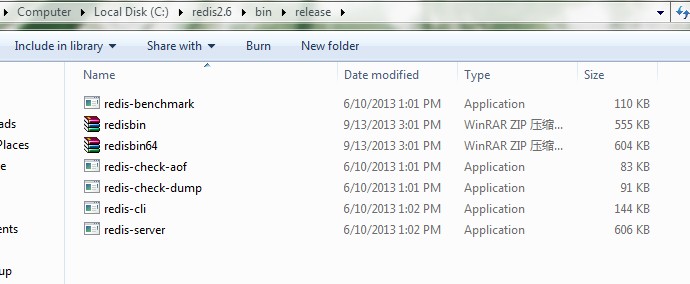
接下来就是启动redis-server和redis-cli了。doc命令进入到上面的目录下,直接双击redis-server.exe就会启动redis-server了,详细解下图。
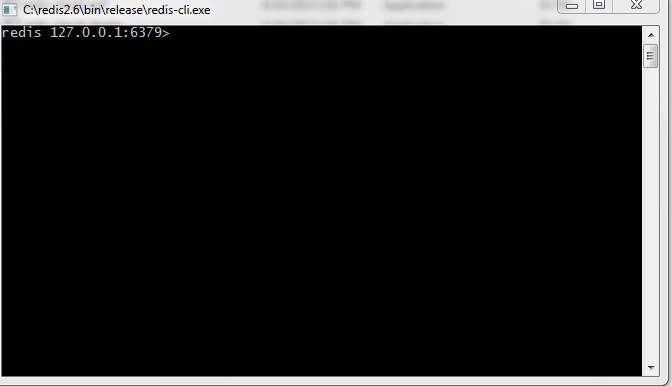
然后直接双击redis-cli.exe就会启动redis-cli了,详细解下图。
废话收尾
以上安装过程比较简单,对入门可能会有所帮助,接下来会介绍redis的相关配置。
Walking on the path of Redis --- Introduction and Installation的更多相关文章
- Walking on the path of Redis --- Data structure
废话开篇 相比于其他内存数据库,Redis最大的特点就是拥有丰富的数据结构, 经常被称为Date Structure Server.Redis支持的数据结构包含strings, hashes, lis ...
- Walking on the path of Redis --- Redis configuration
废话开篇 Redis的安装是非常简单易操作的,但是配置就有点复杂了,要想得到高性能的Redis数据服务,深入了解下如何配置是很重要的. 配置详解 下面是主要的参数及说明,至于如何配置才能最优,目前还不 ...
- SpagoBI 教程 Lesson 1:Introduction and Installation
SapgoBI Lesson 1: Introduction and Installation Downloading and installing SpagoBI. Download SpagoBI ...
- [redis] redis
redis是什么? wiki redis官方介绍:introduction to redis 安装: install 拉到最下面的install小节 wget http://download.redi ...
- Linux实战教学笔记45:NoSQL数据库之redis持久化存储(一)
第1章 redis存储系统 1.1 redis概述 REmote DIctionary Server(Redis)是一个基于key-value键值对的持久化数据库存储系统.redis和大名鼎鼎的Mem ...
- Redis的README.md
This README is just a fast *quick start* document. You can find more detailed documentation at http: ...
- 缓存、队列(Memcached、redis、RabbitMQ)
本章内容: Memcached 简介.安装.使用 Python 操作 Memcached 天生支持集群 redis 简介.安装.使用.实例 Python 操作 Redis String.Hash.Li ...
- Redis 简单搭建
======== redis ======== 1. redis setup and test : 1. download the package from https://redis.io/down ...
- CentOS安装Redis
wget http://download.redis.io/redis-stable.tar.gz tar xvzf redis-stable.tar.gz cd redis-stable make ...
随机推荐
- eas之日期选择控件
初始化打印控件KDPrinter ctrlPrinter = new KDPrinter(); 增加列 // 指定插入位置table.addColumn(index);// 插入到最后table.ad ...
- 数据挖掘系列 (1) 关联规则挖掘基本概念与 Aprior 算法
转自:http://www.cnblogs.com/fengfenggirl/p/associate_apriori.html 数据挖掘系列 (1) 关联规则挖掘基本概念与 Aprior 算法 我计划 ...
- Deepin & ROMS 安装详细流程
按照这个过程,完美安装,当然并不能排除会出现其他的问题.如果遇到了,那就老老实实上网搜吧.
- 使用Vue CLI 3将基于element-ui二次封装的组件发布到npm
前言:之前在网上找的好多都是基于vue-cli 2.x的,而使用vue-cli 3的文章比较少,Vue CLI 3 中文文档,所以我在自己尝试的时候把几篇文章结合了一下,调出来了我想要的模式,也就是V ...
- delphi窗口的create和free,一个古老的话题
窗体分为模式窗体和无模式窗体. 模式窗体在创建窗口创建和释放: begin if not Assigned(FB_Input_JianYanDan) then FB_Input_JianYanDan ...
- Ubuntu14.043下QT5.5的安装与一点问题
请注明来自于 http://www.cnblogs.com/usegear/p/5100720.html 1.下载qt-opensource-linux-x86-5.5.0.run(去教育镜像网站下载 ...
- java陷阱之spring事物管理导致锁无效
模拟锁情况无效 1.创建一个表 SET NAMES utf8mb4; ; DROP TABLE IF EXISTS `demo`; CREATE TABLE `demo` ( `id` ) NOT N ...
- [bzoj1500][NOI2005]维修数列_非旋转Treap
维修数列 bzoj-1500 NOI-2005 题目大意:给定n个数,m个操作,支持:在指定位置插入一段数:删除一个数:区间修改:区间翻转.查询:区间和:全局最大子序列. 注释:$1\le n_{ma ...
- sublime text 插件emmet快捷命令
原文链接:http://www.17yaobai.com/?p=255 语法: 后代:> 缩写:nav>ul>li <nav> <ul> <li> ...
- hdu 1239
首先,p,q>=2,所以p,q<=50000; 然后,我们观察a<=b<1000,而p,q<=100000.那么,q>=10000时,p<=10,则a/b&l ...